






Change SCCM Client Software Update Point SUP | ConfigMgr
Change SCCM Client Software Update Point SUP | ConfigMgr. Let’s check how to change the SCCM client software update point from the admin console. This feature requires the client to be presented with multiple SUPs from Management Point.
A software update point (SUP) is a crucial component in the Configuration Manager (SCCM) ecosystem. Its interfacing with Windows Server Update Services (WSUS) facilitates the distribution of software updates to SCCM clients.
Proper SUP role installation and configuration are essential when deploying software updates via SCCM. Ensuring the SUP is integrated seamlessly with WSUS is vital to guarantee efficient update delivery to the client environment.
Two options exist for changing the client’s Software Update Point (SUP). The manual option (via notification channel) is explained in the following section of this post, and the automatic option is explained in the fallback section of this post.

- Install New ConfigMgr Software Update Point Role | SUP
- SCCM WSUS Cleanup – Fix SCCM Scan Timeout Errors
- SCCM Patch Software Update Deployment Process Guide
| Index |
|---|
| Prerequisites |
| Change SCCM Client SUP |
| Logs |
Prerequisites
Let’s understand the prerequisites for having SUP switch functionality working for the clients.
- Boundary Groups should be configured appropriately. More than one SUP should be part of the boundary group.
- Management Point should deliver more than one Software Update Point to the client. You can check locationsevices.log to confirm this.
- You should have appropriate access permissions on the collections and devices to initiate notification actions.
- SCCM clients should be ONLINE.
Change SCCM Client SUP
You can change the Software Update point for a group of devices or a particular device. You can Start this change on a device or a device collection.
Once the switch SUP action is triggered, the clients look for another software update point at the next scan. Learn how to Change SCCM Client Software Update Point SUP | ConfigMgr.
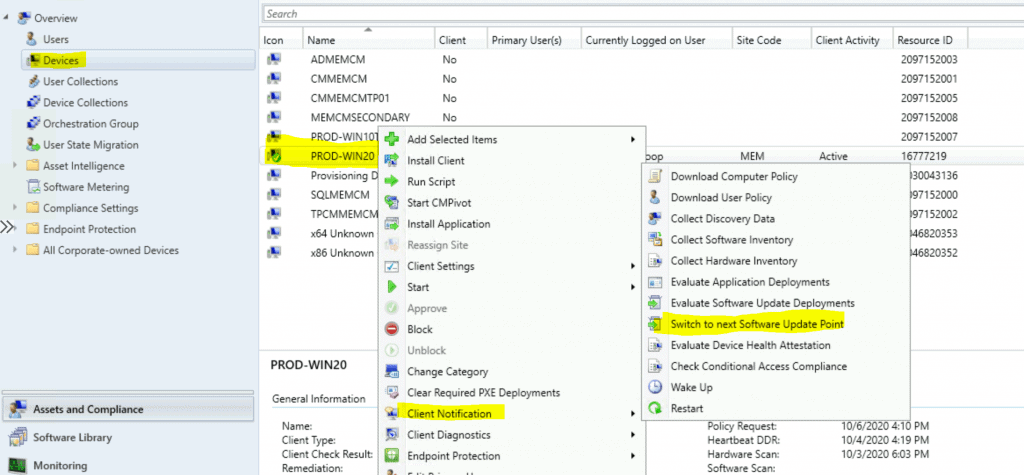
- Launch the SCCM console.
- Go to the Assets and Compliance workspace and select the Device Collections node.
- Select the target collection or a device.
- Right-click on a collection or a device.
- Select Client Notification, and then click Switch to the following Software Update Point.
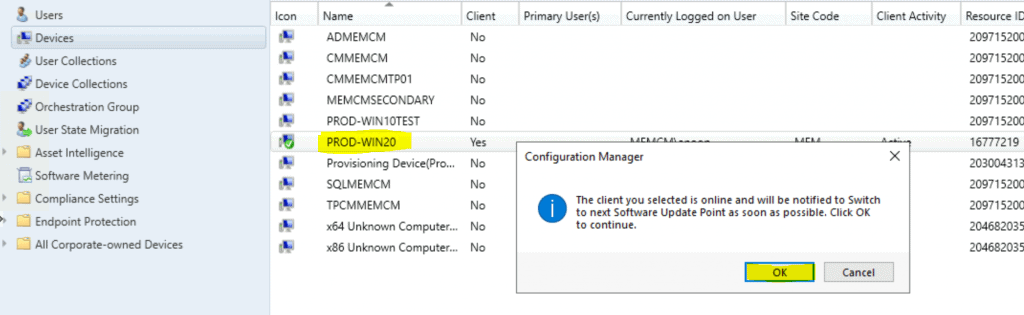
- Click OK to send the client notification to switch the SUP.
NOTE! – The client you selected is online and will be notified to switch to the next Software Update Point immediately.
Logs
You can check the following logs from the ConfigMgr client side to understand how to switch to the next software update point. For more details, see the SCCM logs.
- CcmNotificationAgent.log
- LocationServices.log
- WUAHandler.log
Receive task from server with pushid=63, taskid=63, taskguid=0D7008C8-EBBF-4DFE-B86D-1E81EE80DE77, tasktype=10 and taskParam=

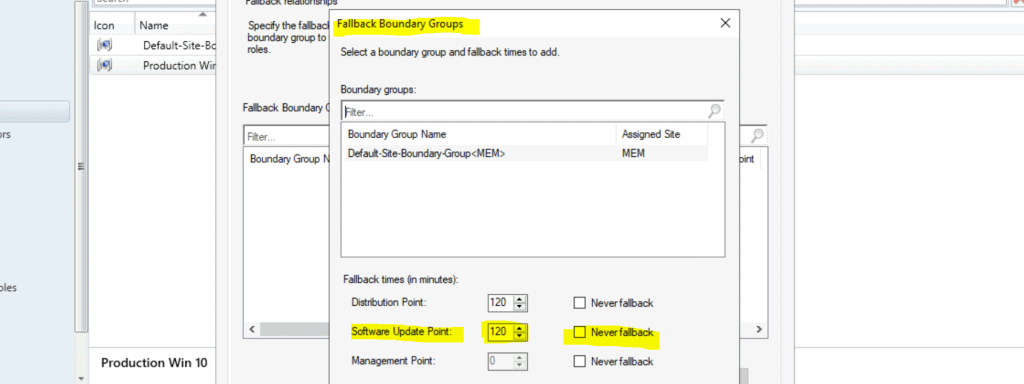
Fallback for SUP
You can read more about the Automatic SUP fallback options in the Microsoft docs below.
NOTE: The Boundary group SUP fallback option is different from the manual switch of SUP using the notification channel that we are discussing in this post.
Resources
- Manually switch clients to a new software update point
- Restart Windows 10 Device using SCCM | ConfigMgr
Author
We are on WhatsApp. To get the latest step-by-step guides and news updates, Join our Channel. Click here –HTMD WhatsApp.
Author
Anoop C Nair is Microsoft MVP! He is a Device Management Admin with more than 20 years of experience (calculation done in 2021) in IT. He is a Blogger, Speaker, and Local User Group HTMD Community leader. His primary focus is Device Management technologies like SCCM 2012, Current Branch, and Intune. He writes about ConfigMgr, Windows 11, Windows 10, Azure AD, Microsoft Intune, Windows 365, AVD, etc.




Discussion