






Client Notification Option in SCCM to Download Computer Policies ASAP ConfigMgr
In this blog post, I will explore the Client Notification option in SCCM, which allows you to download computer policies ASAP ConfigMgr. The fast channel notification feature has been in SCCM products since 2012 SP1.
The Client Notification Function in CM 2012 SP1 can be used to Download Computer Policy. It was mainly used to notify clients about vital policies, collect inventories, etc.
Client notification to start some client operations from the Configuration Manager console, which include downloading computer policy and initiating a malware scan to be performed as soon as possible, instead of during the normal client policy polling interval.” via TechNet Article.
As Soon As Possible without using any third-party right-click tools. Obviously, you won’t get this option for User Collections.

- Fix ConfigMgr Client Notifications Issue | SCCM 2010 Hotfix | Configuration Manager
- Troubleshoot SCCM Fast Channel Push Notification Issues HTMD Blog (anoopcnair.com)
Table of Contents
Client Notification Option in SCCM to Download Computer Policies ASAP ConfigMgr
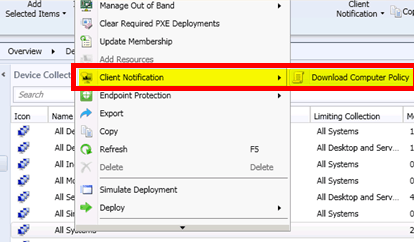
Client notification to start some client operations from the Configuration Manager console includes downloading computer policy and initiating a malware scan to be performed as soon as possible instead of during the normal client policy polling interval. Via TechNet Article.
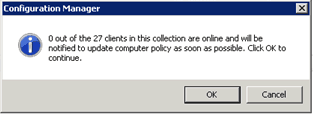
When you click on Download Computer Policy, a notification window checks the availability of ONLINE Clients. I’m not sure what the process behind this check is (inactive clients are treated as not online, or is it just a ping test?). I’ll probably explain that in a future post.
0 out of the 27 clients in the collection are online and will be notified to update the computer policy as soon as possible. Click OK to continue.
We are on WhatsApp. To get the latest step-by-step guides and news updates, Join our Channel. Click here –HTMD WhatsApp.
Author
Anoop C Nair has been Microsoft MVP from 2015 onwards for 10 consecutive years! He is a Workplace Solution Architect with more than 22+ years of experience in Workplace technologies. He is also a Blogger, Speaker, and leader of the Local User Group Community. His main focus is on Device Management technologies like SCCM and Intune. He writes about technologies like Intune, SCCM, Windows, Cloud PC, Windows, Entra, Microsoft Security, Career, etc.




Anoop, for a non Administrative Role what ‘rights’ should be added in order to take advantage of Client Notification? I saw one article saying that a user requires the “Deploy Configuration Items” to be able to use it. Can you confirm or point me in the right direction? Thanks!
StaffDavid, What you meant by “take advantage of Client Notification” – Does that mean you want your non admin user to initiate client notification related tasks?
I know this is an old post, but this is exactly my issue right now. As a sysadmin that just lost admin rights on my default user account, I would like to easily execute client notification related tasks using my non-admin account. The alternative would be to give my 2nd admin account access within the console, but not something I really want to do for all support personnel.
For now, I have just been launching PowerShell or “Client Center for Configuration Manager” as my admin account and executing it from there.
Thanks,