





How to Monitor SCCM Client Operations from the Admin Console ConfigMgr
How do you monitor SCCM Client Operations from the Admin Console ConfigMgr? Monitoring client operations initiated from the SCCM Console has always been challenging.
In SCCM / ConfigMgr 2012, we can watch the status of client operations initiated from the CM 2012 console through the Monitoring workspace.
This post will really help me understand SCCM better. I always like to start learning about something from the SCCM console.
Do you think it’s okay to begin learning about SCCM with an overview of the console? “You can get more detailed training on SCCM from HTMD SCCM Free training videos.

- SCCM Log Files Updated List Client And Server
- SCCM Console Beginners Guide | ConfigMgr
- SCCM Tenant Attach Troubleshooting Issues via Logs | ConfigMgr
- SCCM Secondary Site Maintenance Tasks List Primary Site Server
Table of Contents
How to Monitor SCCM Client Operations from the Admin Console ConfigMgr
In the earlier post, I discussed the option to help us initiate the Download Computer Policy As Soon As Possible through the CM 2012 console. How do we monitor the status of this action?

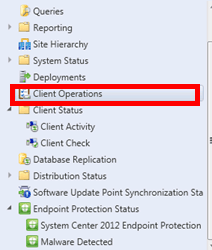
Yes, in CM 2012, we can monitor the progress of client actions initiated through Monitoring Workspace –> “Client Operations” Node (\Monitoring\Overview\Client Operations).
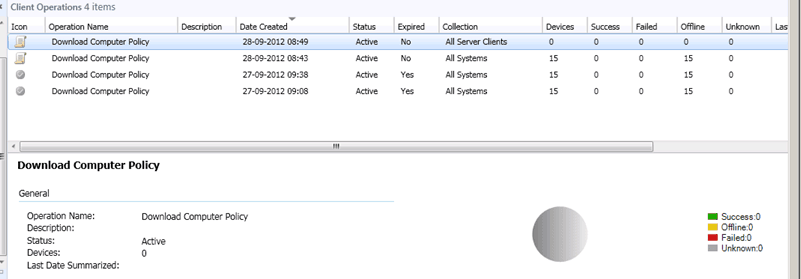
On the right-hand side, we can see many details: “Operation Name—Download Computer Policy, Date Created, Status—Active, Expired—Yes: No, Collection details, Success, Failed, Offline, Unknown, etc.”
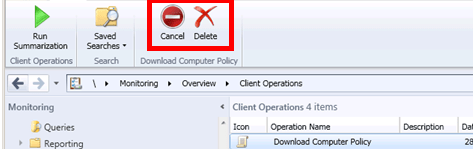
There are options if we want to delete or cancel the initiated actions.
- 1. Right-click on the Operation Name, in this case, “Download Computer Policy” and click on Cancel.
- 2. Select the required one from the operation list, and using the ribbon option, we can Cancel or Delete it.
We are on WhatsApp. To get the latest step-by-step guides and news updates, Join our Channel. Click here –HTMD WhatsApp.
Author
Anoop C Nair has been Microsoft MVP from 2015 onwards for 10 consecutive years! He is a Workplace Solution Architect with more than 22+ years of experience in Workplace technologies. He is also a Blogger, Speaker, and leader of the Local User Group Community. His main focus is on Device Management technologies like SCCM and Intune. He writes about technologies like Intune, SCCM, Windows, Cloud PC, Windows, Entra, Microsoft Security, Career, etc..




Hi Anoop. Can you explain a little more on what the Client Operations node is supposed to be used for? I’m a little confused as to what will appear in here and when? All I ever seem to see in there is an ‘Evaluate Software Update’ item – and even that seems to appear some times and not at others…
StaffHi Paul ! – More details available over here.
https://www.anoopcnair.com/2012/09/27/configmgr-sccm-2012-sp1-client-notification-option-to-download-computer-policies-asap/
hello,
I want a way to export a list of the clients that have configuration manager clients not installed (as pdf form or any other form) in SCCM 2012 r2
sccm 1710, my “Client Operations” is completely blank, nothing in there at all.
Apart from that, sccm appears to be working fine, os and software deploying ok, little green ticks everywhere
StaffSCCM Console ? I never seen this before …. Can you try to install SCCM console on different machine and test ?
Hi Anoop, thanks for the reply.
I’ve done that, exactly the same, if I go into Client Status, Client Activity, Client Check, etc are all populated with pi charts and bar charts, etc, but the console shows “No items found” for the Client Operations icon.
Any idea which log might give a clue about the cause of this?
I’ve just reimaged a few machines and they are getting their ccm client, and software ok, so functionality seems ok.
Hi,
When I select SCCM/Overview/Client Operations – there are more than 100K results shown. All have status – Expired. How can I see those, which are Active? Unable to find Filter or Search, please assist, if possible.
StaffThe option is to use the Sorting option.
Click on Status Column and filter the entries based on the status
This will group active ones and Expired ones from Client operations
I think this is one thing very helpful in your scenario