






Windows Cloud Login App Conditional Access Policies in Entra ID
Let’s check what actions you need to prepare to Update Conditional Access Policies Targeting the Remote Desktop Entra ID Cloud App for Windows 365 SSO. Conditional Access (CA) Policies and Continuous Access Evaluation (CAE) are mechanisms introduced to Entra ID (Azure AD) to help organizations control access.
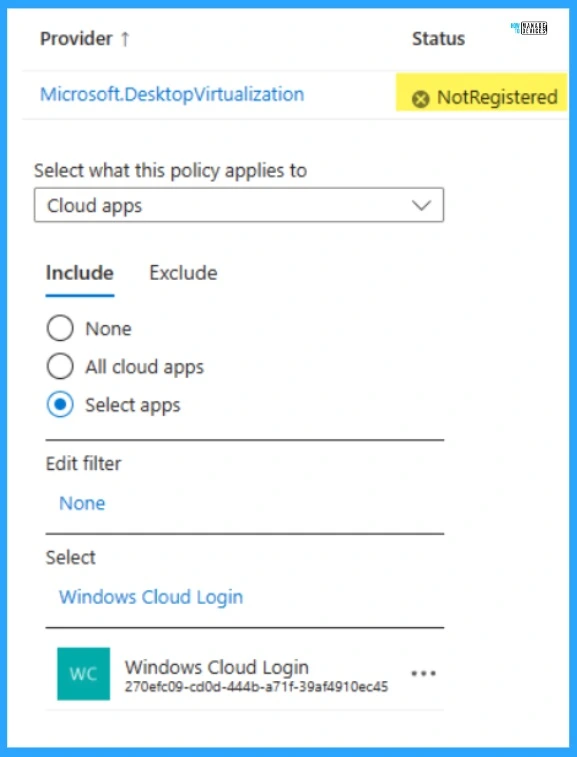
This transition can be expected in April 2024, and you need to update your Windows 365 Conditional Access policies to include the “Windows Cloud Login” App. Register the provider “Microsoft.DesktopVirtualization” if the App is missing from your Azure Subscription.
You can leverage the Entra License Utilization Feature that helps to optimize the Entra ID premium License. This feature is currently in Public Preview and will be available to users soon. As a part of this update, Windows 365 clients can transit to the Windows Cloud Login Entra ID cloud App.
This can be done with Windows authentication when single sign-on is enabled. Single sign-on is an authentication method that allows users to sign in using one set of credentials to multiple independent software systems.

- Optimize Entra License with New Entra License Utilization Feature
- Auto Rollout of Conditional Access Policy from Microsoft Entra ID Coming Soon
Windows Cloud Login App Conditional Access Policies in Entra ID
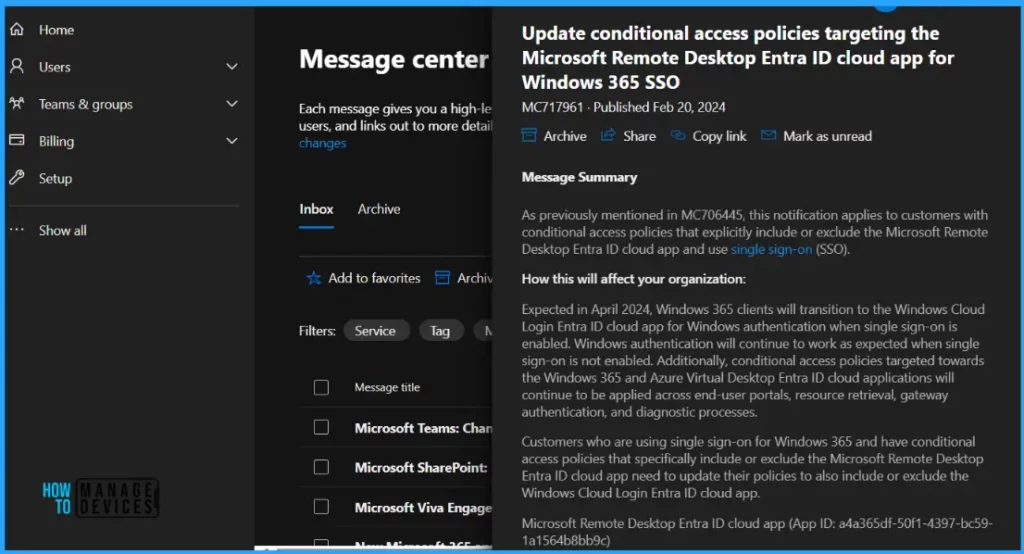
As previously mentioned in MC706445, this notification applies to customers with conditional access policies that explicitly include or exclude the Microsoft Remote Desktop Entra ID cloud app and use single sign-on (SSO).
Customers need to update their policies to also include or exclude the Windows Cloud Login Entra ID cloud app, if they use single sign-on for Windows 365 and have conditional access policies that specially include or exclude the Microsoft Remote Desktop Entra ID cloud app.
How will this Affect Your Organization?
As expected, in April 2024, Windows 365 clients will transition to the Windows Cloud Login Entra ID cloud app for Windows authentication when a single sign-on is enabled. Windows authentication will continue to work as expected when single sign-on is not enabled.
Additionally, conditional access policies targeted towards the Windows 365 and Azure Virtual Desktop Entra ID cloud applications will continue to be applied across end-user portals, resource retrieval, gateway authentication, and diagnostic processes.
Customers who are using single sign-on for Windows 365 and have conditional access policies that specifically include or exclude the Microsoft Remote Desktop Entra ID cloud app need to update their policies to also include or exclude the Windows Cloud Login Entra ID cloud app.
Microsoft Remote Desktop Entra ID cloud app (App ID: a4a365df-50f1-4397-bc59-1a1564b8bb9c) Windows Cloud Login Entra ID cloud app (App ID: 270efc09-cd0d-444b-a71f-39af4910ec45)
If you have existing conditional access policies targeting the Microsoft Remote Desktop Entra ID cloud app, action is required to ensure policies continue to be applied as intended.
What You Need to Prepare
We strongly recommend customers update any conditional access policies that specifically target the Microsoft Remote Desktop Entra ID cloud app to add the Windows Cloud Login Entra ID cloud app to ensure a smooth transition. To get more information on assigning a conditional access policy for Windows 365 Cloud PC.
- Download Microsoft Entra Architecture Icons
- Microsoft Entra ID Sync Delays to Microsoft 365 Services
This screenshot shows the Windows Cloud Login Entra ID cloud app status is not Registered to Microsoft.DesktopVirtualization provider. Register the provider “Microsoft.DesktopVirtualization” if the App is missing from your Azure Subscription.
We are on WhatsApp. To get the latest step-by-step guides and news updates, Join our Channel. Click here –HTMD WhatsApp.
Author
Gopika S Nair is a computer enthusiast. She loves writing on Windows 11 and related technologies. She is here to share quick tips and tricks with Windows 11 or Windows 10 users. She is Post Graduate Diploma Holder in Computer Science.




Discussion