






Exciting News! Windows 365 Cloud PC Gallery Images now Pre-Install New Microsoft Teams. Recently, Microsoft announced that Windows 365 Cloud PC gallery images have been enhanced to include the new Microsoft Teams application by default.
Windows 365 is now enhancing Virtual desktop technology, which means you can use your own Windows setup from anywhere. The best thing about it now that it is integrated with Microsoft Teams is that it’s become more accessible to communicate and collaborate in your workplace.
Windows 365 provides a built-in Gallery of Windows enterprise images, updated monthly with security patches. Gallery images are part of Windows 365; this new enhancement provides a ready-to-use environment for its users.
Integrating Microsoft Teams into the Windows 365 Cloud PC gallery images simplifies the user experience by eliminating the need for separate installations. This new enhancement is happening in new Microsoft teams but is not included in the classic version so that we can discuss the overall details of this announcement.

In the May update, we covered some major topics related to Windows 365’s service release in May 2024. In the May update post, we covered Improvements in the Device Security and Monitoring and Troubleshooting Improvements.
- How to Create Cloud PC Maintenance Windows using Microsoft Intune
- New 7 Windows 365 Graph API Queries for CloudPC Management
- Troubleshoot Windows 365 Cloud PC Connectivity Check

Windows 365 Cloud PC Gallery Images Now Pre-Install New Microsoft Teams
Above, we discussed some details of the new announcement about Windows 365 Cloud PC gallery images. Now, pre-install the new Microsoft Teams. This is a significant enhancement that comes in the May update. This update only applied on the Windows Enterprise 11 23H2 and 22H2.
- By using these gallery images, administrators can save time and resources since they don’t need to install and configure Microsoft Teams manually.
See more Windows 365 May update Service Release: Windows 365 Cloud PC 2405 May Update Service Release
Gallery Image on Windows 365 Cloud PC
You all know about Windows 365; the gallery image is one of its most important features. It offers the default and custom operating system images to create virtual cloud PCs for End users. Gallery images also provide default and customizable images.
When setting up Cloud PCs, it’s recommended to use the Windows 10/11 Enterprise + Microsoft 365 images from the gallery for a smooth experience with pre-installed Office applications. If you create a custom image without Microsoft Teams, you should not install the Teams desktop application separately.
| Device Images | Info |
|---|---|
| Gallery Image | Gallery images are essential applications that are pre-installed in Microsoft teams |
| Custom Image | For those who create custom images, Microsoft provides guidance on ensuring the correct registry settings and policies to support Teams. |
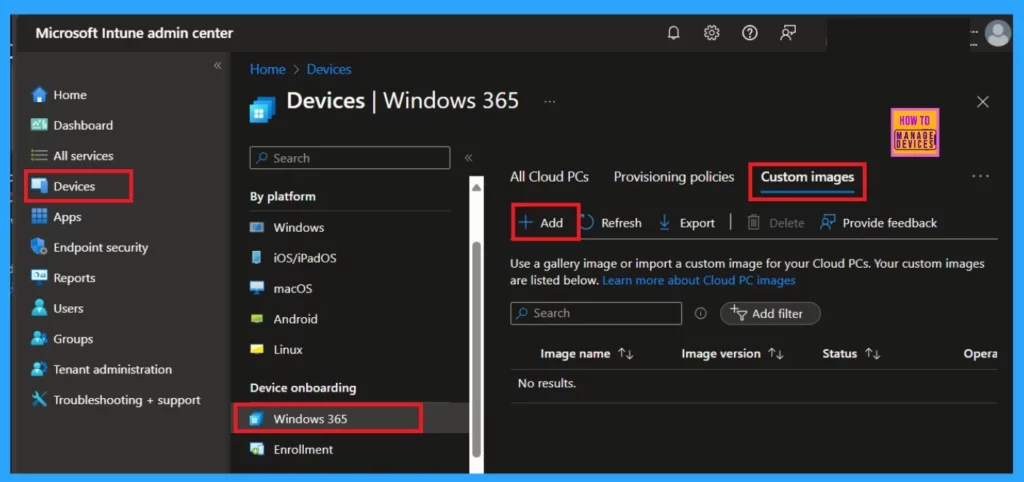
For uploading Custom images, follow the steps.
- Sign in to the Microsoft Intune admin center.
- Navigate to the Device > Windows 365 > Custom Images > Add.
- Windows365 Enterprise Introduces Disk Storage Resizing for Cloud PCs with Step-Up Licenses
- Create Windows 365 Frontline Deployment Policy
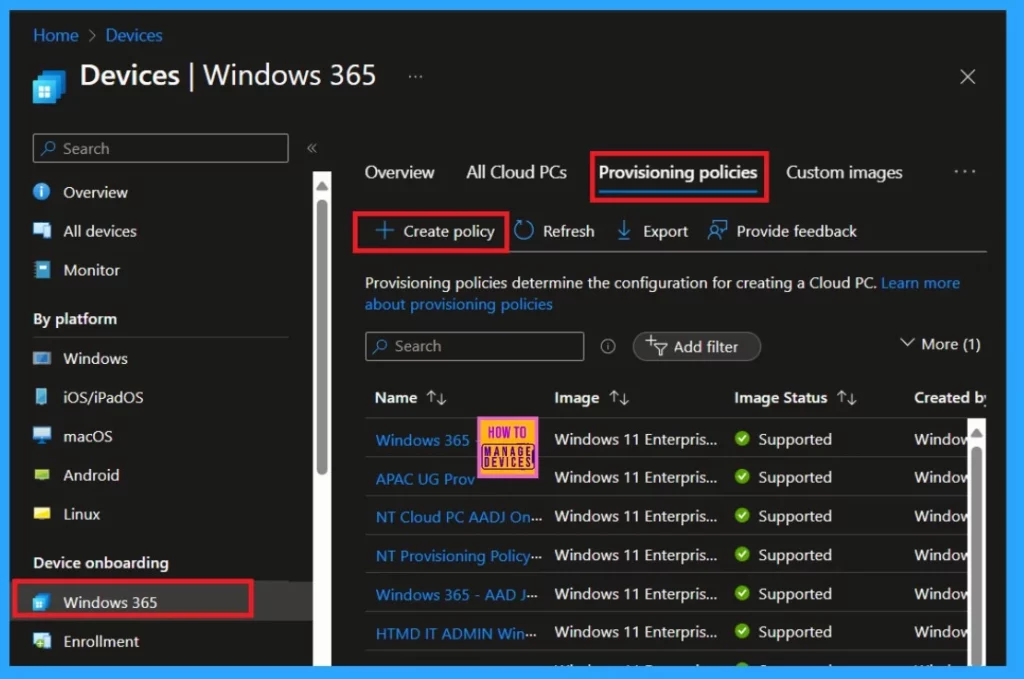
Windows 365 includes a built-in collection of Windows Enterprise images that you can access while creating provisioning policies. These images come with pre-configured audit settings. It means rules for user accounts, monitoring of log-on and log-off events, tracking object access, and managing policy changes. This simplifies the process for administrators to ensure security.
- Sign in to the Microsoft Intune admin center
- Navigate to the Device > Windows 365 > Provisioning policies > Create Policy.
Reference
What’s new in Windows 365 Enterprise
We are on WhatsApp. To get the latest step-by-step guides and news updates, Join our Channel. Click here –HTMD WhatsApp.
Author
Krishna. R is a computer enthusiast. She loves writing about Windows 11 and Intune-related technologies and sharing her knowledge, quick tips, and tricks about Windows 11 or 10 with the community.




Discussion