






CMPivot Query for SCCM BitLocker Management Event Logs
Let’s check the CMPivot query for SCCM Bitlocker Management event logs. The SCCM CMPivot architecture is based on fast channel notification. This helps to get the reports back quickly from the Online Clients. In this post, find the easiest method to centrally monitor the MBAM event logs using SCCM.
The SCCM (ConfigMgr) Bitlocker management provides full BitLocker lifecycle management similar to MBAM (Microsoft BitLocker Administration and Monitoring). Configuration Manager BitLocker management uses the MDOP MBAM client in the background.
The client-side event logs for SCCM BitLocker management are the same as MBAM. You need to look into the same place to get more details on SCCM BitLocker troubleshooting scenarios. There are SCCM BitLocker management reports available to help with the first level of troubleshooting.
There are different types of event logs for SCCM BitLocker Management, such as Admin, Operational, Analytic, and Debug logs. Admin and Operational logs are for the standard troubleshooting scenarios. The Analytics and Debug logs help to perform deep-level BitLocker management troubleshooting.

- Intune Device Encryption Status Report
- Intune Bitlocker Drive Encryption A Deeper Dive
- Publish CMPivot Query To The SCCM Community Hub Contributions
SCCM BitLocker Management Event Logs
Let’s look closely at the SCCM BitLocker Management-related event Logs before going into the details of CMPIvot queries. To collect the BitLocker event logs from the Windows 11 or 10 devices, you must look at MBAM event logs.
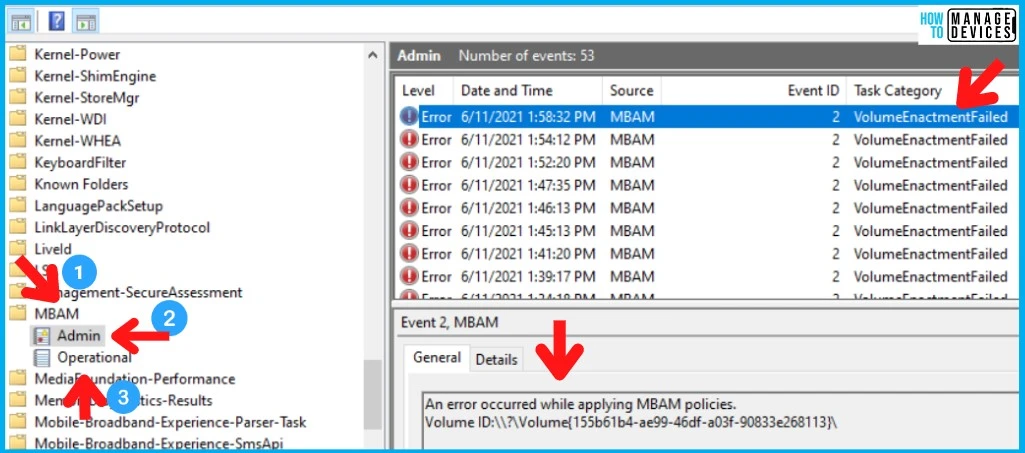
As explained before, there are 4 types of BitLocker Management (MBAM) event logs. But normally, the default ones are only visible unless and until you explicitly enable Analytic and Debug Logs. The default event logs for MBAM are:
- SCCM BitLocker Management Event log path is the Applications and Services Logs – Microsoft – Windows – MBAM:
- Admin
- Operational
You can enable more detailed SCCM MBAM logs for troubleshooting purposes. You can enable this from Event Viewer, go to the View menu, and select Show Analytic and Debug Logs. Now onwards, you can see two additional logs called Analytic and Debug.
How to Launch SCCM CMPivot Tool
Let’s understand how to launch SCCM CMPivot Tool from the SCCM console or use CMPivot standalone tool or from the MEM admin center portal. You have three ways to launch SCCM CMPivot and find out the Windows 11 compatibility check details.
- CMPivot in console option.
- CMPivot Standalone Tool.
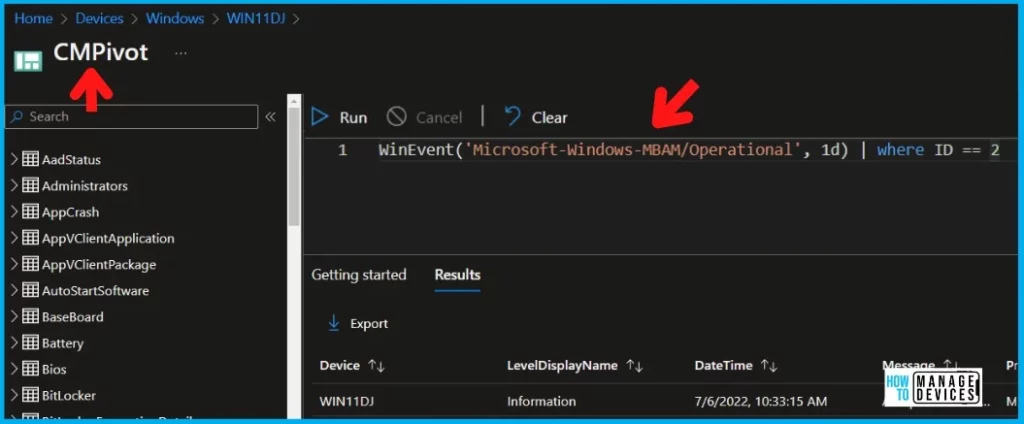
- CMPivot query from Endpoint Manager portal (Intune portal)
The following is one example to get the CMPivot from SCCM Cloud Attach (aka Tenant Attach) devices. This is the combination of the modern way with traditional power!
Start Using SCCM CMPivot for Reviewing MBAM Event Logs
It’s time to start using SCCM CMPivot for reviewing MBAM event logs. The CMPivot can collect the details from event logs from Online Clients. If the SCCM clients are offline, then you won’t be able to get the event log details from those clients.
For offline clients, it’s worth using the SCCM BitLocker management reports. Or you can re-run the CMPivot query multiple times depending on the availability of the online SCCM clients.
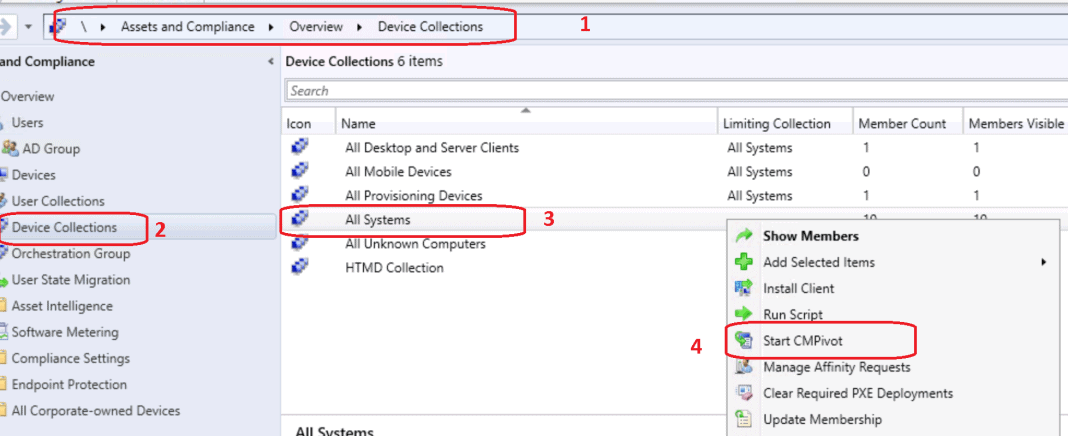
Let’s learn how to launch the CMPivot by selecting the appropriate device collection. Always use the smallest device collection as the first step for initial testing. This will help to understand whether the CMPivot query is working as expected or not.
- Navigate to the Device Collections against which you want to run the CMPivot query to review the BitLocker Management event logs.
- Select any one of the device collections as per your requirement.
- Right-Click on Device collection.
- Select Start CMPivot.
- SCCM Report for Windows 11 Version Count Dashboard
- Best Guide Deploy Windows 11 Using SCCM Task Sequence
- Upgrade to Windows 11 using Intune Feature Update Deployment Policy
CMPivot for BitLocker Event Logs | MBAM
Let’s check the CMPivot for BitLocker Event Logs | MBAM in this section. You have already identified the event logs that you have to review to check whether everything is going well with their encryption process.
You can perform this activity if you want to quickly check the status of the BitLocker encryption using SCCM policies for newly provisioned Windows 11 laptops/desktops. CMpivot is the best tool to get live data from clients.
The following CMPivot query gives you the details of the Microsoft-Windows-MBAM/Admin event logs for the last one hour. Need to be careful here! You don’t want to choke up the entire network by pulling the data from thousands of clients together.
WinEvent('Microsoft-Windows-MBAM/Admin', 1h)The following are some additional CMPivot queries that will help you to filter down to more specific events for a single Windows 11 or Windows 10 device.
WinEvent('Microsoft-Windows-MBAM/Admin', 1h) | where ID == 2
WinEvent('Microsoft-Windows-MBAM/Admin', 1h) | where Message contains 'An error occured while applying MBAM policies'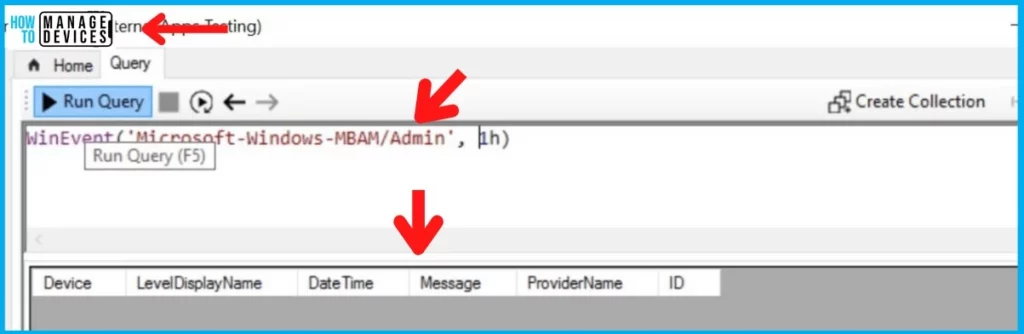
CMPivot for BitLocker Operational Event Logs
Let’s now check the CMPivot for BitLocker (MBAM) Operational Event Logs for the last hour. This is where more operational details will be available. You just need to copy the following CMPivot query to the Query window of CMPivot and hit on Run Query.
You can use different options to filter down the BitLocker event logs as per your requirement. You can change it to one day (1d) if you want to check event logs from a particular device for troubleshooting.
WinEvent('Microsoft-Windows-MBAM/Operational', 1h)
WinEvent('Microsoft-Windows-MBAM/Operational', 1d)
You can filter the MBAM event logs based on the event ID or Message details. Some of the sample CMPivot queries are given below with filter options.
WinEvent('Microsoft-Windows-MBAM/Operational', 1h) | where ID == 2
WinEvent('Microsoft-Windows-MBAM/Operational', 1h) | where Message contains 'An error occured while applying MBAM policies'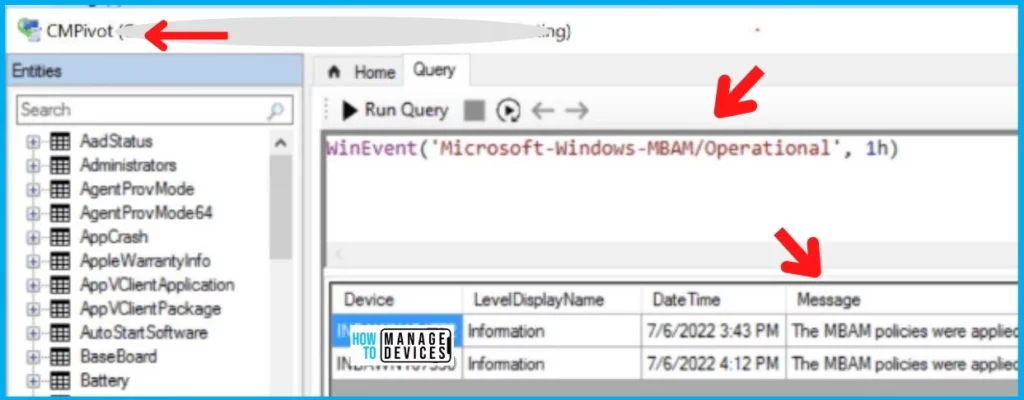
SCCM CMpivot Queries for MBAM Analytic and Debug Event Logs
Let’s find the best SCCM CMpivot Queries for MBAM Analytic and Debug Event Logs. You need to ensure that these event logs are enabled on the client devices using the method explained below before running the CMPivot queries.
How to Enable Analytic and Debug Event logs for BitLocker Management via SCCM -> You can enable this from Event Viewer, go to the View menu, and select Show Analytic and Debug Logs. Now onwards, you can see two additional logs called Analytic and Debug.
You can also get the advanced troubleshooting event logs such as Microsoft-Windows-MBAM/Analytic and Microsoft-Windows-MBAM/Debug using the following SCCM CMPivot queries for BitLocker encryption troubleshooting and review.
WinEvent('Microsoft-Windows-MBAM/Analytic', 1h)
WinEvent('Microsoft-Windows-MBAM/Debug', 1h)- SCCM BitLocker Management Reports | Default Reports
- How To Collect Windows Update Logs From SCCM Client Remotely
Author
Anoop is Microsoft MVP! He is a Device Management Admin with more than 21 years of experience (calculation done in 2022) in IT. He is Blogger, Speaker, and Local User Group HTMD Community leader. His main focus is on Device Management technologies like SCCM 2012, Current Branch, and Intune. He writes about ConfigMgr, Windows 11, Windows 10, Azure AD, Microsoft Intune, Windows 365, AVD, etc.




Discussion