






Feature Comparison Video SCCM ConfigMgr CB 1702 VS 1706
Let’s discuss the Feature Comparison Video SCCM ConfigMgr CB 1702 VS 1706. I continue to produce comparison videos with every production release of SCCM CB.
This post helps you go through the “Feature Comparison Video SCCM ConfigMgr CB 1702 VS 1706.” The previous week was busy because of the SCCM CB preview and production version release.
Being on a business trip didn’t stop me from upgrading my LAB environment to the SCCM CB 1706 production version. In this post, you will find all the details of the Feature Comparison Video between SCCM ConfigMgr CB 1702 and 1706.
The post provides a look at the differences and improvements between the two versions, helping you understand what has changed and how the updates can benefit your system management.

Table of Contents
- SCCM 2303 Upgrade Step-by-Step Guide | New Features
- SCCM Upgrade with an Offline Service Connection Point | ConfigMgr
- FIX SCCM Upgrade Issue because of SQL-Based Replication
- FIX SCCM SQL Replication Issues Using Replication Link Analyzer
- Troubleshoot and FIX SCCM SQL Backlog Issues using SSMS
- FIX SCCM SQL-Based Database Replication Failure Between CAS Primary
Feature Comparison Video SCCM ConfigMgr CB 1702 VS 1706
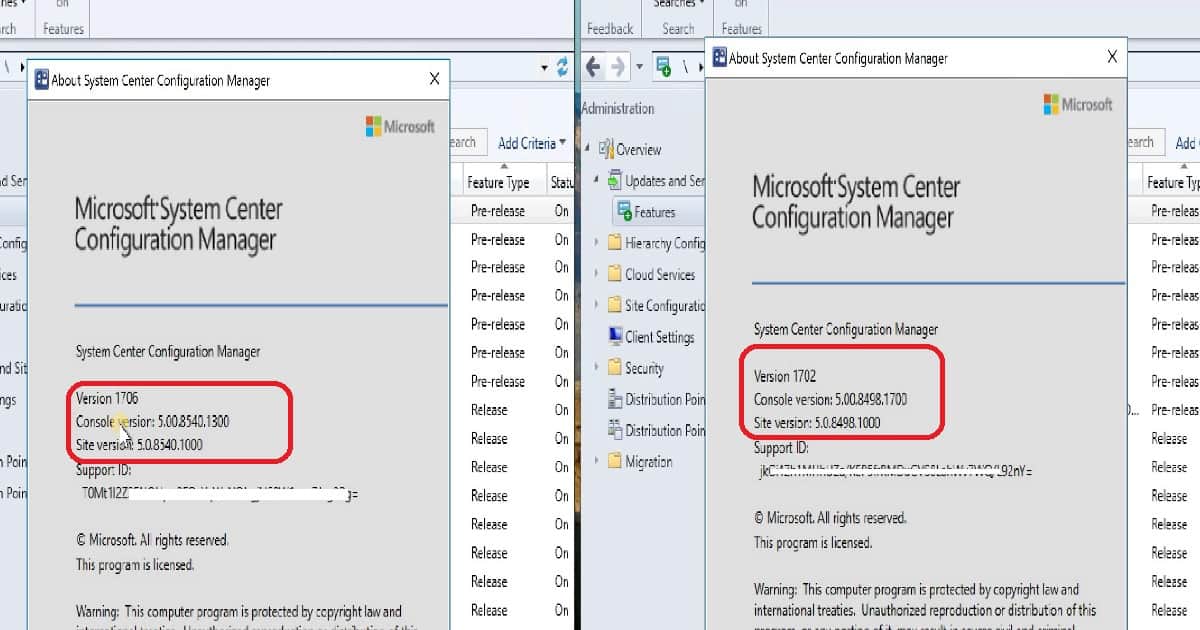
In the comparison video tutorial, we see the SCCM console GUI changes. What are the new nodes added to the 1706 console? We also see some deep dives into new features, tools, and settings introduced in the SCCM CB 1706 version.
| Feature Comparison Video SCCM ConfigMgr CB 1702 VS 1706 | |
|---|---|
| Console | SCCM CB 1706 |
| Version | 1706 |
| Console version | 5:00.8540.1300 |
| Site Version | 5.0.8540.1000 |
- Console – SCCM CB 1706 = Version 1706
- Console version: 5:00.8540.1300
- Site Version: 5.0.8540.1000
Feature Comparison Video SCCM ConfigMgr CB 1702 VS 1706
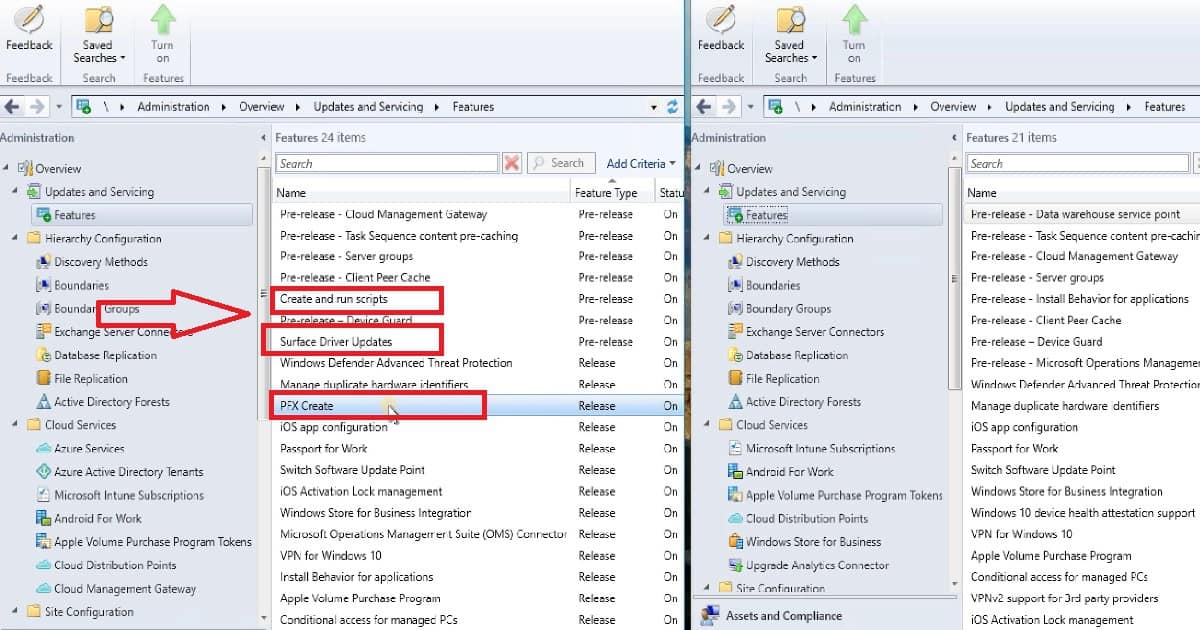
There are 24 Features in SCCM CB 1706, whereas only 21 in 1702. 3 new features were added in SCCM CB 1706 production release. The important point to note here is some pre-release features are still not ready for production release.
These are Cloud Management Gateway, Server Groups, TS Pre-Caching Device Guard, and Client Peer Cache, which are still in pre-release.
The new features introduced in SCCM CB 1706 are Create and Run Scripts, Surface Driver Updates, and PFX Create.
Compare the New Tools and Features of SCCM CB 1706
Client Peer Cache support for express installation files for Windows 10 and Office 365. There are improvements for SQL Server Always On Availability Groups.
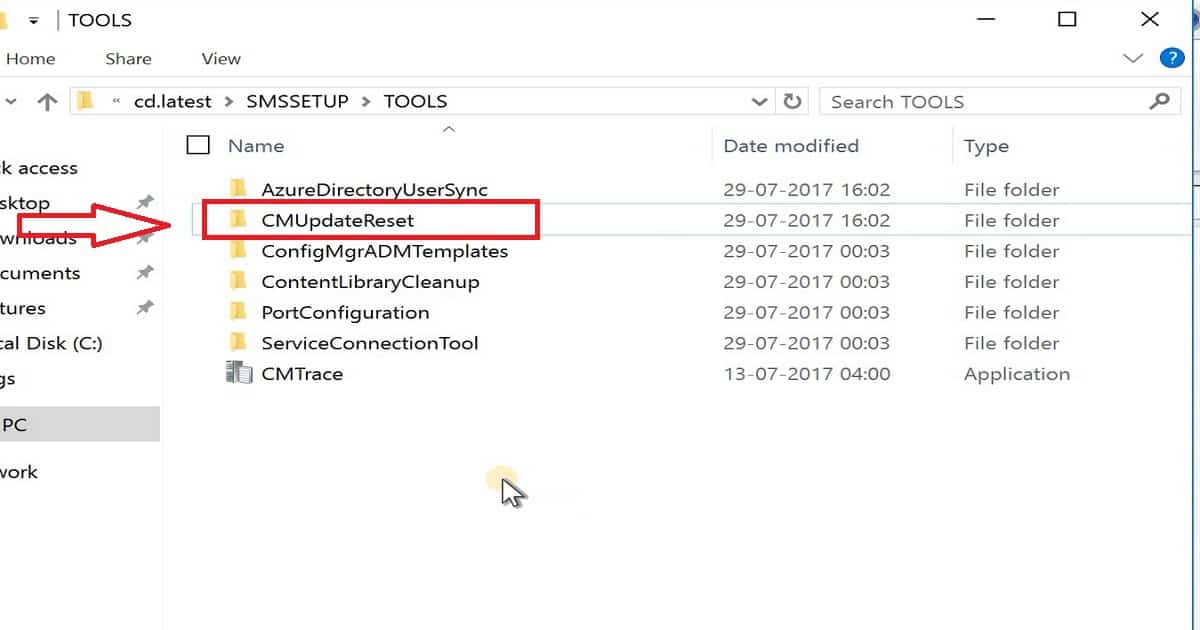
Update Reset tool is released with the SCCM CB 1706 production version. The CMUpdateReset.exe tool helps to fix issues when in-console updates have problems downloading or replicating content to primary servers.
The SCCM CB 1706 production release includes improvements for software update points working with boundary groups.
You have improved the integration of SCCM and Azure AD (AAD). These improvements streamline how you configure the Azure services you use with SCCM and help you manage clients and users who authenticate through Azure AD.
There are some new Compliance Settings (Configuration Items) for Windows 10 Intune-managed clients. The updated/improved categories are Password, Device, Store, and Microsoft Edge.
Android for Work configuration items for the Allow data sharing between work and personal profile settings descriptions have been updated.
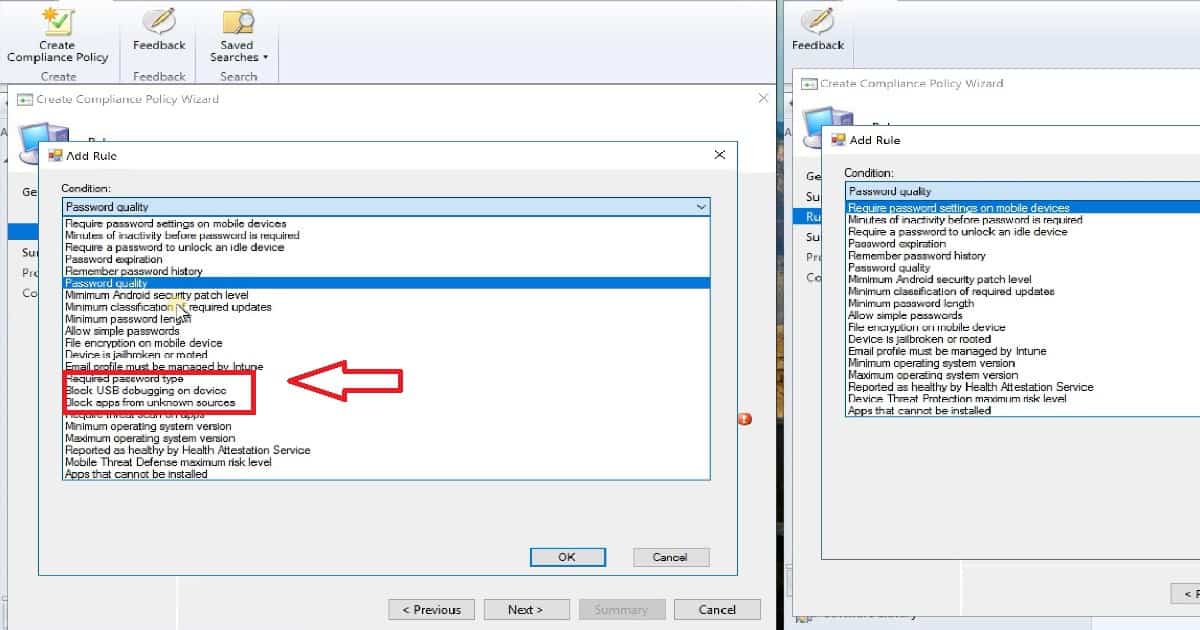
NEW Compliance Policy Rules in SCCM CB 1706 Production Version
The following are very important compliance policies available in the SCCM CB 1706 version. Required Password Type—Either Alphanumeric or Numeric is supported for Windows phones, Windows devices, and iOS.
Block USB debugging on Devices, Block apps from unknown sources, and Require threat scan on apps. Compliance policies are supported for Android Devices.
New Additions in Application Management – SCCM CB 1706
We can deploy PowerShell Scripts from the SCCM CB 1706 console. Run scripts on collections of Windows client PCs and on-premises managed Windows PCs. The script runs in nearly REAL TIME on client devices.
NEW MAM Policy setting in SCCM CB 1706 – Block Screen Capture (only for Android), Disable contact sync, and Disable printing. Software Updates – Manage Microsoft Surface driver updates, which is ONLY possible when your SUPs are on SERVER 2016.
SCCM CB 1706 Security Improvement
SCCM CB 1706 can deploy Device Guard policy management. Device Guard is a group of Windows 10 features designed to protect PCs against malware and other untrusted software.
References
What’s new in version 1706 of SCCM CB
We are on WhatsApp now. To get the latest step-by-step guides, news, and updates, Join our Channel. Click here. HTMD WhatsApp.
Author
Anoop C Nair is Microsoft MVP! He is a Device Management Admin with more than 20 years of experience (calculation done in 2021) in IT. He is a Blogger, Speaker, and Local User Group HTMD Community leader. His main focus is on Device Management technologies like SCCM 2012, Current Branch, and Intune. He writes about ConfigMgr, Windows 11, Windows 10, Azure AD, Microsoft Intune, Windows 365, AVD, etc.




Discussion