






ConfigMgr Pull DP Details Log Files | SCCM
ConfigMgr Pull DP Details Log Files | SCCM. Pull DP (Distribution Point) is one of the new features available with the ConfigMgr 2012 SP1 RTM release.
What is the Pull Distribution Point? Enable the pull DP option on a DP to change the behavior of how that computer obtains the content that you distribute to the DP.
When configuring a DP to be a pull DP, we must specify one or more source DPs from which the pull DP obtains the content.
This post provides all the details about ConfigMgr Pull Distribution Point (DP) log files. The guide explains how to access and interpret these log files to monitor and troubleshoot the Pull DP functionality in SCCM.

Table of Contents
ConfigMgr Pull DP Details Log Files | SCCM
Pull DP configuration would be very helpful in the following scenario. When you have a primary server across the WAN (for example, in the US) and 3 DPs in India. Out of 3 DPs, one DP is configured as pull DP and specified other 2 DPs in the pull DP to act as “source for content”.
When you deploy a package to ‘pull DP’ and the content is already replicated to any other DPs in India, the content won’t get downloaded across the WAN. One of the DPs with the content acts as “SOURCE for content” for pull DP.
The following are topics covered in this post. ConfigMgr Pull DP Details Log Files | SCCM.
| Topics Covered in this Post |
|---|
| 1. How to Install/Configure Pull DP? |
| 2. How do we verify the Pull DP is installed successfully? |
| 3. How can we confirm whether the package or application is replicated to PULL DP? |
| 4. More details about Pull DP |
How to Install Pull DP?
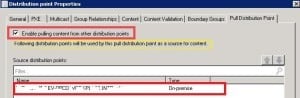
In the CM 2012 console, Navigate to “Servers and Site System Roles” –> Under Site System Roles right, click on Distribution Point and go to properties –> Click on the “Pull Distribution Point” tab and select the option “Enable pulling content from other Distribution points” and you’re done!
(Note: ACNCMPRI is my Primary server. Pull DP = ACNCMCDP02)
How Do You Verify the Pull DP is Installed Successfully?
Let’s discuss how you verified the pull DP was installed successfully. It is explained in detail below.
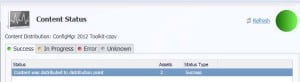
Go through the log files in the following sequence.
Distribution Points of site PRI have changed. Update the DistributionPoints table in the database.
Updated DP [“Display=\ACNCMCDP02.ConfigMgr.Com\”]MSWNET:[“SMS_SITE=PRI”]\ACNCMCDP02.ConfigMgr.Com. DBCRC:7AE1A830,NewCRC:1500BC21,Action:0,PDP:0,PullDP:1
hman.log @ Primary Sever ACNCMPRI
DistMgr.log @ Primary Sever ACNCMPRI
Installing PullDP, check \\ACNCMCDP02.ConfigMgr.Com\SMS_DP$\sms\logs\smsdpprov.log and \\ACNCMCDP02.ConfigMgr.Com\SMS_DP$\sms\bin\\pulldp_install.log
PullDP [“Display=\\ACNCMCDP02.ConfigMgr.Com\”]MSWNET:[“SMS_SITE=PRI”]\\ACNCMCDP02.ConfigMgr.Com\ is marked Installed
PullDp_Install.log @ Remote PULL DP Site System ACNCMCDP02.ConfigMgr.Com
Location of the pulldp_install.log file C:\SMS_DP$\sms\bin\pulldp_install.log
How to Confirm Whether the Package or Application is Replicated to PULL DP
Distmgr.log @ Primary Site ACNCMPRI
Created package transfer job to send compressed copy of package CAS000C4 to distribution point [“Display=\\ACNCMCDP02.ConfigMgr.Com\”]MSWNET:[“SMS_SITE=PRI”]\\ACNCMCDP02.ConfigMgr.Com\. Transfer root = CAS000C4.PCK.DLT.0.1.
Successfully updated the package server status for [“Display=\\ACNCMCDP02.ConfigMgr.Com\”]MSWNET:[“SMS_SITE=PRI”]\\ACNCMCDP02.ConfigMgr.Com\ for package CAS000C4, Status 3
PkgXferMgr.log SMS_PACKAGE_TRANSFER_MANAGER @ Primary Site – ACNCMPRI
Sending package info bundle CAS000C4 to PullDP. [“Display=\\ACNCMCDP02.ConfigMgr.Com\”]MSWNET:[“SMS_SITE=PRI”]\\ACNCMCDP02.ConfigMgr.Com\
Generated XML notification for Pull DP ACNCMCDP02.ConfigMgr.Com.
Successfully performed WMI actions on pull DP ACNCMCDP02.ConfigMgr.Com.
Finished sending SWD package CAS000C4 version 1 to distribution point ACNCMCDP02.ConfigMgr.Com
Send Request 2012LPRI~ Job: JEMZC1ZG Destination: ACNCMCDP02.ConfigMgr.Com~ State: Working Status: Success Action: None~ Total size: 0 k Remaining: 0 k Heartbeat: 11:59~ Start: 11:59 Finish: 11:59 Retry: ~ SWD PkgID: CAS000C4 SWD Pkg Version: 1
smsdpprov.log Remote Site Server PULL DP – ACNCMCDP02
Location of the log file – SMS_DP$\sms\logs
[F34][Wed 01/16/2013 11:57:50]:Successfully notified PullDP
[F34][Wed 01/16/2013 11:57:51]:Content ‘Content_ff6ce16f-d89a-490f-afc8-21c4cf1e50b3.1’ for package ‘CAS000C4’ has been added to content library successfully
PullDp.log Remote Site Server PULL DP – ACNCMCDP02
Location of the log files – SMS_CCM\Logs
CPullDPPkgJob::LoadJobFromXML() successfully loaded job.
Successfully verified content info Hash C:\SMS_DP$\CAS000C4.tz :63D5CE8E5C794D09183FFEB341083CCBA05B69F554B3D1ACA5173B73B6C7A1E7
CPullDPService::ExecuteJobs(). 1 job to do.
Unpack FileInfo (C:\SMS_DP$\CAS000C4\Content_ff6ce16f-d89a-490f-afc8-21c4cf1e50b3.1.tar)
Created FullDownload DTS job for package CAS000C4, version 1
Content job Content_ff6ce16f-d89a-490f-afc8-21c4cf1e50b3.1 has downloaded successfully for package CAS000C4, version 1
The package job has been completed successfully for package CAS000C4, version 1
More Details about Pull DP are here.
Nothing in the console indicates that the distribution point is a pull-distribution point. You must review its properties to determine whether it is configured as such.
Resources
How To Check ConfigMgr Task Sequence Size | SCCM – HTMD Blog #2 (howtomanagedevices.com)
We are on WhatsApp now. To get the latest step-by-step guides, news, and updates, Join our Channel. Click here – HTMD WhatsApp.
Author
Anoop C Nair is Microsoft MVP from 2015 onwards for consecutive 10 years! He is a Workplace Solution Architect with more than 22+ years of experience in Workplace technologies. He is a Blogger, Speaker, and Local User Group Community leader. His main focus is on Device Management technologies like SCCM and Intune. He writes about technologies like Intune, SCCM, Windows, Cloud PC, Windows, Entra, Microsoft Security, Career etc…




Hi…
I have one Standalone server with SCCM 2012 SP1. But i am not able to find any tab in as pull DP in my distribution point role.
StaffDo you have more than one DP in the hierarchy ?
nope.. its a single server in my test VM..
StaffYou can only configure your remote DP as pull dp if you’ve more than one Remote DPs available in the hierarchy.
Thanks for your reply..
Our infrastructure have recently been updated to be on SCCM 2012 R2. we have more than 10 remote dp in our environment. Weird thing is I cannot see any Pull distribution tab like you explained in your article. Do I need to enable anything from the Central Server or something need to be installed or enabled from the DP server itself?
StaffNo need to configure anything extra at CAS server.
StaffQazi ! – Are you seeing this issue ? https://www.anoopcnair.com/2013/11/27/redownload-updated-sccm-2012-r2-setup-prerequisite-files-fix-issue/
Hi Anoop, We have a scenario where we want to introduce additional primary servers in another connected DC and configure all the existing dp’s to take updates from the new primary servers. Wondering what needs to be done here ?
StaffHi ! – Does that mean primary server is in another forest and both the forests don’t have two way trust? By default, a pull-distribution point uses its computer account to transfer content form a source distribution point. However, when the pull-distribution point transfers content from a source distribution point that is in a remote forest, the pull-distribution point always uses the Network Access Account.
Hi Anoop – Definitely enjoy your novelty of SCCM write ups, keep up the good work!
My question is working with VSAT connections. Not sure how much you’ve worked with customers around this but I will ask anyways, opinion if you will. We are using 1 Primary with 37 DPs mixed Windows 7 boxes and Server 08 R2 for PXE purposes. MP and SUP roles are on the same server if that is necessary to know.
Here we are in Oil & Gas and rather difficult getting content distribution over low bandwidth – high latency connections (500-600+ms some up to 1200+ms) to our Rig platforms over VSAT especially Windows Updates. To overcome this minor issue, since my connection from Primary pushing content to Remote offices is just fine, could I take each of the Rig DPs onboard and turn those into Pull DPs selecting the Remote Office DP as the Source in the nearest Region oppose to the Primary which is where the Rig DPs get it from now. BITs Throttling, since my SCCM DPs have Clients, can’t I use Client Settings targeting the Collection of Pull DPs since the Rate Limit tab goes away, if I understand correctly?
I.E. Primary server is in the US, DP in the South East Asia Office and wanted the Content distribution for the Rigs offshore to get it from the Office DP and not from the Primary…
Thoughts that this might help? Hopefully I am thinking this Pull Distribution process correctly, if not suggest any other way to help this scenario? BranchCache maybe, but then again content has to go over VSAT at least once at the same package size and rate so I am not sure where that would help greatly.
StaffHi Eric ! – I Never worked with VSAT however from SCCM perspective it’s same, isn’t it ? It just increases the hop to reach the client machines. The technologies (pull DP, BranchCache) which you mentioned are good ….however I think, they are not very robust and missing the touch of enterprise class at the moment. Have you tried third part content providers like Adaptiva OneSite or 1E in this scenario? I would suggest to go for third party content providers …
Thanks for the prompt feedback. Unfortunately, 3rd party is out of the question at this time due to budget constraints. I will do testing on a DP configured for Pull DP and report anything worthy.
hii, PDP info is not getting updated in Database.. I check manually packages are present in PDP Server.. just complete location is not present in DB