






Learn How to ConfigMgr SCCM Merge Obsolete Duplicate Records
Let’s learn how to ConfigMgr SCCM Merge Obsolete Duplicate Records. I have a post with a detailed solution to remove duplicate record issues in SCCM.
Records with the same name but different GUIDs and hardware IDs are called Duplicate or Conflict Records. This happens when a machine already has a record in SCCM, is modified, and generates a new GUID.
However, we can use the following method to resolve duplicate records for the latest version of the Configuration Manager (a.k.a ConfigMgr) CB.
Let’s figure out how to configure and Automatically resolve conflicting records.

Table of Contents
Automatically Resolve Conflicting Records
Let’s follow the settings below to complete it.
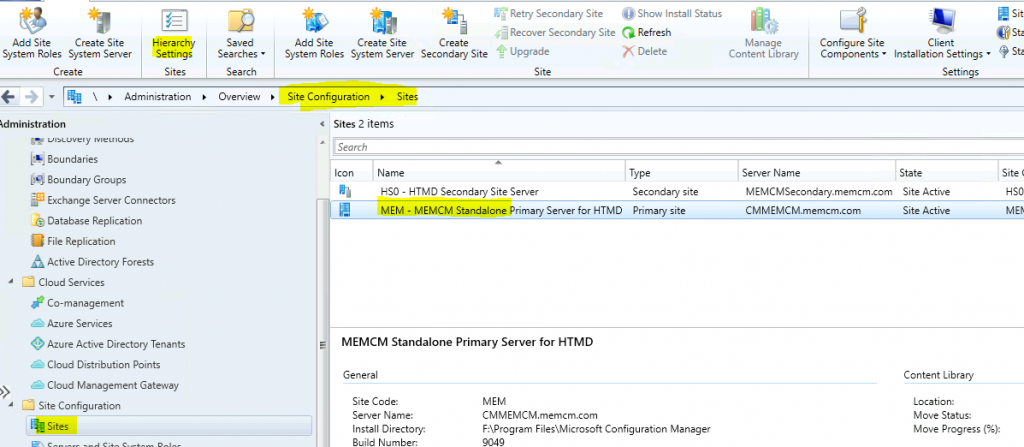
- Navigate to \Administration\Overview\Site Configuration\Sites
- Select the site – Standalone Primary server
- Click on Hierarchy settings from the ribbon
- ConfigMgr SCCM How To Resolve Duplicate Or Conflict Record Issue How To Manage Devices (anoopcnair.com).
- ConfigMgr Reports Power Management | Default
- How To Disable SCCM Application Deployment | ConfigMgr
Select the Client Approval and Conflicting Records tab
- Under the Conflicting Client Records section
- If Configuration Manager detects duplicate hardware IDs, you can allow Configuration Manager to resolve the conflict or manually resolve the conflicts in the Conflicting records node of the Monitoring workspace. This setting applies to client computers in Workgroups or untrusted domains that do not use PKI certificates.
- Select – Automatically resolve conflicting records option to automatically fix the issue.
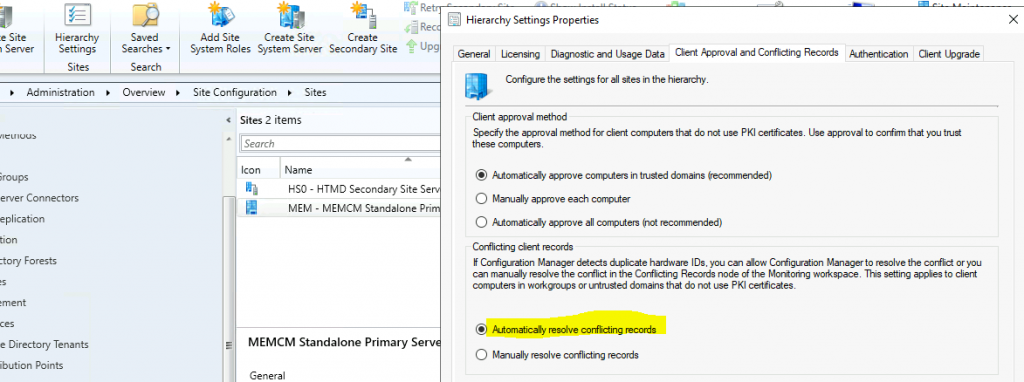
Click OK to complete the process.
Duplicate Hardware Identities
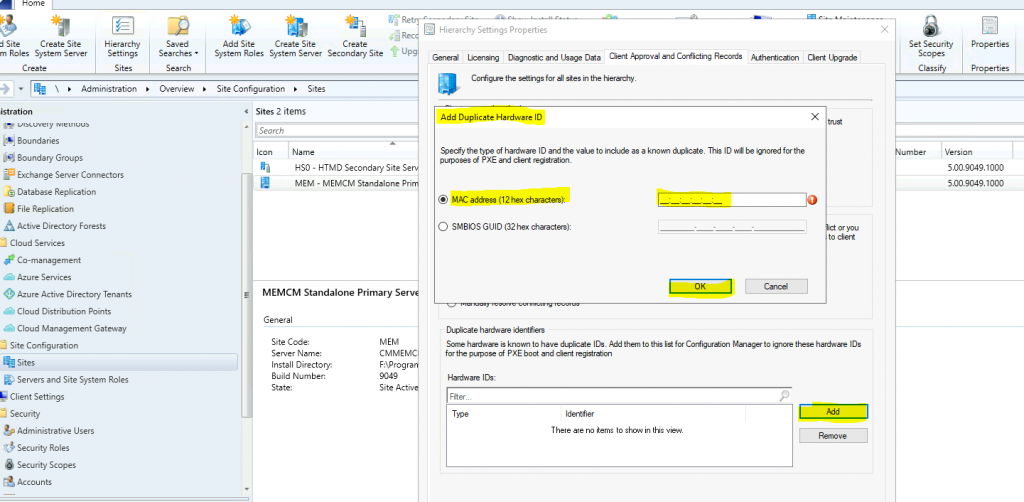
You also have the option to duplicate hardware identities from the console. This option is mainly for hardware issues with the vendor after replacing some parts, like the device’s motherboard.
- Select the Client Approval and Conflicting Records tab.
- Select Add in the Duplicate Hardware Identifiers section to add new hardware identifiers.
- Enter MAC Address (12 hex characters) or SMSBIOS GUID (32 hex characters) value.
- Click OK to continue.
Resources
- More details ConfigMgr SCCM How To Resolve Duplicate Or Conflict Record Issue How To Manage Devices (anoopcnair.com).
- Manage conflicting records – Microsoft Docs
We are on WhatsApp. To get the latest step-by-step guides and news updates, Join our Channel. Click here –HTMD WhatsApp.
Author
Anoop C Nair is Microsoft MVP! He is a Device Management Admin with more than 20 years of experience (calculation done in 2021) in IT. He is a Blogger, Speaker, and Local User Group HTMD Community leader. His primary focus is Device Management technologies like SCCM 2012, Current Branch, and Intune. He writes about ConfigMgr, Windows 11, Windows 10, Azure AD, Microsoft Intune, Windows 365, AVD, etc.




Excellent web site
Good posting
Question, in a multi-tier hierarchy, does this go on each primary site? Such as Central, parent child, parent child……..