






What is ConfigMgr SCCM Tenant Attach Architecture?
Let’s examine ConfigMgr SCCM Tenant Attach Architecture. The single pane of glass is back again for Configuration Manager and Intune customers.
With SCCM 2002 or a later version, you can sync ConfigMgr Devices to Intune. Let’s learn how to build a sync between SCCM and the Intune Portal. This is also referred to as Tenant attachment.
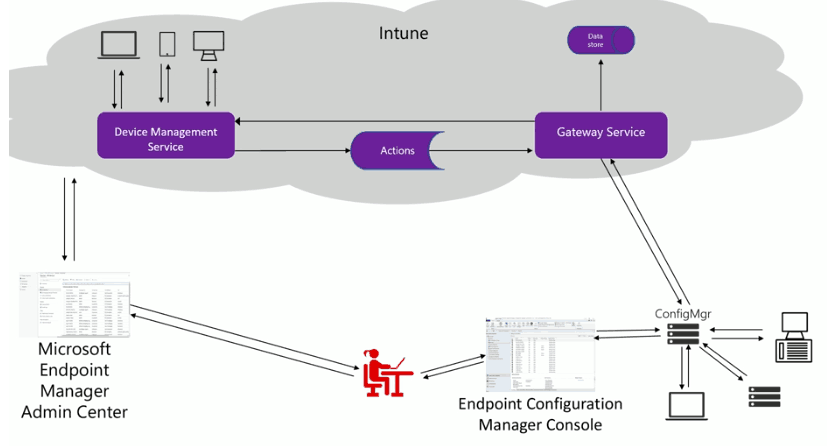
Tenant Attach is the feature to connect the SCCM site to Microsoft Intune for instant cloud console (Microsoft Endpoint Manager Admin Center) and troubleshooting power. The “tenant attach” is an on-demand connected architecture.
The tenant Attach architecture is an on-demand connection when you click on an item in the Microsoft Endpoint Manager portal. Also, these types of information will give help desk teams a better experience (as per Rob York and Jason Githens’s Ignite presentation).

Related post by Vimal Das – How to Build Tenant attach for Microsoft Endpoint Manager | SCCM | ConfigMgr | Intune
ConfigMgr SCCM Tenant Attach Architecture
Diagram Creds to Rob York and Jason Githens’s Ignite presentation
Tenant Attach is NOT
- No, the tenant Attach or Device Sync option doesn’t replicate the entire Configuration Manager (a.k.a. SCCM) DB to Intune!
- Nay, it’s not Co-Management
- Nay, it’s not SCCM collection sync to Azure AD Groups
- Nay. It’s not just Device Sync (rather, you can manage SCCM clients from the Intune portal)
Why Enable Sync Between SCCM Intune Portal
As per Microsoft’s Ignite presentation, the following are the business justifications to enable sync between SCCM and Intune.
- Helpdesk admin can manage SCCM and Intune clients from the cloud Console through Microsoft Endpoint Admin Console (EMAC or A.K.A Intune Portal)
- ATP Integration (for SCCM clients available in TP 2003 version)
- Desktop Analytics
- User Experience Analytics
- Web front-end CMPivot
Prerequisites of SCCM Device Sync to Intune
More updated details about prerequisites are given in Microsoft docs.
- Full Admin access (infrastructure admin) to ConfigMgr infra is preferred.
- Global Administrator Access on Azure Active Directory tenant (These apps will be created automatically during the tenant attach onboarding process)
- To Create a 3rd party application under App Registration
- To Create a first-party service principal account
- An Azure public cloud environment (not available for Govt and other Azure Cloud environments)
- The user account triggering device actions from the Cloud console has the following prerequisites:
- Azure AD Connect should be in place to sync on-prem AD users and groups to Azure AD (if you have Office 365, then you might already be using Azure AD Connect).
- Should be part of Azure Active Directory User Discovery in SCCM
- Should be part of Active Directory User Discovery in SCCM
Firewall Proxy Settings for ConfigMgr Tenant Attach
In a corporate environment, you must open some firewall ports and proxy bypass list updates. In this scenario, to enable a tenant to attach, you might need to white list the following url (internet endpoints for tenant attach scenario).
The protocol and Port number used for the following endpoints is https (443).
https://aka.ms/configmgrgatewayhttps://gateway.configmgr.manage.microsoft.comhttps://us.gateway.configmgr.manage.microsoft.comhttps://eu.gateway.configmgr.manage.microsoft.com
Enable Tenant Attach
Let’s see how to enable SCCM device sync to the cloud console (A.K.A tenant attach).
NOTE! – The following steps should be followed only when you have not enabled the co-management feature in the SCCM environment.
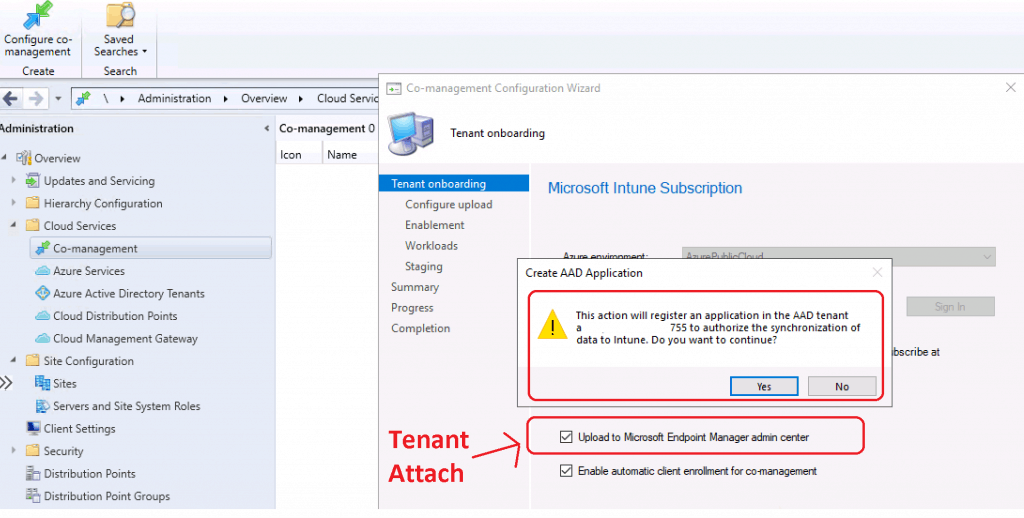
- Navigate Administration > Overview > Cloud Services > Co-management.
- Click on the Configuration Co-management Management button.
- On the Tenant onboarding page, select AzurePublicCloud for your environment.
- Click Sign In. Use the Azure Global Administrator account to sign in.
- On the tenant onboarding page, select the Upload to Microsoft Endpoint Manager admin center option to enable device sync to the Intune portal.
NOTE! – Select Enable Automatic client enrollment for the co-management option to enable co-management. Do not select this option not to enable co-management.
- Click on the YES button to create Azure AD applications, as mentioned in the pre-requisite checks section.
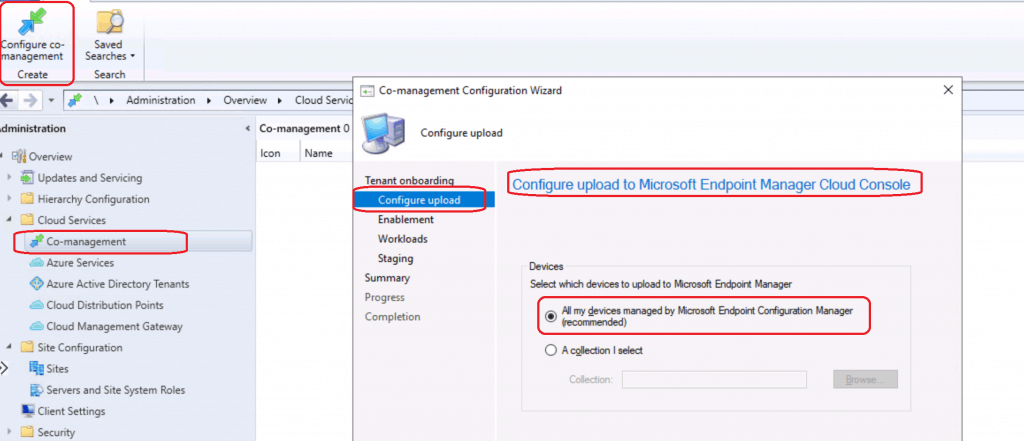
- Select the devices to upload to Microsoft Endpoint Manager (Intune portal)
- Select “All my devices managed by Microsoft Endpoint Configuration Manager (recommended)” to sync all devices from SCCM to Intune.
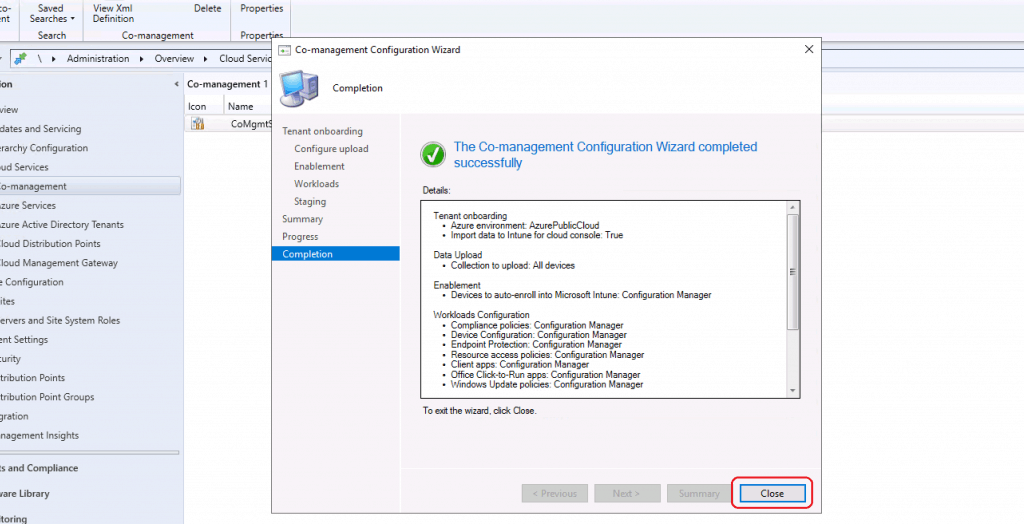
- Complete the Wizard by clicking on CLOSE.
SCCM Tenant Attach Azure Apps
When you enable Device Sync or Tenant attach from the SCCM 2002 production version, two (2) Azure applications (App Registration Node) get created automatically in Azure. The Onboarding process creates a third-party app and a first-party service principal in your Azure AD tenant
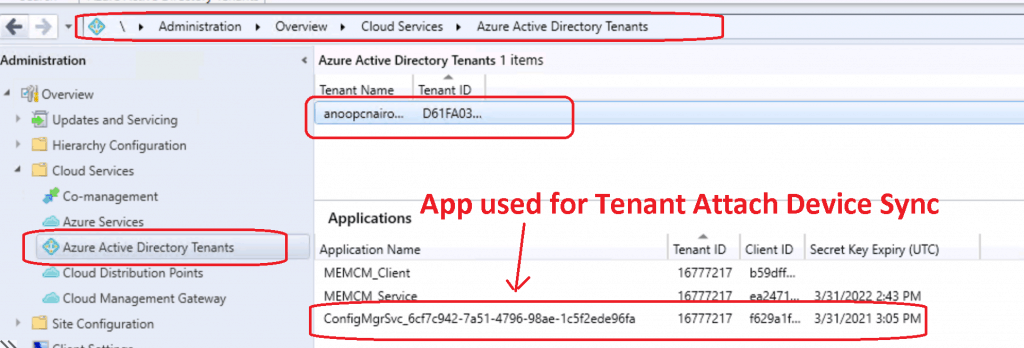
From the SCCM console, you can see one application from the Active Directory Tenants node under Cloud Services.
- Check the Azure Portal Azure AD -> “App Registration” to confirm ConfigMgrSvc applications are created
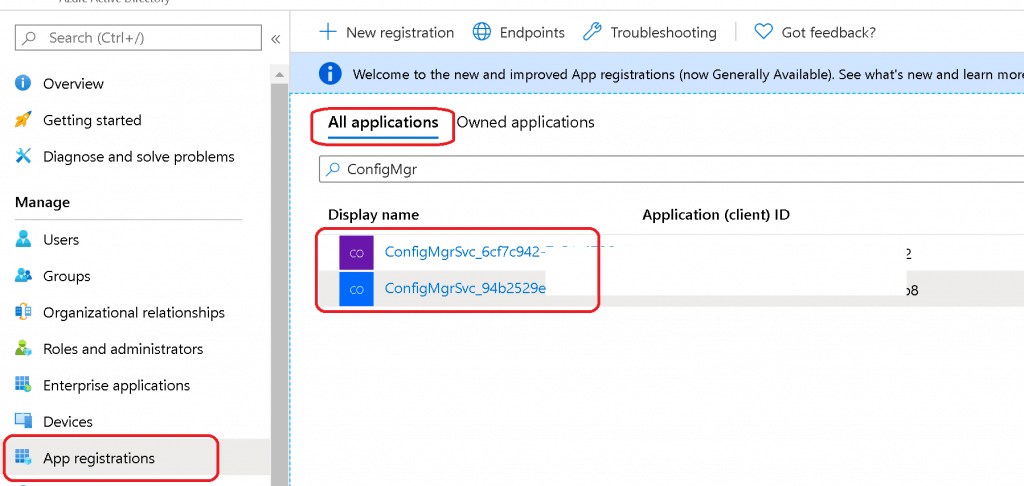
From the Azure portal, you can check two (2) applications under the Azure Active Directory – App Registration – All Application blade. A third-party app and a first-party service principal.
- ConfigMgrSvc_6cf7c923
- ConfigMgrSvc_94b2529e
Azure Apps Permissions for Tenant Attach
The above two applications and respective permissions are automatically created during device sync or SCCM tenant attach configuration. No manual intervention is required.
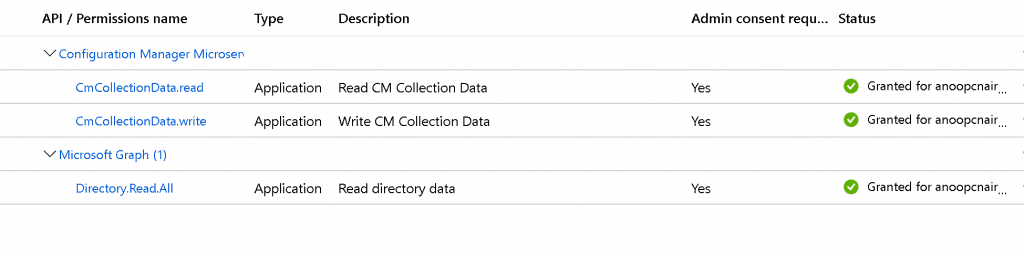
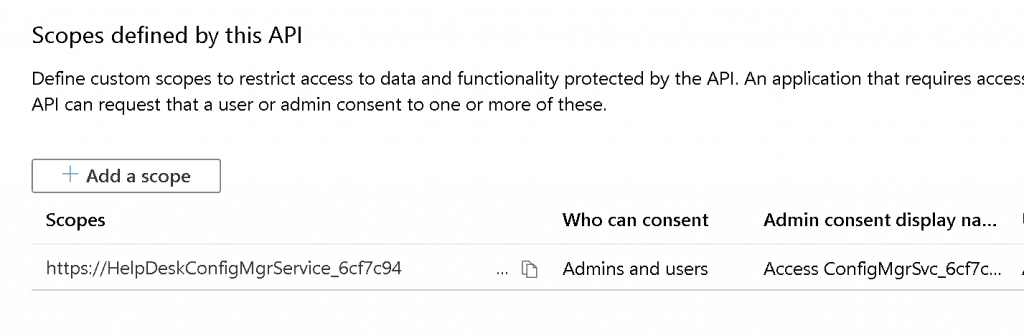
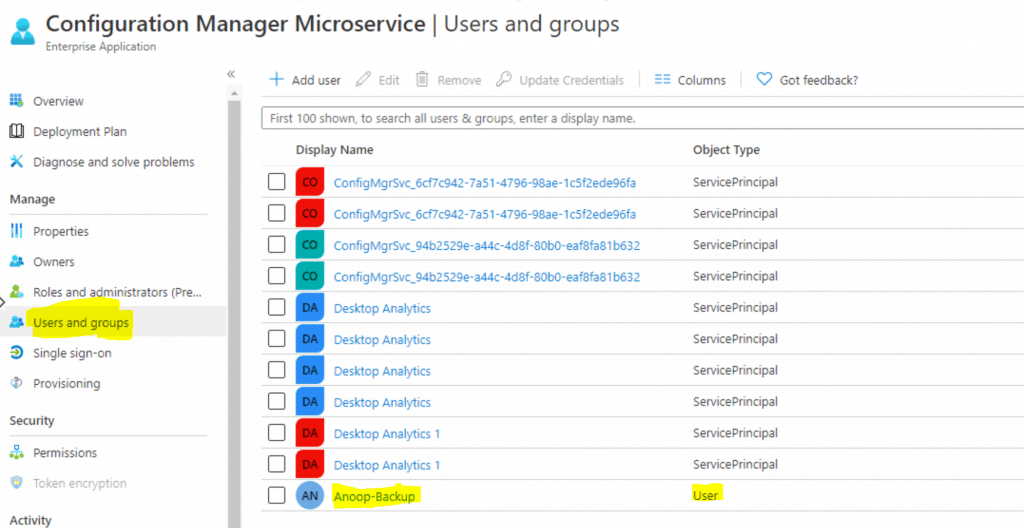
Configuration Manager Microservice
Let’s add your admin user to this (Configuration Manager Microservice) enterprise app to get appropriate permissions to initiate SCCM actions from Intune portal.
- CMPivot
- Run Script
- Collections
- etc..
Results – ConfigMgr SCCM Tenant Attach Architecture
SCCM Console End Results
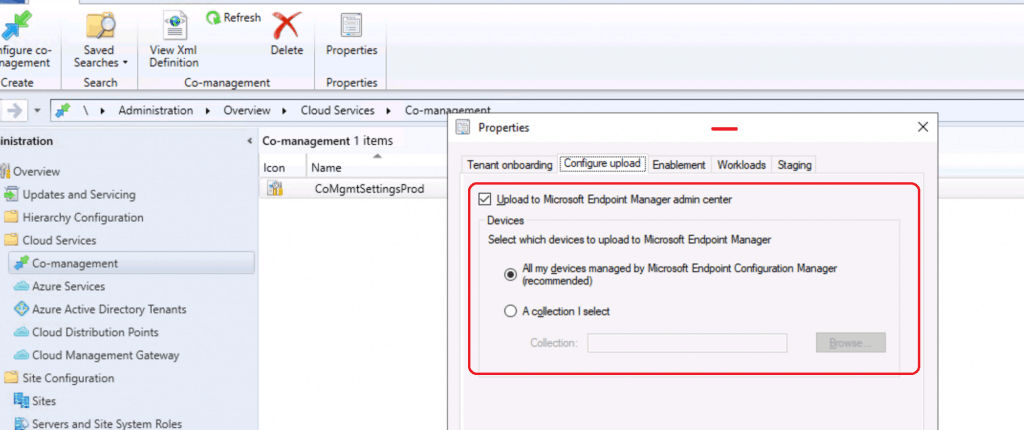
- You can go to properties of SCCM co-management
- Click on Configure Upload to check and confirm whether the device sync is enabled or not.
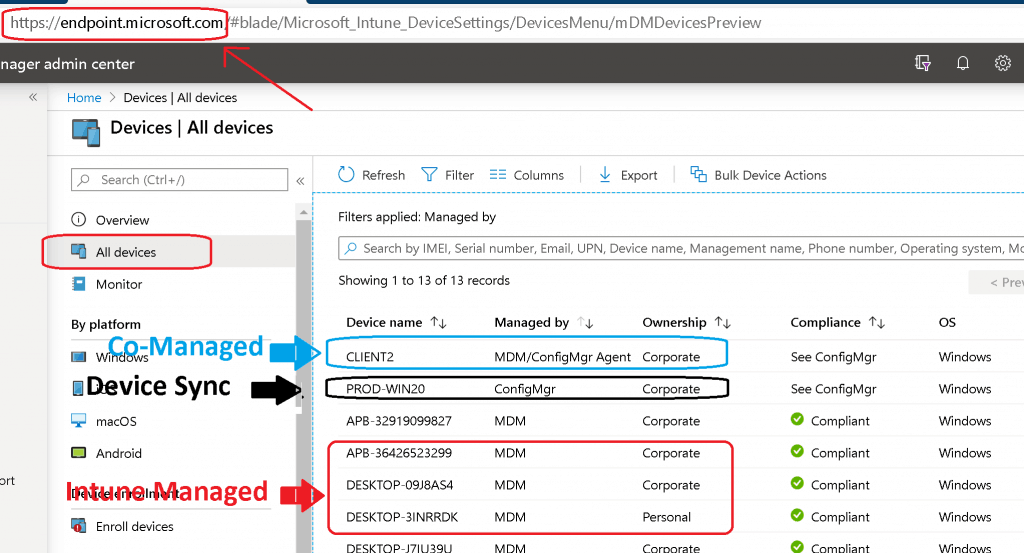
Intune Portal (Microsoft Endpoint Manager Admin Center)
Let’s have a look at the results of SCCM 2002 tenant attach or device sync options.
Logs Related to Tenant Attach
Use the following logs located on the service connection point:
- CMGatewaySyncUploadWorker.log
- CMGatewayNotificationWorker.log
- Adminservice.log
Resources
- Microsoft Endpoint Manager tenant attach: Device sync and device actions
- ConfigMgr 2002 List of New Features Enhancements MEMCM SCCM
- SCCM Tenant Attach Step-by-Step Guide Troubleshooting
We are on WhatsApp. To get the latest step-by-step guides and news updates, Join our Channel. Click here –HTMD WhatsApp.
Author
Anoop C Nair is Microsoft MVP! He is a Device Management Admin with more than 20 years of experience (calculation done in 2021) in IT. He is a Blogger, Speaker, and Local User Group HTMD Community leader. His main focus is on Device Management technologies like SCCM 2012, Current Branch, and Intune. He writes about ConfigMgr, Windows 11, Windows 10, Azure AD, Microsoft Intune, Windows 365, AVD, etc.




Thanks Anoop.
I’ve followed your great guide but the devices aren’t showing in the endpoint portal. Do I need to add additional permissions to the configmgr app or microservice for this to happen? Do I need to enable Azure Services > Cloud Management and Azure AD Discovery method?
https://www.reddit.com/r/SCCM/comments/xlsqj1/enabled_tenant_attach_but_no_devices_are_showing/
Thanks