






SCCM Scenario Health Checks | ConfigMgr | Configuration Manager
In this post, let’s understand ConfigMgr Scenario Health Checks. With the 2010 version of SCCM, the health check of some specific scenarios can be performed from the console. This mainly helps to monitor the health of end-to-end scenarios. Let’s look at the tasks included in each supported scenario check.
It helps to simulate activities to expose performance metrics and failure points. Monitoring scenario health helps to enhance awareness of system latency and component backlogs. The ConfigMgr 2010 version has only two scenarios available.
I’m sure there will be a lot of health scenario health check items coming down in this section of monitoring for the future versions of Configuration Manager. I think this feature would be more helpful with Tenant Attach scenarios.
This post provides all the details about SCCM scenario health checks. This guide will help you understand how to perform health checks to ensure your SCCM setup works correctly and efficiently.

Table of Contents
Introduction
Let’s learn more about Scenario Health options introduced in the 2010 version of SCCM. Configuration Manager monitors the health for the following two scenarios:
- SCCM High Availability Redundancy DR Options ConfigMgr
- ConfigMgr MP Health Check Script | SCCM Endpoint Manager
- ConfigMgr SCCM Report for Software Update Patching Client Health
- SQL Server Service Broker: Many of the core subsystems in Configuration Manager use the service broker.
- Client action health: Monitor the health of the fast channel used for client actions.
Prerequisites
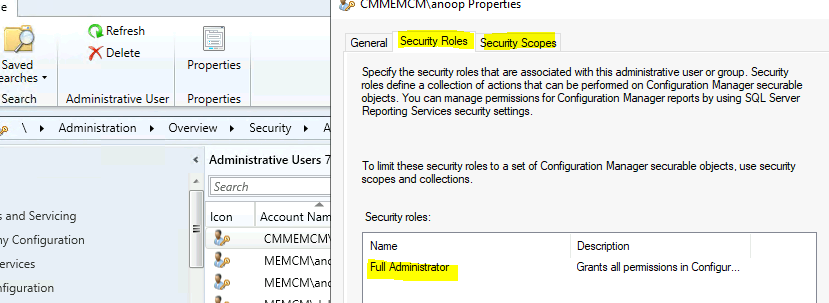
To launch ConfigMgr Scenario Health, the admin must have a full administrator role with scope for the top-level site.
Launch
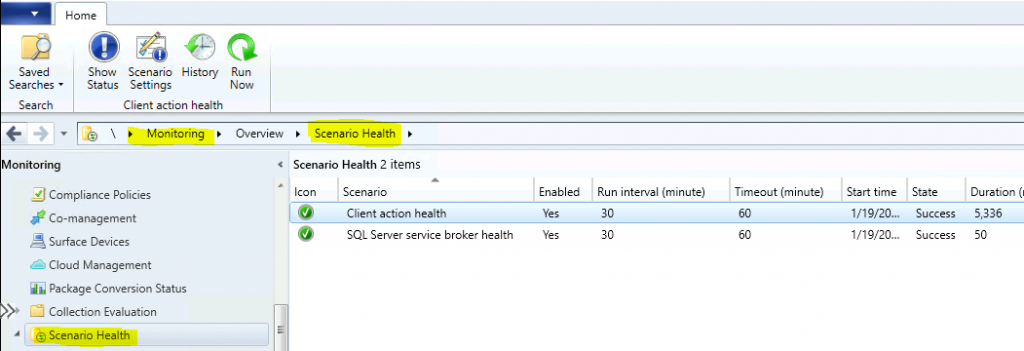
You can navigate to scenario health from \Monitoring\Overview\Scenario Health.
Actions Available for Scenario Health
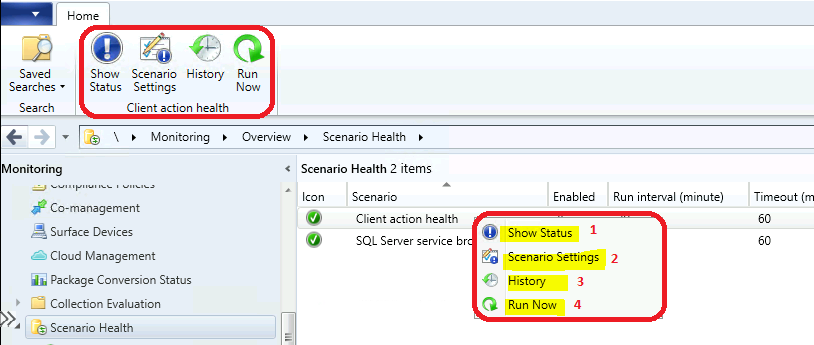
Let’s now check what actions are available for scenario health options.
- Show Status – This shows the latest results of health check tests in a different window.
- Scenario Settings – Change the scenario health check configurations.
- History – This provides a history of health scenario activities.
- Run Now – This allows you to start a health check evaluation manually.
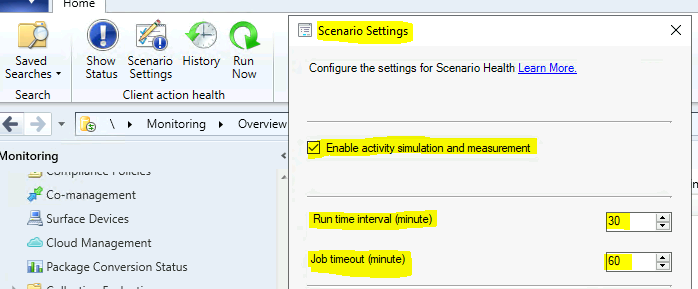
You can have three (3) actions for Scenario Settings.
- Enable activity simulation and measurement.
- Run time interval (minute)
- Job timeout (minute)
SQL Server Service Broker Health Check Scenario
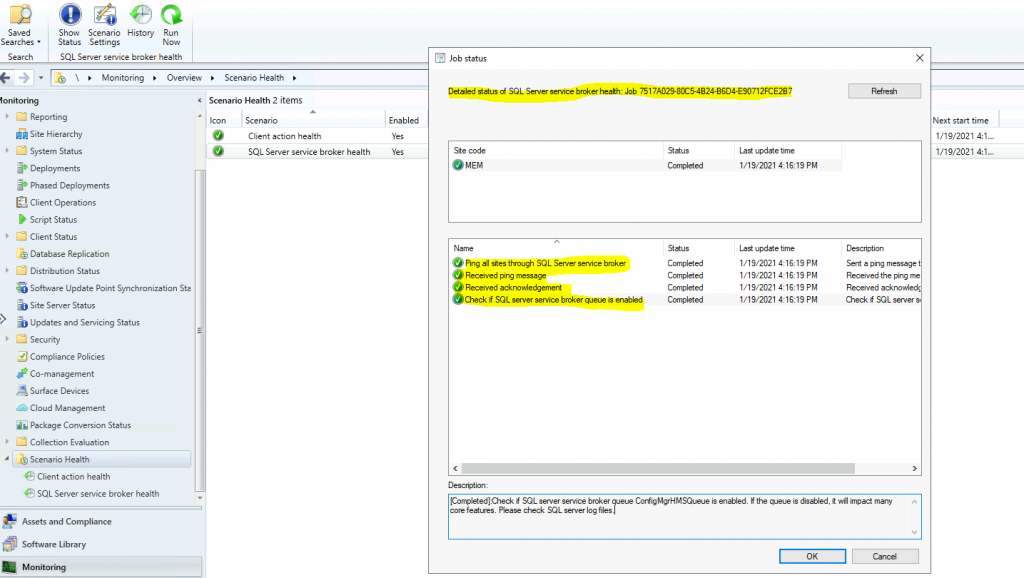
Let’s check what tests the SQL Server Service Broker scenario health task includes. The SQL Server Service Broker is one of the critical configurations required for the site database, and many of the core subsystems in ConfigMgr use it.
The following are 4 tasks performed by the SQL server service broker scenario health check. These health checks help identify issues with the ConfigMgr site, which can be very helpful for troubleshooting scenarios.
- Ping all sites through SQL Server services broker– Sent a ping message to itself. Send a ping message to all other primary sites if in a hierarchy.
- Received ping message – Received the ping message and returned the acknowledgement message.
- I received an acknowledgement message. A long delay will impact the performance of many core features. Please check the SQL server log files.
- Please check the SQL server log files to see if the SQL server service broker queue ConfigMgrHMSQueue is enabled. If it is disabled, it will impact many core features.
Client Action Health Scenario
From 2010 onwards, client action health checks monitored the health of the fast channel used for client actions. This client action health scenario feature would be more helpful with Tenant Attachment scenarios and other cloud scenarios.
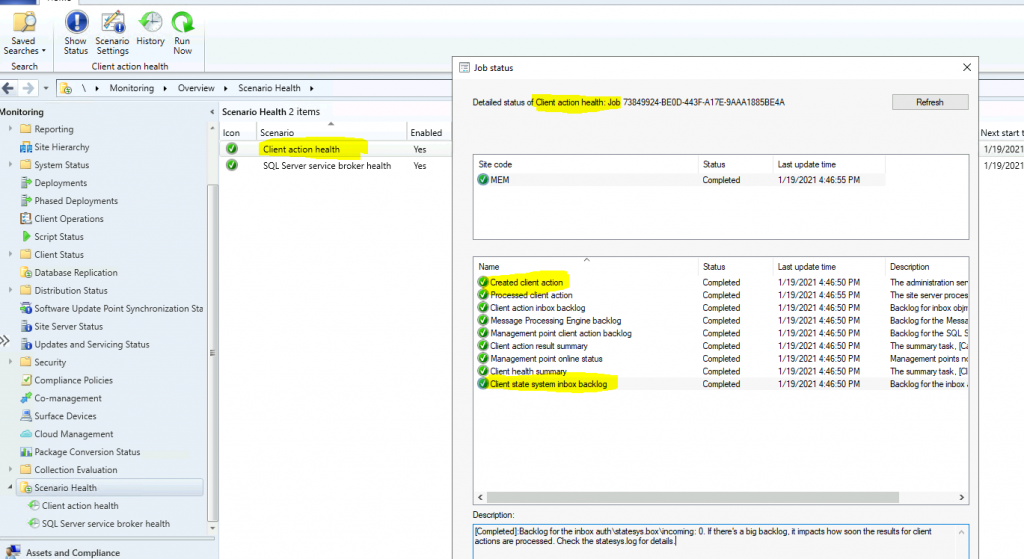
The following are 9(nine) tasks performed by the client action scenario health check. These health checks help identify issues with the ConfigMgr client action and can be very helpful for troubleshooting scenarios.
- Created Client Action – The administration service created the client action.
- Processed Client Action – The site server processed the client action. Check objreplmgr.log for details.
- Backlog for inbox Backlog – Backlog for inbox objmgr.box: 0. If there’s a significant backlog, it impacts how soon the client actions are sent to the clients. Check objreplmgr.log for details.
- Message Processing Engine Backlog—The Backlog for the Message Processing Engine queue is 0. A significant backlog impacts how soon the results of client actions are processed. Check the SMS_MESSAGE_PROCESSING_ENGINE.log for details.
- Management Point Client Action Backlog—The Backlog for the SQL Server service broker queue ConfigMgrBGBQueue is 0. A significant backlog impacts how soon the management point can push actions to the clients. Check the scenario health for the SQL Server service broker and the management point’s bgbserver.log for details.
- Client Action Result Summary – The summary task, [Calculate Client Operation Summary], ran successfully. Check statesys.log for details.
- Management Point Online Status—Management points are not online for processing client actions: If they aren’t online, it impacts how soon the client’s actions can be processed. For details, check the management points ccmexec.log, bgbsetup.log, and bgbserver.log.
- Client Health Summary – The summary task, [Client Health Scheduled Task], ran successfully. Check statesys.log for details.
- Client State System Inbox Backlog—The backlog for the inbox authentication system. Box incoming: 0. A significant backlog impacts how soon the results for client actions are processed. Check the statesys.log for details.
Resources
- Troubleshoot SCCM Fast Channel Push Notification Issues
- FIX SCCM Client Issues Using Automation Client Health
- FIX SCCM SQL-Based Database Replication Failure Between CAS Primary| ConfigMgr
We are on WhatsApp now. To get the latest step-by-step guides, news, and updates, Join our Channel. Click here – HTMD WhatsApp.
Author
Anoop C Nair is Microsoft MVP! He is a Device Management Admin with more than 20 years of experience (calculation done in 2021) in IT. He is a Blogger, Speaker, and Local User Group HTMD Community leader. His main focus is on Device Management technologies like SCCM 2012, Current Branch, and Intune. He writes about ConfigMgr, Windows 11, Windows 10, Azure AD, Microsoft Intune, Windows 365, AVD, etc.




Discussion