






ConfigMgr User Policy Retrieval & Evaluation Cycle Client Action | SCCM | Configuration Manager
Let’s explore the ConfigMgr Client Action User Policy Retrieval & Evaluation Cycle in more detail. Users/admins can initiate the user policy evaluation cycle to speed up troubleshooting of patching-related scenarios.
I explained the Software Updates Scan Cycle in the previous post. However, it’s also essential to understand ConfigMgr Client Component Status details for troubleshooting. Each client component has three different status details: installed, disabled, and enabled.
Many admins are confused between the ConfigMgr Client App and the SCCM Software Center. Both are different, and client actions are available with ConfigMgr Client App (a.k.a Configuration Manager Application) in the control panel.
In this post, you will find all the details about the ConfigMgr User Policy Retrieval & Evaluation Cycle Client Action. This feature helps retrieve and evaluate user policies in SCCM, ensuring that the latest policies are effectively applied to user devices.

Table of Contents
User Policy Retrieval & Evaluation Cycle
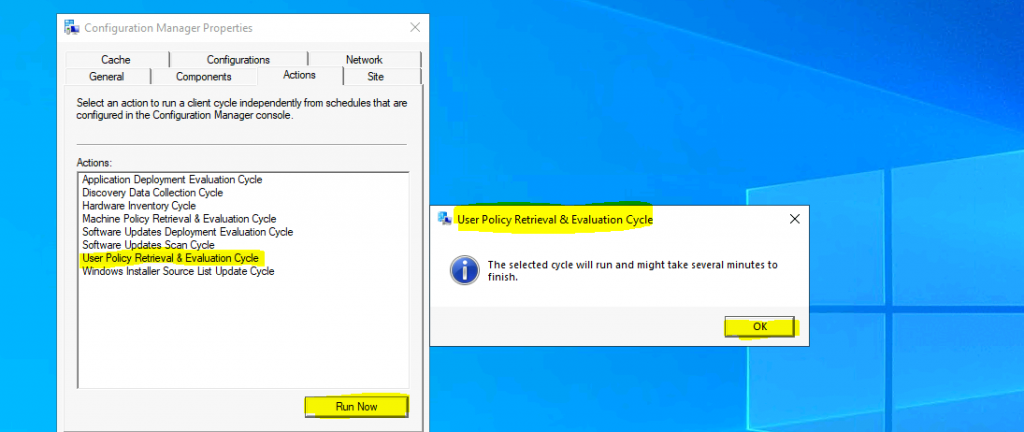
As of the ConfigMgr 2010 version, there are 8 (eight) client actions available in Configuration Manager client application properties. The User Policy Retrieval & Evaluation Cycle client action is the Seventh (7th) one from the top.
Navigate to:
- You can install the client app from any computer with an SCCM client.
- Open Command Prompt
- Run the following command – Control smscfgrc
- Click on the Actions tab
- Select User Policy Retrieval & Evaluation Cycle
- Click on OK from the User Policy Retrieval & Evaluation Cycle popup window
- Deep Dive SCCM Application Model Troubleshooting – Client End
- Machine Policy Request Evaluation Cycle Client Action SCCM ConfigMgr
- ConfigMgr Software Updates Deployment Evaluation Cycle | Client Action | SCCM | Configuration Manager
Background Processes
Let’s understand the User Policy Retrieval & Evaluation Cycle via log files. When you initiate this action from the ConfigMgr client app, you can see the Policy agent and other components are triggered.
NOTE! The background activities of the user policy client action shall be minimal when the user doesn’t have any new assignments as part of the DELTA user policy sync.
This SCCM client action, User Policy Retrieval & Evaluation Cycle, “immediately” triggers the user-based deployment policies from the Windows 10 client. Interestingly, the ConfigMgr policy agent checks whether the user is cloud-enabled.
IsDomainUser = 1, IsCloudUser = 1
Let’s understand the components that help process the user collection-based deployment policies and perform a user policy evaluation, as shown below. This user policy evaluation is performed against all the policy deployments assigned to the logged-in user. The processes are shown in the following log snippets.
- smscliui.log
- Perform Action: Request & Evaluate User Policy – {3A88A2F3-0C39-45fa-8959-81F21BF500CE}. Message sent, id={43B9E4DE-2ACB-42AC-9415-BC22C08B1A40}

PolicyAgent.log – Requesting User policy assignments for ‘S-1-5-21-2901188661-3025291148-348095268-500’ from authority ‘SMS: MEM’. IsDomainUser = 1, IsCloudUser = 1
- Raising event: an instance of CCM_PolicyAgent_AssignmentsRequested
- Processing User assignments from ‘SMS: MEM’. The new cookie is ‘2021-02-09 13:01:53.663’.
- Raising event: an instance of CCM_PolicyAgent_AssignmentsReceived
- Received User delta policy update with 0 assignments

- StatusAgent.log
- Raising event (#1 of 1): an instance of CCM_CcmHttp_Status
- Successfully raised 1 event(s)
- Raising event (#1 of 1): an instance of CCM_PolicyAgent_AssignmentsRequested
- Updating MDM_ConfigSetting.ClientHealthStatus with value 7
- Event forwarder SmsClientEventForwarder: Instance0 successfully handled one event
Logs
The log files recorded a few entries when I triggered the user policy evaluation Cycle. More details about SCCM clients logs are available here.
| Logs |
|---|
| smscliui.log |
| PolicyAgent.log |
| StatusAgent.log |

Resources
- Software Updates Deployment Evaluation Cycle
- ConfigMgr Client Action Discovery Data Collection Cycle | SCCM
- Discovery Data Collection action
- Hardware Inventory Collection Cycle
- ConfigMgr Client App Vs SCCM Software Center
- About client settings in Configuration Manager
We are on WhatsApp now. To get the latest step-by-step guides, news, and updates, Join our Channel. Click here – HTMD WhatsApp.
Author
Anoop C Nair is Microsoft MVP! He is a Device Management Admin with more than 20 years of experience (calculation done in 2021) in IT. He is a Blogger, Speaker, and Local User Group HTMD Community leader. His primary focus is Device Management technologies like SCCM 2012, Current Branch, and Intune. He writes about ConfigMgr, Windows 11, Windows 10, Azure AD, Microsoft Intune, Windows 365, AVD, etc.




Hi Anoop,
Can you please advise the difference between IsDomainUser and IsCloudUser in PolicyAgent.log file.
Along with the values.
Thanks,
Sheetal
StaffIs this helpful https://www.anoopcnair.com/sccm-logs-show-isdomainuser-isclouduser/
Great.