






Configuration Profile for Edge Browser Extensions and Sidebar Management using Microsoft 365 Admin Center
Let’s discuss how to create Configuration Profile for Edge Browser Extensions and Sidebar Management using Microsoft 365 Admin Center. In this post, we are not using Microsoft Intune Configuration Profiles!
These Edge browser management profiles help you control how your users can use Edge extensions and customize the sidebar for everyone in your organization. This is another way to manage and deploy Edge Browser settings from the server side, which in this case is the Microsoft 365 Admin Center.
By creating a configuration profile, you can easily manage Microsoft Edge policies from one place. MS Edge policies can also be deployed from the Microsoft Intune Management platform using settings catalog policies.
M365 admin center is a platform that enables admins to configure Edge browser policies for organizations using MS Edge management service. It’s important to note that the users must be logged into Microsoft Edge to retrieve these settings.

Table of Contents
What is Configuration Profiles?
Configuration profiles allow administrators to manage and control how software and applications work on organizational devices. In the context of Microsoft 365 and Microsoft Edge, configuration profiles help you Manage Settings, Deploy Extensions and Apps, Enhance Security, and Simplify Management.
Configuration Profile for Edge Browser Extensions using Microsoft 365 Admin Center
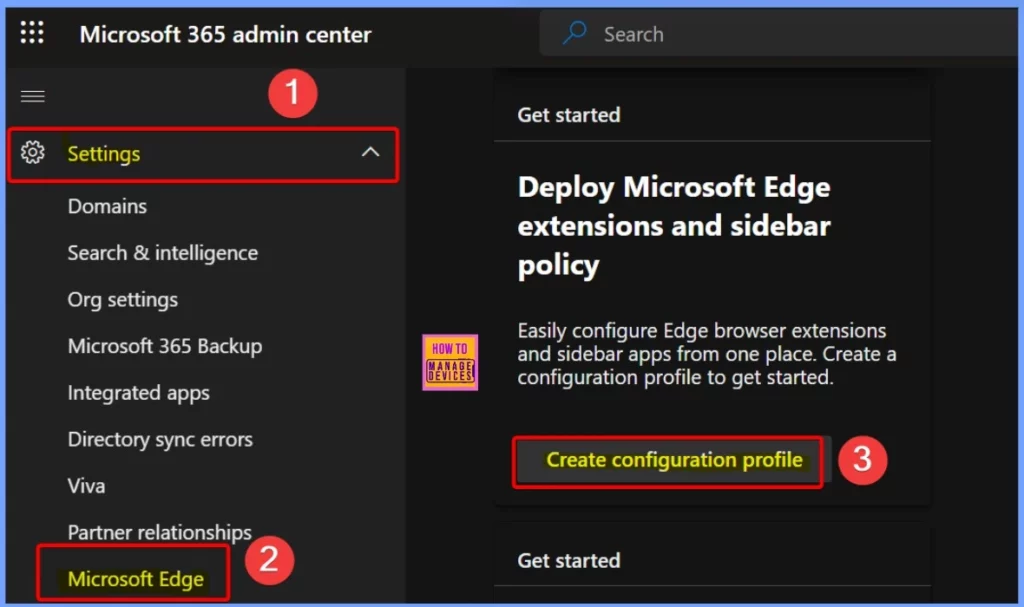
You can easily Create Configuration Profiles for Edge Extensions and Sidebar in the Microsoft 365 Admin Center. The following steps are to create a configuration profile in Microsoft 365.
| Steps | Details |
|---|---|
| Go to Microsoft 365 Admin Center | Open the Microsoft 365 Admin Center and log in with your admin credentials. |
| Access Settings | In the main left navigation bar, select Settings > Microsoft Edge. |
| Navigate to Get Started | Scroll to the Get started section to begin configuring policies for Edge. |
| Create Configuration Profile | Under Deploy Microsoft Edge extensions and sidebar policy, click Create configuration profiles. |
- Brand Identity Advanced Customization Options for Microsoft Edge Browser for Business
- Importance to Add Name for MS Edge Browser Windows
- MS Edge Browser Automatic Options to Organize Tabs Stay Organized with Tab Groups
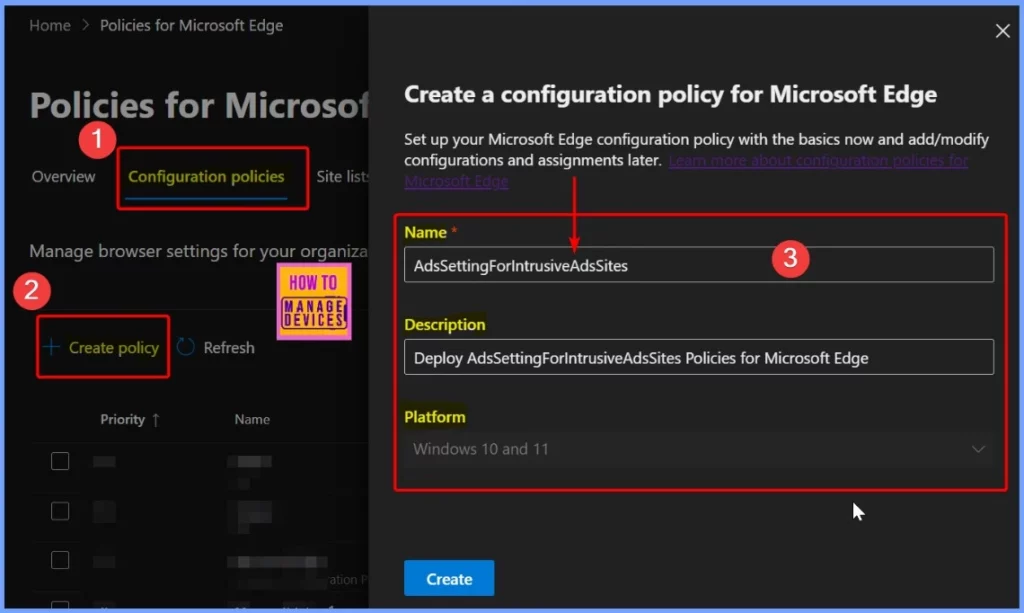
In the Configuration Policies section, select Create Policy. In the “Create a Configuration policy for Microsoft Edge” pop-up window, enter a profile name and description to specify the purpose of this policy. Once you have provided these details, select the Create option to save and start configuring settings for Microsoft Edge.
| Settings | Details |
|---|---|
| Name | AdsSettingForIntrusiveAdsSites |
| Description | Deploy AdsSettingForIntrusiveAdsSites policies for Microsoft Edge |
Monitor the Edge Configuration Policy Creation Status
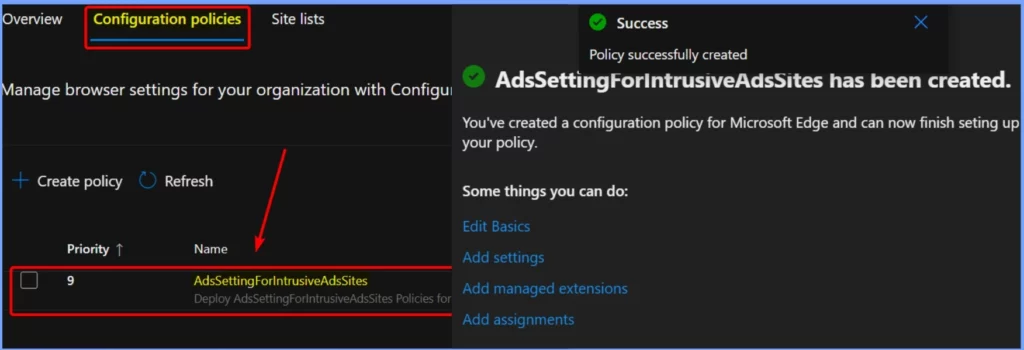
In the screenshot below, you can see that the AdsSettingForIntrusiveAdsSites policy was successfully created. The screenshot provides more details about this policy. Once confirmed, you can open the profile to set up and adjust the necessary policies and extensions.
Need Further Assistance or Have Technical Questions?
Join the LinkedIn Page and Telegram group to get the latest step-by-step guides and news updates. Join our Meetup Page to participate in User group meetings. Also, Join the WhatsApp Community to get the latest news on Microsoft Technologies. We are there on Reddit as well.
Resources
Microsoft Edge management service | Microsoft Learn
Author
Anoop C Nair has been Microsoft MVP from 2015 onwards for 10 consecutive years! He is a Workplace Solution Architect with more than 22+ years of experience in Workplace technologies. He is also a Blogger, Speaker, and Local User Group Community leader. His primary focus is on Device Management technologies like SCCM and Intune. He writes about technologies like Intune, SCCM, Windows, Cloud PC, Windows, Entra, Microsoft Security, Career, etc.




Discussion