






Fix Highly Critical Microsoft Windows MSHTML Platform Spoofing Vulnerability
Let’s discuss Fixing a Highly Critical Microsoft Windows MSHTML Platform Spoofing Vulnerability (CVE-2024-38112). Microsoft recognized a critical security vulnerability in this software, which was identified in the October Patch Tuesday Update.
Do you know what the MSHTML platform is? It is a part of the Internet Explorer browser engine used in various Windows applications. The security vulnerability in MSHTML is critical and must be mitigated immediately.
CISA (Cybersecurity and Infrastructure Security Agency) has warned all federal agencies to immediately implement mitigations to CVE-2024-43573 Microsoft Windows MSHTML Platform Spoofing Vulnerability. This flaw allows hackers to exploit vulnerabilities in MS Internet Explorer.
Attackers exploit this vulnerability, which is still installed on Windows 10 and Windows 11 systems. Users can easily resolve this issue in IE using different methods. This blog post will help you learn more about the Microsoft Windows MSHTML Platform Spoofing Vulnerability.

Table of Contents

Fix Highly Critical Microsoft Windows MSHTML Platform Spoofing Vulnerability
The Microsoft Windows MSHTML Platform Spoofing Vulnerability is raised for several reasons. In this post, we can discuss the reasons and resolution of this vulnerability. The table below shows more details on vulnerability.
| Key Points | Details |
|---|---|
| Nature of the Vulnerability | It allows attackers to spoof content, potentially leading to unauthorized access to user data and system compromise |
| Severity | It has a CVSS score of 7.5, indicating a high severity level |
| Impact | Exploiting this vulnerability could enable attackers to execute malicious code or gain elevated privileges on the affected system |
| Mitigation | Microsoft has released patches to address this issue, and users are advised to apply these updates promptly |
- CVE-2024-3596 RADIUS Protocol Spoofing Vulnerability Remote Authentication Dial-In User Service
- FIX Google Chrome Zero Day Vulnerability
- FIX Spoofing Vulnerability with Outlook Image Blocking and Read-Only Meeting Body
Reasons for MSHTML Platform Spoofing Vulnerability
This issue arises due to the MSHTML engine’s improper handling and validation of certain HTML elements. By following these steps, you can easily avoid this vulnerability.
- Keep your system updated by installing patches and enabling automatic updates.
- Use security software such as antivirus, anti-malware, firewalls, etc.
- Be Cautious with Links and Attachments
- Use Secure Browsers
- Enable Security Features such as 2FA etc
Resolution for MSHTML Platform Spoofing Vulnerability
You can disable IE as a stand-alone browser using the Group Policy key or Registry Editor. The following steps will help you to resolve this issue.
GPO to Resolve MSHTML Platform Spoofing Vulnerability
Using Group policy, you can easily resolve the Internet Explorer Security Vulnerability. To access GPO on your PC, open the run command as Win +R, enter the gpedit.msc, and click on the OK button. In the GPO window, Computer Configuration > Administrative Templates > Windows Components / Internet Explorer.
The MSHTML platform is used in Internet Explorer mode in Microsoft Edge and other applications through WebBrowser control. WebView and some UWP applications use the EdgeHTML platform.
MSHTML and EdgeHTML use scripting platforms, but other legacy applications can also use them. Updates to address vulnerabilities in the MSHTML platform and scripting engine are included in the IE Cumulative Updates; EdgeHTML and Chakra changes do not apply to those platforms.
- Click on the Disable HTML Application
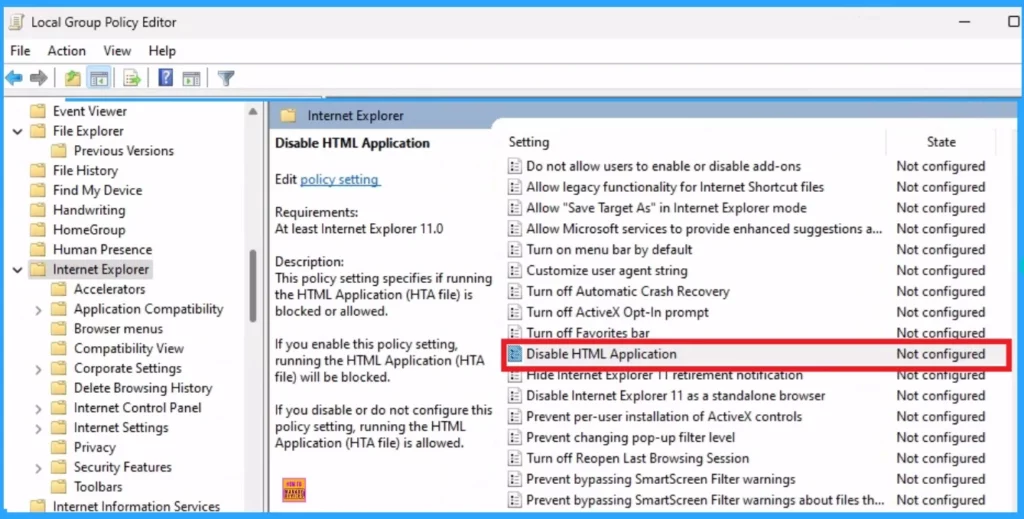
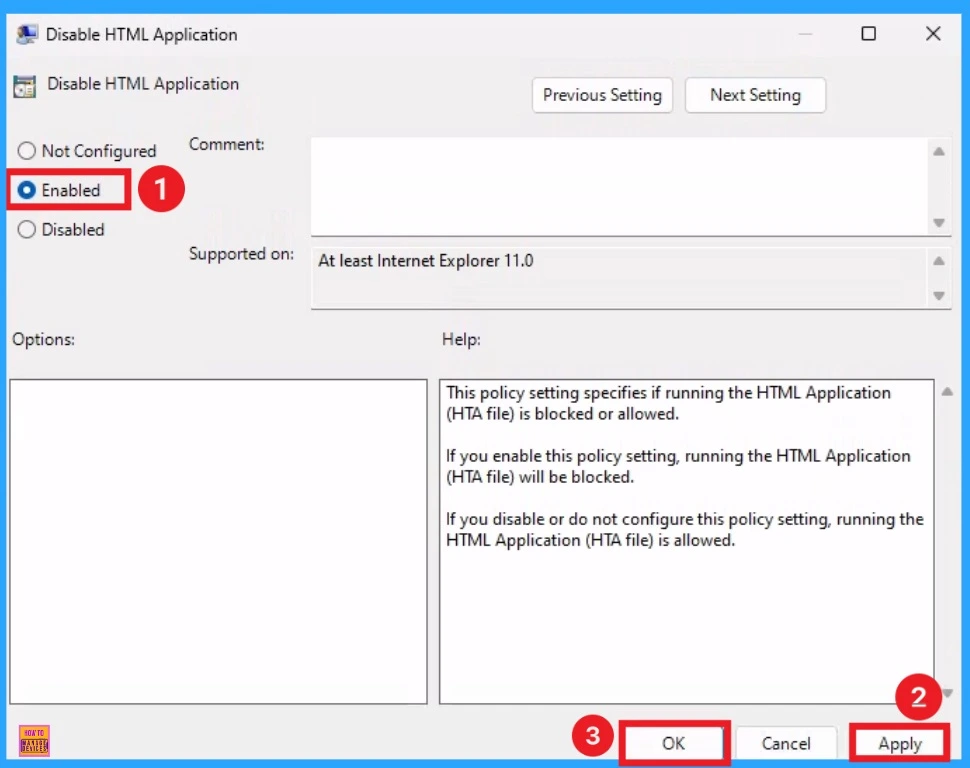
After that, the Disable HTML Application window will appear. In this window, you can enable and disable it. Click on the radio button near the Enabled option. Then click on the Apply and OK button.
- CVE-2023-44487 HTTP/2 Rapid Reset Attack | Workaround for MITRE Vulnerability
- FIX Windows Boot Manager Vulnerability CVE-2023-24932 BlackLotus UEFI bootkit
- FIX PowerShell 7.2 7.3 Vulnerability CVE 2023 28260
Registry Editor
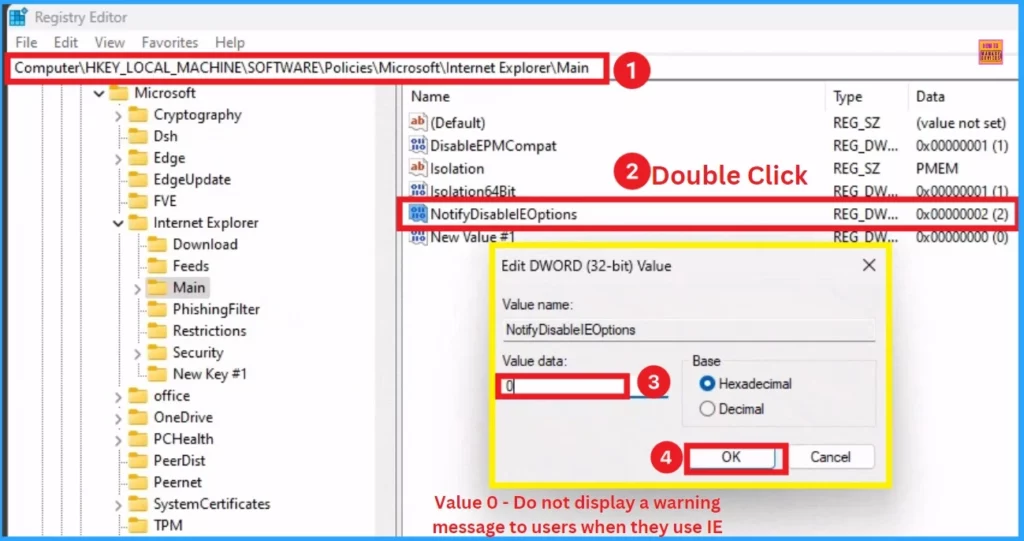
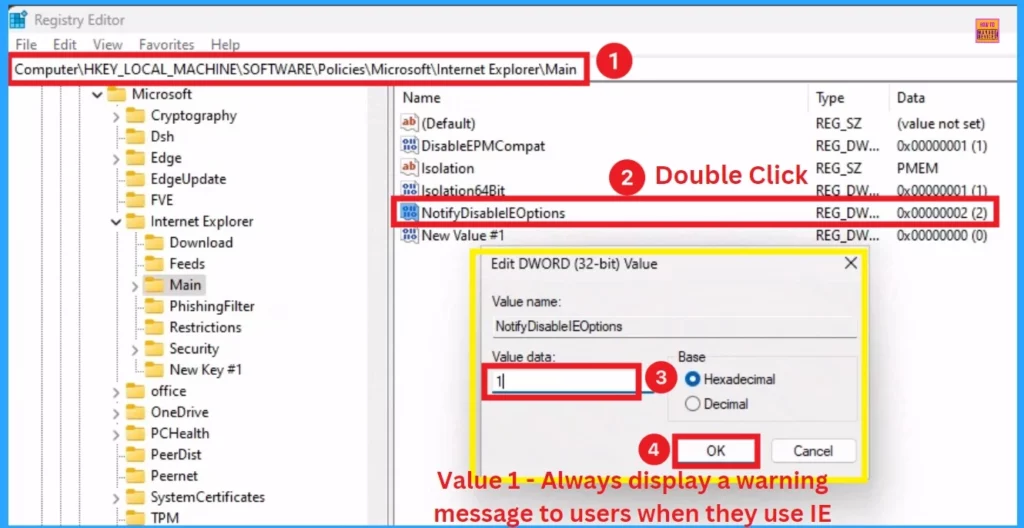
Using Registry Editor, you can resolve the Internet Explorer vulnerability. Open the Registry Editor (regedit) in admin mode and Navigate to HKEY_LOCAL_MACHINE\SOFTWARE\Policies\Microsoft. Then select the Microsoft key, right-click it, and select NEW and Key. Create a new key called “Internet Explorer“.
- Select the new key, “Internet Explorer,” right-click it, and select New and Key. Create a new key called “Main“
- This now looks like this: HKEY_LOCAL_MACHINE\SOFTWARE\Policies\Microsoft\Internet Explorer\Main.
- Select the “Main” key, right-click, and add a New DWOD (32-bit) Value. Name the new DWORD (32-bit) value “NotifyDisableIEOptions.”
- Double click on the NotifyDisableIEOptions
- Set the Value of the new DWORD to 0 – Do not display a warning message to users when they use IE
Like the previous step, you can set the value to 1 – Always display a warning message to users when using IE. Then, Click on the OK button to apply the changes.
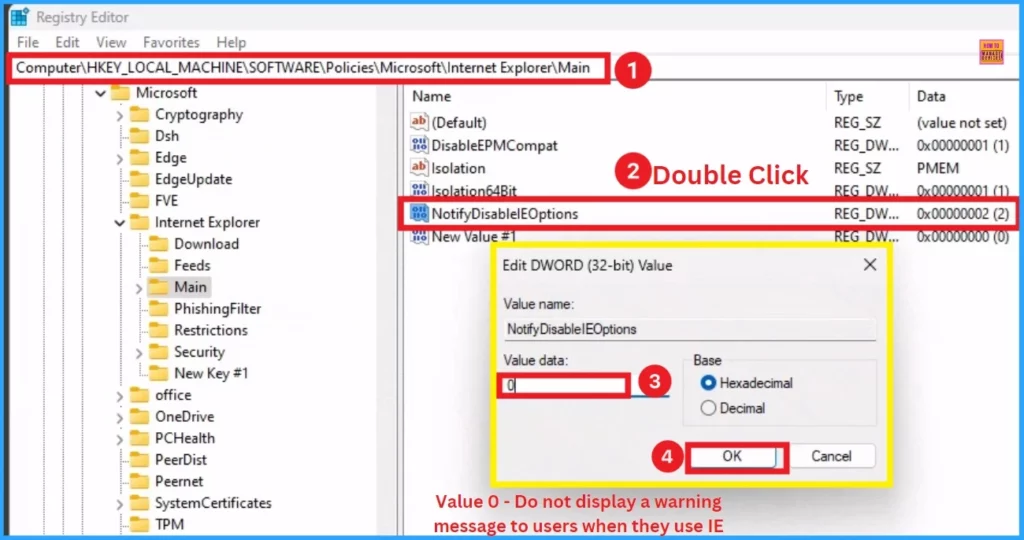
Similar to the previous step, you can set the value to 2 – Display a warning message to each user only once when they use IE for the first time.
Resource
Windows MSHTML Platform Spoofing Vulnerability
Join the LinkedIn Page and Telegram group to get the latest step-by-step guides and news updates. Join our Meetup Page to participate in User group meetings. Also, Join the WhatsApp Community to get the latest news on Microsoft Technologies. We are there on Reddit as well.
Author
Anoop C Nair has been Microsoft MVP from 2015 onwards for 10 consecutive years! He is a Workplace Solution Architect with more than 22+ years of experience in Workplace technologies. He is also a Blogger, Speaker, and leader of the Local User Group Community. His primary focus is on Device Management technologies like SCCM and Intune. He writes about technologies like Intune, SCCM, Windows, Cloud PC, Windows, Entra, Microsoft Security, Career, etc.




Discussion