






Copilot with Commercial Data Protection in Microsoft Edge for Business
Let’s discuss Copilot with Commercial Data Protection in Microsoft Edge for Business. Copilot is a popular AI assistant developed by Microsoft. It is a chatbot based on the large language model (LLM). Its unique features include creating and editing documents, data analysis, summarising the page, and more.
In this busy world, users need more advanced technology to meet their personal and professional needs. Copilot is the best companion for users to ease their work and stay productive and efficient. Copilot features are now also available on Microsoft in all 365 apps.
AI can generate billions of prompts and responses, helping people be more creative and productive. Microsoft announced a new feature in Copilot for commercial data protection. This feature allows users to AI chat for the web with commercial data protection, and it is now generally available.
Copilot, also known as Bing Chat Enterprise, is available for most Microsoft 365 and Office 365 work and school licenses at no additional cost. In this new feature update, Microsoft aims to expand commercial data protection in Copilot to any Entra ID user at no extra cost.

Copilot with Commercial Data Protection in Microsoft Edge for Business
The new features that arrived on Copilot are based on Commercial data protection. With this feature, users can protect commercial data and maintain the organisation’s privacy and security.

1. Commercial Data Protection
AI services are generally available for users to ease their work in the organization. They help workers be more productive and effectively use resources. However, the workers should know how these services handle user and chat data. Because it contains sensitive data, Copilot is designed to protect this information.
| Different Stages of Commerical Data Protection work with Copilot |
|---|
| Copilot only allow users with work accounts in Microsoft Entra ID for authentication and commercial data protection |
| At the start of a chat session, the Entra ID user’s tenant and user information is removed from the chat data |
| This information is only used for checking the eligibility of users for commercial data protection |
| Search queries triggered by prompts from an Entra ID user aren’t linked to users or organizations by Bing. |
| Microsoft doesn’t retain prompts or responses from Entra ID users when using Copilot. |
| For runtime purposes, prompt and response are maintained for a short caching period |
| Microsoft discard the prompts and responses after the browser is closed, the chat topic is reset, or the session times out |
| Chat data sent to and from Copilot with commercial data protection is encrypted in transit (TLS 1.2+) and at rest (AES-128) during the chat session. Microsoft has no ‘eyes-on’ access to it |
| Because Microsoft doesn’t retain prompts and responses, they can’t be used as part of a training set for the underlying large language model. |
| Advertising shown to Entra ID users isn’t targeted based on workplace identity or chat history. |
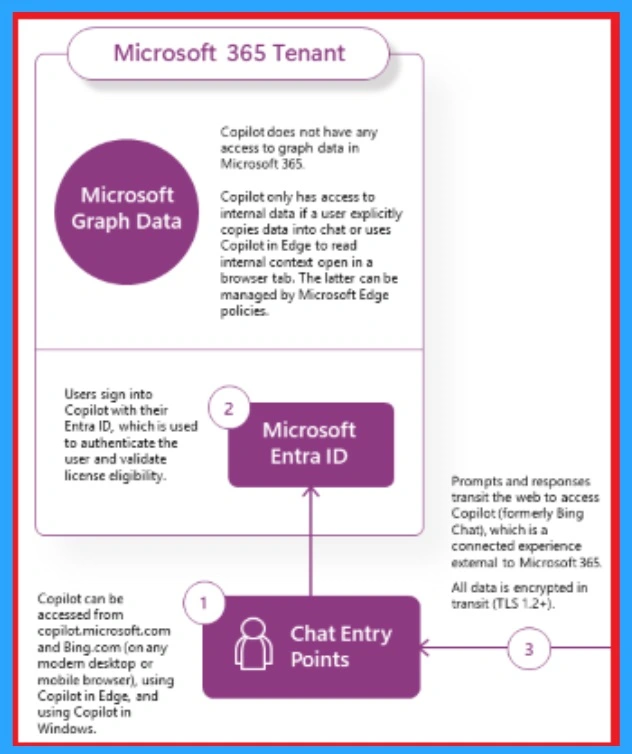
The screenshot below shows how the Copilot (formerly Bing Chat Enterprise) works in Commercial data protection. This service operates in global datacenters external to Microsoft 365 and may process data in the United States.
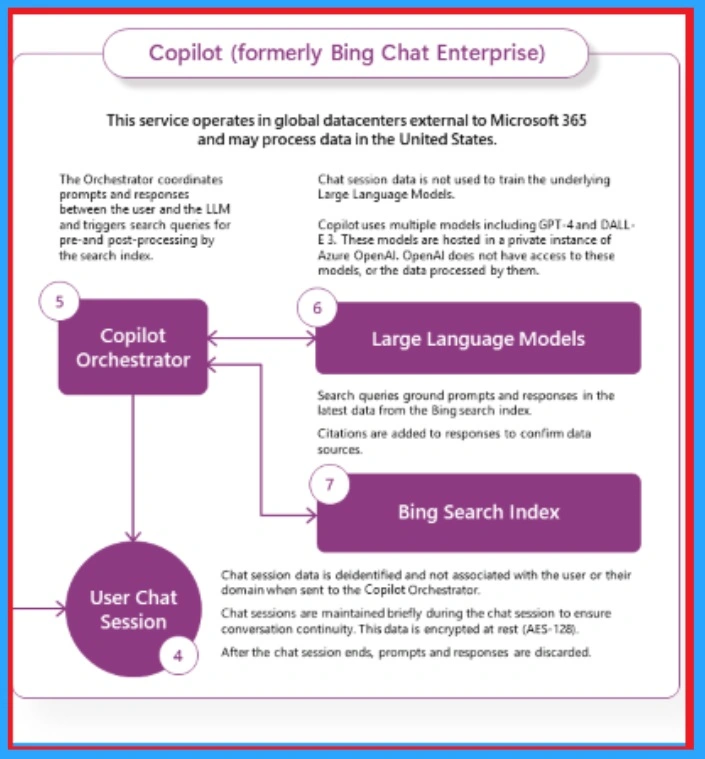
Commercial data protection means both user and organizational data are protected. Prompts and responses aren’t saved, Microsoft has no eyes-on access, and chat data isn’t used to train the underlying large language models. Unlike Copilot for Microsoft 365, Copilot has no access to organizational data in the Microsoft 365 Graph.
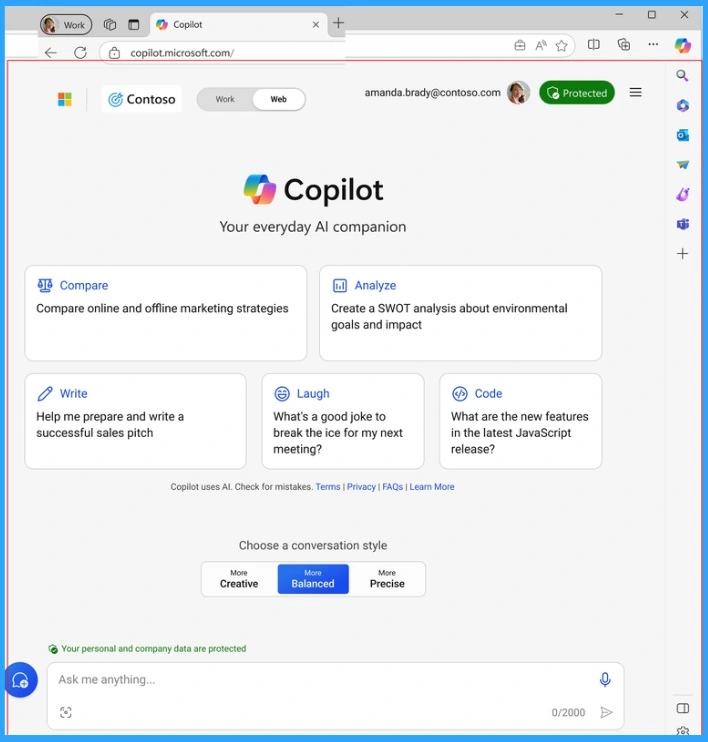
Chat History and Reporting with Copilot
After Commercial data protection is enabled, Copilot doesn’t support the chat history feature or retain chat prompts or responses. However, it does have usage reporting or auditing capabilities.
Organizational Data
If your organization wants a chat experience based on work data inside your tenant boundary, Copilot for Microsoft 365 is required. Copilot can access organizational content in the chat only when provided by users. It has 2 ways.
- Users explicitly type or paste this information directly into the chat
- Users type a prompt into Copilot in Edge after enabling the ‘Allow access to any webpage or PDF‘ setting, and an intranet page opens in the browser. In this scenario, Copilot may use this content to help answer questions.
Reference
Your AI-powered chat for the Web with commercial data protection | Microsoft Copilot
We are on WhatsApp. To get the latest step-by-step guides and news updates, Join our Channel. Click here –HTMD WhatsApp.
Author
Gopika S Nair is a computer enthusiast. She loves writing on Windows 11 and related technologies. She is here to share quick tips and tricks with Windows 11 or Windows 10 users. She is Post Graduate Diploma Holder in Computer Science.




Discussion