


Skip to content
Improved Brush Size Selection in Paint

Improved Brush Size Selection in Paint

Written By Sumitha P
Last Updated March 15, 2024
Posted In Windows 11
SHARE

Exciting News! Improved Brush Size Selection in Paint. With the latest update to Paint, Microsoft made it easier to pick the right brush size. Now, when you use the pencil, brushes, or eraser tools, you will see a new size slider.

This slider lets you choose from a wider range of sizes, and you can see how big your brush will be right on the canvas as you move the slider. It makes painting and drawing in Paint even simpler and more precise.

Windows has released several new features to help users, which are most effective and attractive. Microsoft provides continuous improvements in paint Background Removal and Dark Mode, for example.

These features allow you to improve the brush size. The new size slider also allows you to choose from a wide range of sizes. Recently, MS Paint has introduced several new features, such as layers and the integration of AI-driven features like Cocreator.

Patch My PC

This feature is straightforward to learn and understand. All these features give the paint a modern look, but it remains simple. This blog post will help you use the new improvements and determine how it functions.

Improved Brush Size Selection in Paint - Fig.1
Improved Brush Size Selection in Paint – Fig.1

What are the Features of Microsoft Paint?

Microsoft Paint is a simple graphic editing program. It allows you to crop, resize, and add basic shapes and text to images. Some features are given below.

1. It includes a Pencil, brush and airbrush tool
2. Paint has Wide availability
3. It allows a simple Interface

Improving the Brush Size Selection with New Size Slider

This essential feature window helps you improve the brush size selection experience with a new size slider for pencils, brushes, and eraser tools. You can choose from a wider range of size options and preview the selected size on the canvas as you drag the slider with the New Size Slider.

FeatureUsed to
With a New Size SliderIt helps to improve the brush size and wide range preview.
Improved Brush Size Selection in Paint – Table 1

With a New Size Slider

First, click any of the pencils, brushes, or eraser tools to do this. A size slider will appear on the left side of the canvas. Click and drag the slider to view different sizes, and select the desired size to start drawing.
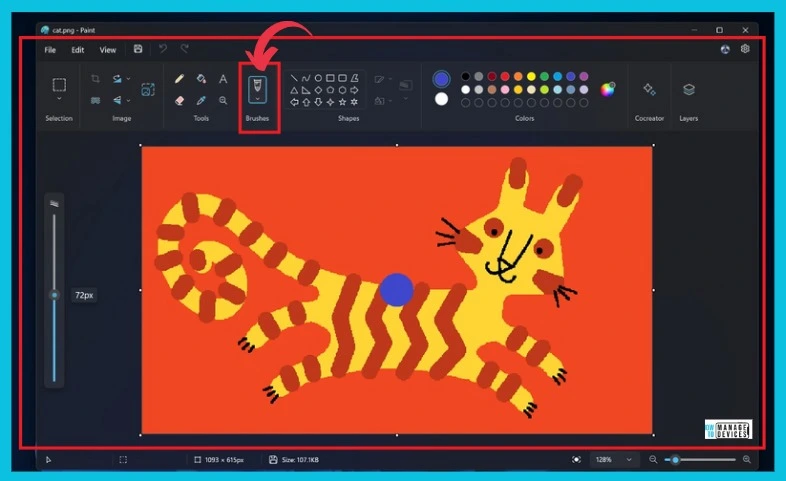
Improved Brush Size Selection in Paint - Fig.2 - Creds to MS
Improved Brush Size Selection in Paint – Fig.2 – Creds to MS

Other News Related to Paint

We are on WhatsApp now. To get the latest step-by-step guides, news, and updates, Join our Channel. Click here. HTMD WhatsApp.

Author

Sumitha was introduced to the world of computers when she was very young. She loves to help users with their Windows 11 and related queries. She is here to share quick news, tips and tricks with Windows security.


Written by

Sumitha was introduced to the world of computers when she was very young. She loves to help users with their Windows 11 and related queries. She is here to share quick tips and tricks with Windows security.

Discussion

Join the discussion

Your email address will not be published. Required fields are marked *

Related guides

Security

Microsoft Fixes 570 Security Vulnerabilities and 3 Zero-Day Vulnerabilities in July 2026 Patch Tuesday

Key Takeaways Microsoft Fixes 570 Security Vulnerabilities and 3 Zero-Day Vulnerabilities in July 2026 Patch Tuesday! Microsoft fixed 3 zero-day vulnerabilities as part of the July 2026 Patch Tuesday updates. Two of them, CVE-2026-56164 (Microsoft SharePoint Server Elevation of Privilege) and CVE-2026-56155 (Active Directory Federation Services Elevation of Privilege), were actively exploited before the security […]

AC Anoop C Nair 29 min read
Intune

Windows 11 KB5101650 KB5099414 July 2026 Patch and 3 Zero Day Vulnerabilities and 570 Flaws

Key Takeaways Windows 11 KB5101650 KB5099414 July 2026 Patch and 3 Zero Day Vulnerabilities and 570 Flaws! In the July 2026 Patch, Microsoft introduced new features designed to improve the overall Windows experience. The update adds enhancements to Windows Update for more flexible update management and introduces Point-in-Time Restore, providing an additional recovery option for […]

AC Anoop C Nair 9 min read
Windows 11

Boost Productivity with Zoom Workplace on Windows 11 | Setup Guide for Meetings Chat Calls and Collaboration

Key Takeaways Hey, let’s learn about Boost Productivity with Zoom Workplace on Windows 11 | Setup Guide for Meetings Chat Calls and Collaboration. Zoom workplace is an AI-powered collaboration app used for online meetings, team collaboration, and video calls. This application helps to conduct meetings Including chat and messaging, screen sharing and Calendar Integration. Boost […]

AC Anoop C Nair 35 min read
Windows 11

13 Windows AI Features to Turn Off for Better Privacy

Key takeaways Hey, let’s discuss about 13 Windows AI features to turn off for better privacy. AI is widely used in modern systems such as Windows 11 to automate tasks, improve productivity, and enhance user experience. However, AI also has several disadvantages. It may raise privacy concerns because personal data can be collected and analysed […]

AC Anoop C Nair 15 min read
