






How to Fix CPU Spike Issues in Classic Outlook for Windows
Let’s discuss How to Fix CPU Spike Issues in Classic Outlook for Windows. Microsoft identified an issue on Classic Outlook for Windows while writing the Email. While Typing the email on Outlook for Windows, users face CPU spike issue.
Due to CPU Spike Issues in Classic Outlook, users face performance issue. The CPU usage is increased to 30-50% while typing. As a result device slow down and its affect multitasking. By increasing the CPU usage, power consumption also increased and drain battery life.
Recently there are many issues faced by Outlook users and it affect their day to activities. We have post that discussed on an issue on Outlook. Due to this issue, Incorrect timeslot is selected after clicking a meeting in the Calendar.
As you know that, CPU spike refer to sudden and temporary increases in the usage of the Central Processing Unit (CPU) of a computer. It occurs due to background processes, resource-intensive application, OS update etc. Here the Issue occurred after the OS update. In this blog post i will share more information’s about this issue.

Table of Contents
How to Fix CPU Spike Issues in Classic Outlook for Windows
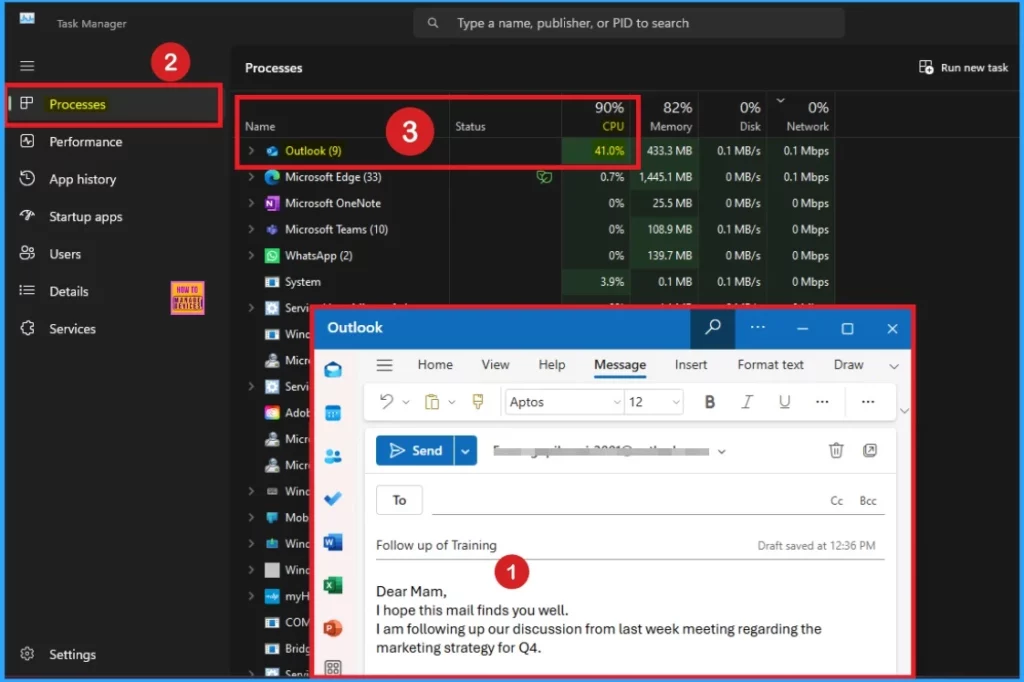
As mentioned above CPU Spike Issues in Classic Outlook issue occur while writing email. You can observe CPU Spike issue if Task Manager is open while you type. Due to increasing the CPU spike up to 30 to 50% users cannot do the task. And it become a biggest performance issues.
| Reasons for this Issue |
|---|
| This issue can occur after updating to Version 2406 Build 17726.20126+ on Current Channel, Monthly Enterprise Channel, or the Insider channels. |
- How to Fix Text Predictions Missing or Unavailable Issue with Outlook
- Fix Classic Outlook NDR Error 0x80070005-0x0004dc-0x000524 Unable to Send Emails
- Outlook Start Menu Icon Not Updating to Outlook Classic After Version 2407 Update
After Effects of CPU Spike in Outlook
As mentioned above performance issues is the biggest after effects of CPU Spike issue. By increasing CPU Spike, increased power consumption and performance slowdowns, especially when typing emails. The following list shows the Long-term CPU spikes in Outlook can lead to several issues.
- Performance Degradation
- System Overheating
- Reduced Productivity
- Data Corruption
- Increased Power Consumption
Workaround for CPU Spike Issue
Till Now, the final workaround is not available. The Outlook team is investigating this issue. Microsoft will update this topic when there are any status updates.
Workaround
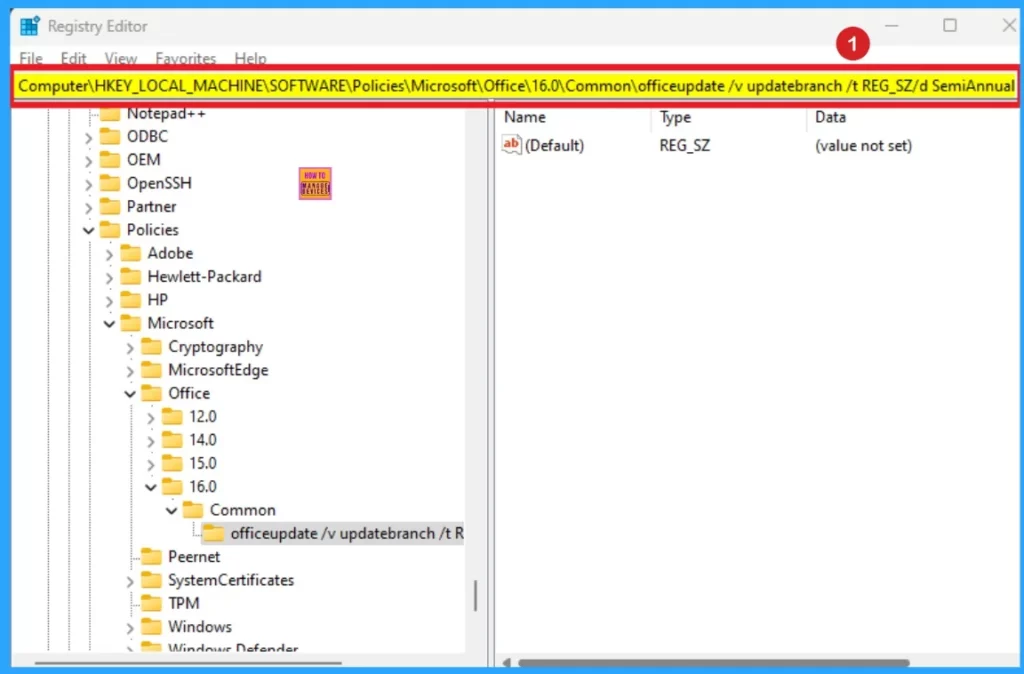
Outlook team provides a temporary Workaround to resole this issue. you can switch to Semi Annual Channel where the issue has not been observed. You can switch to Semi Annual Channel using one of registry commands.
- Open the Command prompt window as administrator
- Paste the command below and press Enter:
- reg add HKLM\Software\Policies\Microsoft\office\16.0\common\officeupdate /v updatebranch /t REG_SZ /d SemiAnnual
- After you add the registry key, select File > Office Account > Update Options > Update Now to initiate the switch to Semi Annual Channel.
Need Further Assistance or Have Technical Questions?
Join the LinkedIn Page and Telegram group to get the latest step-by-step guides and news updates. Join our Meetup Page to participate in User group meetings. Also, Join the WhatsApp Community to get the latest news on Microsoft Technologies. We are there on Reddit as well.
Resource
CPU spikes when typing in classic Outlook for Windows
Author
Anoop C Nair has been a Microsoft MVP from 2015 onwards for 10 consecutive years! He is a Workplace Solution Architect with more than 22+ years of experience in Workplace technologies. He is also a Blogger, Speaker, and leader of the Local User Group Community. His primary focus is on Device Management technologies like SCCM and Intune. He writes about technologies like Intune, SCCM, Windows, Cloud PC, Windows, Entra, Microsoft Security, Career, etc.



Discussion