






Create Application Group Using SCCM | ConfigMgr | Deploy App Group
Create an application group using SCCM to deploy a group of apps to users or devices. Let’s see how to create ConfigMgr Application groups to deploy a group of applications. The ConfigMgr 2111 version has the great news that SCCM application groups and orchestration groups are not pre-release features.
An SCCM Admin can create a group of applications called the application group. You can use the application group and deploy it to a user or device collection as a single deployment. The Application Groups feature was released with Configuration Manager version 1906. However, it’s still a pre-release feature. This doesn’t mean you can’t use it in your production environment.
I recommend using it and providing valuable feedback to the Microsoft Endpoint Manager product group! Are you trying to replace Task Sequence capabilities with application groups?
- Implicit Uninstall Of An Application Using SCCM Remove Device From Collection
- Deep Dive SCCM Application Model Troubleshooting – Client End
- ConfigMgr SCCM Client Action Application Deployment Evaluation Cycle | Configuration Manager
Create an Application Group Using SCCM
Let’s try to create an application group using SCCM.

Launch SCCM Console. Navigate to Software Library – Application Management – Application Group node. Select Create Application Group from Create group in the ribbon.
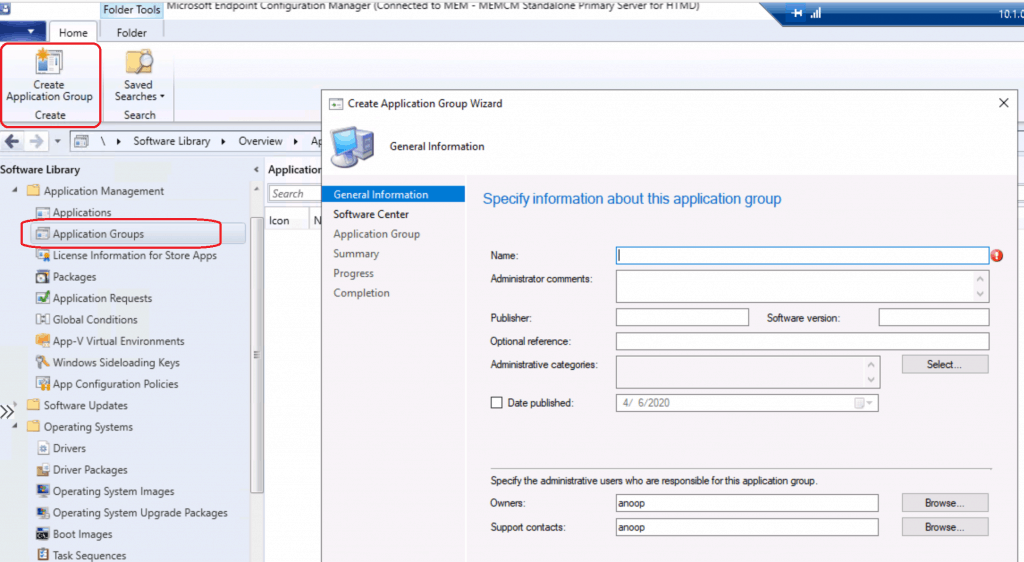
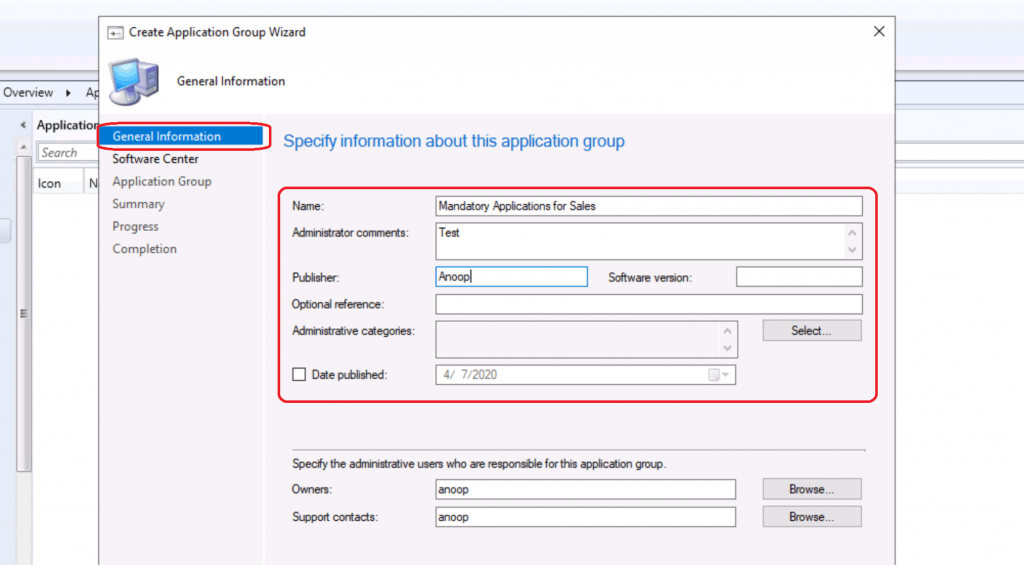
On the General Information page, specify information about the app group. Enter Application Group Name = Mandatory Applications for Sales. Enter Administrator Comments = Add if there are any. Enter Publisher Name
Click on the Next button to continue.
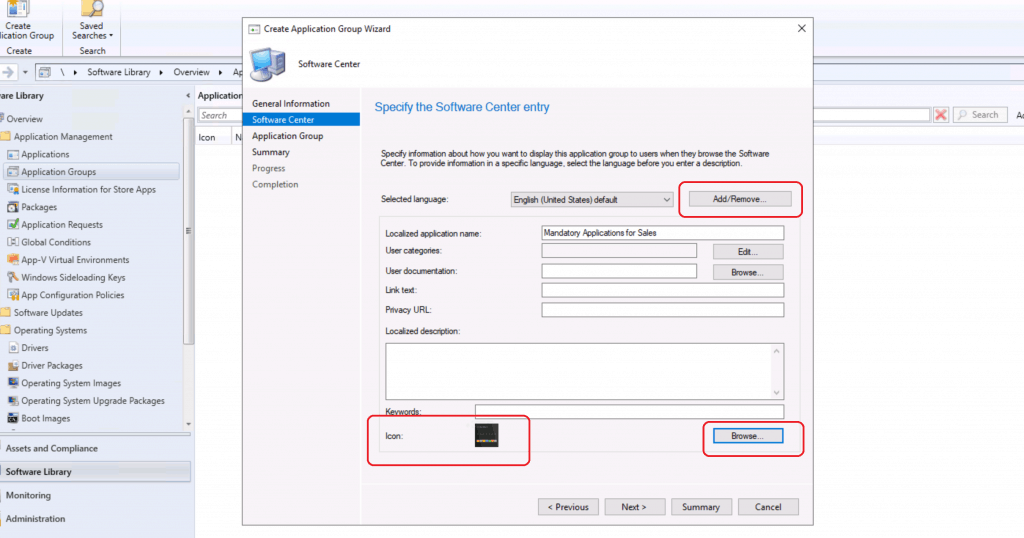
Software Center Icon for Application Group
It’s time to create a software center icon for the app group. On the Software Center page, include information that shows in the Software Center.
You can add additional Languages to Application Groups by Add/Remove Language
Click on Browse to upload a new Software Center ICON
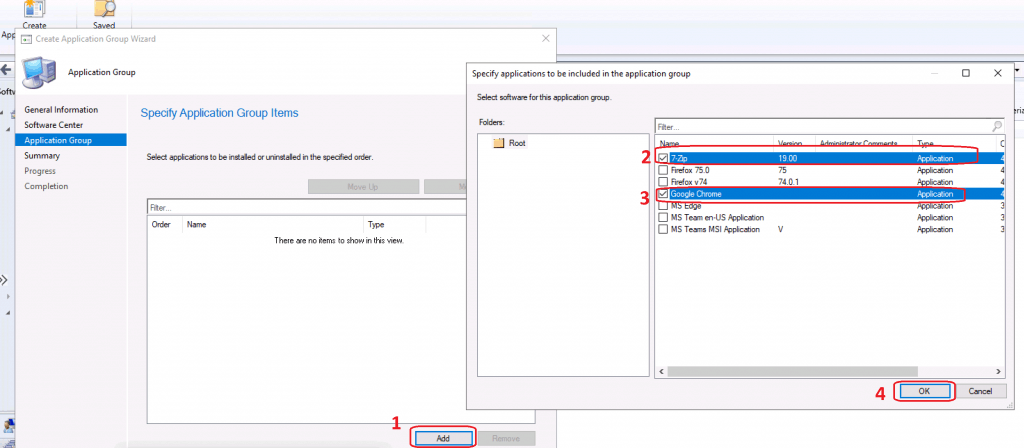
Select Applications for App Group
Let’s select applications that you want to add to the application group.
- On the Application Group page, select Add. Select one or more apps for this group and reorder them using the Move Up and Move Down actions.
- Selected 7Zip and Chrome.
- Click on the NEXT button.
Click on NEXT, NEXT, and Close to finish the application group creation
Deploy SCCM Application Groups
Now, let’s deploy the application groups to a Device collection.
- Right-click on Application Groups and select Deploy
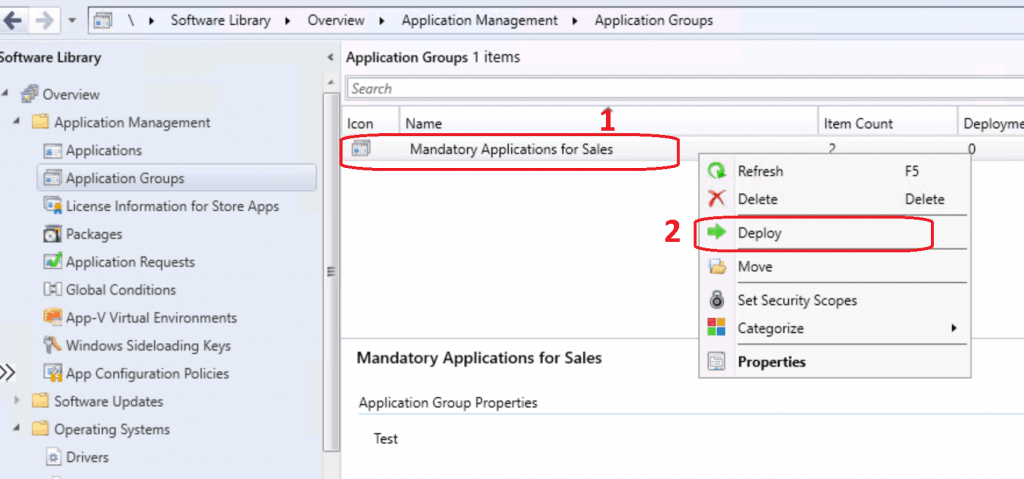
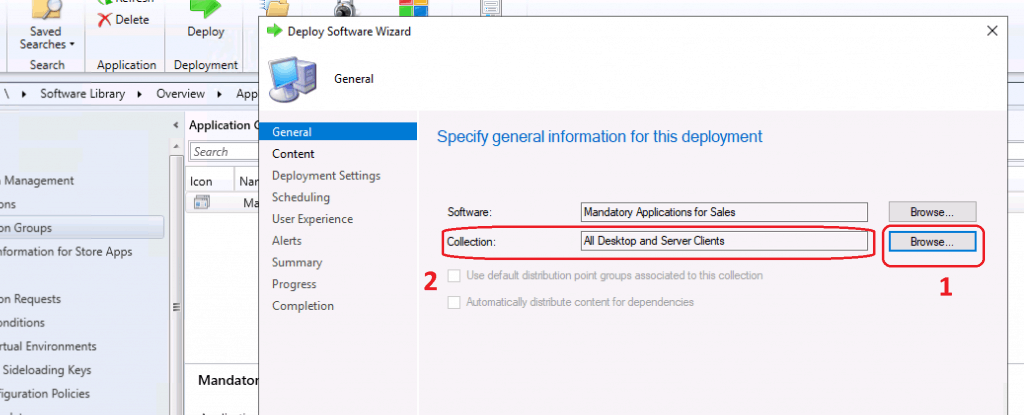
Click on Browse to select Collection to deploy
Content Distribution
Now, it’s time to distribute the content to the DPs.
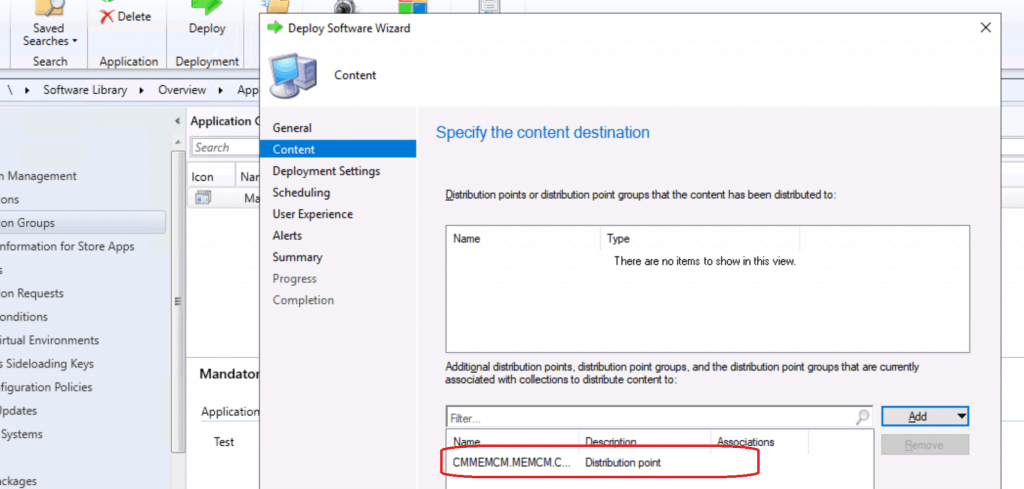
Specify the content location and distribute the content to the Distribution point or Distribution point group. Click on Add. Select the DPs or DP groups to which you want to distribute the Firefox source file. Click on NEXT to continue.
Deployment Settings
Let’s start configuring the deployment settings.
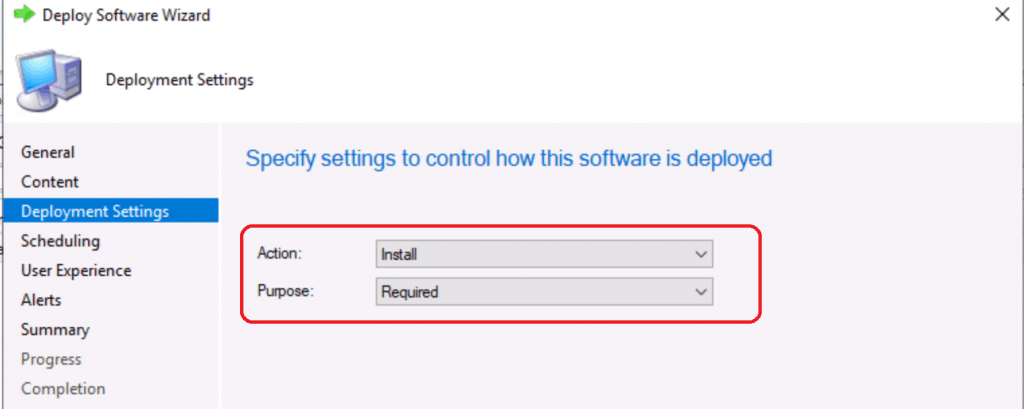
- Select Action – Install (Application Groups). I selected Install to install Firefox on those devices.
- Select Purpose as Required, or you can make it an available application if you want
- Click NEXT to continue
NOTE! – You can notice that there are no additional options in deployment settings.
Scheduling Options for Application Group Deployment
Let’s see how to start scheduling Application Group Deployment.
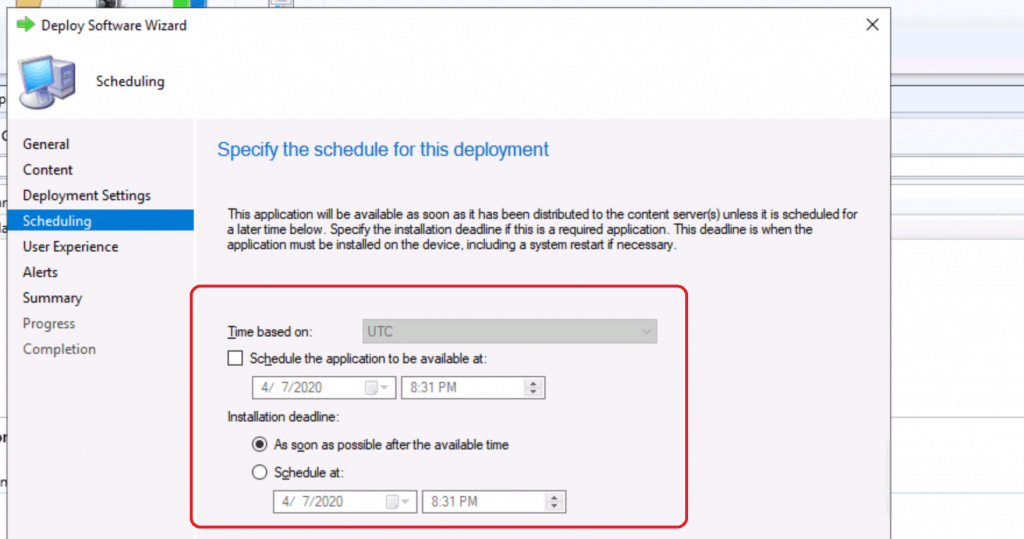
- You can select the scheduling options from Specify the schedule for this deployment window.
- Schedule the application to be available already
- You can also specify the deadline if you want to deploy the Application group after off-hours
- As Soon As Possible after the available time
- You can schedule the deadline as per your requirement
User Experience Options
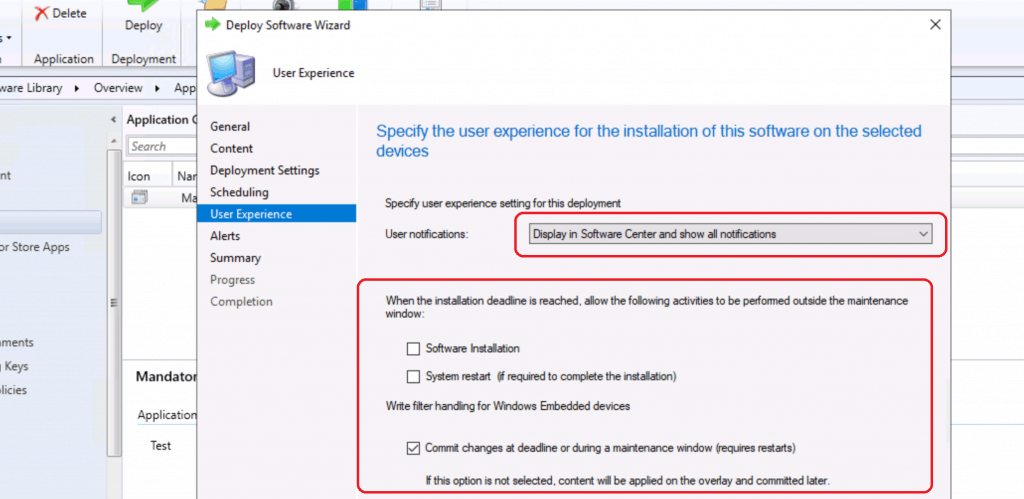
Specify the user experience for installing Application Groups on the selected devices. Also, specify the user experience setting for the deployment Display in the Software Center and only show notifications for computer restarts.
Click on the Next button.
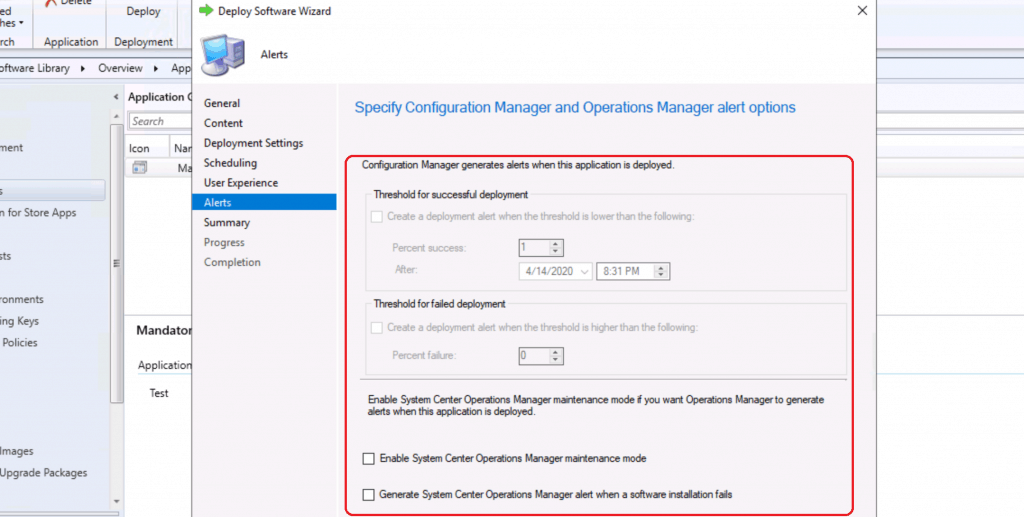
Specify Configuration Manager and Operations Manager alert options. Click on NEXT (All default settings selected).
Click on NEXT, NEXT, and Close
ConfigMgr Application Groups Deployment
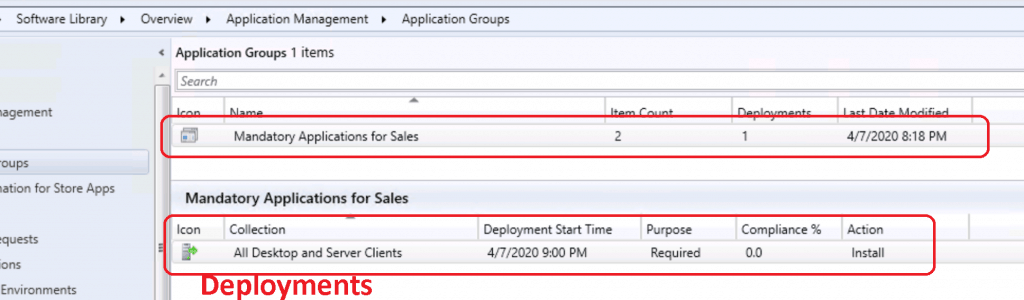
The following deployment was created for application groups.
Log Files Related to ConfigMgr Application Group
To troubleshoot an app group deployment, use the following log files on the Windows 10 client:
- AppGroupHandler.log
- AppEnforce.log
- SettingsAgent.log
Snippets of AppGroupHandler.log
Checking apps with which to force desired state of: Installed
Raising client SDK event for class CCM_Application, instance CCM_Application.Id="ScopeId_1074285A-82C7-474F-B242-1EE20F8C3CE5/ApplicationGroup_dede2225-7292-4b27-8aa7-5a21257d3fed",Revision="1",IsMachineTarget=1, actionType 23l, value NULL, user NULL, session 4294967295l, level 0l, verbosity 30l
Installing app: ScopeId_1074285A-82C7-474F-B242-1EE20F8C3CE5/Application_471fdf49-b217-4bfc-b807-4a19ad5fc555, revision: 1, user:
app ScopeId_1074285A-82C7-474F-B242-1EE20F8C3CE5/Application_471fdf49-b217-4bfc-b807-4a19ad5fc555, jobId: {4BD36D70-1D72-4D9C-AACB-7C68E2AD6A63}
found App: 7-Zip ScopeId_1074285A-82C7-474F-B242-1EE20F8C3CE5/Application_471fdf49-b217-4bfc-b807-4a19ad5fc555, revision: 1, applicability: Applicable, InstallState: Installed
App: 7-Zip ScopeId_1074285A-82C7-474F-B242-1EE20F8C3CE5/Application_471fdf49-b217-4bfc-b807-4a19ad5fc555, is Installed
App ScopeId_1074285A-82C7-474F-B242-1EE20F8C3CE5/Application_471fdf49-b217-4bfc-b807-4a19ad5fc555, after enforcement has state: Compliant
Installing app: ScopeId_1074285A-82C7-474F-B242-1EE20F8C3CE5/Application_25cf40e6-5acc-4495-8d7f-4e7336766257, revision: 1, user:
app ScopeId_1074285A-82C7-474F-B242-1EE20F8C3CE5/Application_25cf40e6-5acc-4495-8d7f-4e7336766257, jobId: {25B65587-7A58-44C0-A372-BEB58A3C6B96}
found App: Google Chrome ScopeId_1074285A-82C7-474F-B242-1EE20F8C3CE5/Application_25cf40e6-5acc-4495-8d7f-4e7336766257, revision: 1, applicability: Applicable, InstallState: Installed
App: Google Chrome ScopeId_1074285A-82C7-474F-B242-1EE20F8C3CE5/Application_25cf40e6-5acc-4495-8d7f-4e7336766257, is Installed
Results
Let’s see the results of the Application Group deployment results. I have added 7Zip and Chrome.
Windows 10 Client-Side
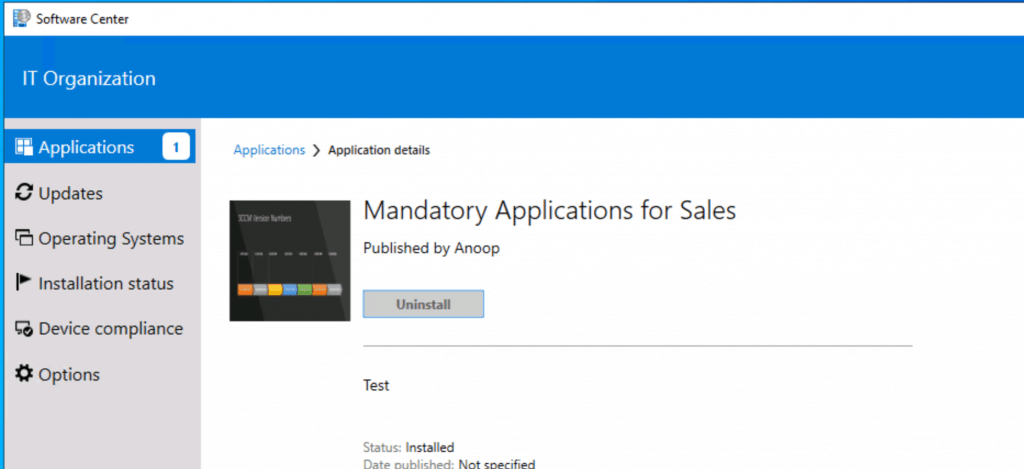
Let’s look at the Software center and Windows 10 devices to check and confirm whether all the applications got installed successfully.
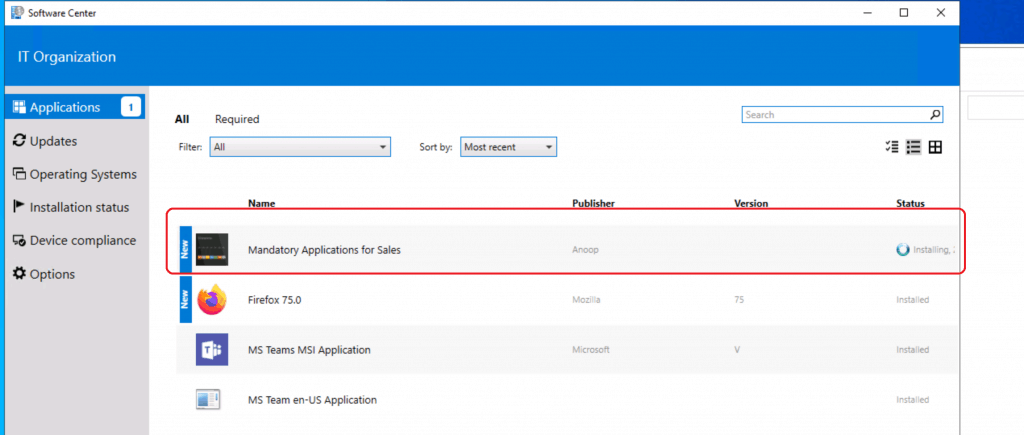
The Application for sale is installed successfully.
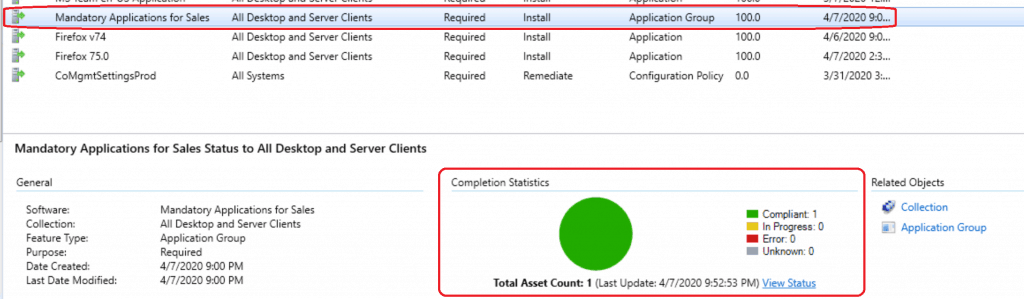
Server Side
Let’s examine the Configuration Manager console—Monitoring workspace to check and confirm whether the application group deployment has been completed.
Resources
We are on WhatsApp. To get the latest step-by-step guides and news updates, Join our Channel. Click here –HTMD WhatsApp.
Author
Anoop C Nair is Microsoft MVP! He is a Device Management Admin with more than 20 years of experience (calculation done in 2021) in IT. He is a Blogger, Speaker, and Local User Group HTMD Community leader. His main focus is on Device Management technologies like SCCM 2012, Current Branch, and Intune. He writes about ConfigMgr, Windows 11, Windows 10, Azure AD, Microsoft Intune, Windows 365, AVD, etc.




Hi Anoop,
We do not have any SCCM reports to monitor the deployment status for App group. Every time we have to check it from console. Any suggestions for that.
StaffHello I’ve not checked that and I won’t be surprised if there is no default reports at the moment specifically for app groups.
Heyie Anoop.
Good Day!
I have created an Application group, but its failing to download the source.
The only error I could see is from PolicyAgent.log “Failed to find property ‘Priority’ in ‘CCM_AppGroupCIAssignment’ class definition. Error 0x80041002. Default value will be used for this property”
Would you please assist me on this.
Regards,
Avi
StaffThe following is the translation of the error:
0x80041002 = Not found Source: Windows Management (WMI)
Staffwe can have more discussions at the HTMDForum.com to understand the issue better.
These application groups work amazing, the only problem I’m having with them is they’re not correctly gathering completion statistics. It always show’s 0 requested.
If I break the applications out of the group and do them as one off installs they correctly install AND how the completion statistics. Any idea why the statistics break for Application Groups?
Hi,
I observed following problem. Installation of Application Group (like Available) works fine. Everything is ok. In Software Center status is fine, but if you will refresh policy (for example by ConfigManager on End User machine or by Client Notification by Console) then status in Software Center will be visible like “not installed”. There will be button like “Install” because in theory application group is not installed (of course it’s there). What is funny all of components (member of this Application Group) will be still visible by Powershell like installed. In monitoring everything is still fine. Application group is visible like installed… So, only in Software Center status is not nice.
Have you ever had similar problem ?
I made my application test group as available. it installed.
but regression is not good, it is stuck during uninstall phase.
what can I look out for.