






FIX Firefox Installation Failed SCCM Reporting Issue| ConfigMgr
Firefox installation failed SCCM reporting issue. I deployed Firefox MSI to Windows 10 devices, as explained in the post “Deploy Firefox Browser Using SCCM.” Let’s check how to fix the Firefox installation failed reporting issue with Configuration Manager.
Please try to change the detection method so that ConfigMgr can detect whether the Firefox application is installed successfully on the Windows 10 device.
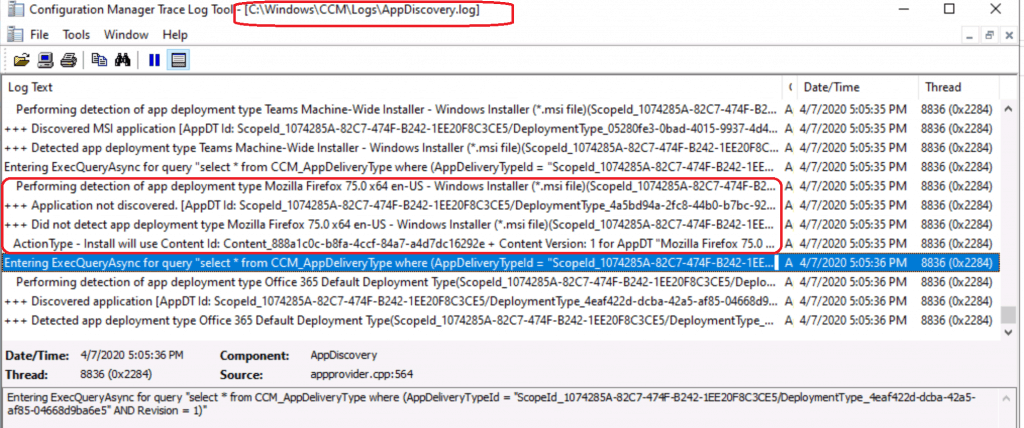
The Application Deployment Evaluation Cycle action didn’t detect the Firefox install. Why? Let’s check the log file AppDiscovery.log.
- Deep Dive SCCM Application Model Troubleshooting – Client End
- Deep Dive SCCM Application Model Troubleshooting – Server Side
Issue
The application was successfully installed, but SCCM cannot detect that Firefox is successfully installed. It seems the installation failure report is because of Firefox MSI itself.

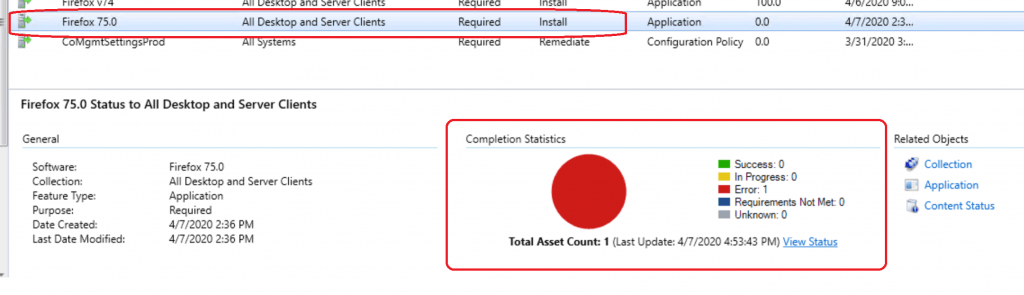
To be fair, it’s not an issue with ConfigMgr application deployment. It’s more to do with the packaging of the Firefox MSI application.
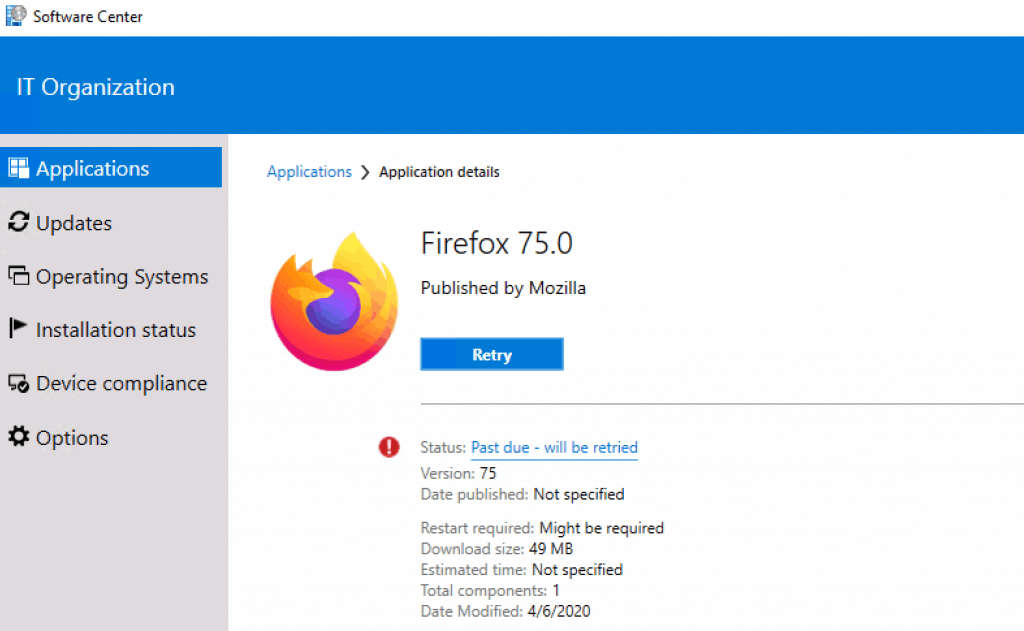
It seems that Firefox MSI calls EXE as part of the installation, and after the installation, EXE cannot provide the installation status back to MSI.
The following detection rule, automatically created during ConfigMgr Firefox application creation, is NOT working.
The Product code is not available in the registry 🙁 {1294A4C5-9977-480F-9497-C0EA1E630130}
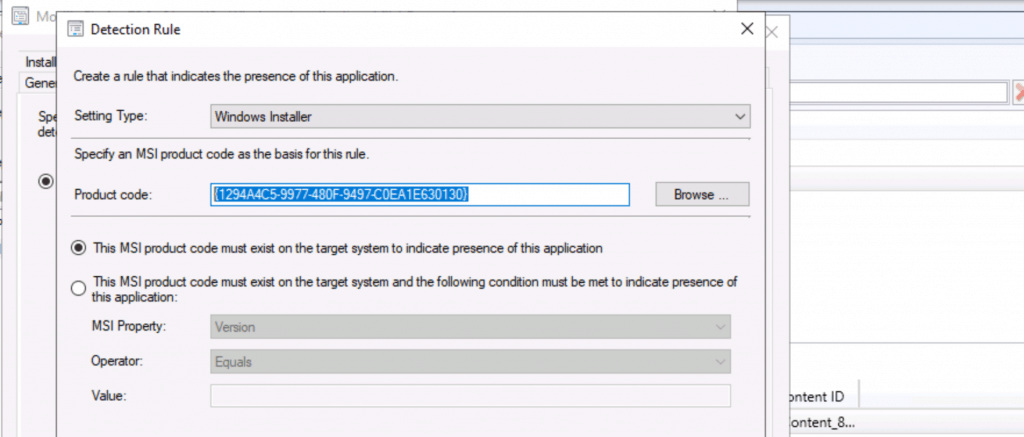
The Firefox log file Install.log (Folder C:\Program Files\Mozilla Firefox) confirms that the installation was OK. But, SCCM thinks the installation didn’t go well.
FIX Firefox Installation Failed SCCM Reporting Issue
Let’s see if SCCM (A.K.A ConfigMgr) detection rules might help to fix this Firefox reporting issue.
Change SCCM Detection Method for Firefox Browser
Try to change the detection method so that ConfigMgr can detect whether or not the Firefox application is installed successfully on the Windows 10 device. As I mentioned above, SCCM can’t detect the installation of Firefox because of an invalid product code – {1294A4C5-9977-480F-9497-C0EA1E630130}.
- Select the Firefox application from the SCCM console
- Right-Click on the Deployment Type available and select the Properties option
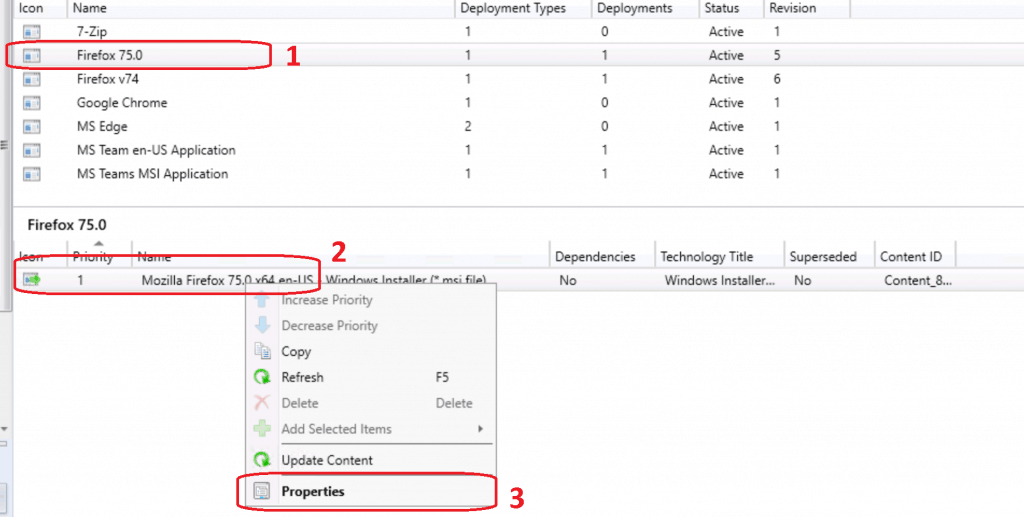
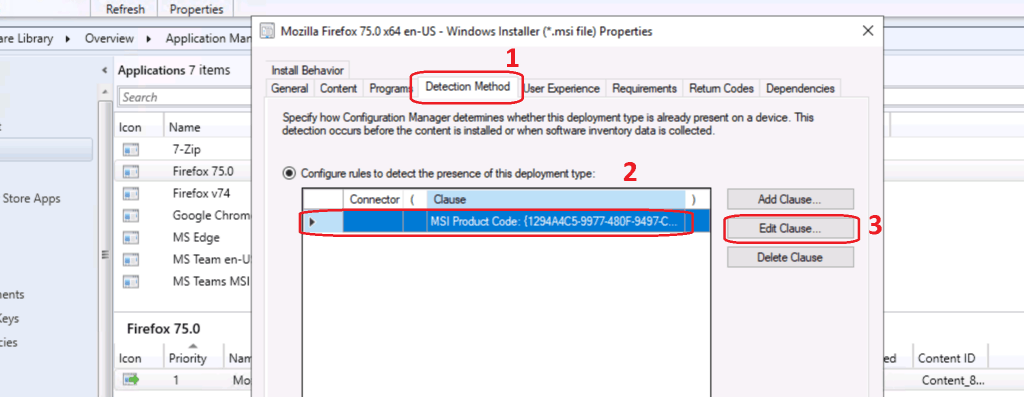
Change Detection Rule Firefox Application
Click on the Detection Method tab. Select the detection method with the product code. Click on the EDIT Clause button to change the detection method for the Firefox browser application.
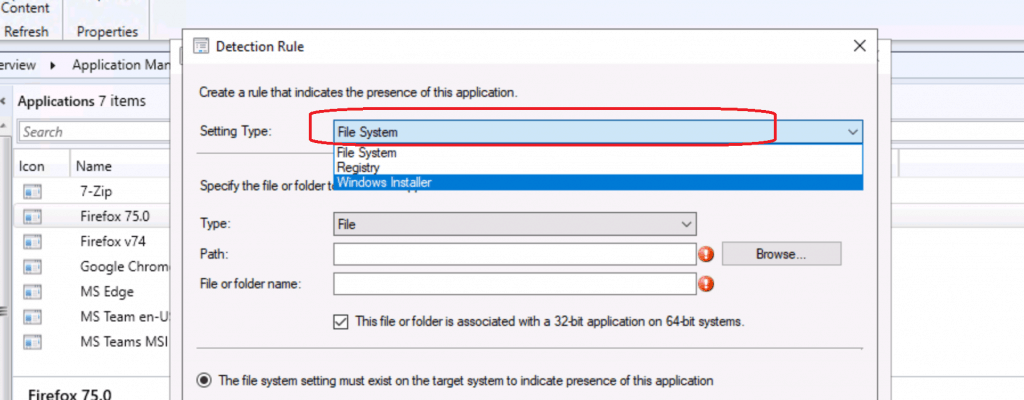
Select the File Type from the Setting Type drop-down options
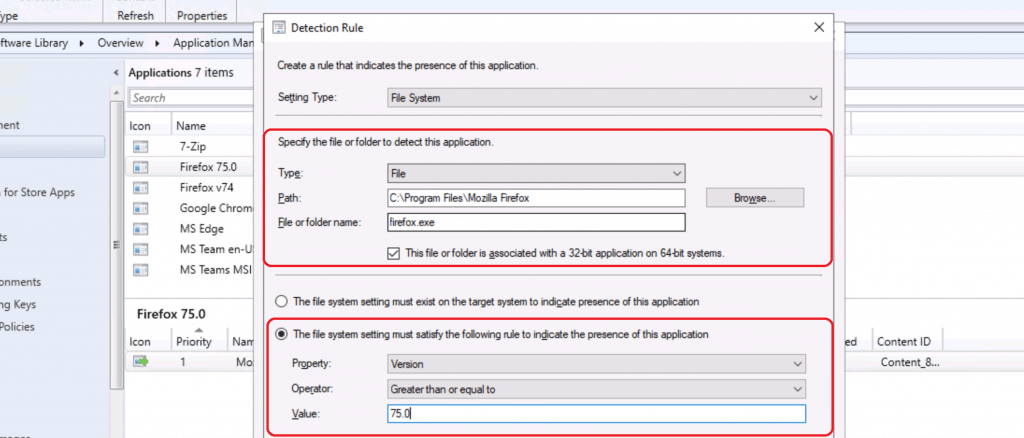
Enter the following details in the detection rule for Firefox.
- Specify the file or folder to detect this application
- Type – File
- Path – C:\Program Files\Mozilla Firefox
- Use any of the following environment variables based on your requirement %programFiles% or %programFiles(x86)%
- File or Folder Name – firefox.exe
The file system setting must satisfy the following rule to indicate the presence of this Firefox application.
- Property – Version (you can also use file version)
- Operator – Greater than or equal to
- Value – 75.0
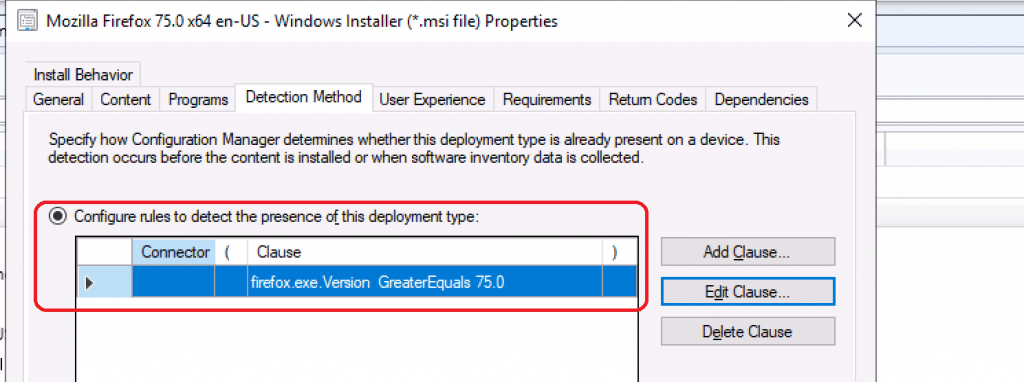
Click OK to continue. Click OK to close the Mozilla Firefox Deployment Type Properties windows.
Initiate Application Deployment Evaluation Cycle
Let’s initiate the Application Deployment Evaluation Cycle from a Windows 10 device.
- Launch the Configuration Manager applet from the Control Panel
- Click on the Actions tab
- From the actions menu, select Application Deployment Evaluation Cycle
- Click on Run Now
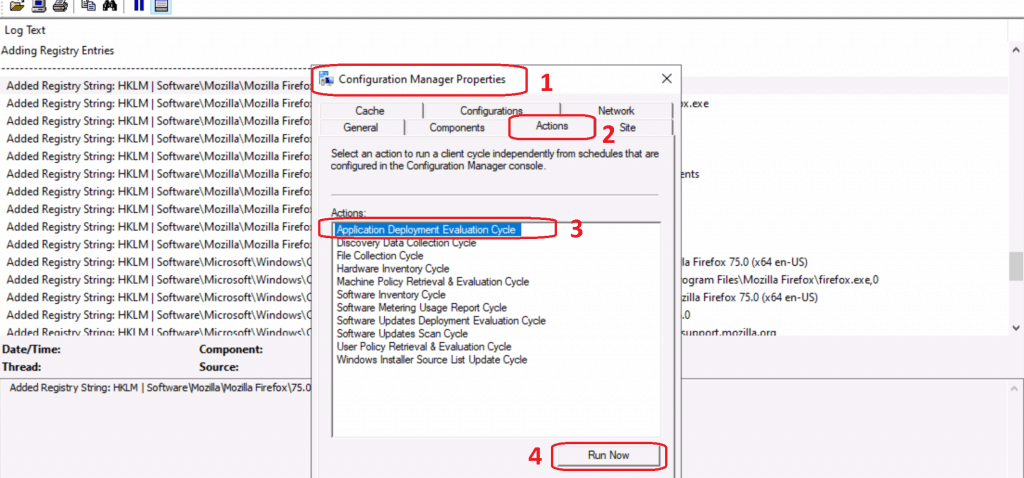
The Application Deployment Evaluation Cycle action didn’t detect the Firefox install. Why? Let’s check the log file AppDiscovery.log. The following are some of the snippets from the AppDisocovery.log file:
Performing detection of app deployment type Mozilla Firefox 75.0 x64 en-US- Windows Installer (*.msi file)(ScopeId_1074285A-82C7-474F-B242-1EE20F8C3CE5/DeploymentType_4a5bd94a-2fc8-44b0-b7bc-92e52169e9f1, revision 4) for user.+++ Application not discovered. [AppDT Id: ScopeId_1074285A-82C7-474F-B242-1EE20F8C3CE5/DeploymentType_4a5bd94a-2fc8-44b0-b7bc-92e52169e9f1, Revision: 4] +++ Did not detect app deployment type Mozilla Firefox 75.0 x64 en-US - Windows Installer (*.msi file)(ScopeId_1074285A-82C7-474F-B242-1EE20F8C3CE5/DeploymentType_4a5bd94a-2fc8-44b0-b7bc-92e52169e9f1, revision 4) for S-1-5-21-2901188661-3025291148-348095268-500. ActionType - Install will use Content Id: Content_888a1c0c-b8fa-4ccf-84a7-a4d7dc16292e + Content Version: 1 for AppDT "Mozilla Firefox 75.0 x64 en-US - Windows Installer (*.msi file)" [ScopeId_1074285A-82C7-474F-B242-1EE20F8C3CE5/DeploymentType_4a5bd94a-2fc8-44b0-b7bc-92e52169e9f1], Revision - 4
ConfigMgr Machine Policy Retrieval & Evaluation Cycle
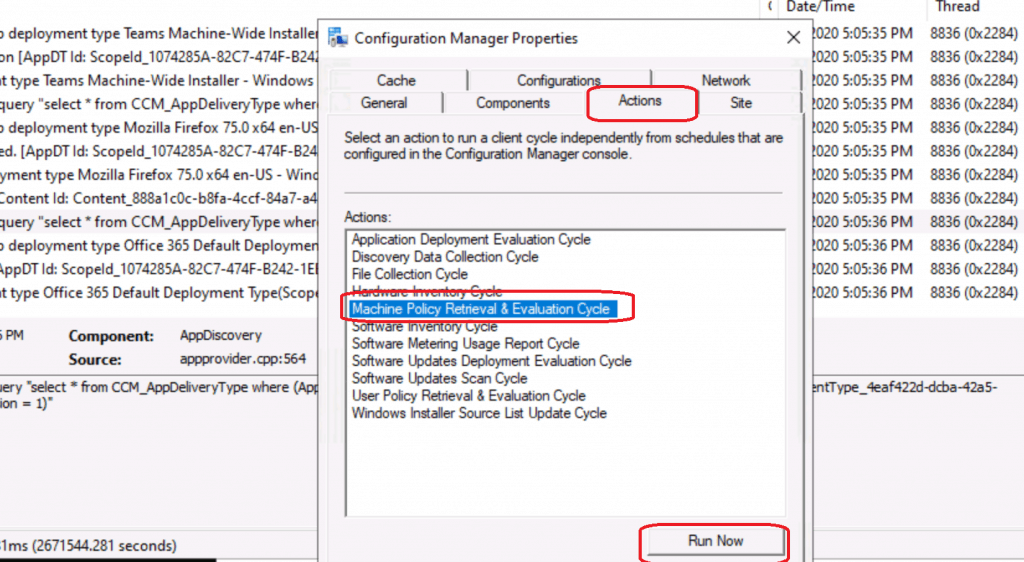
Let’s try to initiate the Machine Policy Retrieval & Evaluation Cycle from the Configuration Manager applet.
- Launch the Configuration Manager applet from the Control Panel
- Click on the Actions tab
- From the actions menu, select Machine Policy Retrieval & Evaluation Cycle
- Click on Run Now
- Repeat the same steps for the action “Application Deployment Evaluation Cycle“
AppDisocover.Log
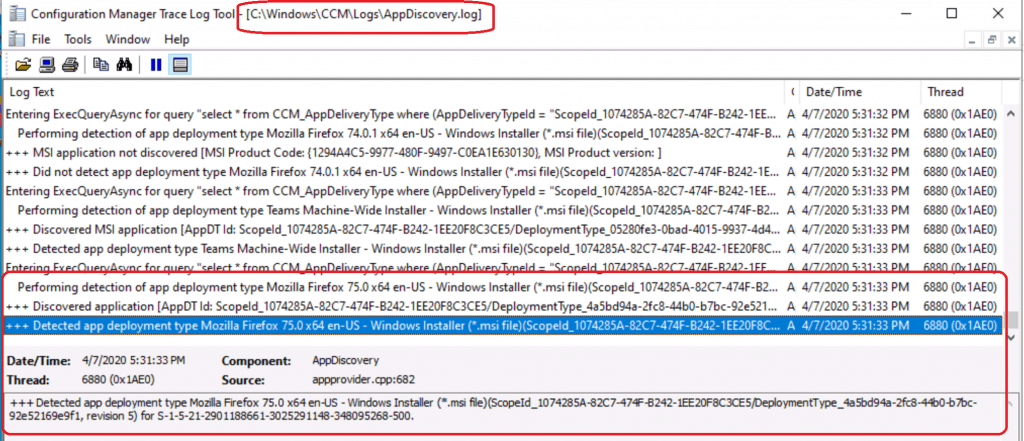
Let’s check AppDiscovery.log to confirm whether the Firefox application installation is detected or not.
Entering ExecQueryAsync for query "select * from CCM_AppDeliveryType where (AppDeliveryTypeId = "ScopeId_1074285A-82C7-474F-B242-1EE20F8C3CE5/DeploymentType_4a5bd94a-2fc8-44b0-b7bc-92e52169e9f1" AND Revision = 5)"
Performing detection of app deployment type Mozilla Firefox 75.0 x64 en-US - Windows Installer (*.msi file)(ScopeId_1074285A-82C7-474F-B242-1EE20F8C3CE5/DeploymentType_4a5bd94a-2fc8-44b0-b7bc-92e52169e9f1, revision 5) for user.
+++ Discovered application [AppDT Id: ScopeId_1074285A-82C7-474F-B242-1EE20F8C3CE5/DeploymentType_4a5bd94a-2fc8-44b0-b7bc-92e52169e9f1, Revision: 5]
+++ Detected app deployment type Mozilla Firefox 75.0 x64 en-US - Windows Installer (*.msi file)(ScopeId_1074285A-82C7-474F-B242-1EE20F8C3CE5/DeploymentType_4a5bd94a-2fc8-44b0-b7bc-92e52169e9f1, revision 5) for S-1-5-21-2901188661-3025291148-348095268-500.
As per the AppDiscovery.log, SCCM (A.K.A) can detect the Firefox application is installed successfully on Windows 10 Device.
Results – Client side and Server Side
Client-Side
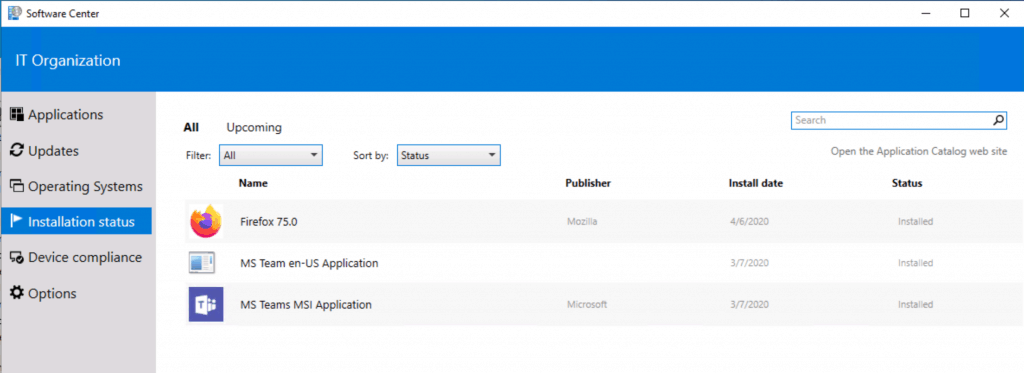
The software centre application on Windows 10 shows that Firefox 75 has been installed successfully.
Server Side
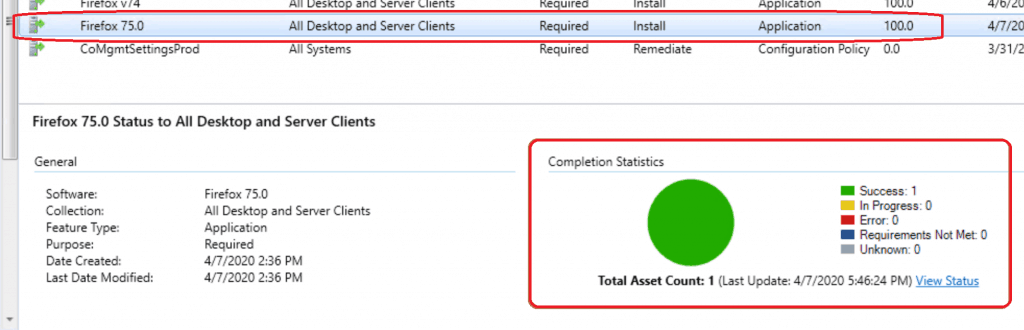
Let’s check SCCM Console – Monitoring Workplace – Deployment – Firefox 74:
Resources
- Update Deploy Firefox Browser Using SCCM | ConfigMgr | Step-by-Step Guide
- Deployment type Detection Method options
We are on WhatsApp. To get the latest step-by-step guides and news updates, Join our Channel. Click here –HTMD WhatsApp.
Author
Anoop C Nair is Microsoft MVP! He is a Device Management Admin with more than 20 years of experience (calculation done in 2021) in IT. He is a Blogger, Speaker, and Local User Group HTMD Community leader. His main focus is on Device Management technologies like SCCM 2012, Current Branch, and Intune. He writes about ConfigMgr, Windows 11, Windows 10, Azure AD, Microsoft Intune, Windows 365, AVD, etc.




Thanks man, you helped me allot!
The MSI was installed like many others of my applications, but still this treasure keeps failing.
Noted and learned something again.
I have a question when I installed firefox in my appdiscovery.log It says deteceted app deployment for mozilla firefox for system. The issue is that on the server itself the compliance is still 0% . Why is that happening?