Skip to content
How to Uninstall DeepSeek AI Assistant App on Android using Intune Managed Google Play App

How to Uninstall DeepSeek AI Assistant App on Android using Intune Managed Google Play App

Written By Anoop C Nair
Last Updated March 24, 2025
Posted In Android
SHARE

Let’s discuss How to Uninstall DeepSeek AI Assistant App on Android using Intune Managed Google Play App. DeepSeek AI Assistant can be easily uninstalled from Android devices. For this Intune provide Managed Google Play App.

Prevention and Uninstallation of DeepSeek AI Assistant is a very important need of every organization. By uninstalling this app you can ensure data privacy and security. So you have to uninstall DeepSeek AI Assistant from an Android device on your organization.

As per the government policies, every organization should remove, block and uninstall the use of DeepSeek AI Assistant from your organization’s tenant. We have different articles that guide the step-by-step guidance to Block DeepSeek on managed devices.

In this blog we can discuss how to uninstall DeepSeek on Adroid devices. Here i would like to share a step by step guidance for you. As a IT Admin you can refer this blog post and uninstall DeepSeek on your organization.

Patch My PC

What is a Managed Google Play App on Intune?

Managed Google Play is Google’s enterprise app store, integrated with Microsoft Intune for Android Enterprise management. It allows IT administrators to deploy, manage, and approve apps for Android devices enrolled in Intune.

How to Uninstall DeepSeek AI Assistant App on Android using Intune Managed Google Play App

As mentioned above using Managed Google Play app in Intune you can quickly uninstall DeepSeek from Android devices. This helps you to prevent the installation on your tenant. You can specify groups and devices for the uninstallation.

Steps to Uninstall DeepSeek
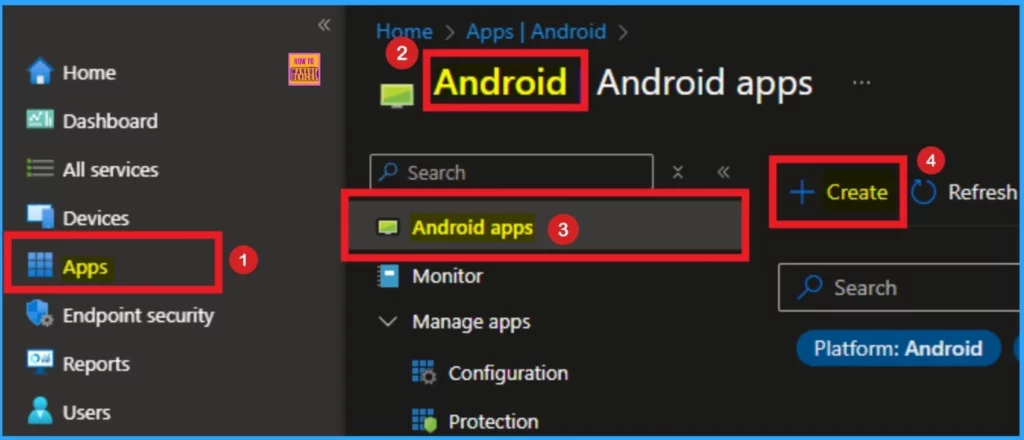
Open the Microsoft Intune admin center
Go to Apps > Android > Android Apps
Click on the + Create button.
How to Uninstall DeepSeek AI Assistant App on Android using Intune Managed Google Play App – Table.1
How to Uninstall DeepSeek AI Assistant App on Android using Intune Managed Google Play App - Fig.2
How to Uninstall DeepSeek AI Assistant App on Android using Intune Managed Google Play App – Fig.2

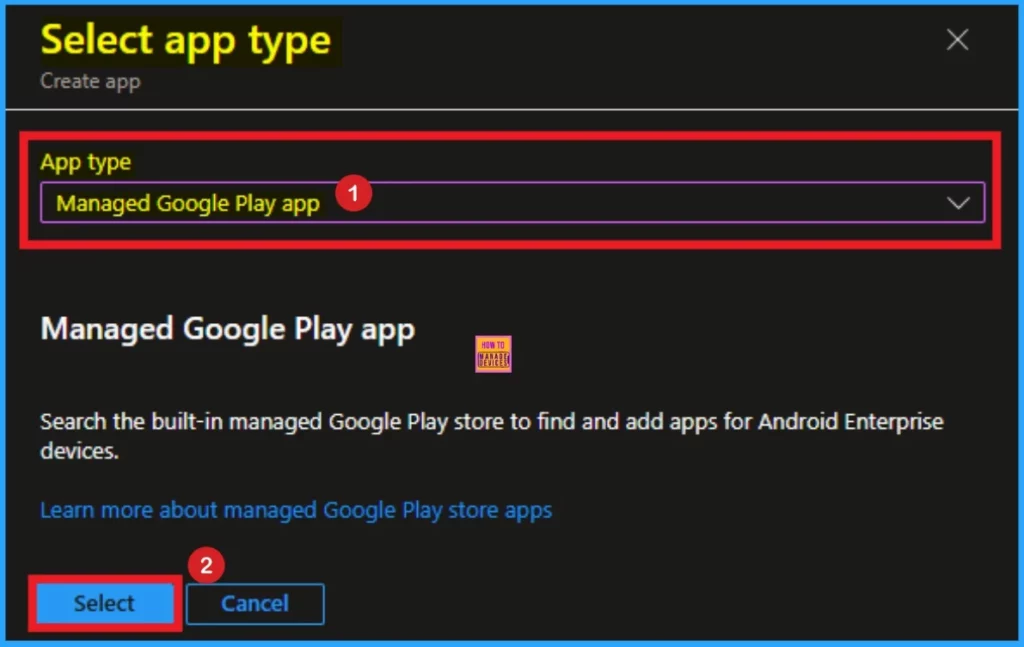
Then select Managed Google Play App from the list of app type options. Managed Google Play App helps to search the built-in managed Google Play store to find and add apps for Android Enterprise
devices. Then click on the Select button.
How to Uninstall DeepSeek AI Assistant App on Android using Intune Managed Google Play App - Fig.3
How to Uninstall DeepSeek AI Assistant App on Android using Intune Managed Google Play App – Fig.3

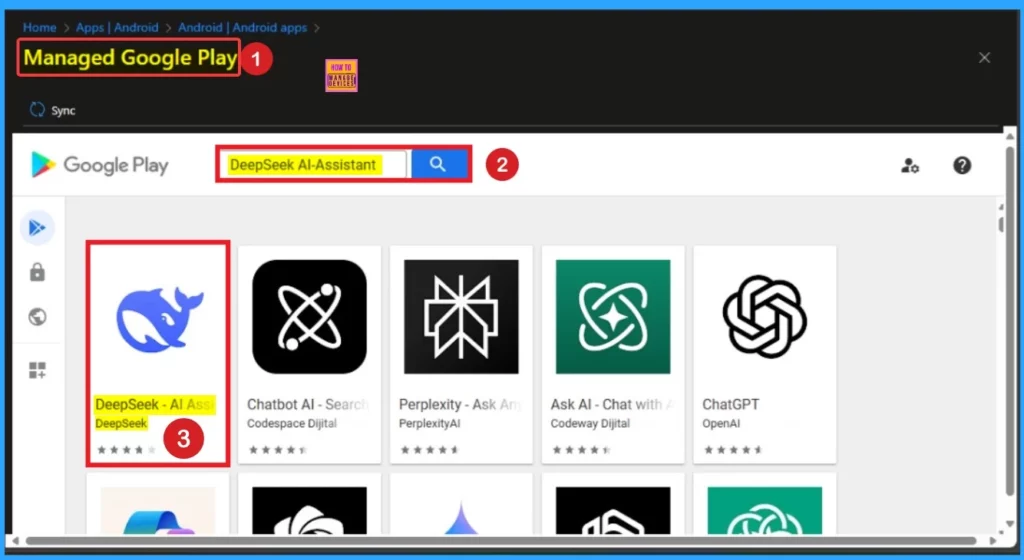
Then you will get the Managed Google Play window. From this window, you can search for an app. On the Search box, search for DeepSeek AI-Assistant and click on the search icon. Then select DeepSeek AI-Assistant and click on the Sync button.
How to Uninstall DeepSeek AI Assistant App on Android using Intune Managed Google Play App - Fig.4
How to Uninstall DeepSeek AI Assistant App on Android using Intune Managed Google Play App – Fig.4

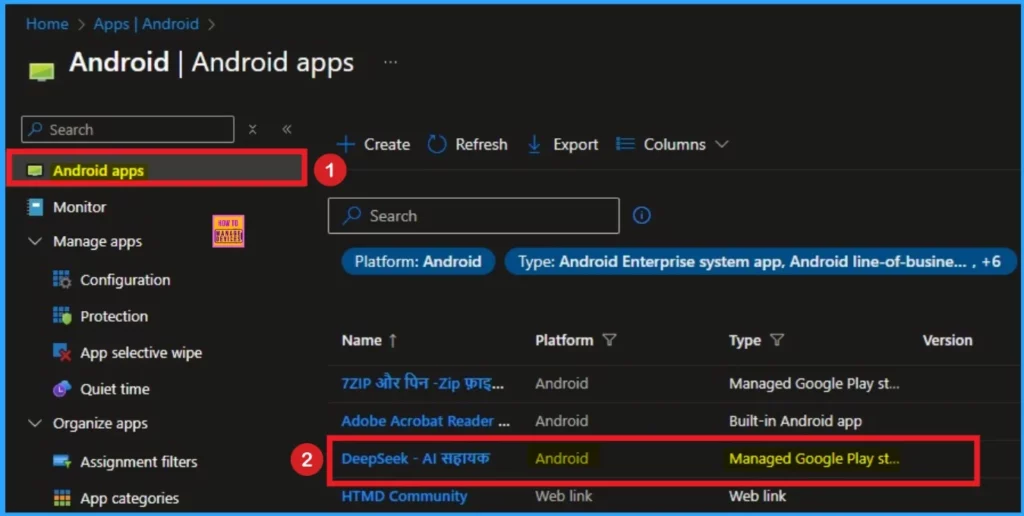
After the syncing completed the Managed Google Play window will automatically closed. Then DeepSeek AI Assistant app can be seen on the Android Apps section on Intune portal. Select the App from this window.
How to Uninstall DeepSeek AI Assistant App on Android using Intune Managed Google Play App - Fig.5
How to Uninstall DeepSeek AI Assistant App on Android using Intune Managed Google Play App – Fig.5

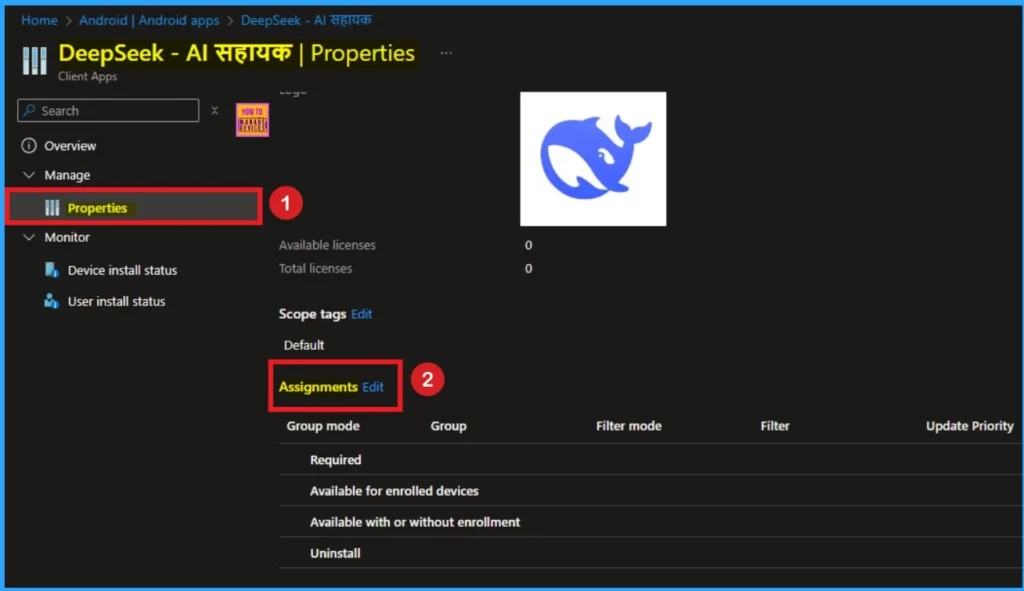
After that Go to Properties option on the DeepSeek AI Assistant on the Overview Page. Here you can edit the each tabs. Click on the Edit button near Assignments.
How to Uninstall DeepSeek AI Assistant App on Android using Intune Managed Google Play App - Fig.6
How to Uninstall DeepSeek AI Assistant App on Android using Intune Managed Google Play App – Fig.6

Assignments Tab

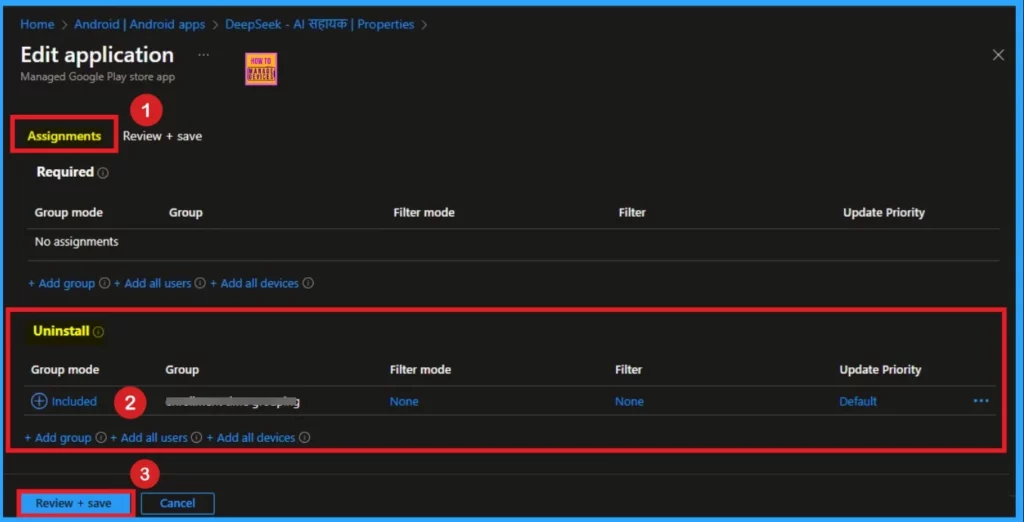
As you know that on the Assignments tab you assign groups to deploy an app or policy etc. Here you can assign groups to uninstall DeepSeek. Click on the +Add group option under Uninstall. Select the group from the list groups. Then click on the Review + Save button.
How to Uninstall DeepSeek AI Assistant App on Android using Intune Managed Google Play App - Fig.7
How to Uninstall DeepSeek AI Assistant App on Android using Intune Managed Google Play App – Fig.7

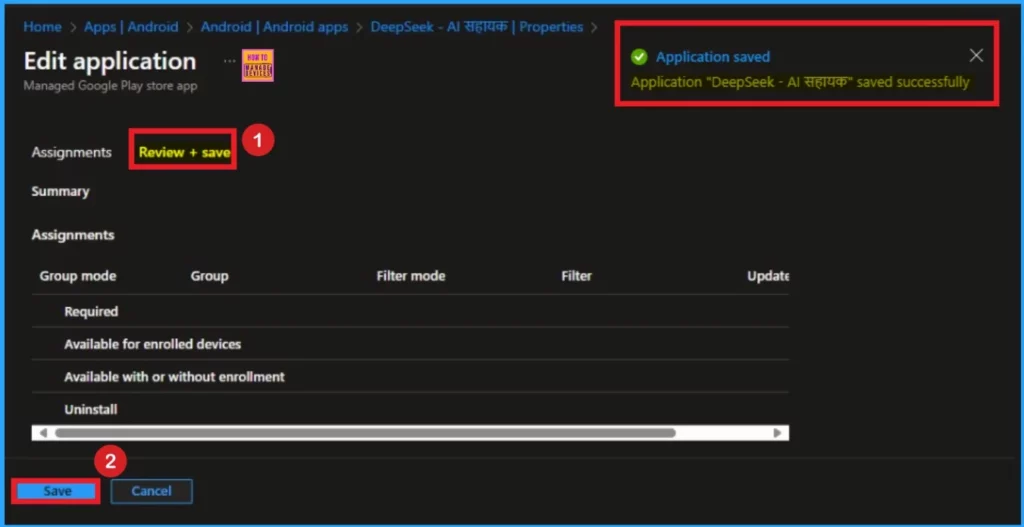
On the Review + Save tab you ca review all the information and finalize the uinstallation. Click on the Save button and you will get the notification like Application Saved.
How to Uninstall DeepSeek AI Assistant App on Android using Intune Managed Google Play App - Fig.8
How to Uninstall DeepSeek AI Assistant App on Android using Intune Managed Google Play App – Fig.8

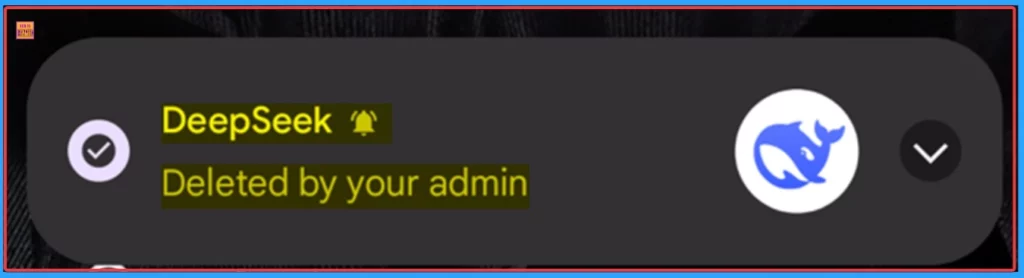
After that you can the sync the assigned devices on the Company Portal. Then the Google play will uninstall the app, and the user will receive a notification on their managed device that the app was “deleted by your admin”. The below window will guide you.
How to Uninstall DeepSeek AI Assistant App on Android using Intune Managed Google Play App - Fig.9 - Creds to MS
How to Uninstall DeepSeek AI Assistant App on Android using Intune Managed Google Play App – Fig.9 – Creds to MS

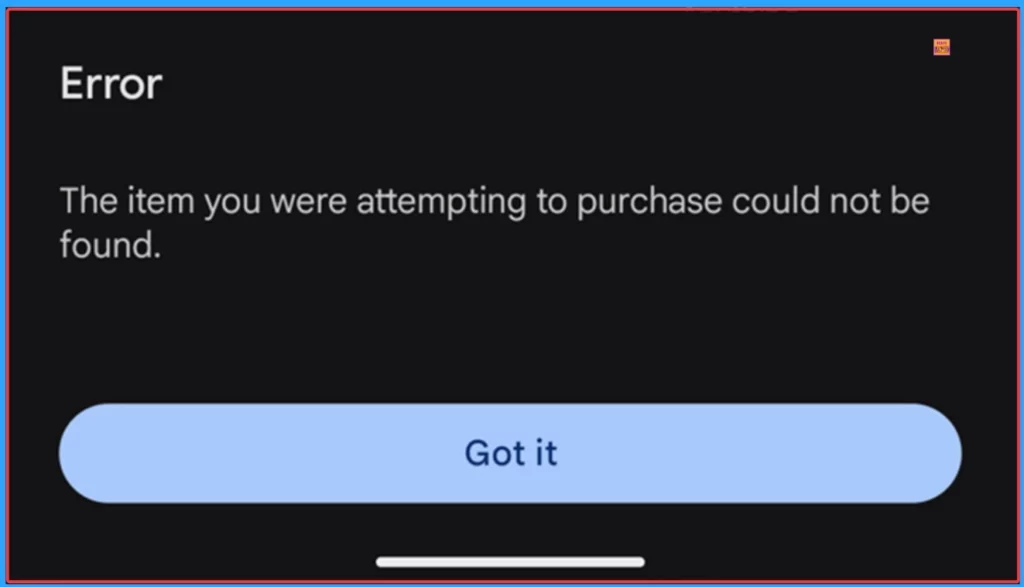
The Google Play Store will no longer display the DeepSeekapp. If the user attempts to install or access the app directly via a link, the example error below is displayed on the user’s managed device.
How to Uninstall DeepSeek AI Assistant App on Android using Intune Managed Google Play App - Fig.10 - Creds to MS
How to Uninstall DeepSeek AI Assistant App on Android using Intune Managed Google Play App – Fig.10 – Creds to MS

Need Further Assistance or Have Technical Questions?

Join the LinkedIn Page and Telegram group to get the latest step-by-step guides and news updates. Join our Meetup Page to participate in User group meetings. Also, Join the WhatsApp Community to get the latest news on Microsoft Technologies. We are there on Reddit as well.

Reference

Blocking and removing apps on Intune managed devices (Windows, iOS/iPadOS, Android and macOS)

Author

Anoop C Nair has been Microsoft MVP for 10 consecutive years from 2015 onwards. He is a Workplace Solution Architect with more than 22+ years of experience in Workplace technologies. He is a Blogger, Speaker, and Local User Group Community leader. His primary focus is on Device Management technologies like SCCM and Intune. He writes about technologies like Intune, SCCM, Windows, Cloud PC, Windows, Entra, Microsoft Security, Career, etc.
Written by

Anoop C Nair is Workplace Technology solution architect with 25+ years of experience in global enterprise organizations such as JP Morgan, Capgemini, etc. Microsoft Certified Trainer. Microsoft MVP from 2015 onwards for consecutive 11+ years! He also conducts Intune and modern workplace tech training for enterprise organizations. He is Blogger, Speaker, and Founder of HTMD Community and HTMD Conference. His main focus is on Device Management technologies like Intune, Windows, Cloud PC. He writes about technologies like Intune, SCCM, Windows, Cloud PC, Windows, Entra, Microsoft Security.

Discussion

Join the discussion

Your email address will not be published. Required fields are marked *

Related guides

Android

Microsoft Intune Finally Restores Password Manager Support for Android Enterprise Devices

Key Takeaways By default, Android blocks third-party password manager and credential apps on managed work devices. With this new Intune setting, IT admins can allow trusted apps like Microsoft Authenticator or other password managers to securely save and autofill passwords and passkeys. This also helps organizations enable passkey sign-ins and control which apps are trusted […]

AC Anoop C Nair 3 min read
Android

Microsoft Teams on Android to Support Third-Party Meetings with SIP Integration

Key Takeaways Microsoft Teams on Android to Support Third-Party Meetings with SIP Integration! Microsoft is improving cross-platform communication by enabling Microsoft Teams users on Android devices to join third-party meetings using Session Initiation Protocol (SIP). Recently added to the Microsoft 365 roadmap, this upcoming feature helps organizations connect different communication platforms more easily. Microsoft Teams […]

AC Anoop C Nair 4 min read
Android

Microsoft Announces Teams Optimization for Windows App on iOS and Android

Key Takeaways Microsoft Announces Teams Optimization for Windows App on iOS and Android In this post we are discussing, Microsoft Announces Teams Optimization for Windows App on iOS and Android. Microsoft has officially announced the general availability of Teams optimizations for Windows App on both iOS and Android devices. This update is a better for […]

AC Anoop C Nair 3 min read
Android

Microsoft Intune Enhances Line-of-Business App Management for Android Devices

Key Takeaways Hey, let’s discuss about Microsoft Intune Enhances Line-of-Business App Management for Android Devices. Several improvements are planned for Android Enterprise management. Support for Entra accounts for the AE connector will be introduced, along with better web enrollment for BYO (Bring Your Own) work profiles. There will also be clearer provisioning status updates and […]

AC Anoop C Nair 3 min read