






How to Delete Attack Surface Reduction ASR Policy from Microsoft Intune
How to Delete Attack Surface Reduction ASR Policy from Microsoft Intune. Attack Surface Reduction (ASR) policies in Microsoft Intune is very important to protect devices from different types of cyber threats. It block suspicious activities, such as unknown scripts or malicious files, that could harm your system. These rules reduce the chances of attackers exploiting weaknesses in your devices.
Sometimes it is important to delete an ASR policy from Intune for example, when the policy is outdated, no longer needed, or replaced with a new one. Removing unused or duplicate policies helps keep your Intune environment clean and easier to manage.
You can easily delete the ASR policy through Intune admin center. Once deleted, the policy will no longer apply to your managed devices. However, it may take a short time for the changes to reflect on all systems. Make sure to verify that no important protection rules are lost before deleting the policy.
Deleting an Attack Surface Reduction (ASR) policy in Intune helps IT admins by keeping the environment organized and efficient. When a policy becomes outdated, duplicated, or replaced with a new version, removing it prevents confusion and ensures that only relevant and updated security policies are applied.

Table of Contents
How to Delete Attack Surface Reduction ASR Policy from Microsoft Intune
Deleting an Attack Surface Reduction (ASR) policy in Intune helps organizations by improving security management and operational efficiency. When outdated or duplicate policies are removed, it ensures that only the most relevant and updated rules are enforced across all devices.
| Steps |
|---|
| Sign in to https://intune.microsoft.com with your admin account |
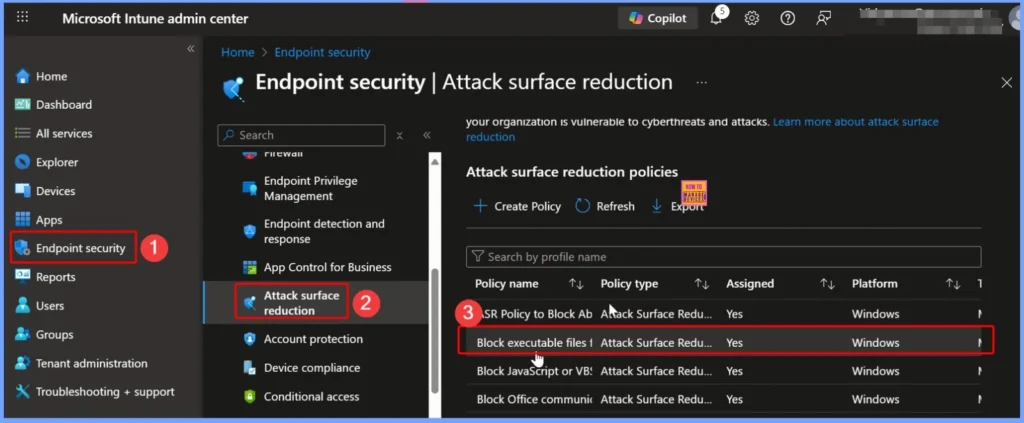
| Select Endpoint Security to access security policies |
| Choose Attack Surface Reduction to view all existing ASR policies. |
| Click on the specific ASR policy you want to remove. |
Here i select the Block executable files from running unless they meet a prevalence, age, or trusted list criterion policy. This rule blocks the following file types from launching unless they meet prevalence or age criteria, or they’re in a trusted list or an exclusion list: Executable files (such as .exe, .dll, or .scr).
- How to Remove Assigned Groups from Attack Surface Reduction ASR Policy in Microsoft Intune
- Microsoft Defender ASR Rules to Block Rebooting Machine in Safe Mode
- Block Vulnerable Signed Drivers Using Intune ASR Rules
Check Policy Status Before Deletion
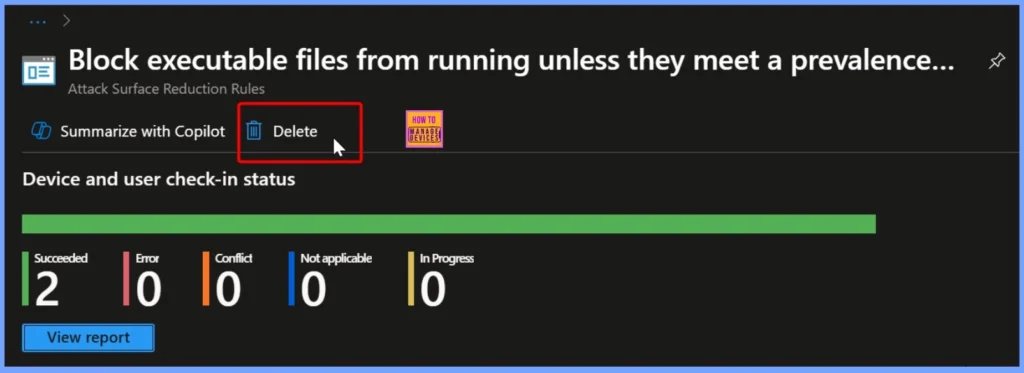
After selecting the ASR policy, click the Delete button. Before confirming, review the Device and User check-in status to understand where the policy is currently applied. The status may show details such as “Succeeded to 2 devices,” indicating that the policy has been successfully deployed to two managed devices.
- This helps ensure that you are aware of its impact before removing the policy from Intune.
Confirm Policy Deletion
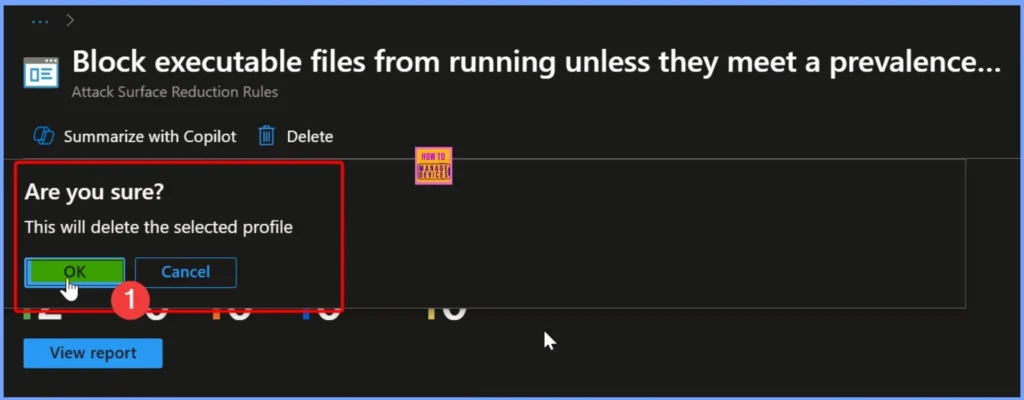
After clicking the Delete button, a confirmation pop-up window will appear. It will notify you that this action will permanently delete the selected profile. If you are sure about removing the policy, click OK to proceed. If you want to review the settings again, click Cancel to stop the deletion process.
Need Further Assistance or Have Technical Questions?
Join the LinkedIn Page and Telegram group to get the latest step-by-step guides and news updates. Join our Meetup Page to participate in User group meetings. Also, Join the WhatsApp Community to get the latest news on Microsoft Technologies. We are there on Reddit as well
Author
Anoop C Nair has been Microsoft MVP from 2015 onwards for 10 consecutive years! He is a Workplace Solution Architect with more than 22+ years of experience in Workplace technologies. He is also a Blogger, Speaker, and Local User Group Community leader. His primary focus is on Device Management technologies like SCCM and Intune. He writes about technologies like Intune, SCCM, Windows, Cloud PC, Windows, Entra, Microsoft Security, Career, etc


Discussion