






The Easiest Way to Find Deployments Targeted to a Collection in SCCM ConfigMgr
Let’s find the list of deployments targeted to a collection in SCCM (a.k.a. ConfigMgr). This is one of the easiest ways to determine which deployments are targeted to an SCCM device or user collection. The deployment details help troubleshoot and fix SCCM issues.
SCCM Collections are critical in the SCCM environment. We should be careful when creating or modifying collections, as they can cause performance issues.
You can use SQL query or Powershell to find the deployments associated with collections. However, getting these details directly from the Configuration Manager console might help service desk support and easily identify the issues.
You can use the deployments tab from static and dynamic collections. In previous posts, I explained how to create a static and dynamic collection. Microsoft also introduced the Verify SCCM Collection Query Preview Tool | Best Tool to Analyse Collection Query to help admins.

Table of Contents
Feature Types Supported
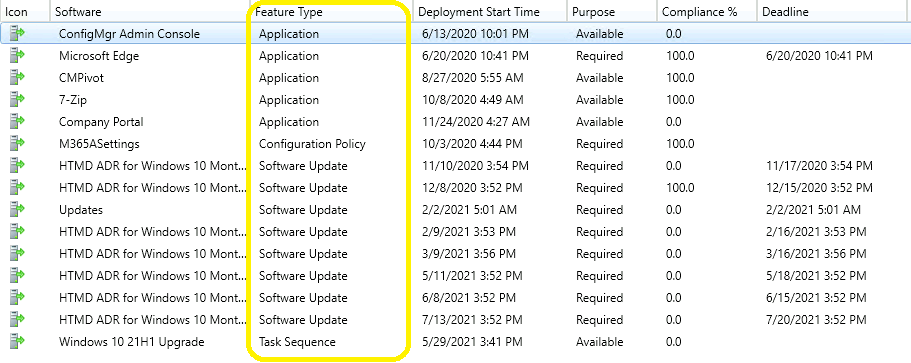
You can get application deployment details from user collections and device collections. Apart from application deployment details, you can get the details about other feature types mentioned below:
- Application
- Software Update
- Configuration Policy
- Software Update
- Task Sequence
- The Best Method to Find Custom Client Settings for a Collection in SCCM ConfigMgr
- Easily Find SCCM Task Sequences Reference Application
- Deploy Windows 11 23H2 using SCCM Step-by-Step Guide
- Easily Find SCCM Applications Without Deployments
Find Deployments Targeted to a Collection
Let’s check how to find deployment targeted to a collection from the admin console assets and compliance node.
- Launch ConfigMgr admin console.
- Navigate to Assets and Compliance -> Device collections.
- You can use User Collections as well.
- Click on the Device/User collection that you want to find out the details of deployments.
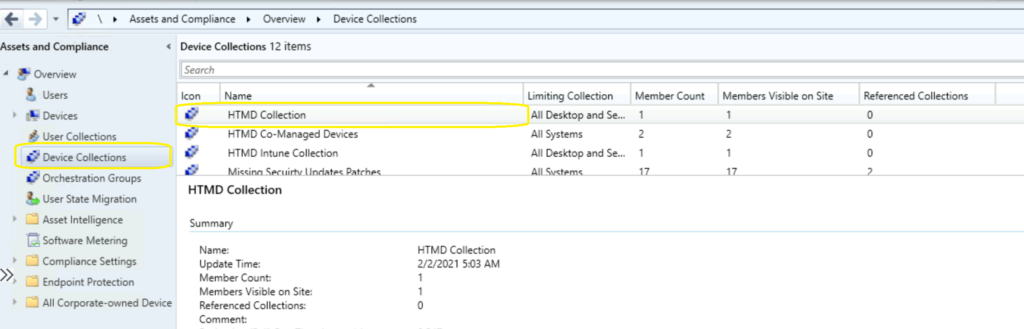
For each device collection in the SCCM console, there are three tabs available (in the Details Pane). The Details Pane is the bottom portion of the results pane, and it displays additional details about the object selected in the list view.
- Summary – This shows the collection properties. Details like –
- Collection Name
- Update Time
- Member Count
- etc…
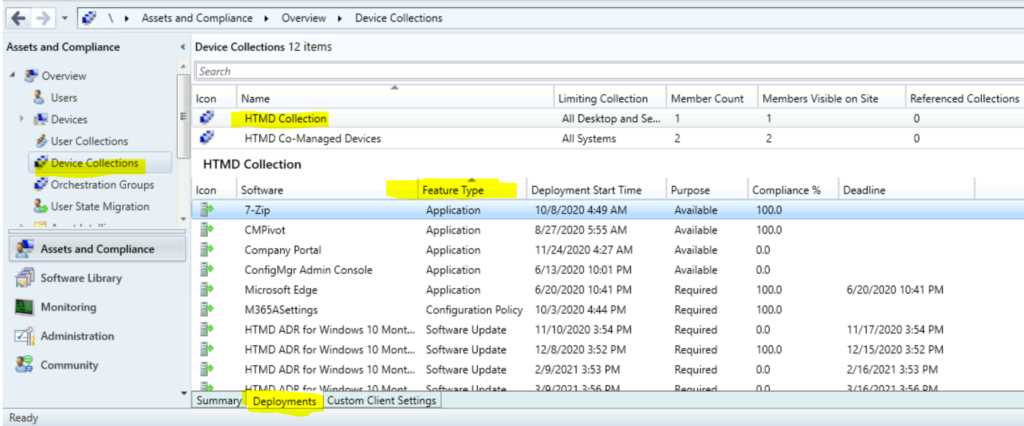
- Deployment – This is the tab where you get all the details about the deployments associated with this collection.
- Software Name (Feature type name)
- Feature Type
- Deployment Start Time
- Purpose (available or required apps?)
- Compliance %
- Deadline
- Custom Client Settings – This tab helps you you to understand custom client settings policies deployment to this particular collection.
Resources
We are on WhatsApp. To get the latest step-by-step guides and news updates, Join our Channel. Click here –HTMD WhatsApp.
Author
Anoop C Nair has been Microsoft MVP for 10 consecutive years from 2015 onwards. He is a Workplace Solution Architect with more than 22+ years of experience in Workplace technologies. He is a Blogger, Speaker, and Local User Group Community leader. His primary focus is on Device Management technologies like SCCM and Intune. He writes about technologies like Intune, SCCM, Windows, Cloud PC, Windows, Entra, Microsoft Security, Career, etc.




Discussion