






Fix Intune Device Internal Service Error Code 0X80180006
Let’s discuss Fix Intune Device Internal Service Error Code 0X80180006. Microsoft Intune admins get an error code 0X80180006 due to an unhandled exception on the Mobile Device Management (MDM) server.
Microsoft Intune admins usually encounter many errors during Intune enrollment for different reasons. Most of the time, they do not know why or how to fix the error. Maybe simple carelessness leads to major Mobile Management Devices (MDM) errors.
The Fix Intune Device Internal Service Error Code 0X80180006 may occur during device enrollment in Microsoft Intune. This issue concerns registering the device or communicating with the Intune service. So users must enroll devices carefully.
In this blog post, I will help you learn more about Fix Intune Device Internal Service Error Code 0X80180006. You can understand different reasons for this issue and fix this error with available methods. With this blog, the above-mentioned errors can be avoided easily.

Fix Intune Device Internal Service Error Code 0X80180006
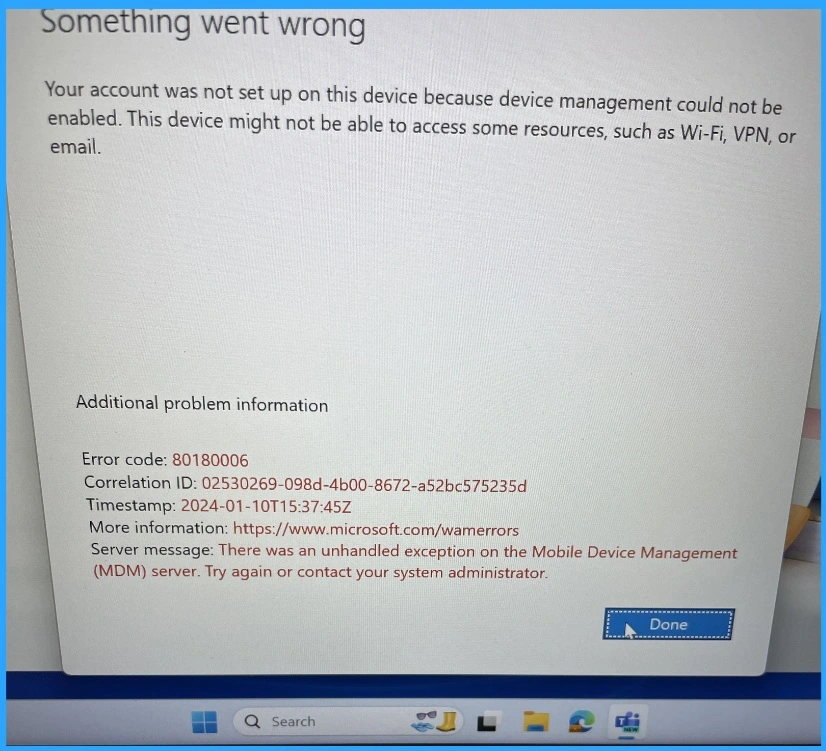
The Error Code 0X80180006 is related to an unhandled exception on the Mobile Device Management (MDM) server. This error message also shows that you should Try again or contact your system administrator.
| Aditional Problem Information | Details |
|---|---|
| InternalServiceFault | 80180006 |
- Fix MDM Enrollment Error Code 0x80180001
- Fix Autopilot Device Enrollment Error 0x80180022
- FIX Windows Autopilot Enrollment with Error 0x801C03ED
- Fix MDM Authentication Error Code 80180002
Something went wrong
Your account was not set up on this device because device management could not be
enabled. This device might not be able to access some resources, such as Wi-Fi, VPN, or
email.
Additional problem information
Error code: 80180006
Correlation ID: 02530269-098d-4b00-8672-a52bc575235d
Timestamp: 2024-01-10T15:37:45Z
More information: https://www.microsoft.com/wamerrors
Server message: There was an unhandled exception on the Mobile Device Management
(MDM) server. Try again or contact your system administrator.
Primary Reasons for Intune Device Internal Service Error
There are many reasons behind the Intune Device’s Internal Service Error. It may be due to network Connectivity issues, expired device certificates or corrected or incomplete App packages.

- Intune Fix MDM User License Error Code 0X80180018
- Fix Intune Error Code 80192EE7 the Device Management Enablement Issue on Intune
- Intune MDM Enrollment Error Code 80180005
- Troubleshoot MDM Enrollment Error Code 80180004
Steps for Fix Intune Device Internal Service Error Code 0X80180006
This error code can be fixed easily. You can follow these steps before contacting your system administrator to resolve this issue.
- Check whether the Microsoft Intune service is healthy and running. For more details, see Get Email Alerts For Intune Outages Microsoft 365 Services Advisory Status Change.
- Check your Internet Connection – Most errors occur due to Poor Internet connection. So check your internet connection first.
- If the device is connected to Corp WiFi, check whether the proxy exceptions or whitelisting of required communications are in place or not to fix Intune Device Internal Service Error Code 0X80180006.
- Update the Company Portal App – Make sure that you are using the latest version of the Company Portal App
- Clear the App Cache or reinstall it – Clear the App Cache or reinstall may help to resolve this issue
- Reboot your Device – By rebooting your device, the error can be resolved
We are on WhatsApp now. To get the latest step-by-step guides, news, and updates, Join our Channel. Click here. HTMD WhatsApp.
Author
Anoop C Nair has been Microsoft MVP from 2015 onwards for 10 consecutive years! He is a Workplace Solution Architect with more than 22+ years of experience in Workplace technologies. He is also a Blogger, Speaker, and Local User Group Community leader. His main focus is on Device Management technologies like SCCM and Intune. He writes about technologies like Intune, SCCM, Windows, Cloud PC, Windows, Entra, Microsoft Security, Career, etc.


Discussion