






Key Difference Between Device Inventory and Hardware Tab in Microsoft Intune
Hi everyone, today we are discussing theKey Difference between Device Inventory and Hardware Tab in Microsoft Intune. I think this is an important point to discuss with you, the use of a Resource Explorer (Device Inventory) and the Hardware Tab. You know that Both are essential features of MS Intune.
But somehow those who doesn’t know the difference between them and what is the purpose of it right? Resource Explorer and the Hardware Tab in Microsoft Intune are valuable tools for device management, especially when monitoring hardware and software configurations. You know now Recourse explorer known as Device Inventory.
The Hardware Tab in Intune gives IT admins a quick look at the basic details of a device. Actually they are using to get the device information but they are not similar, and MS recommended using Inventory and Resource Explorer for the most up-to-date data about your devices.
It also provides a full list of installed applications with their versions, shows which users have logged into the device. In coming days (data source for Hardware tab and the Resource Explorer will be the same). So in this case we can discuss Difference Between Resource Explorer and the Hardware Tab.

Table of Contents
Difference Between Resource Explorer and Hardware Tab in Microsoft Intune
Above, we discussed a lot of things about Resource Explorer and the Hardware Tab. This allows admins to view detailed inventory data for a device in an organized way. So lets look how to configure this feature in the Intune. First you have to log in to the MS Intune admin center.
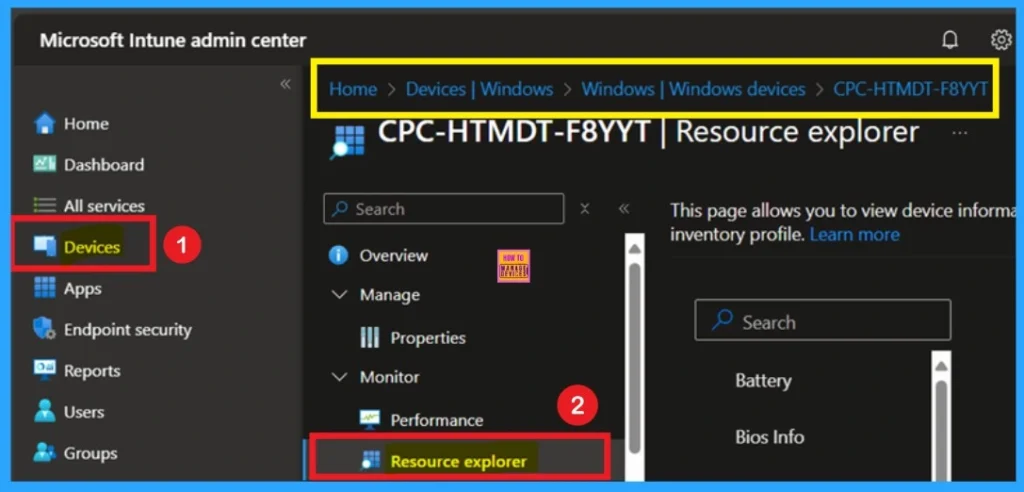
- Then Navigate Devices > Windows > Select a Device from the list, then click on the Resource Explorer.
- Both Hardware tab and Resourse explorer are configured through Properties catalog app.
- Enhanced Hardware Inventory Information for macOS iOS iPadOS and Android Devices
- Intune Inventory Options for Mac iOS Android Windows Devices and Custom Inventory
- Intune App Inventory For Android Devices
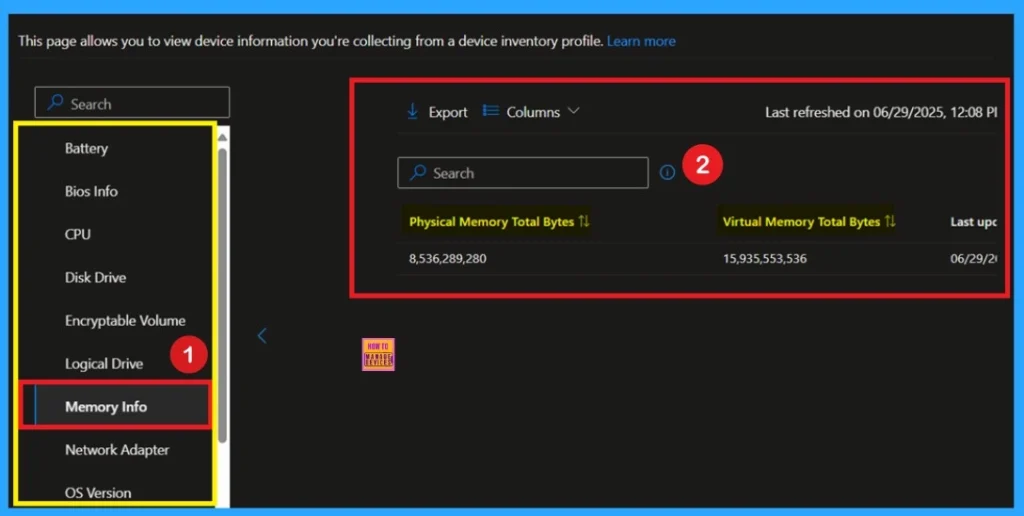
When you Click on the resource explorer you will get detailed inventory data for a device. Resource Explorer help to showing categories like Battery data, Bios Info, disk drives, logical drive and user OS Versions. It’s especially helpful for device management, software audits, and troubleshooting issues.
Intune Resource Explorer Now Known as Device Inventory
Microsoft is renaming the Intune Resource explorer pane to Device inventory starting with the September 2025 (2509) service release. This update is only a change, that there is no impact on functionality or the data displayed within the pane. You will still access it the same way through Devices > select a platform > select a device > Monitor.
Hardware Tab
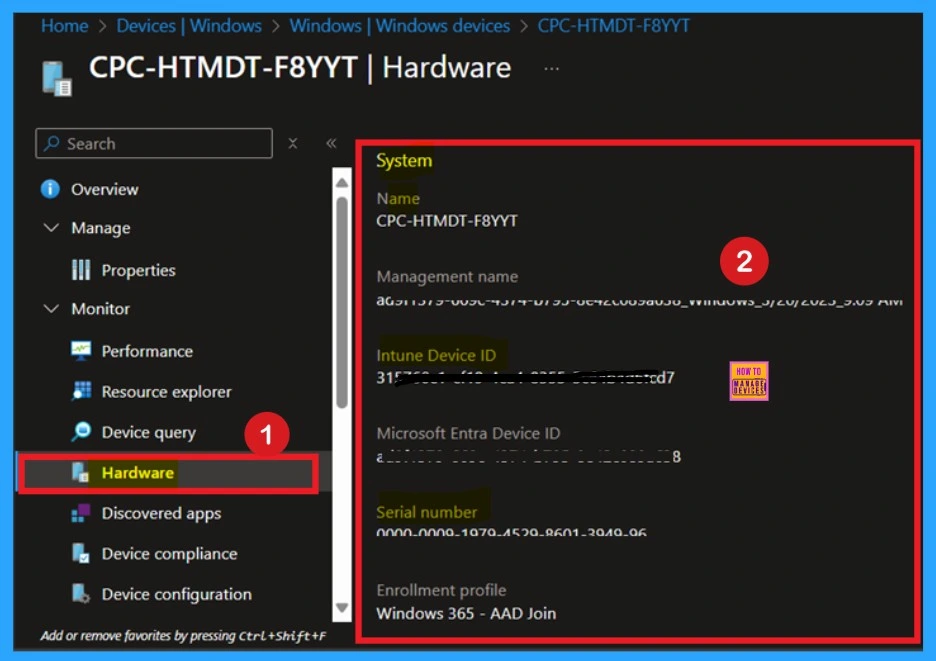
The Hardware tab is the one of the important tool in Intune. With this tab the It admins can get the detailed overview of a device. These both tools are performed by the same but showing different types of Information. For Collection Hardware data First go to the MS Intune then navigate through Devices > Windows> select a Device and click on the hardware tab.
- When you click on the Hardware you will get the device full datails such as Name, Management name, Intune device ID, and Serial Number etc.
| Resource Explorer | Hardware Tab |
|---|---|
| It showing basic Device ibnformations such as Battery data, Bios Info, disk drives, logical drive and user OS Versions | It shows device Name, Management name, Intune device ID, and Serial Number etc. |
| It shows all installed applications and version details. | It can’t shows the Software details. |
| This feature go the deeper side for devices invetory datas. It helps in troubleshooting and detailed reporting. | It used for quick checking and it also report the basic details. |
| Even if a properties policy is deleted, you will still be able to see the last-collected data in Resource Explorer for up to 28 days. | This is not applicable for this feature. |
Need Further Assistance or Have Technical Questions?
Join the LinkedIn Page and Telegram group to get the latest step-by-step guides and news updates. Join our Meetup Page to participate in User group meetings. Also, join the WhatsApp Community to get the latest news on Microsoft Technologies. We are there on Reddit as well.
Author
Anoop C Nair has been Microsoft MVP for 10 consecutive years from 2015 onwards. He is a Workplace Solution Architect with more than 22+ years of experience in Workplace technologies. He is a Blogger, Speaker, and Local User Group Community leader. His primary focus is on Device Management technologies like SCCM and Intune. He writes about technologies like Intune, SCCM, Windows, Cloud PC, Windows, Entra, Microsoft Security, Career, etc.


Discussion