






Differences between SCCM Applications and Packages Workloads
Hello Everyone; in this blog post today, we will try to understand the major differences between SCCM Applications and Packages Workloads. Understanding the differences is important because I see some scenarios still need to use package workload in SCCM.
One must have seen several posts and discussions about the advantages of using an application model rather than “classic” packages. Let’s see more details about SCCM Package Vs. Application.
While Packages has had its history since SCCM 2007, Application was introduced slightly later with the SCCM 2012 version with the intention of filling the gaps left behind by the package model. To look at the difference between these two architectures wise, you can visit our blog SCCM Package Vs. Application 32 Vs. 64 Context.
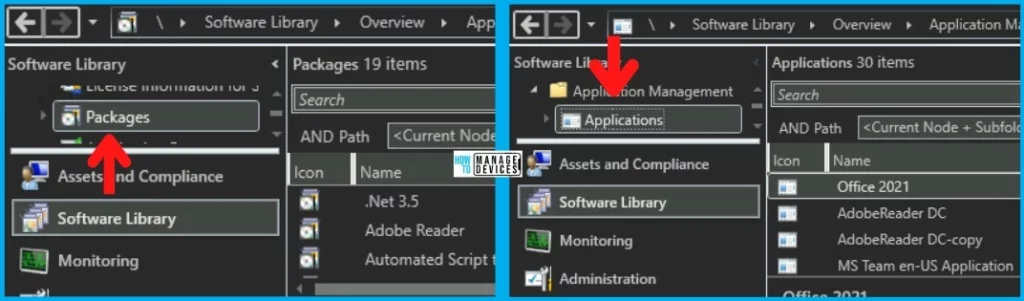
Although both workloads are an integral part of SCCM and, most of the time, not always, can do similar tasks. These workloads share very similar paths in the SCCM Console under the Application Node, as shown in the picture below, but that doesn’t mean they are identical.

- Deep Dive SCCM Application Model Client End Troubleshooting
- SCCM Application Model Server Side Troubleshooting
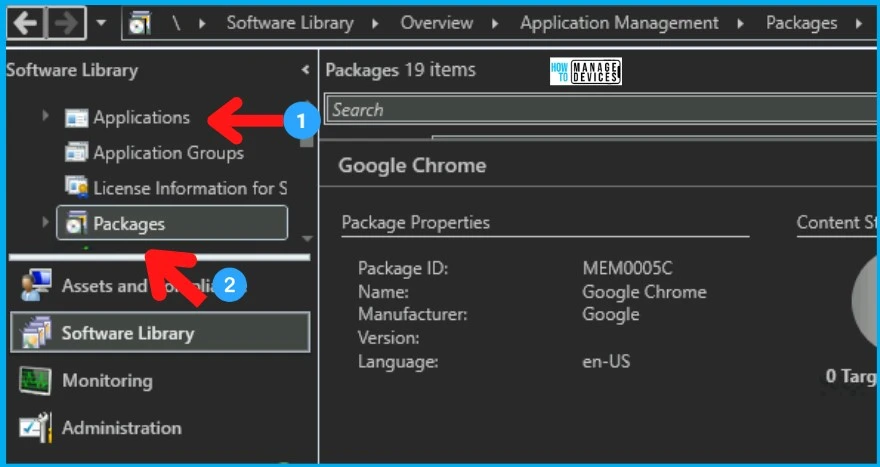
What is SCCM Package Workload
Let’s start with the elder one first :-), i.e., Package. You can easily understand SCCM Package Workload from this section. The package is one of the oldest workloads in SCCM.
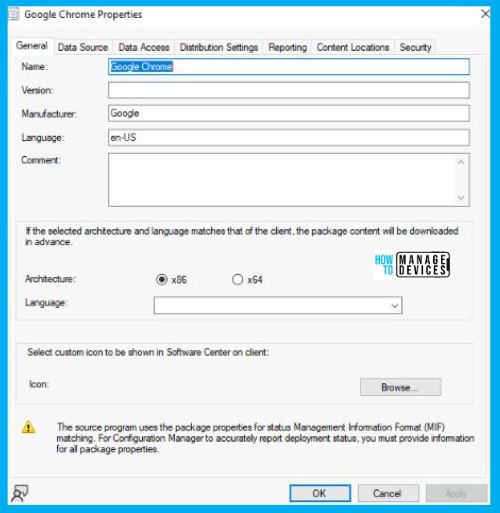
Let’s take an example of Google Chrome which we deploy through the SCCM Package workload. We don’t recommend using packages for MSI or EXE applications. The SCCM application model is best suited for these types of workloads.
You still need to use the package for specific script deployments where you don’t care about detection methods etc. check the various options in Packages properties. Below mentioned are some Tabs shown in the above picture:
- General Tab– It contains all the basic details like Name, Versions, Manufacturer, Architecture type, and Icon, among various other things.
- Data Source- It mainly contains the location where the source file has been placed.
- Data Access- It allows to copy of the content in the package to the package share on distribution points.
Also, each package has Summary, Programs, and Deployment tabs at the bottom side of the console window, similar to the application where one can see the package is deployed to which Collection. Program is the tab that gives us the details regarding command lines.
What is SCCM Application Workload
Now let’s take an example of Brave Browser, which is deployed as an Application as shown in the below screenshot. The SCCM application model is the modern way of deploying applications. We recommend using the SCCM app model to deploy all types of apps.
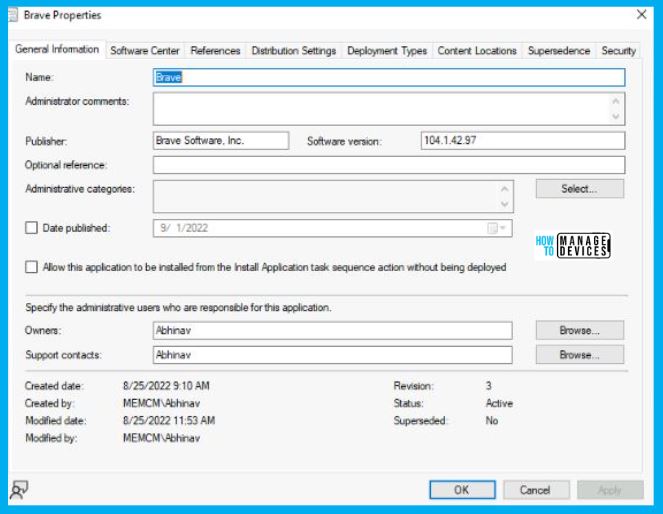
The following are some of the properties of the SCCM applications. Supersedence, Detection logics are the two main topics extensively used in most SCCM deployments. Detection logic is mandatory for the SCCM app model, which is one of the main differences between SCCM applications and packages.
- General Information- It contains generic details like Name, Publisher, Software Version, and all.
- Software Center- It contains information about how an application will look visibly in Software Center. It includes Name, User Categories, Logo, etc.
- Deployment Type- It contains all the details regarding the-
- Command lines– Commands used for the installation
- Detection Method– Detection logic is used to check whether it is installed or not.
- User Experience– It contains details like Installation Behaviour and Logon requirement.
Major differences between SCCM Applications and Packages
Let’s understand the major differences between SCCM applications and packages. In the table below, I tried to put some main differences between the two to make it clearer for you.
The main difference between SCCM applications and packages is that the app workload is only one actively adding new/additional features. The SCCM application model is the workload that adds new features.
| Applications | Packages |
|---|---|
| Here we have Detection logic to use, which helps in detecting whether the application is already present or not. | Here we don’t have such a thing as Detection logic. It will run the Package whether it is already present there or not |
| It has a Supersedence feature. This setting allows you to uninstall the previous version and install the latest one by defining the old deployment type, replacement deployment type, and uninstall settings in Supersedence. | The Supersedence feature is not available for the SCCM Packages model. |
| Applications allow us to have a much more detailed level of reporting. | Packages only allow us information on whether the installation was successful or failed. |
| Applications allow us to add dependencies if there are any to trigger another Application installation part of this install. | There are no such things as dependencies here. We have to do that separately. |
| SCCM App model creation is complex for non-MSI deployments. | The complexity for SCCM package creation is the same for both MSI and non-MSI applications. |
| The application requires more information to fill out and takes more time. | Packages require far fewer details and take less time to create than applications. |
| App model supports all the new installers such as MSIX, etc. | Packages don’t support new/modern installers. |
| App model troubleshooting is complex. | Package model troubleshooting issues are less complex. |
Resource -> Introduction to app management – Configuration Manager | Microsoft Docs
Author
Abhinav Rana is working as an SCCM Admin. He loves to help the community by sharing his knowledge. He is a BTech graduate in Information Technology.




Packages don’t support new/modern installers.
Please provide what kind of softwares for above point.