






Why Available Action is Disabled from Android for Work App Deployment in Intune
Why is the available action disabled from Android for Work App Deployment in Intune? Configuring Android for Work in Intune is not very difficult. However, there are some restrictions when you deploy a volume-purchased application to Android for Work devices.
Microsoft recently announced support for Android for Work (A4W) in Intune, and I’ve been eagerly anticipating the arrival of an A4W-supported device. However, it’s important to note that not all Android devices are compatible with A4W. For those interested, Google has provided a comprehensive list of devices supported by Android for Work.
The Android work profile feature enables users to use a single device for personal and work purposes. Our guide breaks down the steps to help you efficiently manage these devices through Intune, ensuring seamless work and personal data integration.
We can deploy Android for Work Volume Licensed apps only to user groups. The ONLY deployment actions/options enabled in the drop-down list are Not Applicable, Required, and Uninstall actions. The “available” deployment Action/option is DISABLE for Android for Work applications.

- Manage Microsoft Edge Browser on Android Devices using Intune
- Microsoft Ends Support for Running Android Apps on Windows 11
- Universal Print Integration with Microsoft 365 Mobile App for Android Printing
- Prepare Android Virtual Device For Intune Deployment Testing
- Best Way To Remediate Vulnerabilities With Microsoft Defender For Endpoint Using Intune
Table of Contents
Android For Work App Deployment Options Available Required
Let’s explore the possibilities for deploying Android for Work apps, including “Available” and “Required” deployment types. The following video provides a detailed overview of these deployment options, demonstrating how to manage app distribution within your organization effectively.
Why Available Action is Disabled from Android for Work App Deployment in Intune
In the screenshot below, you need to specify the type of deployment you want to execute for this software and review the corresponding deployment settings. Choose the appropriate deployment settings for the software. Note that the “Available” install option is disabled, as shown in the window.
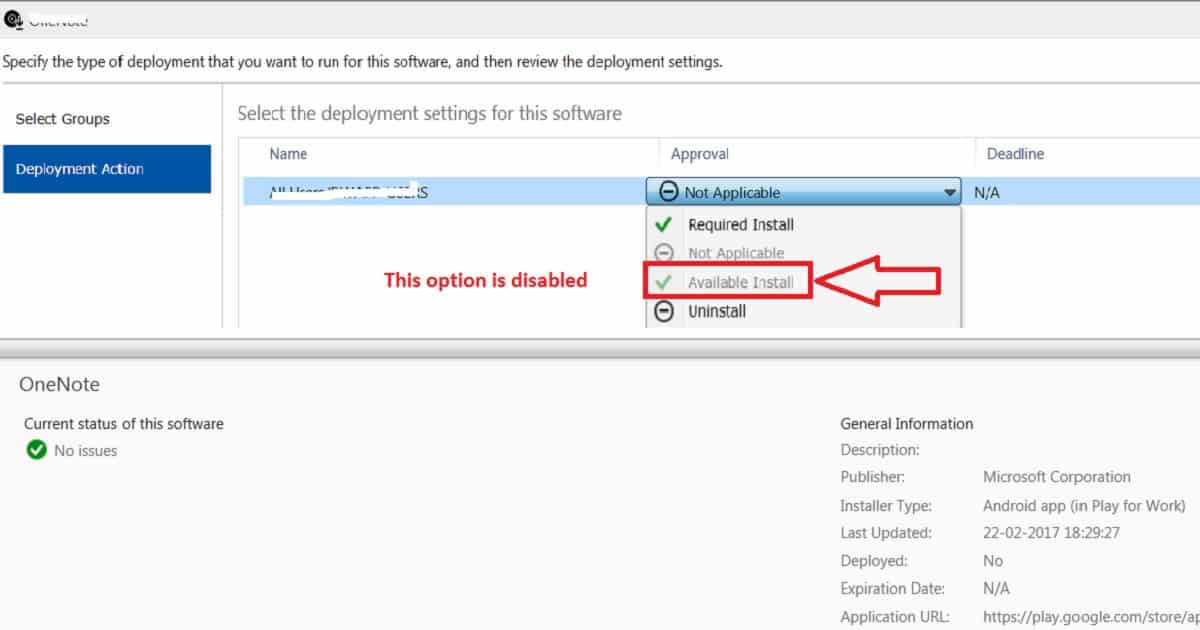
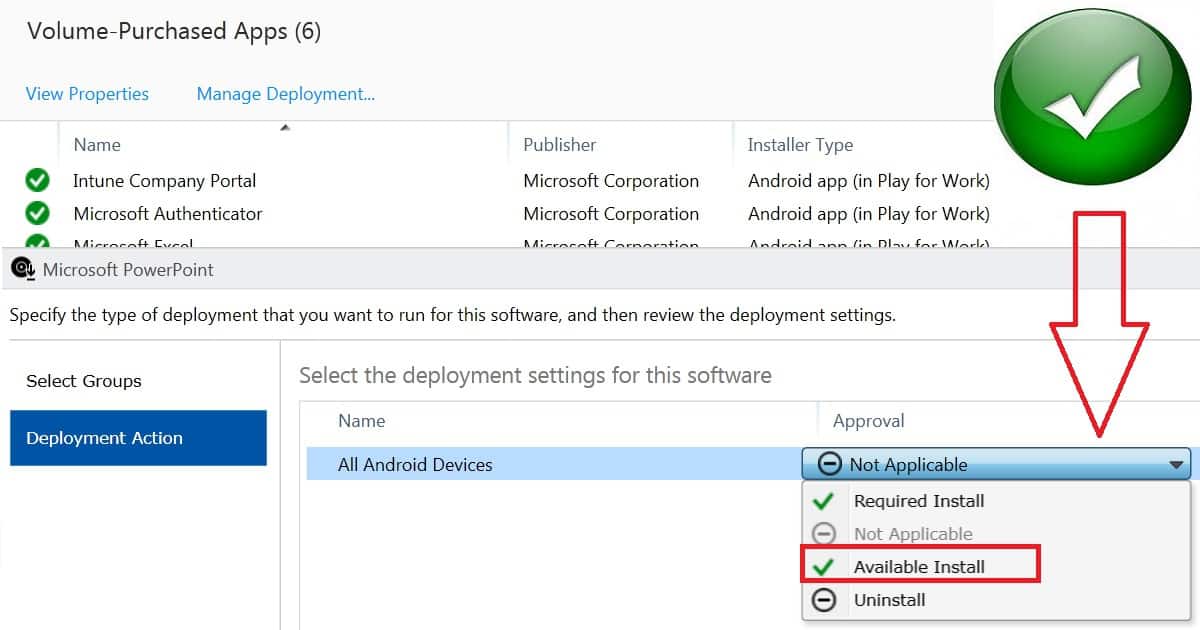
Recently, I noticed that the Android for Work Volume-Purchased App deployment action called “Available” has been enabled for some of the tenants. These “Google Play for Work” applications can be deployed to user/device groups in those tenants where the available action is enabled.
- Understanding Android Management with Intune | Android Enterprise
- Enroll Android Devices To Android for Work in Intune
- Configure Enrolment Notifications For New Enrolled Android Devices in Intune
- Block Personal Windows Devices Enrollment Enrollment restrictions Options
- How To Add Android Managed Google Play App In Intune
Details Why Available Action is Disabled from Android for Work App Deployment in Intune Endpoint Manager
Android for Work Volume-Purchased application deployment option is called “Available,” and volume-purchased app deployment to device groups is ONLY available with new grouping experience in the Azure portal. Hence, this feature is tied to Azure AD group targeting, requiring migration from the Intune Silver Light portal to Azure.
- You can’t see all the Android for Work apps even when you go to the Google Play for Work app store from your Android for Work-supported devices.
- It will only list the apps that are deployed from the Intune console. Why Available Action is Disabled from Android for Work App Deployment in Intune Endpoint Manager
- App deployment action details are well documented in the TechNet article here. When the app is displayed in the Volume-Purchased Apps node of the Apps workspace, you can deploy it just like any other app.
- You can deploy the app to groups of users only. Currently, you can only select the Required and Uninstall actions. Starting in October 2016, we will begin adding the available deployment action for new tenants.
We are on WhatsApp now. To get the latest step-by-step guides, news, and updates, Join our Channel. Click here. HTMD WhatsApp.
Author
Anoop C Nair is Microsoft MVP! He is a Device Management Admin with more than 20 years of experience (calculation done in 2021) in IT. He is a Blogger, Speaker, and Local User Group HTMD Community leader. His main focus is on Device Management technologies like SCCM 2012, Current Branch, and Intune. He writes about ConfigMgr, Windows 11, Windows 10, Azure AD, Microsoft Intune, Windows 365, AVD, etc.


Hi Anoop
I need to ask you for help. Im not sucessful with this problem “Why Available Action is Disabled from Android for Work App Deployment in Intune”. I have groups in Azure AD (new experience) but i dont have “available” choice in application deployment. Could u help me with my problem? Thanks
StaffHi Lubomir! – Hope you are trying to deploy the app from Intune Silverlight portal. I shall double check whether your Intune Silverlight migration has been completed or only the first phase of the migration is completed?
We have this:
– Office 365 full AD synced premise to azure AD
– Intune on tenant o365
– We are using Intune management online and all is integrated with Azure AD
I have google account and bought developer console for google apps. Next we synced this account with Android for work on Intune portal. I have approved some apps from google play.
StaffI don’t think, your Intune Silverlight portal has been migrated to Azure. Can you confirm that first please?