






Enable Admin Protection and Configure Prompt for Consent on the Secure Desktop Policy options Coming to Intune
Hey there today, we are talking about Enable Admin Protection and Configure Prompt for Consent on the Secure Desktop Policy options Coming to Intune. As you all know that Microsoft has introduced a new security feature in Windows for better protect administrator access on devices. Nilanjana Ganguly explains about the Windows Security with Administrator Protection and Just-in-Time Access Control.
This security messurements are very important because it protect from anyone gets access to these admin rights. keeping these rights active all the time creates a big security risk. Hackers know this and try to take advantage of it. In fact, recent reports show that many cases of token theft, where attackers steal user access.
You know when admin rights are always active on a device there is a chance for the theft. Microsoft Intune Endpoint Privilege Management is a new security feature that helps protect Windows devices by keeping users as standard users by default, instead of giving them full admin rights all the time.
But when users need to make system changes the EPM allows them to do it safely, by showing a prompt that asks for permission. So in this post lets discuss Windows Security with Administrator Protection and Just-in-Time Access Control.

Table of Contents
Enable Admin Protection and Configure Prompt for Consent on the Secure Desktop Policy options coming to Intune
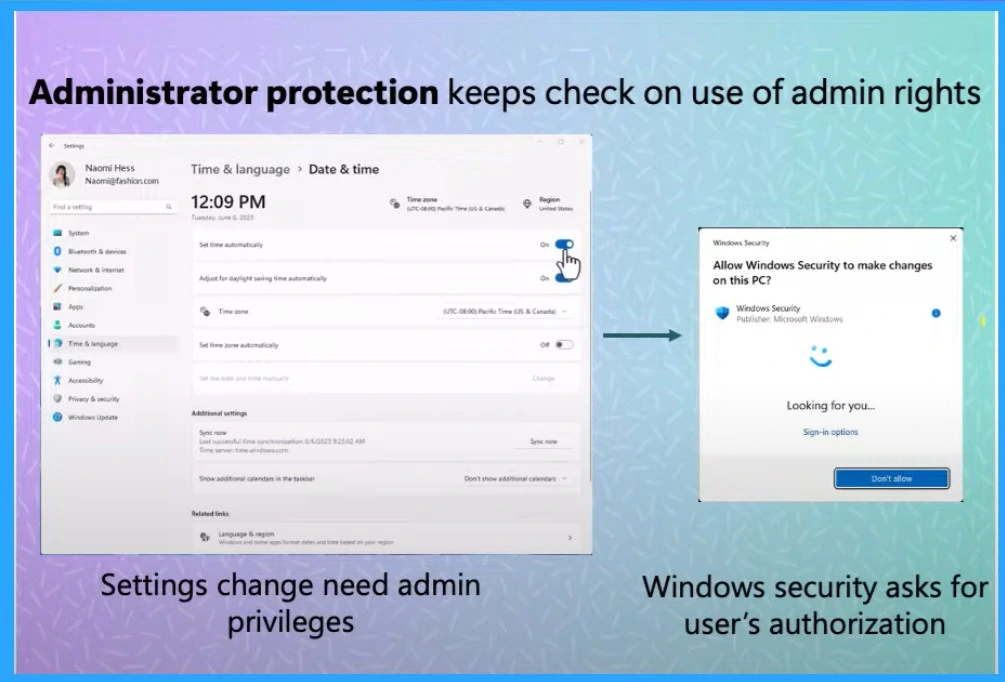
The new Administrator Protection feature in Windows improves security by giving admin rights only when they are needed it’s called Just-in-Time access. Endpoint Privilege Management helps keep Windows devices secure by making users standard users by default.
Once the elevated task is done, the admin token is immediately discarded.This means other apps or malware can’t use that token to access sensitive parts of the system. Without an active admin token, the attack surface becomes much smaller and devices are more secure.
- The old User Access Control that only asked for consent, Administrator Protection now requires both authorization and authentication.
- Nilanjana Ganguly the principal product manager of Windows security in MS, explain these things on Microsoft Technical Takeoff Sessions detailed.
- Now many Windows devices use auto-elevation where some admin tasks are done without the user even noticing. Administrator Protection disables that, so users are always informed.
- IT admins can configure this feature using Windows security settings or management tools and choose the type of prompt that useful to their organization through Intune.
- The goal is to have this feature turned on by default in the future
| Feature Overview |
|---|
| New upcoming security feature in Windows 11 |
| Protects admin user privileges by just in time admin rights |
| Integration with Windows hello for enhanced security with convenience |
| No auto elevation |
| End goal is to enable by default |
- Ensuring Data Protection through Windows Recall with New Security Architecture TPM Windows Hello
- Intune Security Policy to Set Up Smart Screen Enhanced Phishing Protection
- Modern Windows Hello Visual Communication Experience in Windows 11 Devices
Need Further Assistance or Have Technical Questions?
Join the LinkedIn Page and Telegram group to get the latest step-by-step guides and news updates. Join our Meetup Page to participate in User group meetings. Also, Join the WhatsApp Community to get the latest news on Microsoft Technologies. We are there on Reddit as well.
Reference
How to protect your administrator users on the device
Author
Anoop C Nair has been Microsoft MVP from 2015 onwards for 10 consecutive years! He is a Workplace Solution Architect with more than 22+ years of experience in Workplace technologies. He is also a Blogger, Speaker, and Local User Group Community leader. His primary focus is on Device Management technologies like SCCM and Intune. He writes about technologies like Intune, SCCM, Windows, Cloud PC, Windows, Entra, Microsoft Security, Career, etc.




Discussion