






Expansion of Entra Global Secure Access Advanced Threat Protection
Let’s discuss the Expansion of Entra Global Secure Access Advanced Threat Protection. Microsoft Entra Global Secure Access (GSA) is provide a more powerful security solution. With the latest enhancements, it now comes with built-in support for Advanced Threat Protection (ATP) and Data Loss Prevention (DLP).
These features are easily built into the Entra portal, providing a unified interface for security management. This allows IT teams to efficiently control access and enforce security policies from a single, centralized location. Andres Canello shared the news on his LinkedIn page, explaining that Global Secure Access integration with Advanced Threat Protection and Data Loss Prevention is now available.
Microsoft Entra Global Secure Access is a comprehensive, identity-centric security solution designed to protect and manage access to digital resources on a global scale. The solution includes key components like Entra Private Access and Internet Access, each used for securing internal and external connectivity.
In this post, you will find all the details about the expansion of Entra Global Secure Access Advanced Threat Protection. We’ll explore the new features and capabilities that enhance threat detection and prevention, helping organizations safeguard their networks and resources more effectively.


Table of Contents
Expansion of Entra Global Secure Access Advanced Threat Protection
Microsoft is integrating Global Secure Access with leading third-party security solutions such as Netskope to provide a more comprehensive and flexible security framework. This collaboration allows organisations to extend Microsoft’s native capabilities with advanced threat protection, data loss prevention, and traffic inspection powered by trusted vendor technologies.
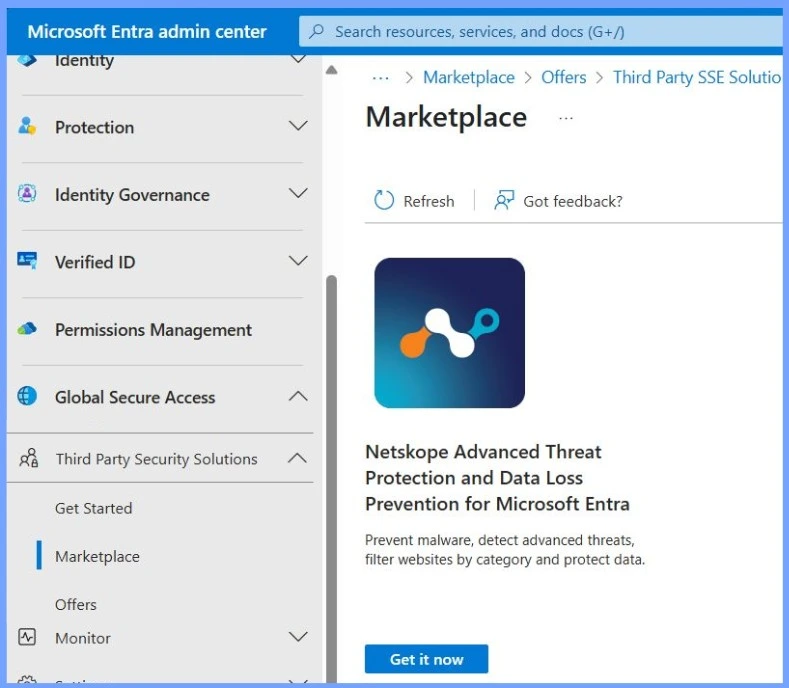
- Sign in to the Microsoft Entra admin center using an account with Global Secure Access Administrator permissions.
- In the left-hand navigation, go to
- Global Secure Access > Third Party Security Solutions > Marketplace.
- Locate the Netskope integration and click on the Get it Now button.
| Marketplace | Details |
|---|---|
| Netskope Advanced Threat Protection and Data Loss Prevention for Microsoft Entra | Prevent malware, detect advanced threats, filter websites by category and protect data. |
- Microsoft Entra License Usage Insights Six-Month Trends Active Vs Guest Reporting And Copilot Suggestions
- Entra Source IP Anchoring with Global Secure Access to Improve the Security Management of SaaS Apps
- Microsoft Entra Enhances Security with New AI face Check Feature
- Blocking Device Code Flows DCF in Microsoft Entra ID to Protect your Tenant from Phishing Attacks
Need Further Assistance or Have Technical Questions?
Join the LinkedIn Page and Telegram group to get the latest step-by-step guides and news updates. Join our Meetup Page to participate in User group meetings. Also, join the WhatsApp Community to get the latest news on Microsoft Technologies. We are there on Reddit as well.
Resources
Global Secure Access: Advanced Threat Protection (Preview) – Global Secure Access | Microsoft Learn
Author
Anoop C Nair has been Microsoft MVP for 10 consecutive years from 2015 onwards. He is a Workplace Solution Architect with more than 22+ years of experience in Workplace technologies. He is a Blogger, Speaker, and Local User Group Community leader. His primary focus is on Device Management technologies like SCCM and Intune. He writes about technologies like Intune, SCCM, Windows, Cloud PC, Windows, Entra, Microsoft Security, Career, etc.




Discussion