






Enable Contact Sharing on Android using Intune
This post walks you through how to enable Contact Sharing on Android using Intune. Contact sharing via Bluetooth allows sharing and access to personally owned devices with work profile contacts from another device.
The Intune device restriction policy setting by default configured for OS might not share work contacts. Enabling Contact sharing via Bluetooth allows sharing and access to personally owned devices with work profile contacts from another device, including a car, that’s paired using Bluetooth.
Enabling this setting may allow certain Bluetooth devices to cache work contacts upon first connection. Disabling this policy after an initial pairing/sync may not remove work contacts from a Bluetooth device.
When Contact sharing via Bluetooth is set to Not configured (default), Intune doesn’t change or update this setting. By default, the OS might not share work contacts.

- Deploy Private LOB Apps To Android Devices Using Intune
- Publish Sensitivity Labels In Microsoft 365 To Protect Corporate Data
Enable Contact Sharing on Android using Intune
Here’s how you can enable contact sharing with work profile contacts on Android using Intune. Let’s check the steps, to understand which policies can be applied to enabling Contact sharing via Bluetooth allows sharing and access to personally owned devices with work profile contacts from another device, including a car, that’s paired using Bluetooth.
- Sign in to Microsoft Intune Admin Center https://intune.microsoft.com/
- Click on Devices > Android > Configuration Policies. I selected the existing configuration profile (Device Restriction) for modification.
You can check more details, you wanted to create device restriction policies from scratch, Enforcing Screen Lock For Android Devices In Intune
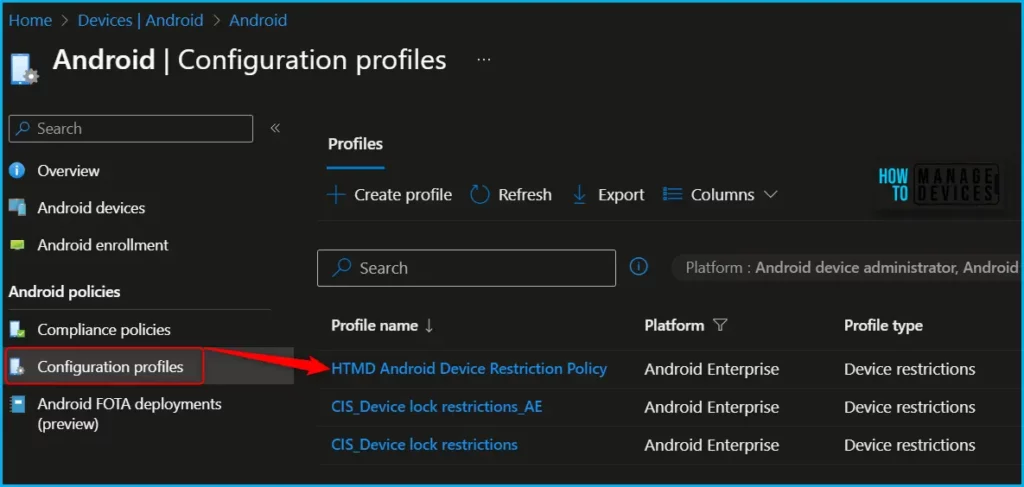
You can see the different categories of applied configuration in the configuration settings for Android Enterprise personally owned devices with a work profile (BYOD). The Work profile settings allow you to configure the policy to control contact sharing from Bluetooth.
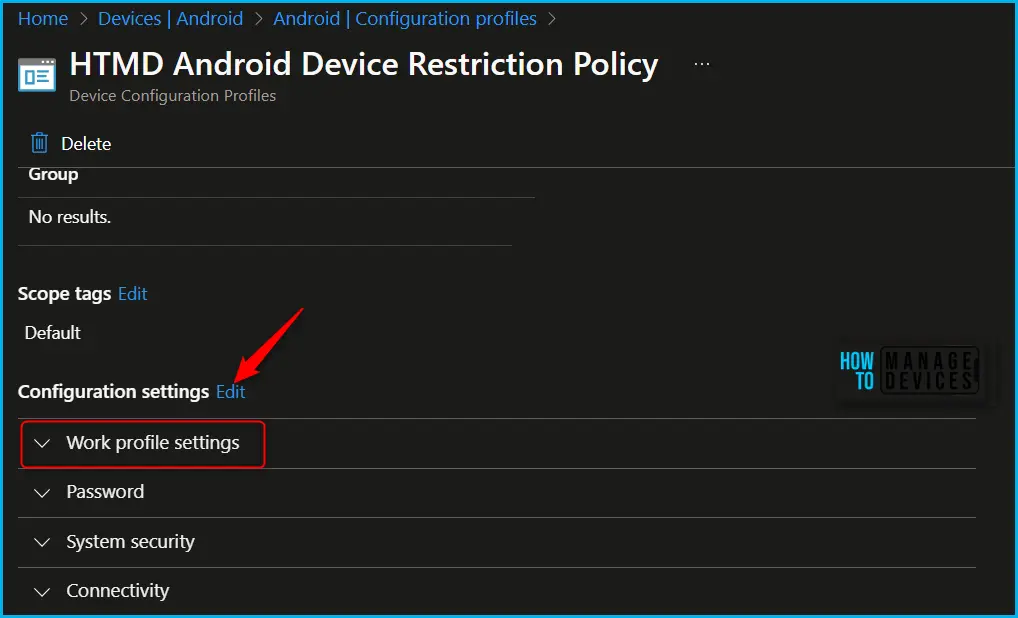
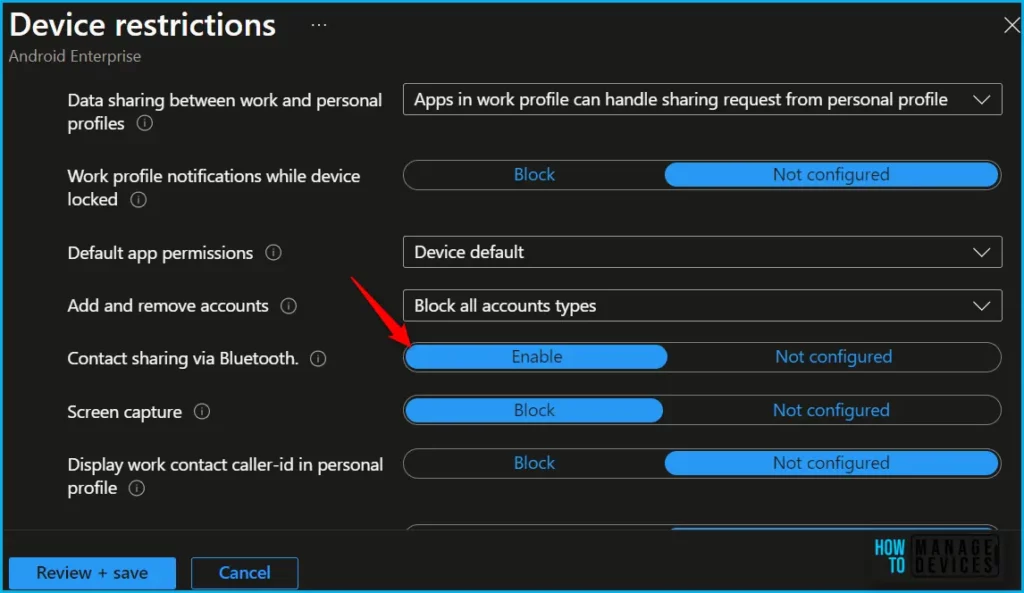
Here you can review the available restriction settings under Work profile settings. You can select and customize them as per our requirements. I will be toggling to Switch to enable sharing work profile contacts.
| Settings | Description |
|---|---|
| Contacts sharing via Bluetooth | Enable allows sharing and access to personally owned devices with a work profile contacts from another device, including a car, that’s paired using Bluetooth. |
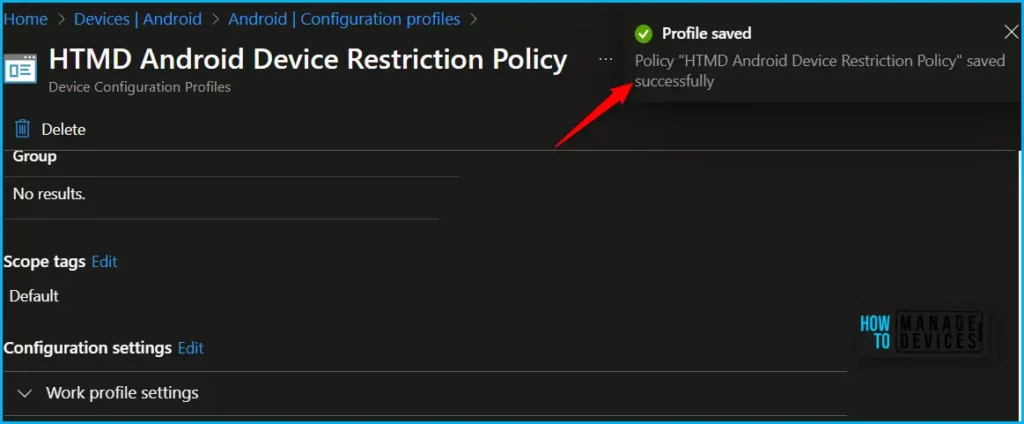
The next step is to review the setup policy and Save. A notification prompt will appear when you save the profile, Profile “HTMD Android Device Restriction Policy” saved successfully.
Once the configuration is applied to the device, You will share your work contacts on a personally owned profile if accessing from Bluetooth, allows sharing and access to personally owned devices with work profile contacts from another device, including a car, that’s paired using Bluetooth. Monitor the devices to ensure that the restriction is successfully enforced.
- Intune Company Portal App For Windows 11 Android | Install And Uninstall
- How To Add Android Managed Google Play App In Intune
We are on WhatsApp. To get the latest step-by-step guides and news updates, Join our Channel. Click here –HTMD WhatsApp.
Author
About Author – Jitesh, Microsoft MVP, has over six years of working experience in the IT Industry. He writes and shares his experiences related to Microsoft device management technologies and IT Infrastructure management. His primary focus is Windows 10/11 Deployment solution with Configuration Manager, Microsoft Deployment Toolkit (MDT), and Microsoft Intune.

Discussion