






Intune App Protection Policies for Android iOS Devices
Let’s check how to enable Intune App Protection Policies for Android and iOS devices. The video below provides more details and an end-user experience. The latest post is available for MAM policies: Step-by-Step Procedure to Create App Protection Policies for iOS/iPadOS in Intune.
Microsoft Intune supports MAM without enrollment (MAM WE) and Conditional Access policies for Android devices. With Intune, there are two types of management options for Android devices.
The first is the traditional way of MDM management, and the second is the light management of apps installed on Android devices via Intune. The previous post discussed the Android MDM management options and end-user experience.
In this post, you will find all the details about Intune App Protection Policies for Android and iOS devices. These policies are essential for managing and securing apps on mobile devices, ensuring that corporate data remains protected even when accessed from personal devices.

- How to Create App Protection Policies for Windows MAM Devices
- Intune create Conditional Access Policies for Windows MAM Devices
- Multiple Identity Support for Intune MAM Policies
- Intune MAM for Personal Windows Devices is now Generally Available
- How to Publish new iOS apps in Intune
- Enroll iOS/iPadOS Devices in Intune Step-by-Step Guide
- List of Supported Intune Application Types
Table of Contents
Intune MAM without Enrollment along with CA Android Devices
To apply Intune App Protection Policies (APP) effectively, the applications must support these policies. Most Microsoft 365 (M365) applications, such as Outlook, Word, and OneDrive, are compatible with App Protection Policies. These policies help ensure that corporate data accessed through these apps remains secure.
Intune App Protection Policies for Android iOS Devices
Mobile Application Management (MAM) Without Enrollment (WE) is a lightweight management option for Android devices. This option has some advantages over full MDM management options.
For example, if a consultant’s device has already enrolled in a 3rd part EMM solution, but he wants to have access to the client’s corporate mail access on his mobile device for a very short period, then The “MAM WE” is the best option for that consultant. With MAM WE, Intune and Azure AD will ensure that corporate mail and other MAM-enabled applications are protected with MAM policies.
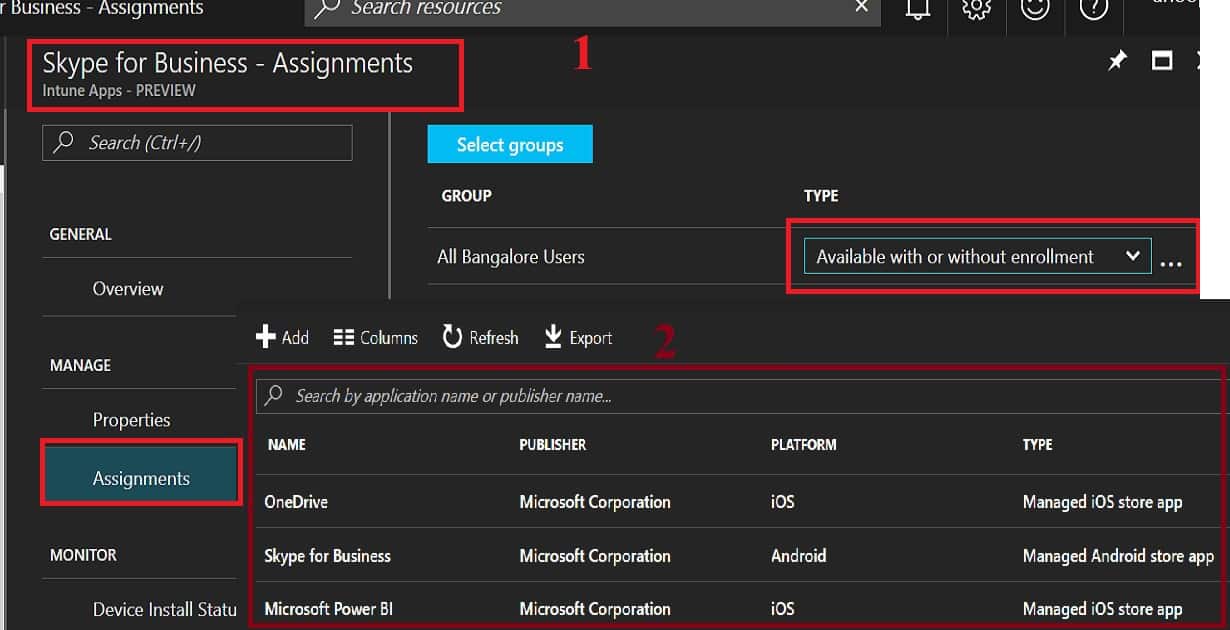
Intune—Mobile Apps—Apps—Skype for Business—Properties: In the following example, you can see that Android’s Skype for Business application has been deployed with a deployment type called “Available with or without enrollment.” So, the deployment type without enrollment is for MAM WE management.
The Intune “MAM WE” has a separate set of conditional access policies that differ from the MDM conditional access policy. So, you must take extra care when deploying both CA policies to the same user groups. I would avoid using the same user group for both policies, or you could use the exclude groups options.
I would avoid deploying the MDM CA policy to user groups whenever possible and deploy it to device groups. Otherwise, we should have a different MDM CA user group and a MAM WE CA user group with unique users in both groups, which will be tricky.
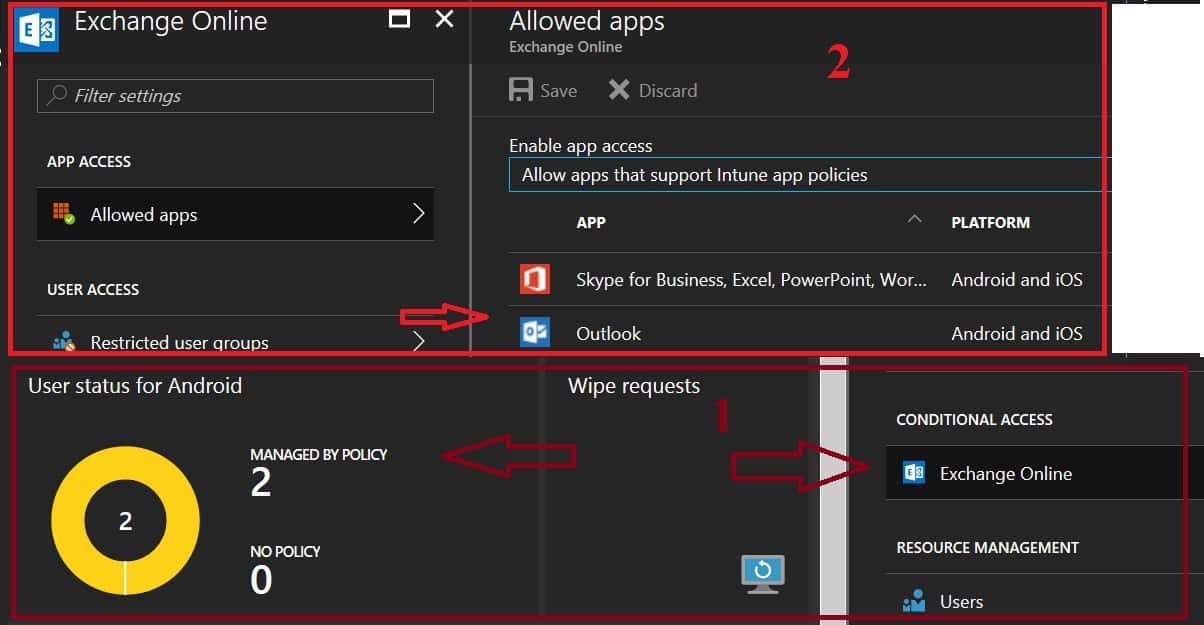
Each MAM-enabled application comes with application protection policies (MAM app protection). We need to deploy these app protection policies to MAM WE user groups. Remember, these types (MAM WE) of policies can’t be deployed to Device Groups.
With an app protection policy, you can restrict corporate data relocation and App data encryption. Creating app protection policies and deploying them to MAM WE user groups is critical.
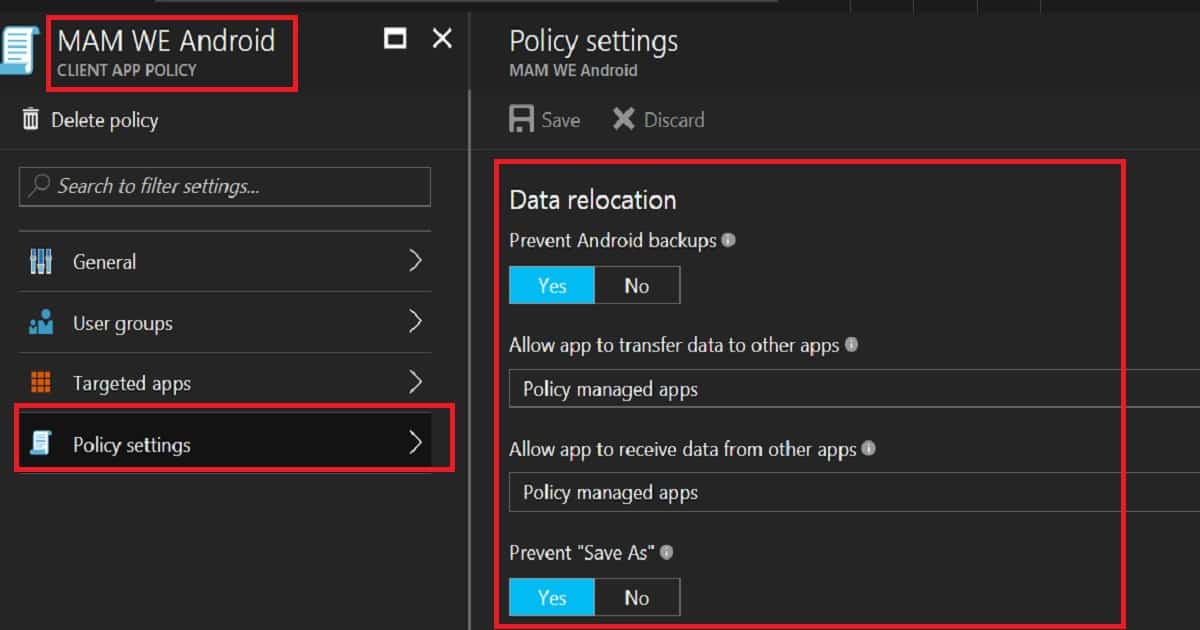
End-User Experience – How to Enable Intune MAM without Enrollment
The video here will provide the Intune MAM WE real-time end-user experience. How do you enable Intune MAM without Enrollment and Azure AD Conditional Access | Endpoint Manager?
We are on WhatsApp now. To get the latest step-by-step guides, news, and updates, Join our Channel. Click here. HTMD WhatsApp.
Author
Anoop C Nair is Microsoft MVP! He is a Device Management Admin with more than 20 years of experience (calculation done in 2021) in IT. He is a Blogger, Speaker, and Local User Group HTMD Community leader. His main focus is on Device Management technologies like SCCM 2012, Current Branch, and Intune. He writes about ConfigMgr, Windows 11, Windows 10, Azure AD, Microsoft Intune, Windows 365, AVD, etc.


Can you enforce MFA for MAM WE without also imposing it to MDM users? For example, if we want to enable MAM for specific apps such that users who are no enrolled with Intune can access these apps but require MFA for extra protection, where users that are enrolled are not required MFA – is this possible?
StaffI think, this possible with different conditional access policies in new Azure Portal
Nice blog!
How can the applications be deployed on to the user device without enrollment? We are considering using Mobile Center Azure for this. For testing purpose can we side load the application as well? If so, do we still need to upload the app to Intune to assign the application with specific profile?
I this article – https://docs.microsoft.com/en-us/intune-classic/deploy-use/protect-app-data-using-mobile-app-management-policies-with-microsoft-intune
they mention “you can’t deploy apps to the device. The user has to get the apps from the store.” Can this be a private store?
How do you deploy MDM CA to device groups?
found it, but that is not applicable when using Intune hybrid. How can I use MAM CA and MDM CA when using Intune hybrid?
StaffMAM CA or MDM CA – Are you looking for MAM CA and MDM CA for domain joined Windows 10 devices?
If so, we should have Domain Join option enabled in Azure CA. And also, Azure AD registration enabled (Write back) for domain joined devices. Also, there is a AAD connect dependency.
https://docs.microsoft.com/en-gb/azure/active-directory/device-management-hybrid-azuread-joined-devices-setup
Hi,
Can I use CA for Users with Azure Ad Basic and Intune Direct license?
StaffI think CA is available only for AAD Premium license
MAM-WE will be support to Windows mobile devices also??
As we are using MFA via conditional access.
StaffI don’t whether it supports Windows mobile devices. MAM-WE for Windows is Windows Information Protection (WIP). I don’t whether WIP is supported for Windows mobile devices…I will try to check and post here
Do we need to set a MDM authority to use MAM-WE and conditional access.
If not, how will Intune know which user has installed an app that need to be managed.
StaffYes I think
You had said “I would avoid deploying MDM CA policy to user groups whenever possible rather. I would deploy the MDM CA policy to device groups. Otherwise, we should have a different MDM CA user group and a MAM WE CA user group with unique users in both groups, which will be tricky.”
I was told that we need to apply CA for user group only and you can use filter now for any device specific things. I have tried to apply for a dynamic device group but it did not work.