


Skip to content
Enable Notification for SCCM Package Deployment

Enable Notification for SCCM Package Deployment

Written By Jitesh Kumar
Last Updated June 29, 2022
Posted In SCCM
SHARE

In this post, you will learn how to enable notification for SCCM Package Deployment. The Configuration Manager can display notifications to users for the package deployment, and You can control many of these behaviors through package properties.

In some scenarios, you want the user to notify that the package program is available for the deployment, downloading, and installation progress, which generally pops a window to show you a notification when the package is triggered from the Software Center.

By default, the notifications for the package program are suppressed. The notification for a new program won’t be available, and the toast notifications are hidden on client computers.

Starting in SCCM version 2203, You can add custom icons for packages. These icons appear in Software Center when you deploy the Packages. Instead of a default icon, a custom icon can improve the user experience to identify the software better. Check details Set SCCM Software Center Icon for Task Sequences Packages.

Patch My PC

You can use PowerShell cmdlets to automate the package creation and deployment process with Configuration Manager, similar to using SCCM Console. This post helps the PowerShell enthusiast to start working on the PowerShell scripting solution for SCCM Package creation process.

Enable Notification for SCCM Package Program

Let’s follow the below steps to enable program notifications for the SCCM package –

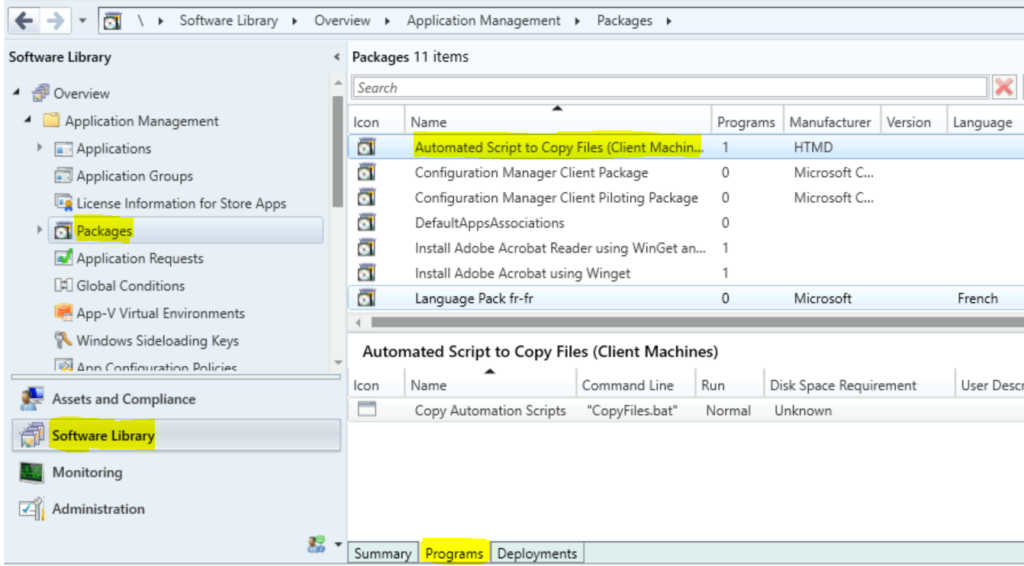
  • Launch the SCCM console, Navigate to Software Library > Application Management > Packages.
  • Select an existing package in the Packages node and then click Programs.
Select SCCM Package - Enable Notification for SCCM Package Deployment 1
Select SCCM Package – Enable Notification for SCCM Package Deployment 1

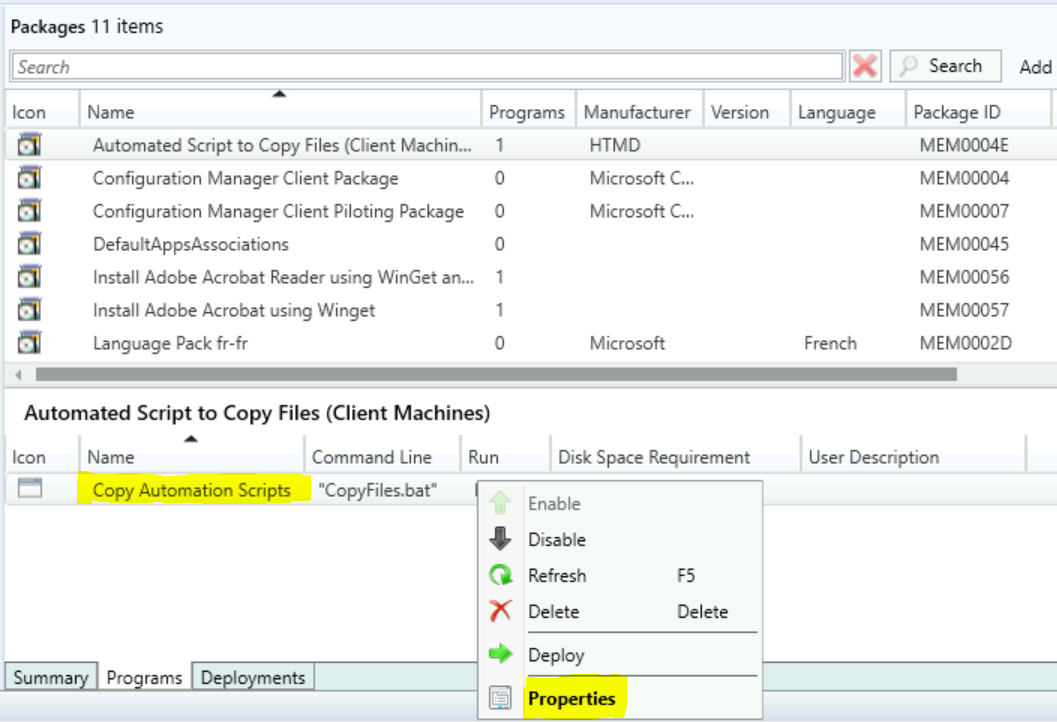
Let’s see how you can change the Maximum Run Time for a Program. Right-click on the program you created and select Properties.
Select SCCM Package Properties - Enable Notification for SCCM Package Deployment 2
Select SCCM Package Properties – Enable Notification for SCCM Package Deployment 2

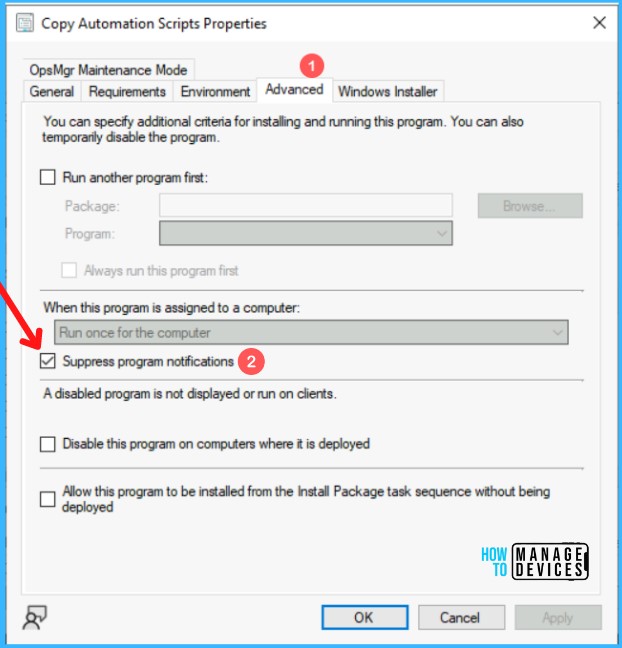
In Package Programs properties, Move to the Advanced tab to configure the behavior of the programs.

Uncheck the option Suppress program notifications. By default, this option is checked. Click Apply and Ok to save the changes done to the package.
Suppress Program Notifications - Enable Notification for SCCM Package Deployment 3
Suppress Program Notifications – Enable Notification for SCCM Package Deployment 3

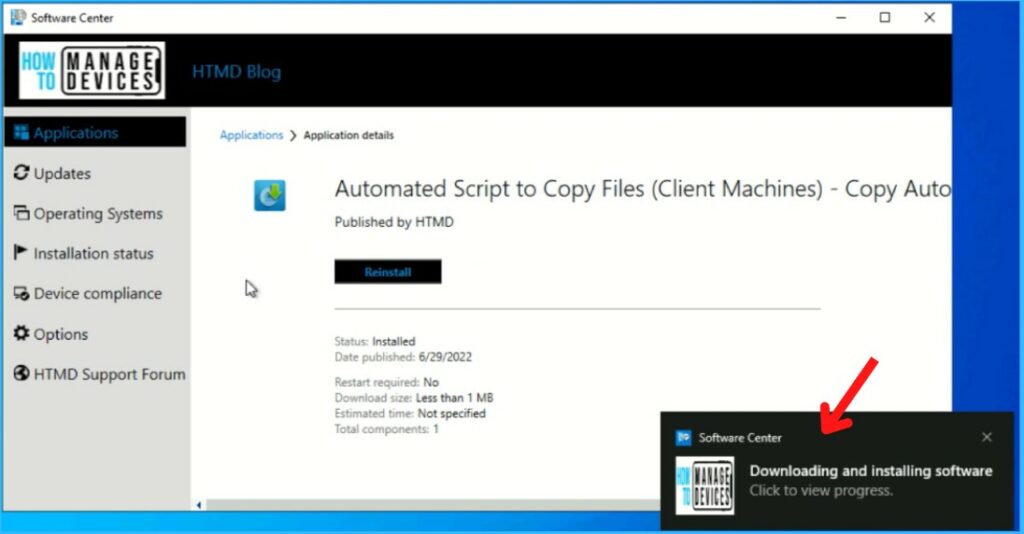
Once you have done this, you will experience the notifications appearing for downloading and installing progress. However, you still visit the software center and check the available deployed package.

Note: You can follow the above steps, leave the default option, and refresh the deployment. Suppose you do not want to hide the SCCM Package Deployment notifications.

Software Center Installation Progress - Enable Notification for SCCM Package Deployment 4
Software Center Installation Progress – Enable Notification for SCCM Package Deployment 4

Author

Written by

Jitesh has over 5 years of working experience in the IT Industry. He writes and shares his experiences related to Microsoft device management technologies and IT Infrastructure management. His primary focus area is Windows 10 Deployment solution with Configuration Manager, Microsoft Deployment Toolkit (MDT), and Microsoft Intune.

Discussion

Join the discussion

Your email address will not be published. Required fields are marked *

Related guides

Intune

Windows 11 KB5101650 KB5099414 July 2026 Patch and 3 Zero Day Vulnerabilities and 570 Flaws

Key Takeaways Windows 11 KB5101650 KB5099414 July 2026 Patch and 3 Zero Day Vulnerabilities and 570 Flaws! In the July 2026 Patch, Microsoft introduced new features designed to improve the overall Windows experience. The update adds enhancements to Windows Update for more flexible update management and introduces Point-in-Time Restore, providing an additional recovery option for […]

AC Anoop C Nair 9 min read
Intune

2026 June KB5094126 KB5093998 Windows 11 Patch | 3 Zero Day Vulnerabilities and 200 Flaws

Key Takeaways 2026 June KB5094126 KB5093998 Windows 11 Patch | 3 Zero Day Vulnerabilities and 200 Flaws! The June 2026 Windows 11 Patch Tuesday update brings several improvements to File Explorer. It adds support for additional archive formats, including UU, CPIO, XAR, and NuGet Packages (NUPKG). The update also preserves View and Sort preferences in […]

AC Anoop C Nair 10 min read
Intune

2026 May KB5089549 KB5087420 Windows 11 Patch | 0 Zero Day Vulnerabilities and 120 Flaws

Key Takeaways The Windows 11 May 2026 Patch KB5089549 KB5087420 Update brings important security fixes, performance improvements, and reliability enhancements across the operating system. The update introduces new features such as Xbox Mode for gaming, File Explorer improvements, enhanced input and sharing experiences, better taskbar and Windows Hello reliability, and additional enterprise management capabilities for […]

AC Anoop C Nair 8 min read
SCCM

ConfigMgr 2603 Introduces New Early Update Enrollment Process

Key Takeaways In this post we are discussing the ConfigMgr 2603 Introduces New Early Update Enrollment Process. Microsoft has officially released Configuration Manager version 2603 to the Early Update Ring, giving organizations an opportunity to test upcoming improvements before the global production rollout. The release is targeted at enterprises running ConfigMgr version 2409 or later […]

AC Anoop C Nair 3 min read


