






Latest Edge Browser Bug Breaks Group Policy Management
Let’s check the news on the latest Edge browser bug that breaks the Group Policy Management of the browser. This bug is affecting the latest versions of different channels of the MS Edge browser release.
Steven Kister has shared this information on Twitter. Other reports also show that Group Policy settings for the browser are getting removed after every GPUPDATE. This impacts AD Domain Joined machines running Edge and being managed via Group Policy.
I have not seen any reports confirming the issue is impacting Windows CSP policy deployments via Intune Settings Catalog. However, it’s worth testing if you have already noticed this.
Latest Update (30th June) from Eric Lawrence Microsoft “This issue is caused by a race condition; its reproducibility will vary depending upon how short the time gap is between old policies being deleted from the registry and new policies being written. The visibility of the problem also varies– only policies that support Dynamic Refresh are impacted, and many policies do not have side-effects that are immediately user-visible.”

Read More on the release of Fixing MS Edge Browser (1st July) -> FIX To Edge Browser Policy Issue Rollout Started for Official Build.
There are also reports that this bug is not only impacting MS Edge but other browsers such as Safari, Firefox, etc. This is a chromium bug and has nothing to do directly with the MS Edge browser and Microsoft.
- FIX IE Mode tabs not Responding Issue after installing June CU.
- Enable Internet Explorer IE Mode in Microsoft Edge
- Configure Enterprise Mode Site List to use IE Mode
- Disable Internet Explorer Using Intune Group Policy Browser App
Latest Edge Browser Bug
This Edge Browser Bug was first reported on June 22nd by one of the users on the Chromium bug portal. It was highlighted as Force-Installed Extensions (via Group Policy) are Re-installed on each Gpupdate issue.
You can check edge:\\policy and confirm whether you see all the policies are present or not. You can update the policies using the GPUPDATE command. Reopen the Edge browse policy page again to check. It will show the empty set of policies.
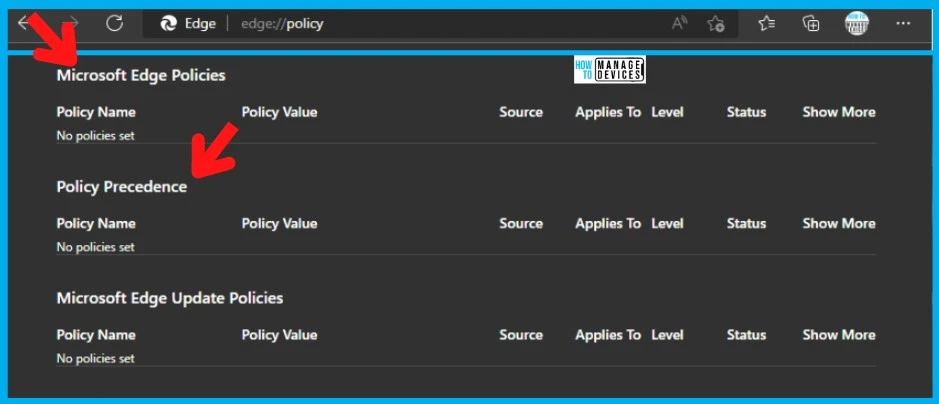
As per the Technet community report, this issue results in all the browser extensions being re-installed, and the centralized bookmarks are getting re-applied. As per the report by AlexandrosAP, this issue is impacting the end users because they see their extensions being re-installed on every gpupdate.
From an IT perspective, this makes the Edge browser not managed by enterprise policies, and users have full control of the browser. This Edge Browser Bug could create many security concerns.
FIX to Latest Edge Browser Bug Breaks Group Policy Management
Let’s discuss the fix to the latest Edge browser bug that breaks Group Policy Management. As mentioned above, this is a Chromium bug with nothing to do directly with the Edge browser. I think this bug also impacts all the other Chromium browsers.
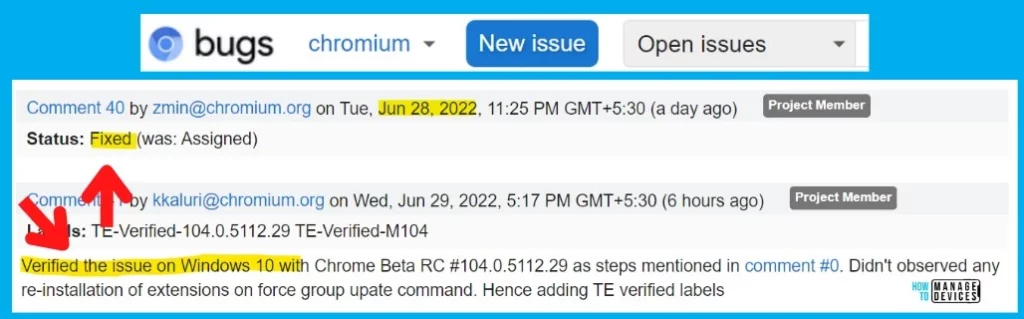
As per the latest update on the Chromium forum, the bug was already fixed and verified by the Chromium team on Jun 28 and 29, 2022. And another Chromium project member confirmed that the fix worked fine for Windows 10 devices.
Verified the issue on Windows 10 with Chrome Beta RC #104.0.5112.29 as steps mentioned in comment #0. Didn’t observed any re-installation of extensions on force group upate command. Hence adding TE verified labels
Chromium Project member’s comment
Microsoft Edge team is aware of this bug and is already working closely with the Chromium team to fix and deploy the fix to the Edge browser versions. The following is the comment from the Edge team. “The Edge team is aware of this issue and working to release a similar update as quickly as possible.”
Author
Anoop is Microsoft MVP! He is a Device Management Admin with more than 21 years of experience (calculation done in 2022) in IT. He is Blogger, Speaker, and Local User Group HTMD Community leader. His main focus is on Device Management technologies like SCCM 2012, Current Branch, and Intune. He writes about ConfigMgr, Windows 11, Windows 10, Azure AD, Microsoft Intune, Windows 365, AVD, etc.




Discussion