






Enable Patching for Server 2022 using SCCM
Let’s learn how to enable patching for Server 2022 using SCCM. I have noticed many organizations use ConfigMgr (a.k.a SCCM) to patch server 2022. You can use the SCCM software update configuration that you have already been using to enable Server 2022.
The Mainstream end date of Windows server 2022 is Oct 13, 2026, and the Extended End Date is Oct 14, 2031. You can have enough time to upgrade to server 2022 and keep it going until 2031. Even though I don’t know how many on-prem servers will be there by 2031! There is also a branding change here from Windows server to Microsoft Server?
SCCM Server In-place OS Upgrade To Server 2022 Guide HTMD Blog (anoopcnair.com)

You can even patch servers in the Azure cloud with SCCM; I have seen some organizations using SCCM for patching servers in the cloud. However, I think it’s not optimal to patch cloud servers with ConfigMgr. I recommend trying out Orchestration groups in SCCM for server patching!

AUM -> Azure Update Management Better?
I don’t know whether Azure Update Management (AUM) is better than SCCM or not. I think you are free to assess and select the best option for your organization. I’m sure even Microsoft will suggest the same.
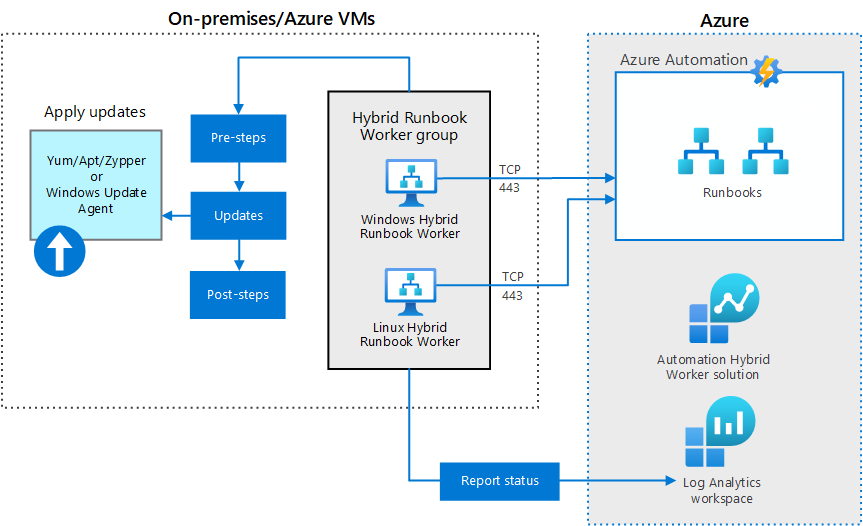
You can manage both LINUX and Windows servers with Azure Update Management (AUM) solution. AUM solution can be used for both on-prem and Azure servers. The very high-level diagram of Azure update management for on-prem and Azure VMs (Windows and Linux) is given below.
SCCM Server Patching Changed with Orchestration groups ?
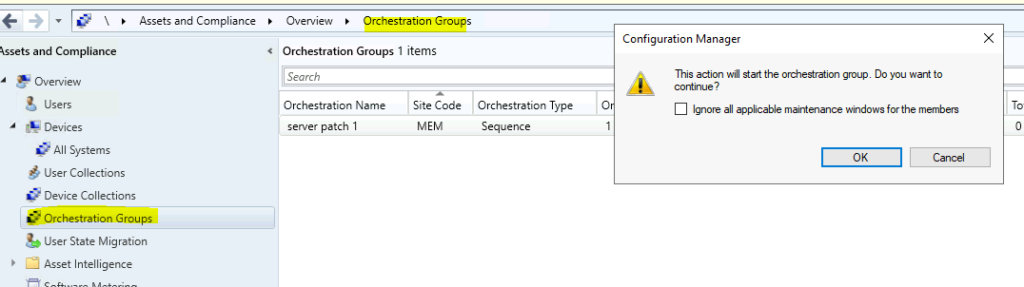
Do you think SCCM server patching is changed slightly, and you get more granularity with orchestration groups? Let me know in the comments. You might know what is Server groups and server groups are automatically updated to orchestration groups.
- SCCM Server Patching Tips Using Orchestration Groups Scripts
- SCCM Orchestration Group Setup Step by Step Guide for Server Patching
Enable Patching for Server 2022
You can now enable Server 2022 patching using SCCM 2107 or a later version. You can build Server 2022 using the SCCM task sequence with the latest versions of SCCM (2107 or above). You can also install SCCM server roles with server 2022 operating systems. Also, an in-place OS upgrade of the SCCM primary server to 2022 so possible if you want to upgrade server 2012 to server 2022.
Let’s learn how to enable the Windows server 2022 product category from the SCCM console. The same can be applied to WSUS as well. The prerequisite for server 2022 patching is similar to any other operating system patching process. Your management tool like SCCM should be ready with end to end patch management process.
Can’t find Windows server 2022 product category?
You can’t find the Server 2022 product category in SCCM and WSUS? Well, you are not alone. Even I got confused initially because of Microsoft’s name change or rebranding sage! Microsoft did that again!
Windows Server 2022 = Microsoft Server 21H2. Is this another branding change, or is Microsoft going to have Microsoft Linux servers as well! We will see!!
The new product category of the server 2022 operating system is given below. You will need to understand which are the products you are going to enable for your organization. The choice is yours depending on the requirements. However, I have enabled all three product categories for server 2022 on my SCCM primary server 2107.
- Microsoft Server Operating System 21H2
- Windows – server Version 21H2 and Later Servicing Drivers
- Window – Server version 21H2 and Later Upgrade & Servicing Drivers
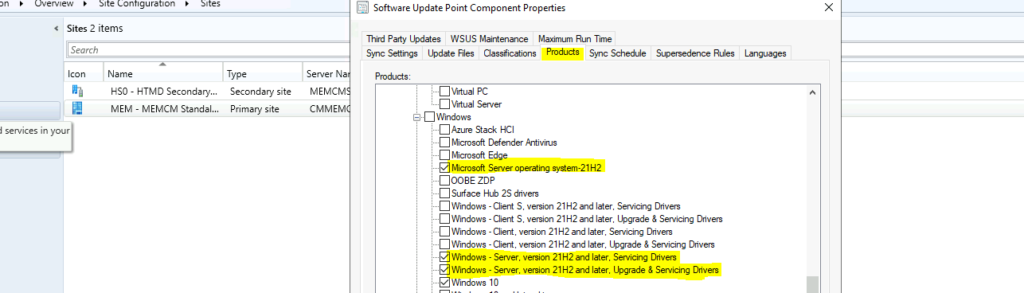
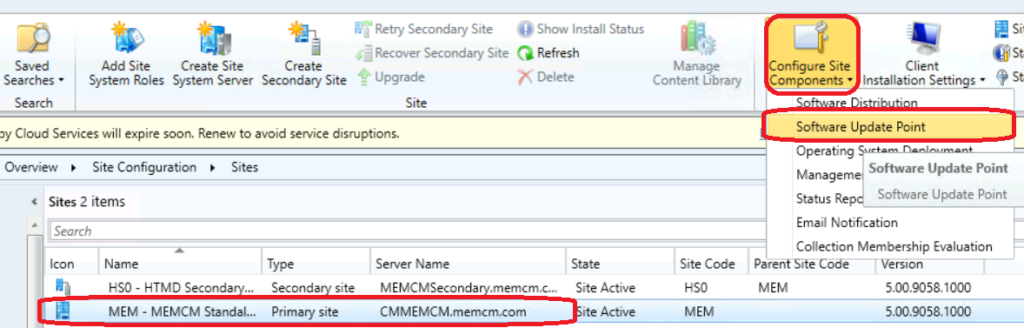
Let’s check how to enable the server operating system product category from SCCM 2107 or later.
- Launch the Configuration Manager console.
- Navigate to \Administration\Overview\Site Configuration\Sites.
- Select the primary server and click on Configure Site Component.
- Select Software Update Point from the drop-down menu.
- From Software Update point component properties – select Products tab.
- Scroll down to the Windows product listing.
- Select Windows Server 21H2 related product categories as mentioned above.
- Click OK to continue.
How to Make Server 2022 Patches available in SCCM?
Once you enable Windows Server 21H2 product categories in ConfigMgr, you will need to do magic sync as mentioned below to make the server 2022 patches available in SCCM. It would be best if you run software update synchronization. You have now already done enable Patching for Server 2022 from the above section.
- You can navigate to Software Library\Overview\Software Updates\All Software Updates
- Select on Synchronize Software Updates option.
- Click OK to to start the first sync.
I have seen sometimes you might need to complete the first sync mentioned above and initiate another sync to get the updates visible in the All Software Updates node in SCCM.
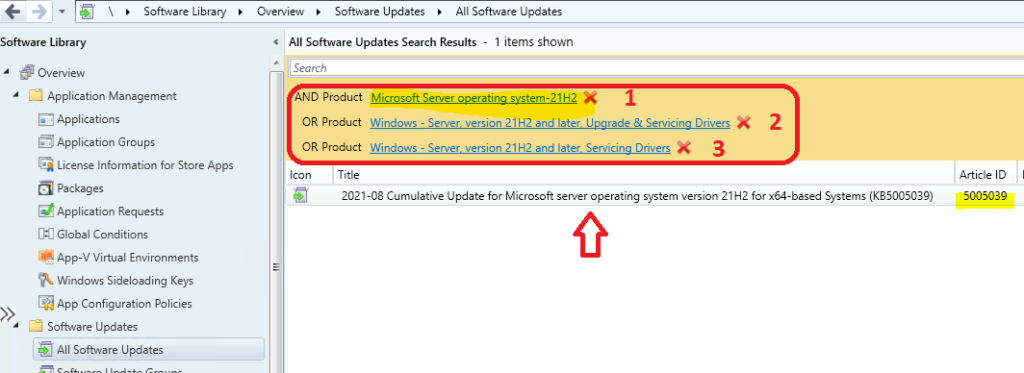
Once the sync is initiated, you can check the SCCM log file called WSYNCMGR.log to confirm the Microsoft server 2022 upgrade updates. You can try to filter the products you have just added to confirm whether the Microsoft Server 21H2 (2022) patches are available or not?
- Yes I can see 2021-08 Cumulative Update for Microsoft server operating system version 21H2 for x64-based Systems (KB5005039).
Author
Anoop is Microsoft MVP! He is a Solution Architect in enterprise client management with over 17 years of experience (calculation done in 2018). He is Blogger, Speaker, and Local User Group HTMD Community leader. His main focus is on Device Management technologies like SCCM 2012, Current Branch, and Intune. He writes about ConfigMgr, Windows 11, Windows 10, Azure AD, Microsoft Intune, Windows 365, AVD, etc…..…




You made a typo i think:
How to Make Server 2022 Patches available in SCCM?
Once you enable Windows Server ***20H2*** product categories in ConfigMgr, you will need to do magic sync as mentioned below to make the server 2022 patches available in SCCM.
StaffIndeed. Thank you. Fixed it now.