






FIX: SCCM Task Sequence Run Command line Create Process Failed Code 0X80070002
Let’s see how you can FIX SCCM Task Sequence Failed to run command line SCCM Task Sequence Run Command line Create Process Failed Code 0X80070002. This error code prompt when the task sequence fails to execute steps during operating system deployment with Configuration Manager.
The Run Command line Create Process Failed error 0X80070002 Translate SCCM Error Codes to Error “The system cannot find the file specified”. This is often seen when the specified command run in the task sequence step doesn’t execute the command.
You can learn how to add Run Command Line Step to SCCM Task Sequence. The command line added to the SCCM task sequence must be installed silently when you decide to add it during the OS deployment. This option helps SCCM Admin perform various operations easily during the operating system deployment with the Task sequence.
- SCCM OSD Task Sequence Troubleshooting Steps by Step Ultimate Guide SMSTS.log.
- SCCM OSD SMSTS Log File Reading Tips | ConfigMgr | MEMCM
Issue Summary – Create Process Failed Code 0X80070002
This error task sequence failed to Task Sequence Run Command line Create Process Failed.Code (0X80070002) appears during the operating system deployment when the SCCM task sequence tries to execute the added run command line steps to run the command.

It’s best to examine the SMSTS.log to troubleshoot OSD-related problems, learning to read SMSTS.log is very important, and being aware of the location of SMSTS log files for different phases of deployment. More you can explore SCCM OSD Task Sequence Troubleshooting Steps by Step Ultimate Guide SMSTS.log.
Task Sequence fails with the error message if the step is not selected continue on error. Here’s the highlight from the SMSTS.log –
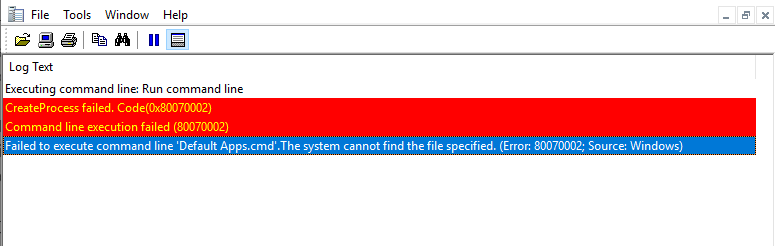
Executing command line: Run command line
CreateProcess failed. Code(0x80070002)
Command line execution failed (80070002)
Failed to execute command line 'Default Apps.cmd'.The system cannot find the file specified. (Error: 80070002; Source: Windows)
Install Software failed to run command line, hr=0x80070002
FIX – SCCM Task Sequence Run Command line Create Process Failed.Code 0X80070002
Let’s check the possible solution to fix the Run Command line Create Process Failed.Code 0X80070002.
- In the Configuration Manager console, go to the Software Library workspace, expand Operating Systems, and then select the Task Sequences node.
- In the Task Sequence list, select the deployed task sequence that you want to edit. Select Edit to modify.
- Locate the steps and validate the command line added to steps and syntax. If you have added any path inside or directly to the command line, Make sure to start with cmd /c and add double quote inside file name to avoid the space between them. For Example – cmd /c “Default Apps.bat”

Important – It’s always recommended to test the script manually before directly adding to the task sequence step. This will help you to perform a smooth deployment and ignore any further issues.
Author
About Author -> Jitesh has over 5 years of working experience in the IT Industry. He writes and shares his experiences related to Microsoft device management technologies and IT Infrastructure management. His primary focus area is Windows 10 Deployment solution with Configuration Manager, Microsoft Deployment Toolkit (MDT), and Microsoft Intune.




Discussion