





MS Entra Face Check Strengthens Identity Verification for Onboarding Access Requests and Account Recovery
Key Takeaways
- Microsoft expanded Face Check support across onboarding, access requests, and account recovery workflows.
- Face Check works with Microsoft Entra Verified ID for high-assurance identity verification.
- The system compares a live selfie with a trusted photo from a verified credential.
- Microsoft removed the per-user Face Check limit in Microsoft Entra Suite.
In this post, we are discussing MS Entra Face Check Strengthens Identity Verification for Onboarding Access Requests and Account Recovery. Microsoft recently announced support for Face Check with Microsoft Entra Verified ID to help organisations secure important identity verification scenarios such as employee onboarding, access requests, and account recovery. The feature is to provide stronger identity checks during high-risk moments, especially in remote and passwordless environments.
MS Entra Face Check Strengthens Identity Verification for Onboarding Access Requests and Account Recovery
The announcement comes as identity-based attacks continue to increase. Microsoft says attackers are now targeting identity verification processes instead of only focusing on passwords. To address this, Face Check helps confirm that the person requesting access is the real account owner by matching a live selfie with a trusted photo linked to a Verified ID credential.
- Non-Human Identities and Agent Identities Gain Access Package Support with Entra Identity Governance for AI Agents
- Understanding Entra Agentic AI in Security From Manual Work to Fully Autonomous Agents
- AI Agent Tool that Brings the Power of Microsoft Graph and MS Entra
What’s New in this Update
Microsoft recently expanded Face Check support in Microsoft Entra Verified ID to help organisations secure onboarding, access requests, and self-service account recovery workflows. The company removed the per-user Face Check limit in Microsoft Entra Suite, making it easier to deploy the feature across more users and scenarios. Microsoft also announced the general availability of verified account recovery, allowing users to recover accounts using government-issued ID verification and Face Check.
- Additionally, a new cost-saving calculator was introduced to help organisations estimate help desk savings from self-service recovery.
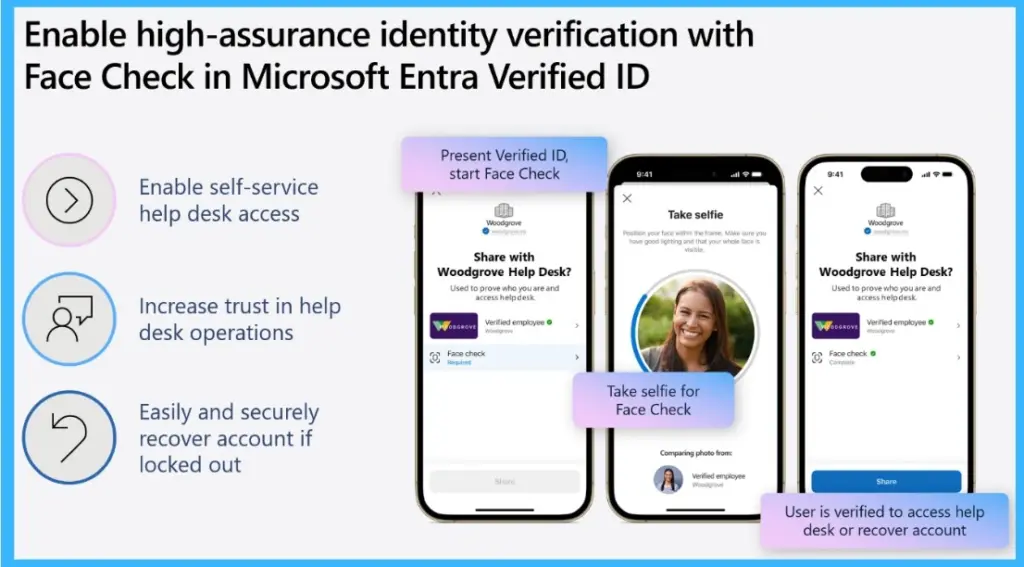
- It enables self-service help desk access
- Increase trust in help desk operations
- Easily and securely recover the account if locked out
| Feature | What’s New |
|---|---|
| Face Check Expansion | Supports onboarding, access requests, and account recovery scenarios |
| Removed User Limit | Microsoft removed the per‑user Face Check limit in Microsoft Entra Suite |
| Verified Account Recovery | Now generally available for passwordless and locked‑out users |
| Cost Saving Calculator | New calculator in Microsoft Entra ID to estimate help desk savings |
Know what Face Check is
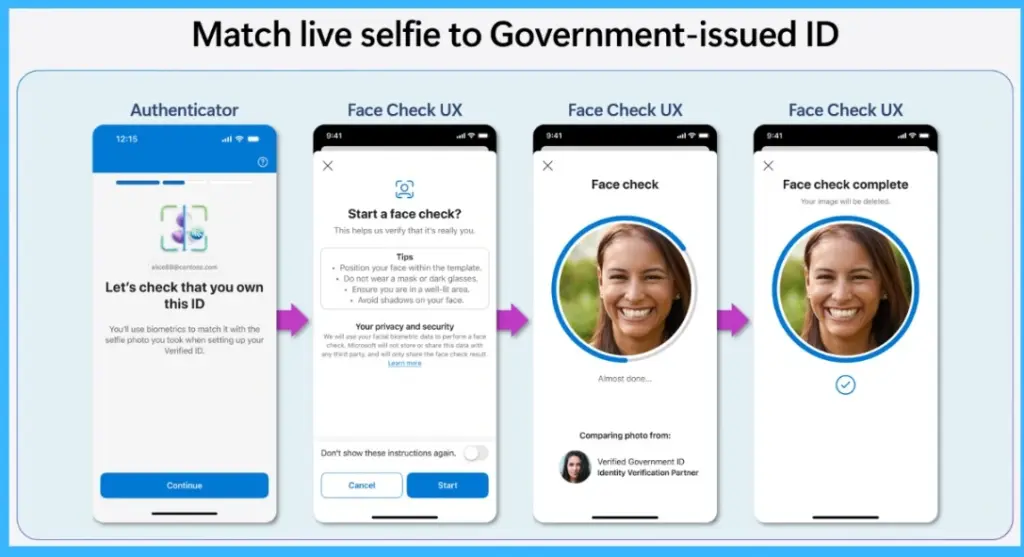
Face Check is a facial verification capability in Microsoft Entra Verified ID that helps organizations confirm a user’s identity during sensitive actions. It works by checking whether a live selfie matches the trusted image connected to a verified credential. Microsoft says the process is designed to improve security while keeping biometric information private.

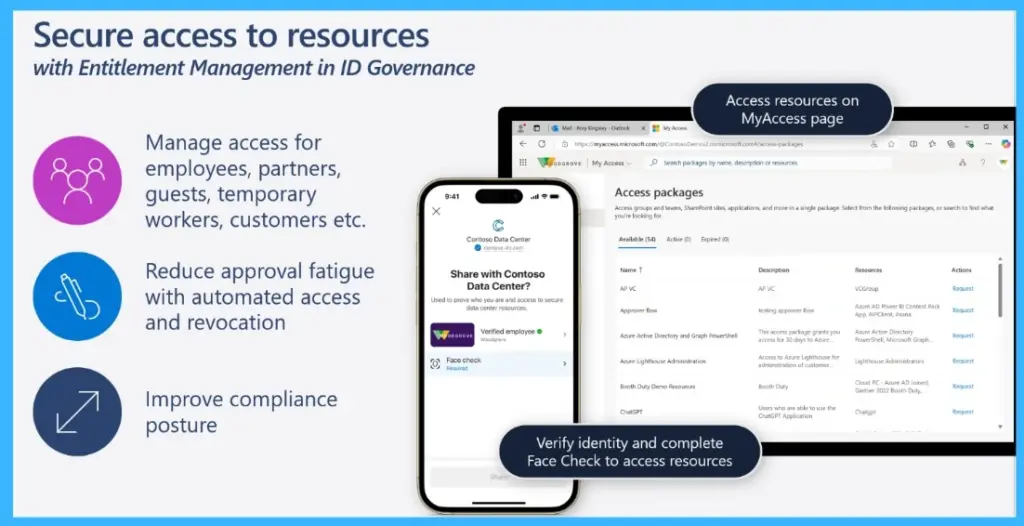
- Manage access for employees, partners, guests, temporary workers, customers etc.
- Reduce approval fatigue with automated access and revocation
- Improve compliance posture
Instant Identity Onboarding
Microsoft says organisations can use Face Check to improve identity verification for remote onboarding. During onboarding, new employees can verify themselves using government-issued identity documents and Verified ID credentials before receiving access to company systems. This helps businesses onboard remote workers more securely without requiring in-person verification.
Face Check for Trusted Access
Face Check can also add stronger verification when employees request access to important business applications or sensitive resources. By combining Verified ID verification with Microsoft Entra entitlement management, organisations can confirm the requester’s identity before approving access, helping reduce the chances of impersonation or unauthorised requests.
High‑Assurance Recovery- Now Available
Microsoft has also made verified account recovery generally available for users who lose access to their authentication methods or passkeys. Instead of depending only on help desk support, users can verify their identity through approved identity verification partners and Face Check, then securely regain temporary access to reconfigure their sign-in methods.
Need Further Assistance or Have Technical Questions?
Join the LinkedIn Page and Telegram group to get the latest step-by-step guides and news updates. Join our Meetup Page to participate in User group meetings. Also, join the WhatsApp Community and the WhatsApp channel to get the latest news on Microsoft Technologies. We are there on Reddit as well.
Author
Anoop C Nair is a Workplace Technology solution architect with 25+ years of experience. Microsoft Certified Trainer. Microsoft MVP from 2015 onwards for consecutive 11+ years! He is a blogger, Speaker, and Founder of HTMD Community and HTMD Conference. His main focus is on Device Management technologies like Intune, Windows, and Cloud PC. He writes about technologies like Intune, SCCM, Windows, Cloud PC, Entra, and Microsoft Security.




Discussion