






How to use Entra Require App Protection Policy in Conditional Access for Secure Access
Hey there, Let’s discuss about enable the Require app protection policy setting in conditional access. The “Require app protection policy” setting in Conditional Access is a security feature designed to ensure that access to corporate resources is only granted through apps that have specific protection policies applied.
What is conditional access? yes, we all know that Conditional Access is a security feature in Microsoft Azure Active Directory (Azure AD) that allows organizations to enforce granular access controls based on specific conditions. It acts as a gatekeeper, ensuring that only authorized users, devices, and applications can access corporate resources, while protecting against potential threats.
It is typically applied to mobile apps to prevent unauthorized or insecure apps from accessing sensitive data. By enforcing this policy, organizations can reduce the risk of data breaches, ensure compliance, and protect corporate information from being accessed or leaked through unmanaged or unprotected applications.
It enforces policies that require additional verification steps or restrict access based on risk. Through this post we need to ensure that our Grant settings in Conditional Access are configured to use the “Require app protection policy” setting to enforce secure access to corporate resources.

Table of Contents
What is the Purpose of Require App Protection Policy?
It ensures that only apps with Intune App Protection Policies can access corporate data, and protects against data leakage by enforcing encryption, PIN requirements, and other security controls.
How to use Entra Require App Protection Policy in Conditional Access for Secure Access
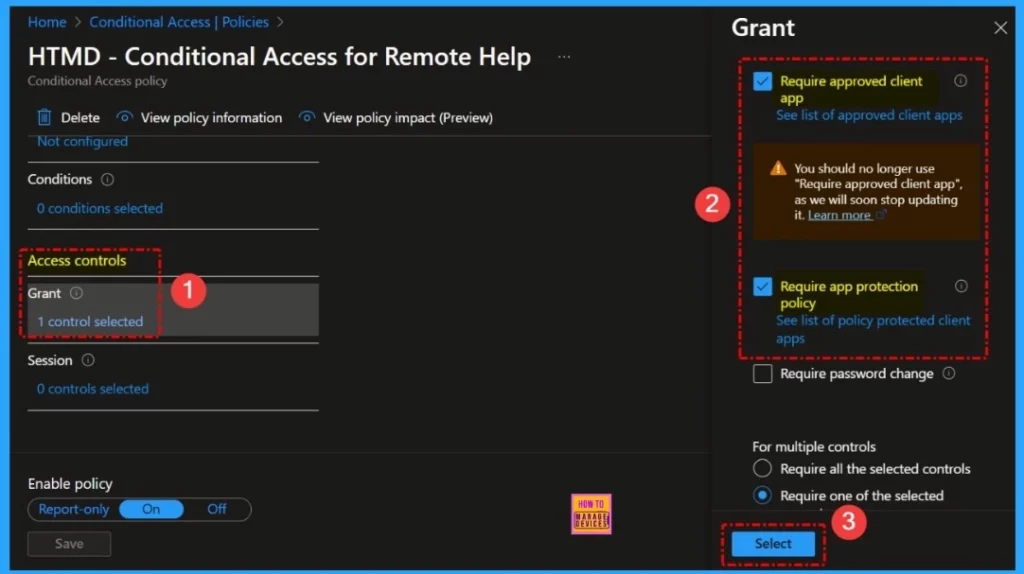
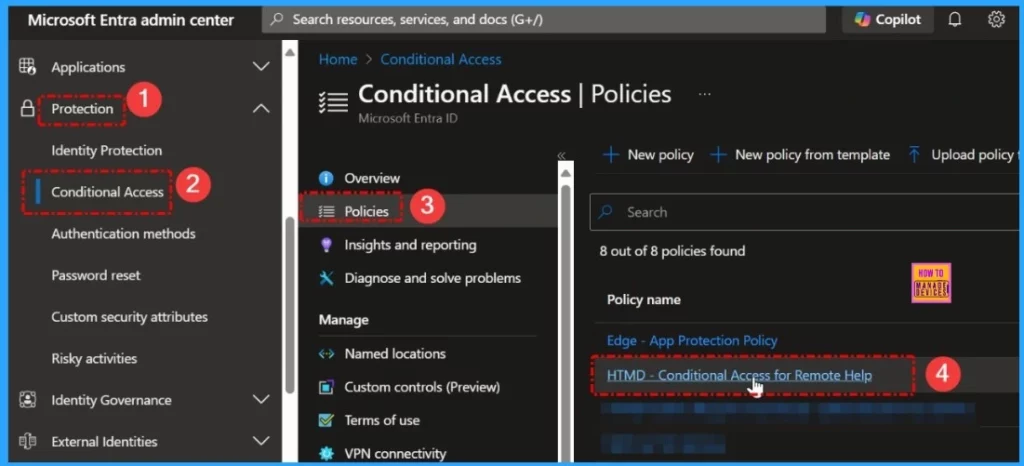
Sign in to the Microsoft Entra admin center as at least a Conditional Access Administrator. Browse to Protection > Conditional Access > Policies. Select a policy that uses the approved client app grant. Under Access controls > select Grant access. Then select Require approved client app and Require app protection policy.
| A Require Approved Client App | Require App Protection Policy |
|---|---|
| No longer enforced from March 2026. Only checks that the app supports app protection policies | Only allow access if the app supports app protection policies and an app protection policy is applied for the account. |
- Entra Conditional Access is Central to Secure Microsoft 365 – A Brief Analysis
- New SharePoint Agent Capabilities Complete Security Controls Conditional Access Authorization Labels etc
- Conditional Access Security Settings for Countries Location in Entra ID
For multiple controls select Require one of the selected controls. Confirm your settings and set the Enable policy to Report-only. Select Create to create to enable your policy.
| Catagory | Setting | Description | Example |
|---|---|---|---|
| Data Protection Encryption Ensures data is encrypted at rest and in transit. Require encryptions for all corporate data. | Encryption | Ensures data is encrypted at rest and in transit | Require encryption for all corporate data. |
Need Further Assistance or Have Technical Questions?
Join the LinkedIn Page and Telegram group to get the latest step-by-step guides and news updates. Join our Meetup Page to participate in User group meetings. Also, Join the WhatsApp Community to get the latest news on Microsoft Technologies. We are there on Reddit as well.
Resources
Author
Anoop C Nair has been Microsoft MVP for 10 consecutive years from 2015 onwards. He is a Workplace Solution Architect with more than 22+ years of experience in Workplace technologies. He is a Blogger, Speaker, and Local User Group Community leader. His primary focus is on Device Management technologies like SCCM and Intune. He writes about technologies like Intune, SCCM, Windows, Cloud PC, Windows, Entra, Microsoft Security, Career, etc.



Discussion