






Entra Source IP Anchoring with Global Secure Access to Improve the Security Management of SaaS Apps
Today, we are discussing Entra Source IP anchoring with Global Secure Access. As you all know, many organizations have used SaaS or the Line of Business to allow access from specific trusted locations. Source IP Anchoring is an essential feature for organizations using Global Secure Access.
With global secure access, it provides the best security features and improves user experience by keeping the source IP address. Although this may be challenging sometimes, the results are very effective for organizations. The user IP address must be safe with the Source IP Anchoring with Global Secure Access.
When traffic goes through a cloud-based security service, users needn’t worry. We all know how vital an IP address is for a user. The IP address helps the device communicate with the network, leading to the data going to the correct location.
As you know, security is an essential part of an organization. Using source IP Anchoring with Entra Global Secure Access is the best way to improve the security management of SaaS or the Line of Business. This post can look at a small overview of Source IP Anchoring with Global Secure Access.

What is an IP Address?
Entra Source IP Anchoring with Global Secure Access to Improve the Security Management of SaaS Apps
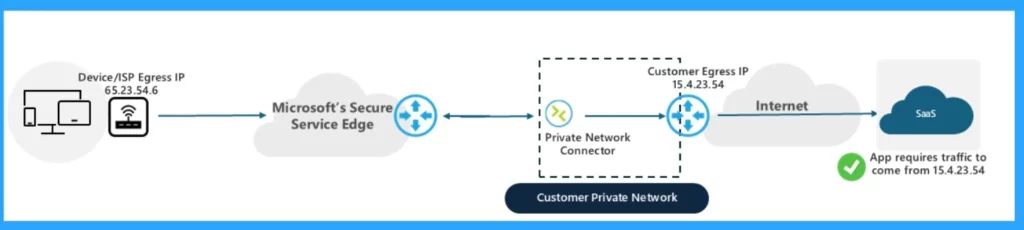
Above, we discussed an overall view of the Source IP anchoring with Global Secure Access. To make an application only accessible through a specific network, you can set it up with Microsoft Entra Private Access. This is useful when an application allows access with local credentials not linked to your identity provider.
- The application only allows connections from the IP address 15.4.23.54
- If a user tries to access the app, the global secure access finds the traffic.
- The traffic tunnels to the on-premises network using the Private Network Connector.
- The traffic uses the internet to reach out to the web application
- The application sees the connection originating from 15.4.23.54 and allows access.
- Microsoft Entra License Usage Insights Six-Month Trends Active Vs Guest Reporting And Copilot Suggestions
- What is Entra Global Secure Access?
- Entra ID Auth Methods WHfB Authenticator push Authenticator passwordless
- Authenticator passkey
- New Entra Phishing Resistant Passwordless Authentication | Zero-Trust Security Strategy | Explicit Verification
How to Configure Source IP Anchoring
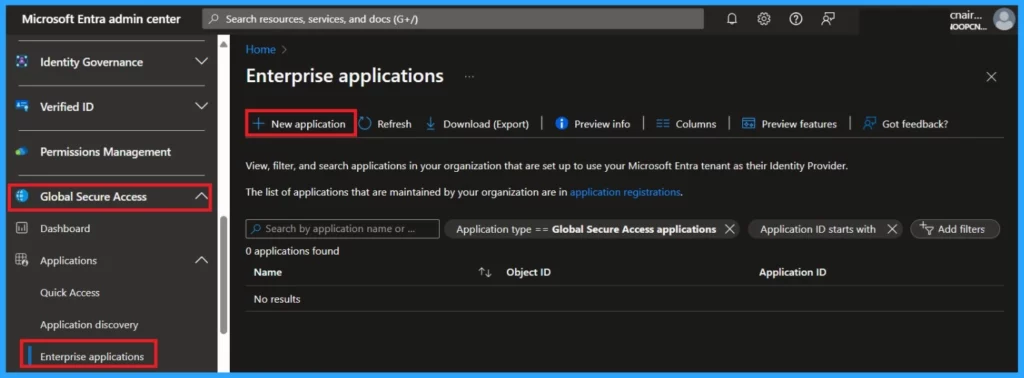
This is an easy step for organizations(users). First, you must log in to the Microsoft Entra admin center. In Entra, go to the Global secure access option; under Global secure access, you can select the Enterprise application option.
Click on the New Application Option. After that, you can name the application and select the Connector Group that acquires and routes the traffic.
- Select Add application segment.
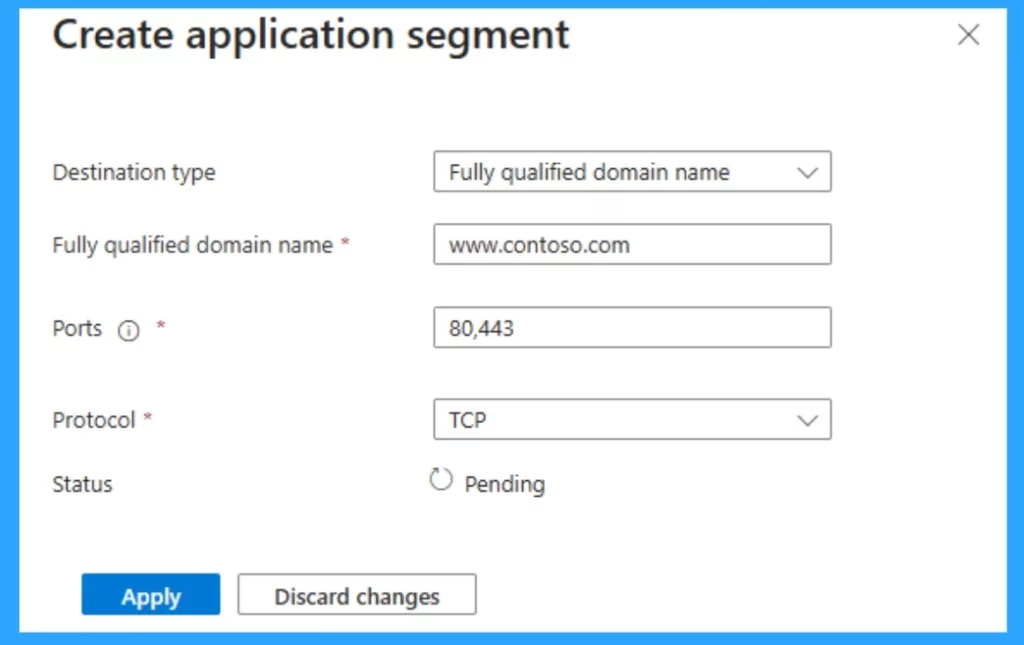
In the application segment, fill in the Destination type, Fully qualified domain name, ports, protocol and status options and click on apply. To assign users and groups to the application, navigate back to Enterprise applications and select the application you created.
- Then, select Users and Groups and Add a user/group.
- Select Users and Groups> None Selected.
- Select the users and groups you want to assign to this application. Select Select.
- Finally, click on the Assign
| Application Segment Options | Info |
|---|---|
| Destination type, | Select a Fully qualified domain name. |
| Fully qualified domain name | Enter the fully qualified domain name of the web application |
| Ports | If the application uses HTTP, enter 80. If the application uses HTTPS, enter 443. You might also enter both ports |
| Protocol | Select TCP. |
Need Further Assistance or Have Technical Questions?
Join the LinkedIn Page and Telegram group to get the latest step-by-step guides and news updates. Join our Meetup Page to participate in User group meetings. Also, Join the WhatsApp Community to get the latest news on Microsoft Technologies. We are there on Reddit as well.
Anoop C Nair has been Microsoft MVP from 2015 onwards for ten consecutive years! He is a Workplace Solution Architect with more than 22+ years of experience in Workplace technologies. He is also a Blogger, Speaker, and Local User Group Community leader. His primary focus is on Device Management technologies like SCCM and Intune. He writes about technologies like Intune, SCCM, Windows, Cloud PC, Windows, Entra, Microsoft Security, Career, etc.




Discussion