






Enable Entra Website SSO using Configuration Profiles for Edge Browser using Microsoft 365 Admin Center
Let’s discuss enable Entra Website SSO using Configuration Profiles for Edge Browser using Microsoft 365 Admin Center. The policy in Microsoft Edge controls whether non-Azure Active Directory (non-AAD) profiles can use single sign-on (SSO) to access work or school sites.
One of our articles guides creating Configuration Profiles in the Microsoft 365 Admin Center to manage Edge extensions and the Edge sidebar. These profiles allow you to control which extensions users can access and customize the sidebar across your organization.
Another article explains how to customize your organization’s branding using the Microsoft Edge management service. With this service, administrators can adjust and enhance the appearance of Microsoft Edge to match the organization’s branding, creating a more attractive and professional look across all users.
This post provides a simple guide on enabling the AADWebSiteSSOUsingThisProfileEnabled policy for Microsoft Edge using the Microsoft 365 Portal. This policy allows single sign-on (SSO) for work or school sites from non-Azure AD profiles in Edge, making it easier for users to access work resources without repeated sign-ins.

Table of Contents
What is the AADWebSiteSSOUsingThisProfileEnabled Policy?
What Versions of Microsoft Edge Support this Policy?
This policy is supported on Windows and macOS for Microsoft Edge versions 92 and later.
Enable Entra Website SSO using Configuration Profiles for Edge Browser
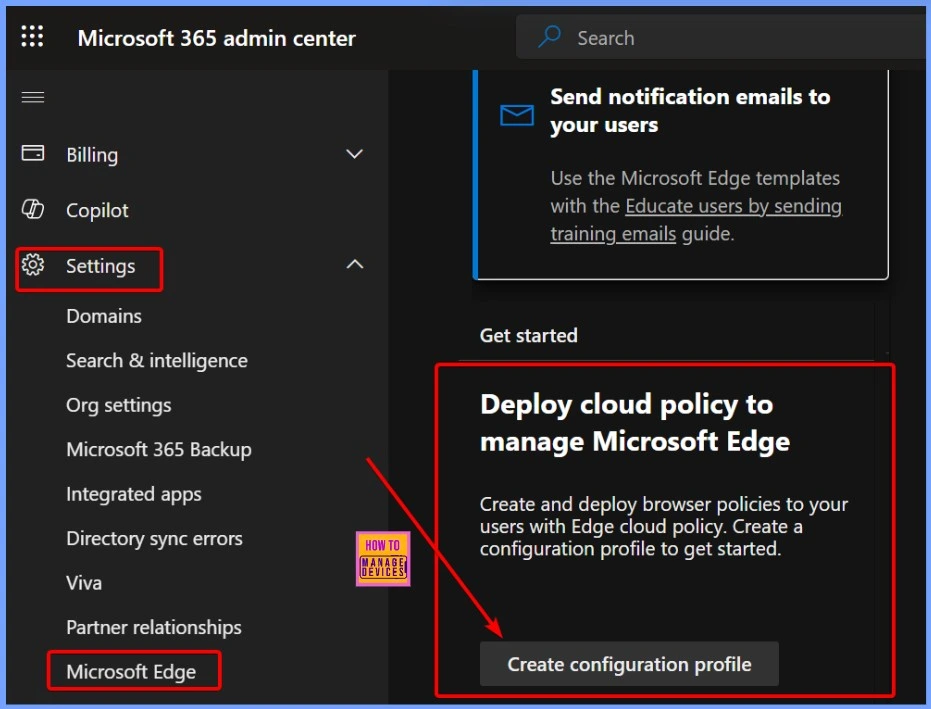
Open the Microsoft 365 Admin Center and sign in with your admin account. In the left navigation menu, go to Settings and select Microsoft Edge. Scroll down to the Get Started section to begin setting up Edge policies. Under the Deploy Cloud policy to manage Microsoft Edge section, click on Create configuration profiles.
- Enable or Disable Password Prompt for Autofill in the MS Edge Browser using Intune Policy
- Enable Disable MS Edge Browser Saving Passwords to Password Manager option using Intune
- How to Configure Microsoft Edge Favorites using Intune Configuration Profile Step-by-Step Guide
Configuration Policies for MS Edge
We created a configuration profile called HTMD Community in the Configuration Policies. To manage the Microsoft Edge policy, you can easily set up your configuration profile under the Deploy Cloud policy. Select the HTMD Community configuration profile, as shown in the screenshot below.
Read more about creating configuration profiles for edge extensions and sidebars in the Microsoft 365 Admin Center.
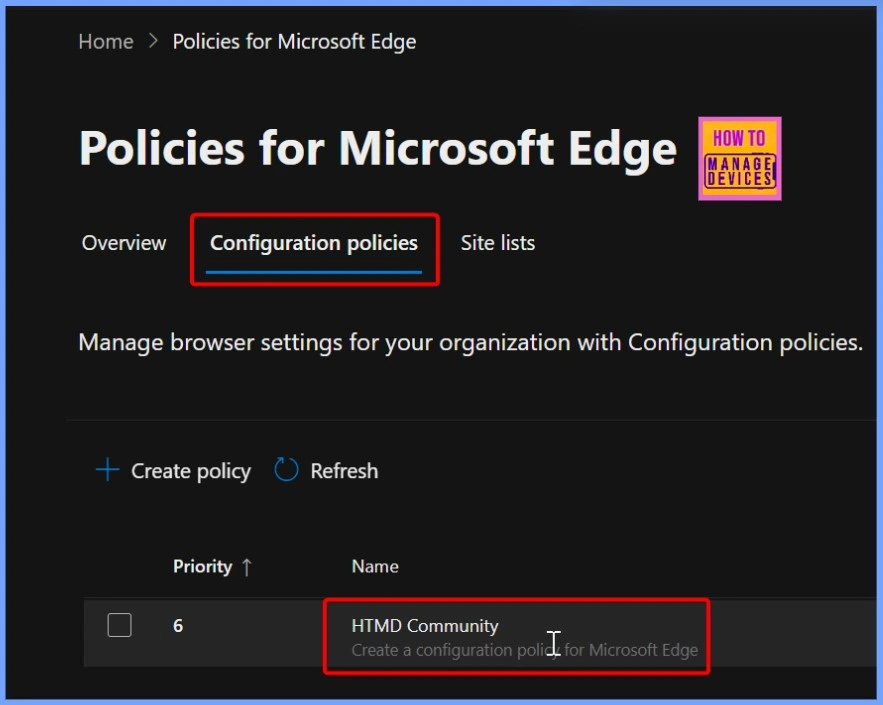
Created HTMD Community as Configuration Profile
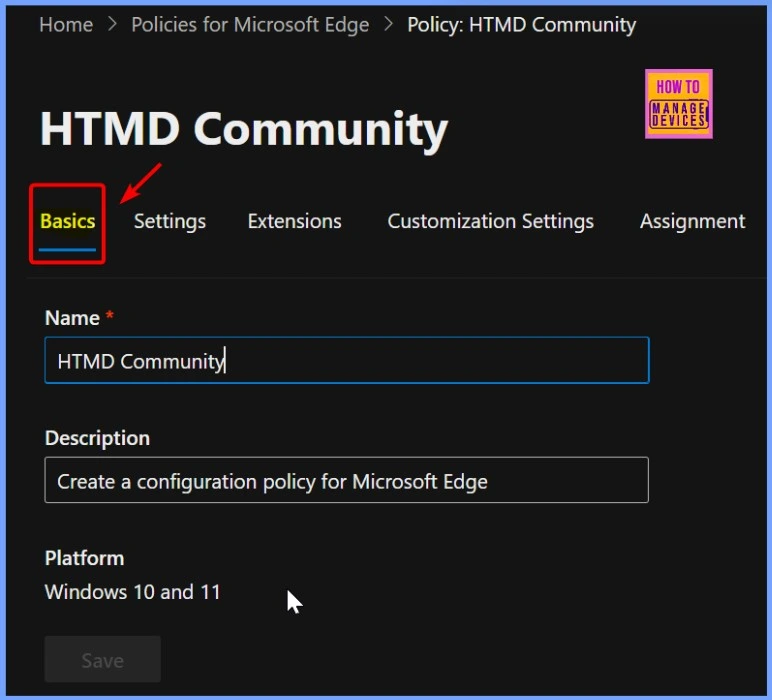
The Basic tab is crucial for setting up a profile in Microsoft Edge. In this tab, you can name and describe your profile. The platform is automatically selected for you, so you don’t need to worry about that.
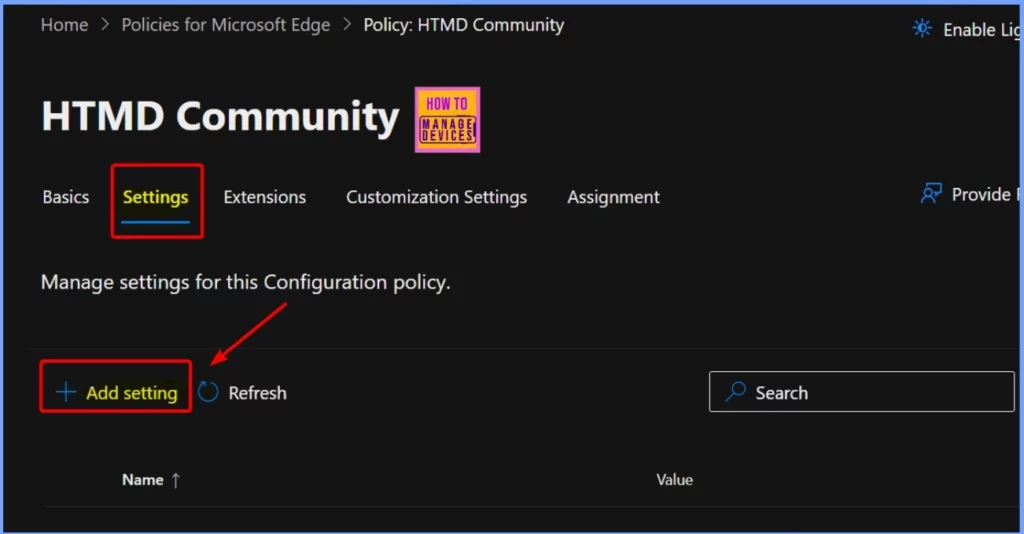
How to Add AADWebSiteSSOUsingThisProfileEnabled Edge Settings
You can easily create new settings in the Settings tab by clicking the +Add Settings button. This is the second tab, and the window below will provide more details to help you set up your configurations.
- Importance to Add Name for MS Edge Browser Windows
- MS Edge Browser Automatic Options to Organize Tabs Stay Organized with Tab Groups
- The New Magnify Feature on Microsoft Edge Browser
- Disable URL Copy Paste Feature in Microsoft Edge
How to Enable AADWebSiteSSOUsingThisProfileEnabled Edge Settings
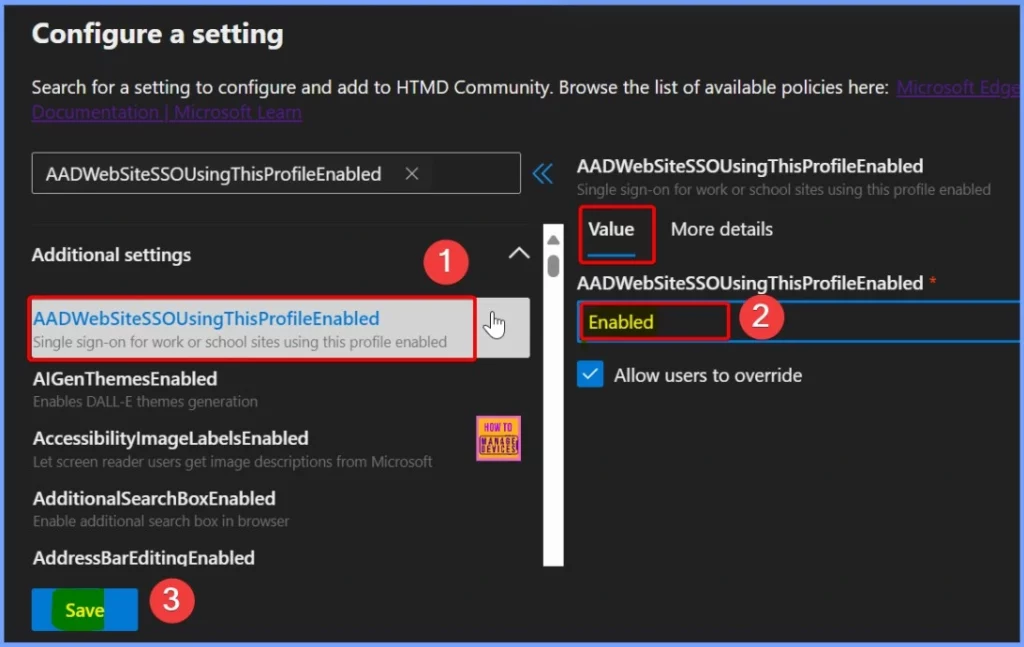
In the Configure a Setting window, you can search through the list of available policies to find a specific setting called AADWebSiteSSOUsingThisProfileEnabled. This setting is located under Additional Settings, as shown below.
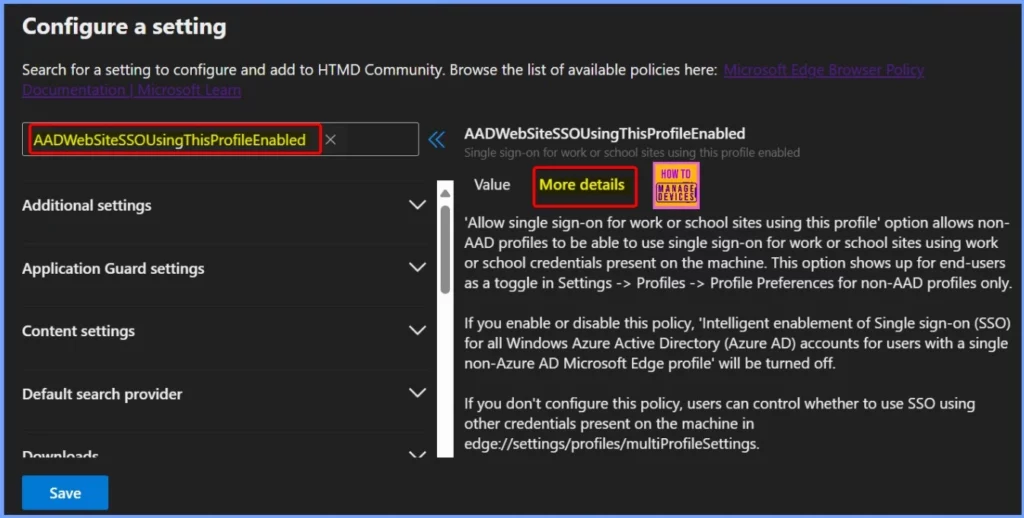
Below are two tabs: Value and More Details. The Value tab lets you choose whether to Enable or Disable the setting. The More Details tab provides a detailed explanation of what the AADWebSiteSSOUsingThisProfileEnabled policy does.
| Settings | How to Enable this Settings |
|---|---|
| AADWebSiteSSOUsingThisProfileEnabled | Select the Enable option from the Drop Down arrow |
The “Allow single sign-on for work or school sites using this profile” option allows non-AAD profiles to use single sign-on for work or school sites using work or school credentials present on the machine. This option appears to end-users as a toggle in Settings -> Profiles -> Profile Preferences for non-AAD profiles only.
If you turn this policy on or off, ‘Intelligent enablement of Single sign-on (SSO) for all Windows Azure Active Directory (Azure AD) accounts for users with a single non-Azure AD Microsoft Edge profile’ will be turned off.
If you don’t configure this policy, users can control whether to use SSO using other credentials present on the machine in edge://settings/profiles/multiProfileSettings.
AADWebSiteSSOUsingThisProfileEnabled
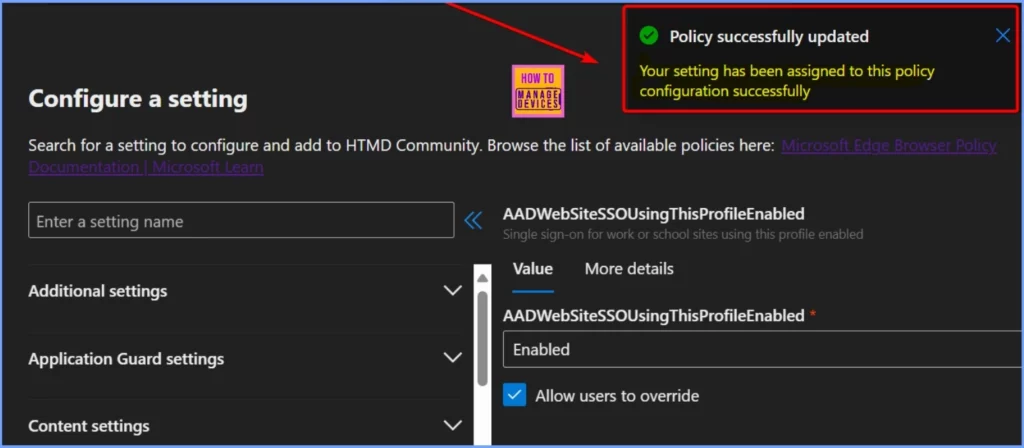
The screenshot below shows that the AADWebSiteSSOUsingThisProfileEnabled setting has been successfully added to this policy configuration. The Value is Enabled.
Extensions
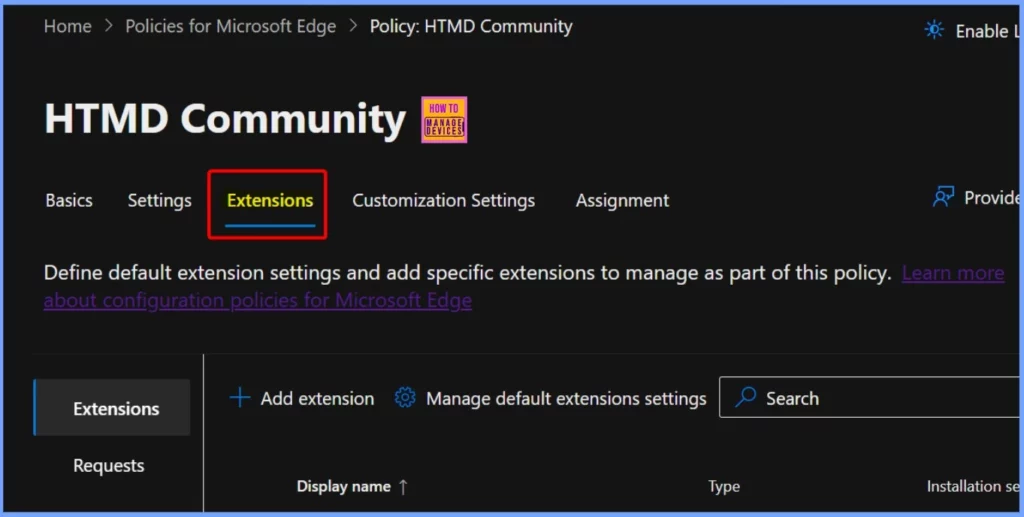
You can easily manage extension settings for a profile in Microsoft Edge. Under Extensions, you can see two menus, such as the Extensions and Requests. You can easily add an Extension by clicking the Add Extension button. Choose an extension from the Microsoft Edge Add-ons store or enter an external extension ID.
Customization Settings
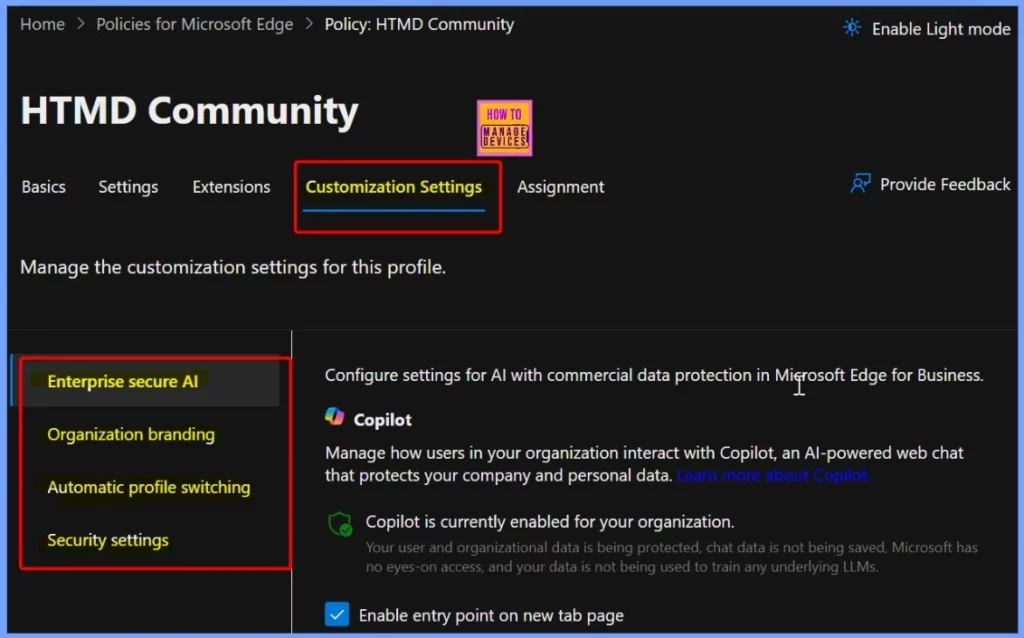
Customization Settings in Microsoft Edge allow administrators to personalize and control certain browser aspects to align with organizational needs. Four customization Settings are available for this profile, which you can easily manage. These include.
- Enterprise secure Al
- Organization branding
- Automatic profile switching
- Security settings
Assignment
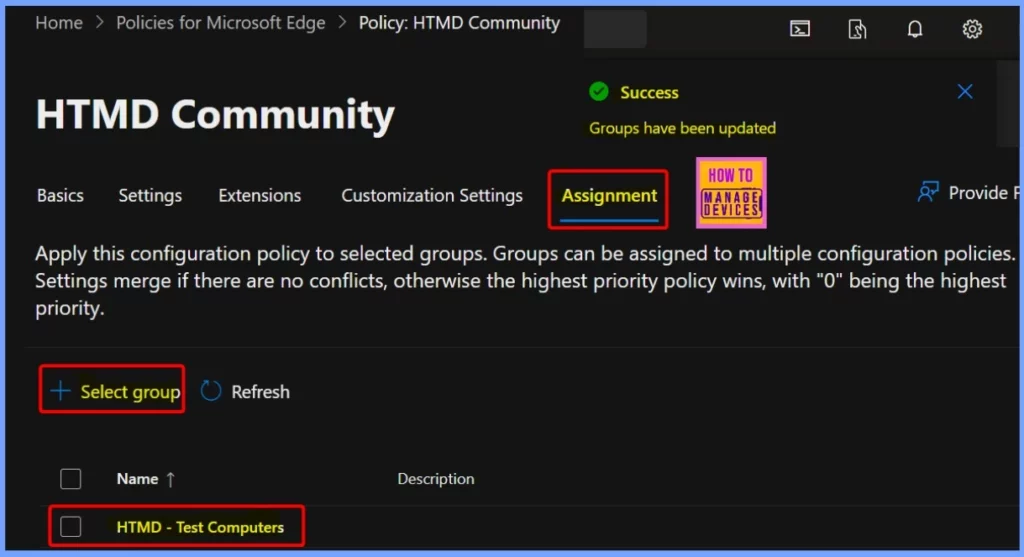
The Assignments tab is the fifth important tab in the configuration policy setup. Here, you can apply the policy to specific groups. A group can be assigned to multiple configuration policies. If there are no conflicts between the policies, their settings will combine.
However, if there is a conflict, the policy with the highest priority will take effect, where “0” represents the highest priority level.
Need Further Assistance or Have Technical Questions?
Join the LinkedIn Page and Telegram group to get the latest step-by-step guides and news updates. Join our Meetup Page to participate in User group meetings. Also, Join the WhatsApp Community to get the latest news on Microsoft Technologies. We are there on Reddit as well.
Resources
Microsoft Edge Browser Policy Documentation | Microsoft Learn
Author
Anoop C Nair has been Microsoft MVP from 2015 onwards for ten consecutive years! He is a Workplace Solution Architect with more than 22+ years of experience in Workplace technologies. He is also a Blogger, Speaker, and Local User Group Community leader. His primary focus is on Device Management technologies like SCCM and Intune. He writes about technologies like Intune, SCCM, Windows, Cloud PC, Windows, Entra, Microsoft Security, Career, etc.




Discussion