






Yubico Smart Card Redirection for Windows 365 Cloud PCs Login using Windows App on iOS
Yubico Smart Card Redirection for Windows 365 Cloud PCs Login using Windows App on iOS! This partnership focuses on improving security and helping users be more productive when using the Windows App on their iPhones and iPads.
The Windows App on iOS now allows users to use YubiKeys with smart card redirection. You can now connect your YubiKey to your iPhone or iPad using the app. This feature helps keep virtual Windows sessions secure and makes it easier to work productively.
The new smart card redirection support for YubiKeys is a significant improvement for users, enhancing security in virtual environments. This feature is currently in a test phase for the Windows App on iOS 11.0.4. However, since it’s in preview, some issues or changes may occur before the final version is released.
In this post, you will find all the details about the partnership between Microsoft and Yubico, which aims to improve the YubiKey experience in the iOS Windows app. All the details related to this feature are explained below.

Table of Contents
Which YubiKeys are Supported?
The integration supports the latest YubiKey 5 portfolio.
Is this Feature Available for All Users?
The smart card redirection support is currently in public preview, meaning it is available for users to try out but may still have some bugs or issues.
Yubico Smart Card Redirection for Windows 365 Cloud PCs Login using Windows App on iOS
Elton Saul, the Principal Software Engineering Lead at Microsoft, commented on Christiaan Brinkhoff’s LinkedIn post about how they enabled intelligent card redirection on iOS.
The team worked on integrating the RDP (Remote Desktop Protocol) PC/SC-based smart card redirection protocol into the iOS platform. This involved careful planning and adjustments to ensure it works smoothly on iOS devices.
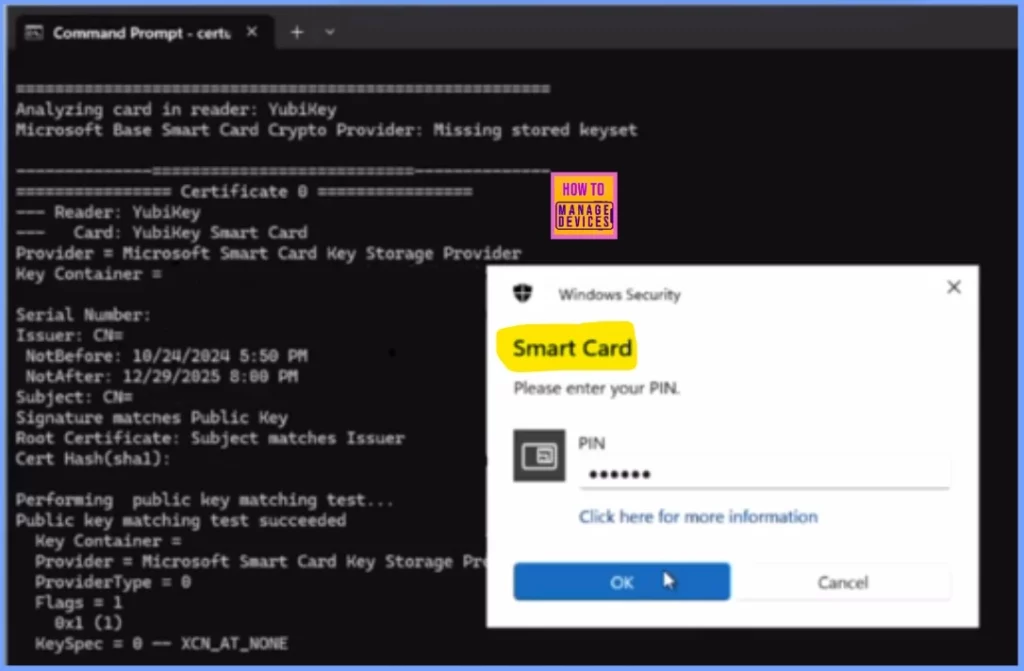
Analyzing card in reader: Yubikey
Microsoft Base Smart Card Crypto Provider: Missing stored keyset
=============== Certificate 0 =..=========
Reader: Yubikey
Card: Yubikey Smart Card
Provider = Microsoft Smart Card Key Storage Provider
Key Container =
Serial Number:
Issuer: CNm
NotBefore: 10/24/2024 5:50 PM
NotAfter: 12/29/2025 8:00 PM
Subject: CN=
Signature matches Public Key
Root Certificate: Subject matches Issuer
Cert Hash(shal):
Performing public key matching test …
Public key matching test succeeded
Key Container =
Provider = Microsoft Smart Card Key Storage Pry
ProviderType = 0
Flags = 1
0x1 (1)
KeySpec = 0 – XCN_AT_NONE
| Feature | Details |
|---|---|
| Feature Name | YubiKey Smart Card Redirection (Preview) |
| Partnership | Developed in collaboration between Yubico and Microsoft for iOS and iPadOS on Windows App |
| Supported YubiKey Models | Supports the latest YubiKey 5 portfolio |
| Support Contact | For YubiKey support, contact Yubico Support Services |
- Allow Disallow Windows Apps to Communicate with Unpaired Devices Policy in Windows 11
- 5 New Windows Apps and Drivers Security Enhancements from Phishing and Malware
- Best Guide to Install Windows App from New Microsoft Store in Intune
- Bulk Install Windows Apps in Intune Company Portal
- How to Control Running Background Windows Apps Using Intune
Limitations of YubiKey Smart Card Redirection on iOS and iPadOS
Let’s discuss the Limitations of YubiKey Smart Card Redirection on iOS and iPadOS. The Limitations of YubiKey Smart Card Redirection on iOS and iPadOS are explained below.
NFC Functionality Not Supported
Currently, the YubiKey smart card redirection feature does not support NFC. NFC-enabled YubiKeys cannot be connected wirelessly and must be physically connected to the device.
Connection Timing Requirement for Yubico Smart Card Redirection for Windows 365
A YubiKey within a remote session must be connected to your iOS or iPadOS device before you start the session. If you connect the YubiKey after the session begins, you will need to disconnect and then reconnect the session for the YubiKey to work correctly.
Need Further Assistance or Have Technical Questions?
Join the LinkedIn Page and Telegram group to get the latest step-by-step guides and news updates. Join our Meetup Page to participate in User group meetings. Also, Join the WhatsApp Community to get the latest news on Microsoft Technologies. We are there on Reddit as well.
Resources
Smart card redirection support for YubiKeys in Windows App on iOS
Author
Anoop C Nair has been Microsoft MVP from 2015 onwards for 10 consecutive years! He is a Workplace Solution Architect with more than 22+ years of experience in Workplace technologies. He is also a Blogger, Speaker, and Local User Group Community leader. His primary focus is on Device Management technologies like SCCM and Intune. He writes about technologies like Intune, SCCM, Windows, Cloud PC, Windows, Entra, Microsoft Security, Career, etc.

Discussion