






How to Resolve Error 0x80070017 on Autopilot Device Setup in Intune
Let’s discuss How to Resolve Error 0x80070017 on Autopilot Device Setup in Intune. Microsoft Intune users are affected by an issue during Autopilot Device Setup. Users are getting errors, especially during the Apps installation stage, with error code 0x80070017.
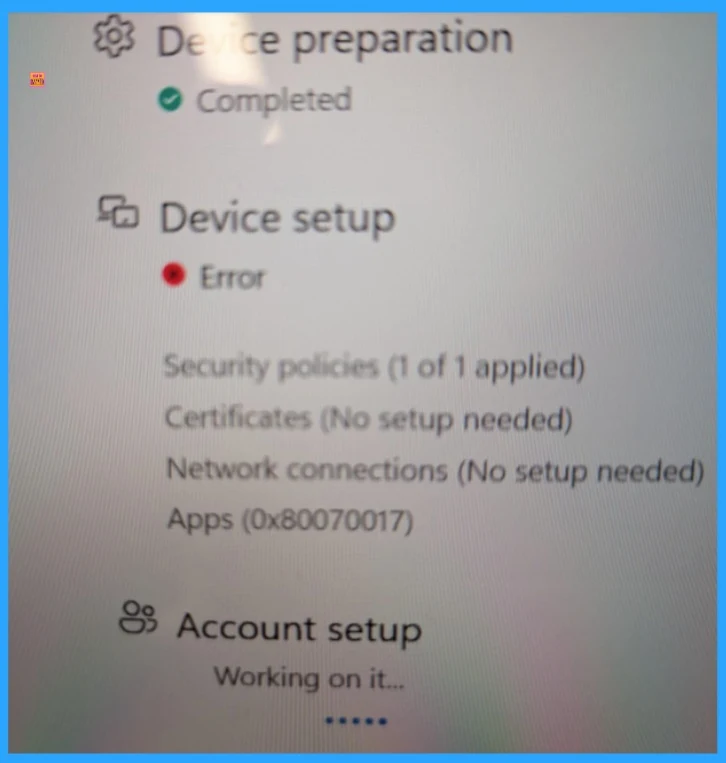
The Autopilot Device Preparation is completed, and Device Setup cannot be completed due to an error. Device Setup is not completed due to issues with app deployment or installation media. But the exact reason for the issue with the app deployment is unknown.
As you know, Autopilot Device Setup is an important phase in the Windows Autopilot provisioning process. The transition of devices from factory state to a fully managed, business-ready configuration happened on this stage. Many Admins and users face issues during this stage.
Today we are going to discuss about one of the issues in Autopilot Device Setup, and the error code is 0x80070017. In this blog post, I am going to share, reasons and resolutions for this issue. If you are facing this issue, this article will help you.

Table of Contents
How to Resolve Error 0x80070017 on Autopilot Device Setup in Intune
As mentioned above, the error occurred during the App deployment stage. The installation failure occurs due to corrupt Win32 app packages or network interruptions. In this particular scenario, 1 security policy is applied, and certificates and Network Connections are setup is not needed.
- Autopilot Registration Tool V2.0 Eliminates Credentials With Secure QR Authentication
- Fix Windows Autopatch Device Configuration Critical Alerts
- Fix Windows Autopilot Device Registration Errors 802 806 808 640
- Guide to Configure Windows Autopilot Next Generation Device Preparation Policy with Intune
Causes of this Issue
There are many reasons behind this issue. Bad Media or corrupted files, especially in Win32 app deployment. Network Instability or Network failure is a common reason for most of the errors. The following table shows the other causes.
| Causes | Details |
|---|---|
| Failed App Deployment | A specific app may be failing silently during setup. |
| Network Issue | Due to poor connectivity, downloads are interrupted. It corrupts payloads mid-transfer |
| ESP timeout or misconfiguration | If the Enrollment Status Page (ESP) times out before apps finish installing, the setup fails. |
| Device-specific issue | Storage errors or disk integrity problems on the device can prevent successful app installation. |
Workaround
Many admins suggest workarounds for this issue. This error occurs for many admins, and they suggest workarounds that are useful for them. The valuable workarounds are provided by Mr GriJ, rahuljindal-MVP.
Check Windows Autopilot Device Status
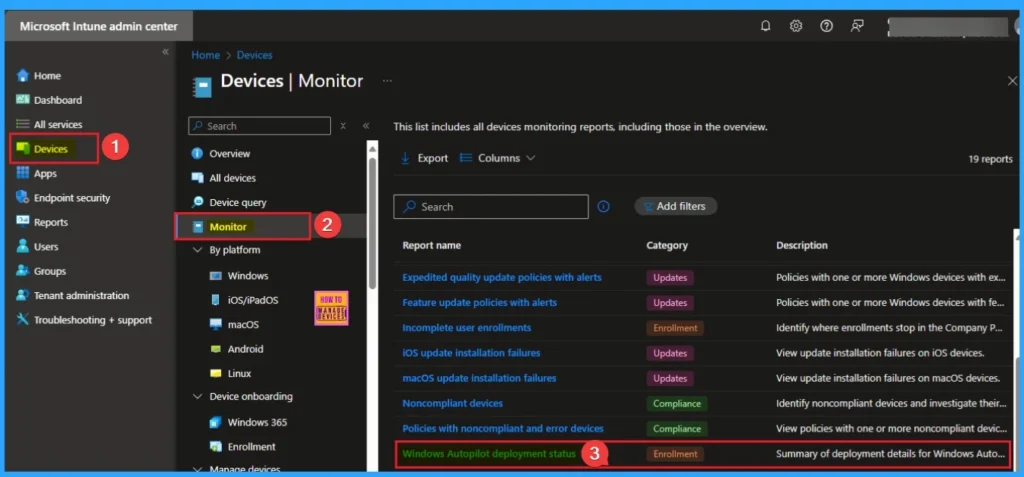
Mr. GriJ suggested that checking the autopilot device status in Intune is a better option to know the details of the device. To do this, Open the Microsoft Intune Portal. Go to Devices > Monitor > Windows Autopilot Deployment Status.
Check Event Viewer
Mr. Rahuljindal-MVP suggested that the error is at the installation of apps stage. You can check the event viewer or device management logs to see which app is failing to install.
Need Further Assistance or Have Technical Questions?
Join the LinkedIn Page and Telegram group to get the latest step-by-step guides and news updates. Join our Meetup Page to participate in User group meetings. Also, join the WhatsApp Community to get the latest news on Microsoft Technologies. We are there on Reddit as well.
Author
Anoop C Nair has been Microsoft MVP for 10 consecutive years from 2015 onwards. He is a Workplace Solution Architect with more than 22+ years of experience in Workplace technologies. He is a Blogger, Speaker, and Local User Group Community leader. His primary focus is on Device Management technologies like SCCM and Intune. He writes about technologies like Intune, SCCM, Windows, Cloud PC, Windows, Entra, Microsoft Security, Career, etc.


Discussion