






How to Fix Error 0xc7d14fbc Android App Installation using Intune
Hi, all today we are discussing How to Fix Error 0xc7d14fbc Android App Installation using Intune. As you all know that MS Intune is deploying different kinds of applications throughout different type of devices. In the Android devices, when Intune installs applications for organisations, sometimes there were some errors that occur.
These Errors have different types of causes that depend on the Device and rule, and setting of Intune. So the Error 0xc7d14fbc has occurred because the device got restarted. As we know that when a deployment on ongoing, these types of sudden restarts may close the tasks we are working.
The problem occurs when the device restarts or the system shuts down while an app is being installed or removed. This can be caused by a low battery, a pending system update. This error can also happen if the network connection is weak or unstable.
This type of cause might pause or cancel the app installation without warning. This kind of error is common when a device experiences a reboot or power loss in the middle of an app install or uninstall. So in this post, lets look how this issue to be solved.

Table of Contents
How to Fix Error 0xc7d14fbc Android App Installation using Intune
Above We discussed the error code 0xc7d14fbc. In the MS documentations explaining that the app install process was terminated by the OS or the device was restarted. So this error occures by several reasons so we have to be careful in the deployement time and always try to check the device conditions.
| Error code (Hex) | Error code (Dec) | Error message/code | Description |
|---|---|---|---|
| 0xc7d14fbc | -942583876 | Uninstall of the app was cancelled because the process was restarted during installation | The app install process was terminated by the OS or the device was restarted. Retry the install and collect Company Portal logs if this error occurs again. |
- Fix Intune Device Internal Service Error Code 0X80180006
- FIX Windows Autopilot Enrollment with Error 0x801C03ED
- Fix MDM Authentication Error Code 80180002
Workaround
The MS suggesting as a workaround as retry the install and collect Company Portal logs if this error occurs again. Also, we are always aware of the installation and we have to check the device condition for the deployment also. We have here sharing diffrent Workarounds that may be a solution for this issue.
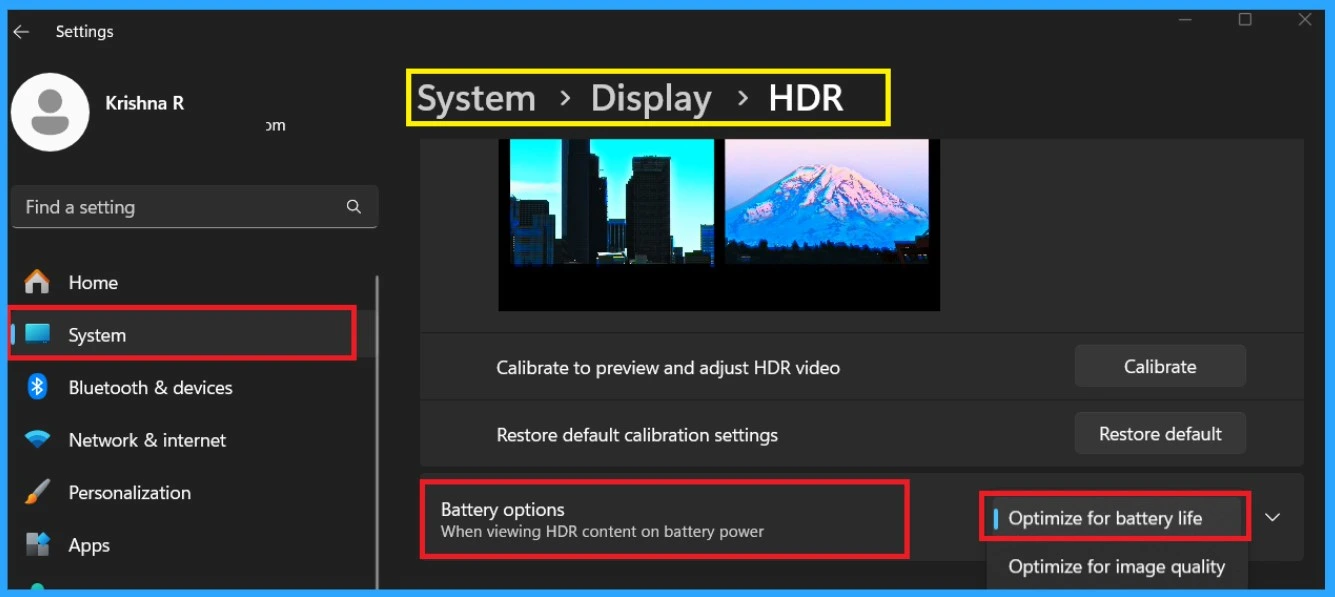
How to Prevent Low Battery Mode
Low battery is the the first cause a issue happens. So, we have to first take care of the device battery. When the device is Mobile or Windows system always make enusre the device have the minimum battery level in a deployement time. If it not have any sufficient battery the device may get shout down. There are many ways to improve your device battery.
We have a post on this basis Top 14 Tips and Tricks to Extend Laptop Battery Life for Windows Operating System without using ARM, so you can check them. If any tips are useful for you can use that.
Top 14 Tips and Tricks to Extend Laptop Battery Life for Windows Operating System without using ARM
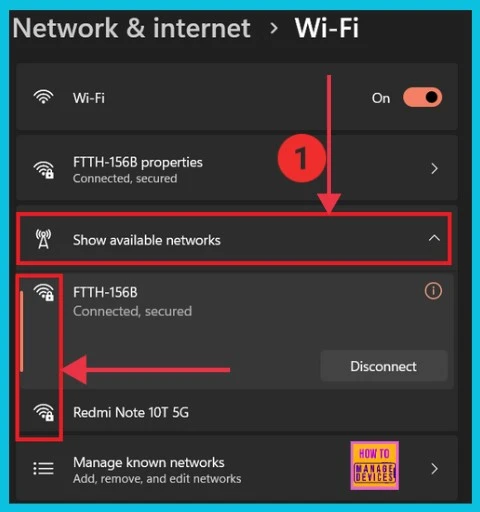
Check Wi-Fi Network Signal
Network problems often cause error 0xc7d14fbc (-942583876) during app installation. e. If the device loses internet, switches networks, or has an unstable signal, which can cancel the process. To avoid this, make sure the device stays connected to a strong and stable Wi-Fi network during the entire installation.
6 Methods to Check Wi-Fi Network Signal Strength in Windows 11
Reinstall the App
If the app installation is cancelled due to the restart then you can again reinstall the application through the intune. When you start re -installing, always remember to check device details and battery details also.
Collect Company Portal logs
You should retry the installation and collect Company Portal logs to help with troubleshooting. The Company Portal app is used on managed devices to receive apps and check compliance. When an app installation fails, the logs from this app can provide important details about what went wrong.
Need Further Assistance or Have Technical Questions?
Join the LinkedIn Page and Telegram group to get the latest step-by-step guides and news updates. Join our Meetup Page to participate in User group meetings. Also, Join the WhatsApp Community to get the latest news on Microsoft Technologies. We are there on Reddit as well.
Author
Anoop C Nair has been Microsoft MVP from 2015 onwards for 10 consecutive years! He is a Workplace Solution Architect with more than 22+ years of experience in Workplace technologies. He is also a Blogger, Speaker, and Local User Group Community leader. His primary focus is on Device Management technologies like SCCM and Intune. He writes about technologies like Intune, SCCM, Windows, Cloud PC, Windows, Entra, Microsoft Security, Career, etc.


Discussion