






Intune Policy Backup Restore Standardize Redeploy using Eido
Let’s discuss Intune Policy Backup Restore Standardize Redeploy using Eido. Managing a large number of policies in Intune can be difficult, especially when multiple admins are involved or when working across different tenants.
If someone accidentally changes or deletes a policy, it can cause problems like security risks or non-compliance. Intune does not have a built-in restore or recycle bin option, so once a policy is deleted, it’s permanently gone unless you have saved a copy somewhere.
You can easily back up and restore Microsoft Intune configurations using PowerShell and Microsoft Graph API. This method helps you export all your configuration policies, compliance policies, applications, and other settings from your Intune tenant and store them safely in a shared folder or repository.
In this post, you will learn how to back up, restore, standardize, and redeploy Intune policies using a simple third-party tool. This tool helps you easily take a backup of your existing policies, so you don’t lose them if something goes wrong.

Table of Contents
Intune Policy Backup Restore Standardize Redeploy using Eido
Let’s explore some helpful tools that can help you make backing up and reusing Intune policies much easier. One effective way to do this is by creating a policy template. Once the template is created, it can be saved and used again in the same or different Intune tenants.
This is especially useful for large organizations managing multiple environments. Instead of recreating policies from scratch every time, you can simply import the saved template, apply the necessary settings, and redeploy it across tenants. This saves time, reduces errors, and ensures your policies stay consistent everywhere.
- How to Make Intune Patch Reports more Useful and Efficient
- Free Intune Training 2025 for Device Management Admins
- Copilot Enhances Troubleshooting using Intune and Device Query to Resolve Missing Patches
- Best Guide to Run Intune Device Query with Microsoft Graph API
Track and Manage Intune Policy Changes with Eido Policy Manager
The tool Eido Policy Manager helps you to automatically detects all the policies in your Intune environment and keeps a version history for each one. You can see what changed, when, and who changed it. Go to Eido portal using the link https://app.eido.cloud/.
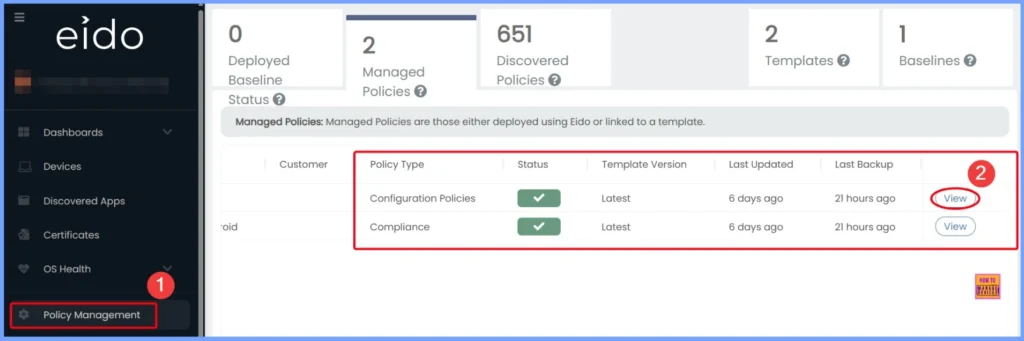
- In the left-hand menu, navigate to Policy Management.
- You will see key policy details such as:
- Policy Type
- Status
- Template Version
- Last Updated
- Last Backup
- To view more information, click the View button in the Eido window below.
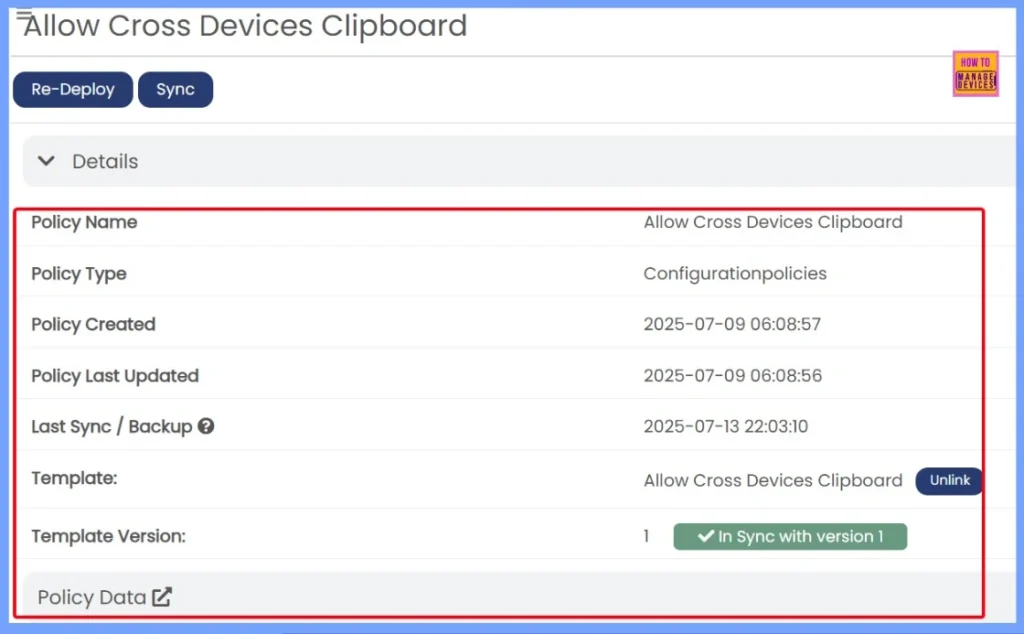
After clicking the View button you can see all details of the specific policy. The details includes the Policy name, Policy Type, Policy created, Policy last updated, Policy sync or backup etc. Click the Redeploy button from the below window.
| Plolicy Details | Description |
|---|---|
| Policy Name | Allow Cross Devices Clipboard |
| Policy Type | Configurationpolicies |
| Policy Created | 2025-07-09 06:08:57 |
| Policy Last Updated | 2025-07-09 06:08:56 |
| Last Sync / Backup | 2025-07-13 22:03:10 |
| Template | Allow Cross Devices Clipboard – Unlink |
| Template Version | In Sync with version 1 |
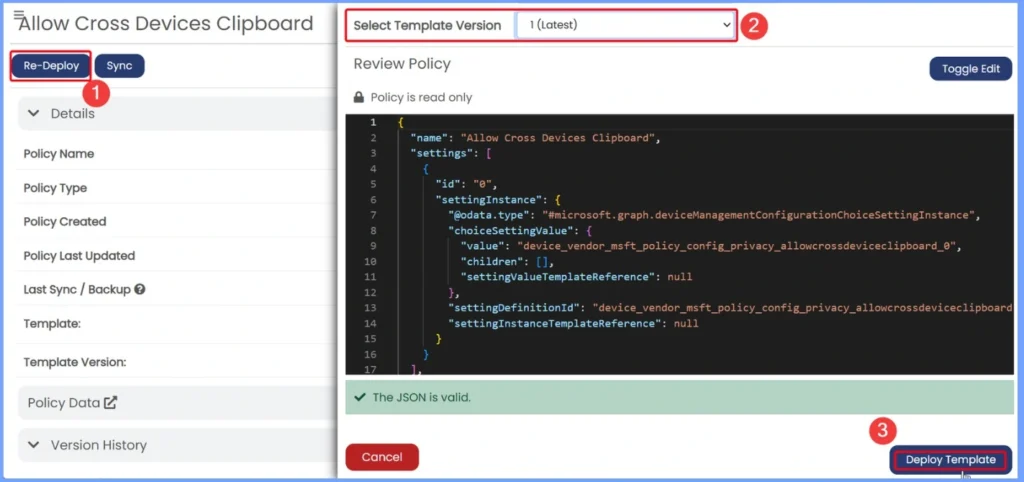
Redeploying a Template – Enter Tenant Details and Start Deployment
With Eido, you can back up your policies, view version history, restore previous versions, and redeploy them across tenants in just a few clicks. But beyond recovery, you can also prevent mistakes by creating standardized templates from existing policies.
- When you click the Redeploy button, a new window will appear where you need to enter some basic information.
- This includes the Intune tenant name and the template version you want to use.
- After filling in these details, simply click the Deploy Template button to begin the deployment.
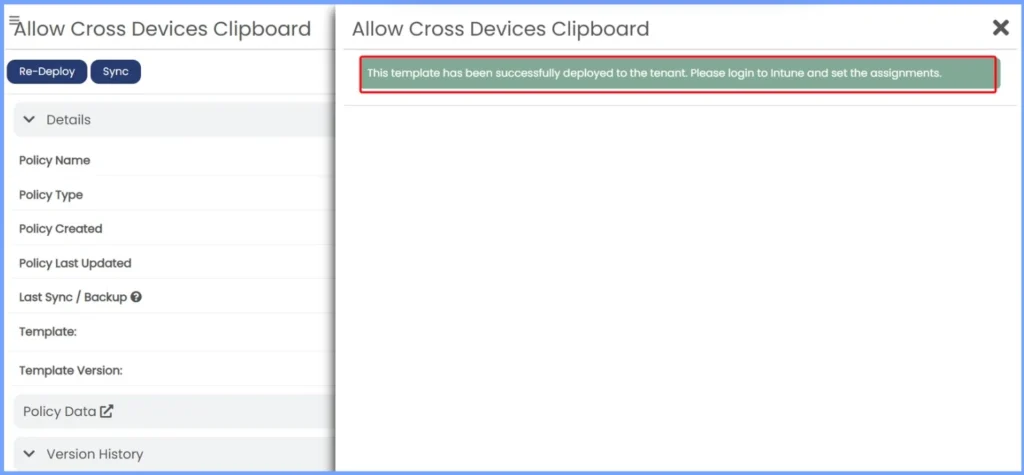
Once you click the Deploy Template button, the deployment will begin. You will see a notification message saying, “This template has been successfully deployed to the tenant. Please log in to Intune to view the assignments.” This lets you know the policy was applied, and you can now check the details directly in the Intune portal.
Intune Policy Backup Restore Standardize Redeploy using 3rd Party Tool
In this video, you will get all the details on how to create a brand-new policy template from scratch using the Eido Policy Manager tool. You will see how easy it is to define your settings, whether it is a configuration or compliance policy and save them as a reusable template.
Need Further Assistance or Have Technical Questions?
Join the LinkedIn Page and Telegram group to get the latest step-by-step guides and news updates. Join our Meetup Page to participate in User group meetings. Also, join the WhatsApp Community to get the latest news on Microsoft Technologies. We are there on Reddit as well.
Author
Anoop C Nair has been Microsoft MVP for 10 consecutive years from 2015 onwards. He is a Workplace Solution Architect with more than 22+ years of experience in Workplace technologies. He is a Blogger, Speaker, and Local User Group Community leader. His primary focus is on Device Management technologies like SCCM and Intune. He writes about technologies like Intune, SCCM, Windows, Cloud PC, Windows, Entra, Microsoft Security, Career, etc.


Discussion