






FIX DCM Compliance Rules Error 0x87d00320 Issue with ConfigMgr | SCCM
Let’s see how to Fix the DCM Compliance Rules Error 0x87d00320 issue with SCCM (Configuration Manager) and learn how to create or build the Desired Configuration Management (DCM).
The rule fails to run and evaluate when creating and targeting a configuration item using a configuration baseline. It fails with the error “0x87d00320 – The script host has not been installed yet.”
Table of Contents
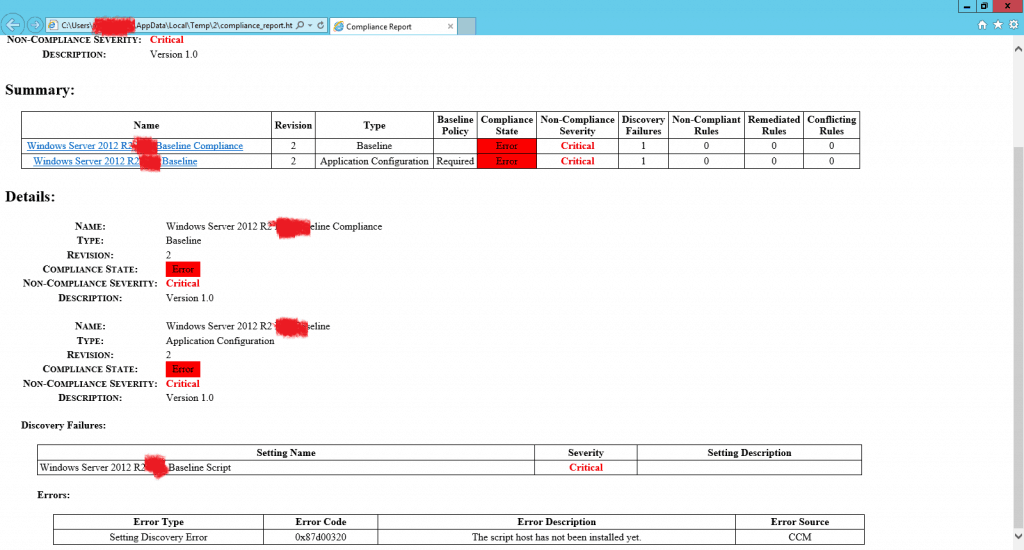
Compliance baseline with Powershell script was failing to evaluate
Since there was a registry key (HKLM\SOFTWARE\Microsoft\PowerShell\1\ShellIds\Microsoft.PowerShell\Path) which points to the C:\windows\System32\WindowsPowershell\v1.0\Powershell.exe’ was missing on the clients (Both Server 2008 and 2012).
I tried to create them and evaluate the baseline manually and found the baseline evaluation was successful.

Troubleshooting Summary SCCM Compliance Rules Error 0x87d00320
See the troubleshooting Summary for SCCM Compliance Rules Error 0x87d00320 in the list below.
- Issues were happening on both VMs and physical machines.
- We have tried rebooting the client, but the issue persists.
- We created a baseline with only one Configuration Item, but the issue remained.
- We looked at the client logs and found the below error.
Log Details
Let’s identify the trouble “Compliance Rules Error 0x87d00320” via SCCM Logs DcmWmiProvider.log.
ScriptProvider::ReadDiscoveryInformation - ScriptType:0
ScriptProvider
The needed Powershell script host is not installed.
ScriptProvider  7044 (0x1B84)
Failed in discovering instance.
The script host has not been installed yet. (Error: 87D00320; Source: CCM) ScriptProvider   7044 (0x1B84)
Failed to do HandleExecQueryAsync().
The script host has not been installed yet. (Error: 87D00320; Source: CCM)        ScriptProvider 7044 (0x1B84)
Failed to process CScriptProvider::GExecQueryAsync.
The script host has not been installed yet. (Error: 87D00320; Source: CCM)  ScriptProvider 7044 (0x1B84)
Solution – Compliance Rules Error 0x87d00320
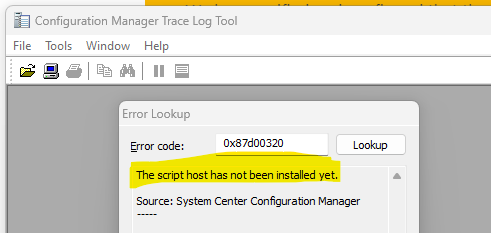
Error 0x87d00320 translates to the script host has not been installed yet. Source: System Center Configuration Manager.
We have verified and confirmed that the Powershell execution policy was set to ‘Bypass’ in the client settings>Computer Agent.
https://technet.microsoft.com/en-us/library/gg682067.aspx#BKMK_ComputerAgentDeviceSettings
Also, we have confirmed that the Powershell was set to Remote signed on the local machine through the GPO. We have also checked and confirmed that Powershell 2.0 was already enabled.
[X] Windows PowerShell PowerShellRoot Installed
[X] Windows PowerShell 4.0 PowerShell Installed
[X] Windows PowerShell 2.0 Engine PowerShell-V2 Installed
[ ] Windows PowerShell Desired State Configuration. DSC-Service  Available
[X] Windows PowerShell ISE PowerShell-ISE Installed
[ ] Windows PowerShell Web Access WindowsPowerShellWeb... Available
- We tried adding the below registry manually and rebooted the client and checked but it didn’t help.
- reg add HKLM\SOFTWARE\Policies\Microsoft\Windows\PowerShell /v EnableScripts /t REG_DWORD /d 1 /f
- reg add HKLM\SOFTWARE\Policies\Microsoft\Windows\PowerShell /v ExecutionPolicy /d RemoteSigned /f
- Created a new client setting with a Computer agent the PowerShell execution policy was set to ‘Bypass’ and deployed to a few clients for testing, but it didn’t help.
- I checked the settings using ‘Policy Spy’ and confirmed that the value was set to 1.
- I have tried reproducing the issue in my lab using the same script, but it is not occurring.
- Invoke-WmiMethod -Namespace “ROOT\ccm\ClientSDK” -Class CCM_ClientUtilities -Name DetermineIfRebootPending | select-object -ExpandProperty “RebootPending”
- Move the client to another OU without any GPO inherited and check the results.
- We have updated that we have already tested it by disabling most of the GPOs except a few, which are needed.
- Suggested to take a Procmon while reproducing the issue.
- I reviewed the procmon and found the below entry.
- wmiprvse.exe 1104 RegQueryValue HKLM\SOFTWARE\Microsoft\PowerShell\1\ShellIds\Microsoft.PowerShell\Path NAME NOT FOUND C:\WINDOWS\system32\wbem\wmiprvse.exe Length: 44 NT AUTHORITY\SYSTEM
I have checked in my lab and could see the above registry key; hence, I compared it with non-working machines and found the Registry key was missing.
We have created the registry value manually evaluated the baseline, and found the baseline evaluation was successful.
Resources
- SCCM Logs and Quick Tips to Read Logs
- FIX Software Center Crash Error SCNotification Has Stopped Working| SCCM | ConfigMgr
- Install SCCM Client Manually Using Command Line
- How to Build Configuration Manager Technical Preview LAB |SCCM 2002.2
Author
Deepak Raiis a Technical Lead with over 14 years of experience in IT. He specializes in SCCM, Intune, and Azure. Throughout his career, he has worked on various platforms such as Active Directory, Exchange, Veritas NETBACKUP, Symantec Backup Exec, NDMP devices like Netapp, EMC Data Domain, Quantum using Backup Exec 2010 and 2012, and HP StorageWorks 4048 MSL G3. He also has experience in data deduplication-related troubleshooting. He has ultimately returned to his roots as an IT Engineer focusing on SCCM technology.


actually this is documented and noted here
https://docs.microsoft.com/en-us/configmgr/core/clients/deploy/about-client-settings
Tip
If unsigned scripts fail to run because of this client setting, Configuration Manager reports this error in the following ways:
The Monitoring workspace in the console displays deployment status error ID 0x87D00327. It also displays the description Script is not signed.
Reports display the error type Discovery Error. Then reports display either error code 0x87D00327 and the description Script is not signed, or error code 0x87D00320 and the description The script host has not been installed yet. An example report is: Details of errors of configuration items in a configuration baseline for an asset.
The DcmWmiProvider.log file displays the message Script is not signed (Error: 87D00327; Source: CCM).
But this is a good article as usual Deepak
StaffThank you frack.