






Fix File Explorer Menu Appear Outside Screen Issue for Windows 11 24H2
Let’s discuss the issue with the File Explorer Menu Appear Outside Screen Issue for Windows 11 24H2. Windows 11 users have been affected by a problem in File Explorer since last month, which occurred after installing Windows 11 24H2.
As you know, Windows 11 24H2 is the last version of Windows 11, also known as Windows 11 2024 Update. This version provides new features and improvements, faster updates, and New AI tools for PCs. However, some issues also occur in this version.
With this version, File Explorer is improved with text labels for the context button on the right click. However, some strange behaviours can be seen in File Explorer, like the 3-dot menu (See More), which is unreadable when you use File Explorer on a full screen.
Have you ever noticed this issue on your Windows 11 24H2 PC? Most users are frustrated with this issue, which affects their activity. In this blog post, I will help you learn more about the Issue of the File Explorer Menu in Windows 11 24H2 | Appear Outside Screen.

Table of Contents
Fix File Explorer Menu Appear Outside Screen Issue for Windows 11 24H2
As mentioned above, File Explorer issues may cause users to behave strangely. The old alignment of File Explorer is very convenient for users as it provides more options. The 3 dots (See more) option helps users to access more options easily. However, the new change affects the user’s experience and daily activities.
- Windows 11 24H2 Monthly Patching Got Faster Installation Reboot and Less CPU usage with new Client Servicing Stack
- Why Does Windows 11 24H2 Have Outdated Versions of Paint and Snipping Tool?
- How to Upgrade Windows 11 24H2 for Free | Easiest Method is Explained
See More Options Outside the File Explorer
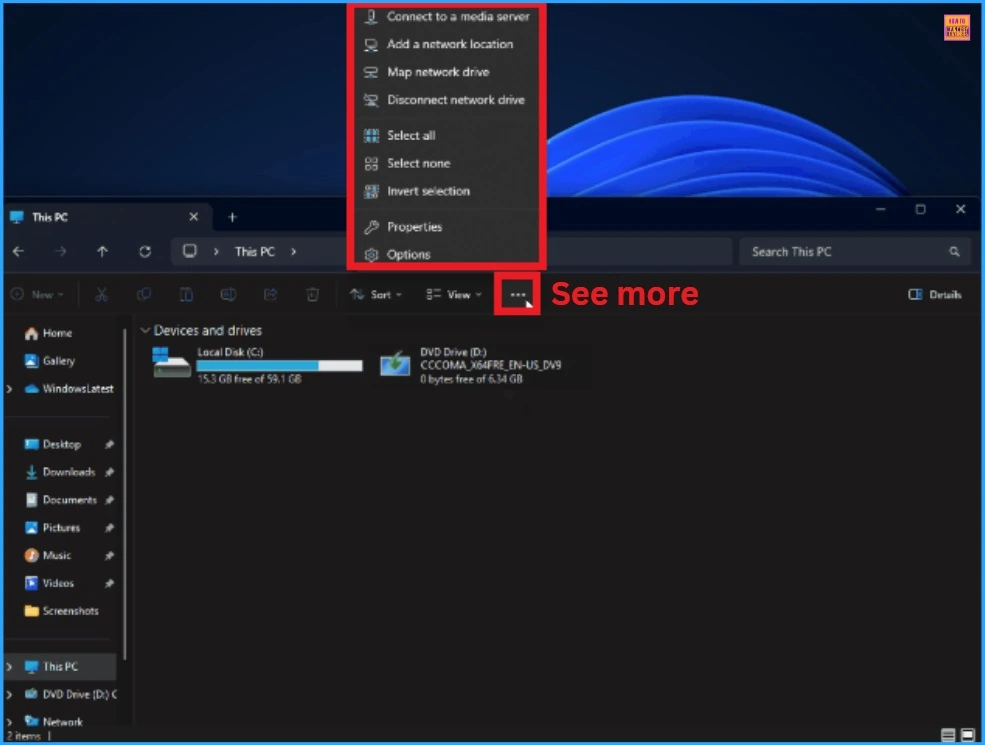
Due to this bug in File Explorer, the 3 dot (See more) option extends beyond the display boundary. Users cannot see the See More option when the screen is in full-screen mode, and It is unreadable in File Explorer. See more options that gave you access to extra actions not shown directly on the toolbar.
| Different options on the Context menu |
|---|
| Connecting to a media server |
| Adding a network location |
| Map Network drive |
| Disconnecting network drive |
| Select All |
| Select none |
| Invert Selection |
| Properties |
| Options |
Display Scaling Issue for File Explorer
The screenshot below shows the many options on the context menu, which appear when you click the three-dot menu. The table above shows the options. Again, the “See more” menu could have different options depending on where you open it.
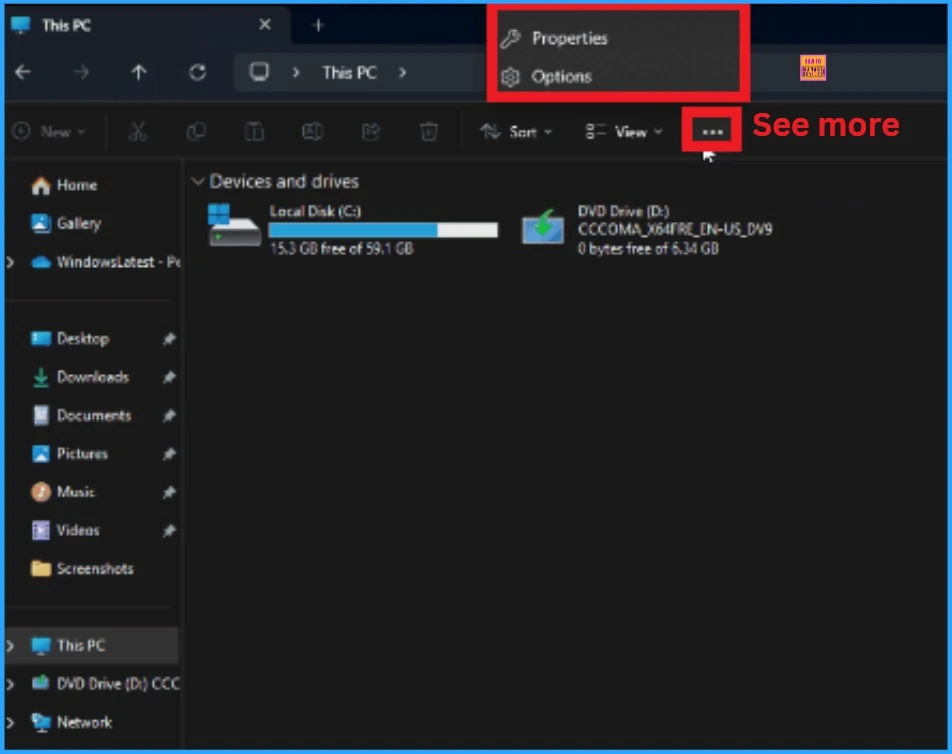
You have also noticed that the menu started appearing at the top of the screen instead of below the 3 dots. This happens all the time whether you use Explorer on full screen (maximized) or in windowed mode, but the menu is sometimes unreadable in File Explorer.
- How to Download the Windows 11 24H2 ISO using Visual Studio Subscription
- Best Way for Windows 11 24H2 Upgrade using Intune and Windows Update for Business WUfB Deployment
- Top 83 Windows 11 Desktop Admin Interview Questions
Workaround
File Explorer menu opening upwards off-screen is a widely reported bug in the Windows 11 24H2 update. Currently, there is no fix for that, but hopefully, the bug will be fixed in the November update, along with the other bugs in version 24H2 in that update.
Need Further Assistance or Have Technical Questions?
Join the LinkedIn Page and Telegram group to get the latest step-by-step guides and news updates. Join our Meetup Page to participate in User group meetings. Also, Join the WhatsApp Community to get the latest news on Microsoft Technologies. We are there on Reddit as well.
Resource
Author
Anoop C Nair has been Microsoft MVP from 2015 onwards for ten consecutive years! He is a Workplace Solution Architect with more than 22+ years of experience in Workplace technologies. He is also a Blogger, Speaker, and Local User Group Community leader. His primary focus is on Device Management technologies like SCCM and Intune. He writes about technologies like Intune, SCCM, Windows, Cloud PC, Windows, Entra, Microsoft Security, Career, etc.




Discussion