






Fix Intune Error Code 80192EE7 the Device Management Enablement Issue on Intune
Let’s check if there are any fixes for the Intune Error Code 80192EE7. Microsoft Identified an error Code 80192EE7. Many users face this error code when their account cannot be set up on a device because device management cannot be enabled.
Device management is an enhancement process for managing various devices connected to a system. When an error occurs, many factors cause it, and many users affect these error codes in different tenants. Sometimes, users encounter an error code when attempting to sign in to apps such as OneDrive or Outlook using their work or school account.
So, we can say that it is because of an error preventing your account setup due to device management. The main issue with this error is that WIP is not configured; this will affect account setup and resource access. Many users have questioned whether any changes in BYOD enrollment are the reason for it.
If you get error code 80192EE7, it may be an issue in device management, resulting in your account setup being blocked; these errors affect Wi-Fi, VPN and email access. In this post, we can look into the error code 80192EE7 and a possible way to fix it.

- How to Configure Automatic Intune MDM Enrollment | Auto Enrollment
- Troubleshoot MDM Enrollment Error Code 80180004
- iOS iPadOS Intune Enrollment Method is Based on Web Based
- FIX Intune Windows Enrollment Invalid_Client Error
- Fix Intune Enrollment Errors 0x80180014 80180003 Unknown Win32
- How to Create Azure AD Dynamic Device Groups for Windows BYOD CYOD Devices Microsoft Intune
| Index |
|---|
| Intune Error Code 80192EE7 |
| Solution for Fixing the Issue |
What is BYOD?
Fix Intune Error Code 80192EE7 the Device Management Enablement Issue on Intune
Above, we discussed many things about Error code 80192EE7. Your device is enrolled and managed by your organization’s Intune policy. If you try basic fixes that do not work, you can check the domain configuration settings in the Microsoft 365 admin centre.
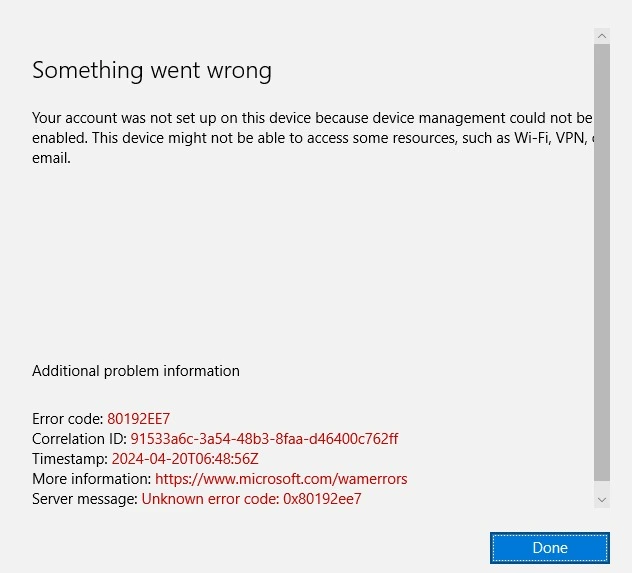
- The error message shows that Something Went Wrong.
- In detail,” Your account was not set up on this device because device management could not be Enabled. This device might be unable to access resources such as WIFI, VPN and email.”
| Additional Problem | Info |
|---|---|
| Error Code | 80192EE7 |
| Correlation ID | 91533a6c-3a54-48b3-8faa-d46400c762ff |
| Timestamp | 2024-04-20T06:48:56Z |
| More information | https://www.microsoft.com/wamerrors |
| Server message | Unknown error code: 0x80192ee7 |
- FIX: SCCM Task sequence failed with error code 0x80220005
- macOS New Notification Permission for Shell Scripts
- Renew Automated Device Enrollment Apple ADE Tokens in Intune
Solution for Fixing the Issue
When an error occurs, the first thing you have to do is ensure that your domain is correctly configured. You can also check that the DNS record is appropriately set up. You can also ensure that this error affects only one or many other devices.
Also, any recent changes in BYOD enrollment could affect the device management setup. The error code is related to Intune, so you can verify that the device is enrolled correctly. You can also check the basis errors during a network connectivity issue. So, let’s check the basic fixes for this.
See More: Fix Windows BSOD Issue caused by Crowdstrike Update Major Impact around the Globe
| No | Basic Fixes for Error Code 80192EE7 |
|---|---|
| 1 | If any error occurs first, you can check the Internet Connection may it occurs errors. |
| 2 | Check the domain configuration settings in your Microsoft 365 admin centre. Ensure that the domain is correctly configured and verified, |
| 3 | You can check the proxy and firewall requirements. Sometimes, the errors will occur |
| 4 | If the error occurs, you can try to connect with a different device or network. |
| 5 | You can retry the process after a short wait; maybe these small tricks will resolve the issues. |
| 6 | You can also check the username and password when connecting to the domain. You can also reset the password to check the issue is solved. |
| 7 | If these basic fixes do not resolve the error and the issue occurs again, you can contact Microsoft Support. |
We are on WhatsApp now. To get the latest step-by-step guides, news, and updates, Join our Channel. Click here. HTMD WhatsApp.
Anoop C Nair has been Microsoft MVP from 2015 onwards for 10 consecutive years! He is a Workplace Solution Architect with more than 22+ years of experience in Workplace technologies. He is also a Blogger, Speaker, and leader of the Local User Group Community. His main focus is on Device Management technologies like SCCM and Intune. He writes about technologies like Intune, SCCM, Windows, Cloud PC, Windows, Entra, Microsoft Security, Career, etc..


Discussion