






Free Microsoft Copilot for Security Training in Audit Mode | 5 Modules
Let’s discuss the Free Microsoft Copilot for Security Training with five Modules in audit mode. Microsoft provides free 5 training modules in Audit mode for Microsoft Copilot for Security. The main purpose of this course is to provide comprehensive guidance for users on integrating advanced AI capabilities into security operations.
As you know, Microsoft Copilot for Security is a generative AI-powered security solution. It helps to increase the efficiency and capabilities of defenders to improve security outcomes at machine speed and scale. Microsoft provides this free training to users to learn about integrating AI with cybersecurity.
Microsoft Copilot for Security is a great innovation that uses different AI capabilities to increase cybersecurity. This short course, which includes 5 modules, covers every aspect of Security Copilot that can be used in practical security scenarios.
This blog post will help you to know more about Free Microsoft Copilot for Security Training with Audit Mode, 5 Modules. To be successful in this project, you will need at least 2 years of experience in cloud security, 1 year with Microsoft security products like Sentinel and Defender XDR, and foundational knowledge of KQL.

- Microsoft Copilot for Security is Generally Available
- What is the Security Compute Unit in MS Copilot for Security Context
- Get Free Certification from Microsoft on Copilot for Security

Free Microsoft Copilot for Security Training in Audit Mode | 5 Modules
Microsoft Copilot for Security capabilities can be easily understood with these 5 Modules. This is a free course for users, so don’t waste this opportunity to learn more about Microsoft Copilot for Security. You can quickly join this course and achieve AI capabilities.
Join for Free in Microsoft Copilot for Security
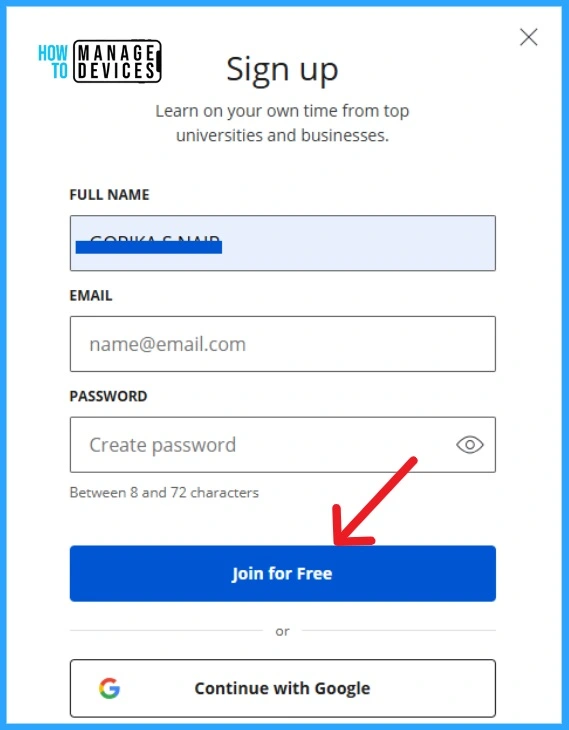
This free course teaches Microsoft Capabilities. If you want to take it, you can Sign Up and start the Course. The screenshot below will help you.
- Enter the Full Name, Email and Password.
- Click on the Join for Free button.
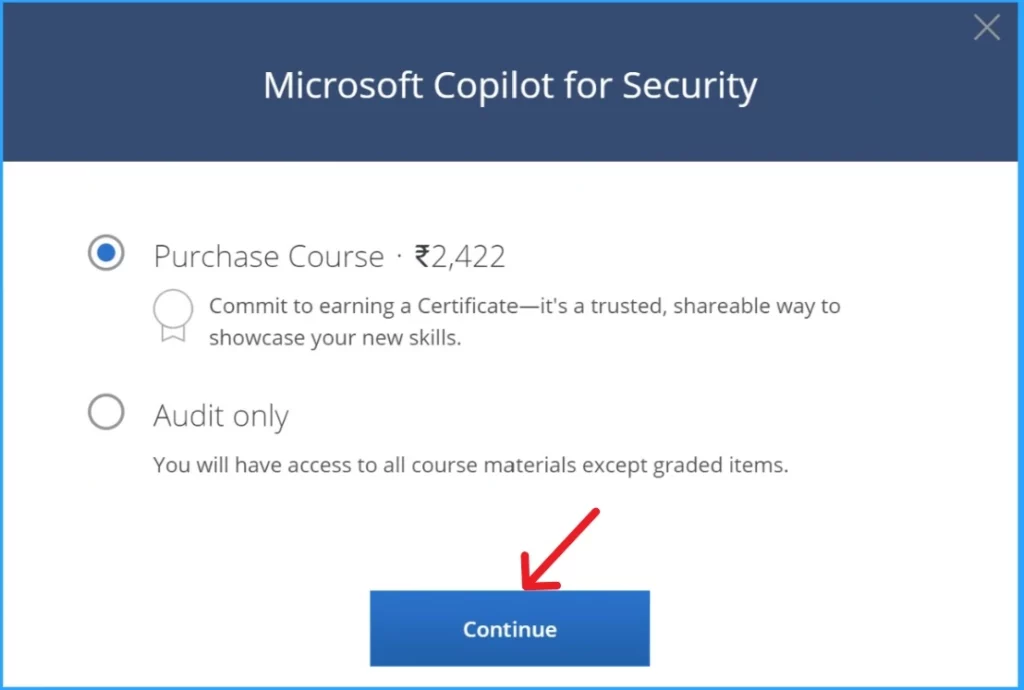
After that, you will get the window to purchase the course with 2 options. You can buy the course for Rupees 2,422 or choose Audit only. Select the option and click on the Continue button. You will get the course fee payment window if you select the purchase course option. Or, if you choose the Audit mode, you will get the welcome window to start learning.
1. Microsoft Copilot for Security
The First Module will give an overview of Copilot for Security. According to the study, cybercrimes occur every 39 seconds worldwide. So, cybersecurity is very challenging, and leveraging AI-powered solutions helps handle cybercrimes. This first module welcomes you to Security Copilot.
This module helps you apply security strategies in day-to-day operations. These five modules offer many things to learn.
| Aims of Microsoft Copilot for Security |
|---|
| Core functionalities of Microsoft Copilot for Security |
| How to apply these capabilities in incident response |
| Threat hunting and security reporting |
| AI integration for security |
| Strategic security planning |
| Developing solutions, and security operations management |
2. Introduction to Microsoft Copilot for Security
The second Module introduces Microsoft Copilot for Security. This module will help you learn more about Microsoft Copilot, such as what it is, Distinguishing between different Copilots, Describing its functionalities, and Recognising its limitations.
In this module, you will understand how the different Microsoft Copilots are constructed, the use cases of MS Copilot for security, the purpose of using Copilot for Security, and the components, you will also take a practice quiz in this section.
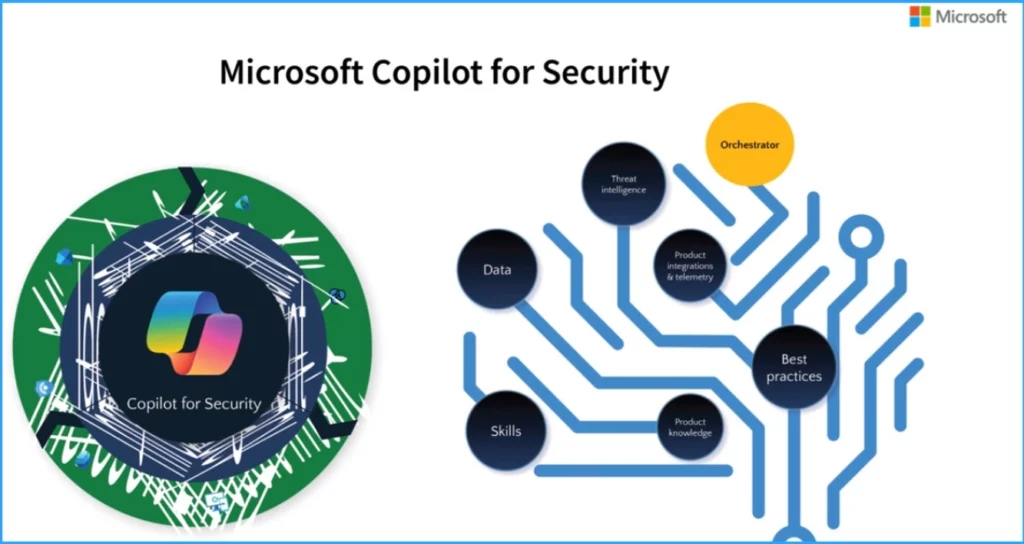
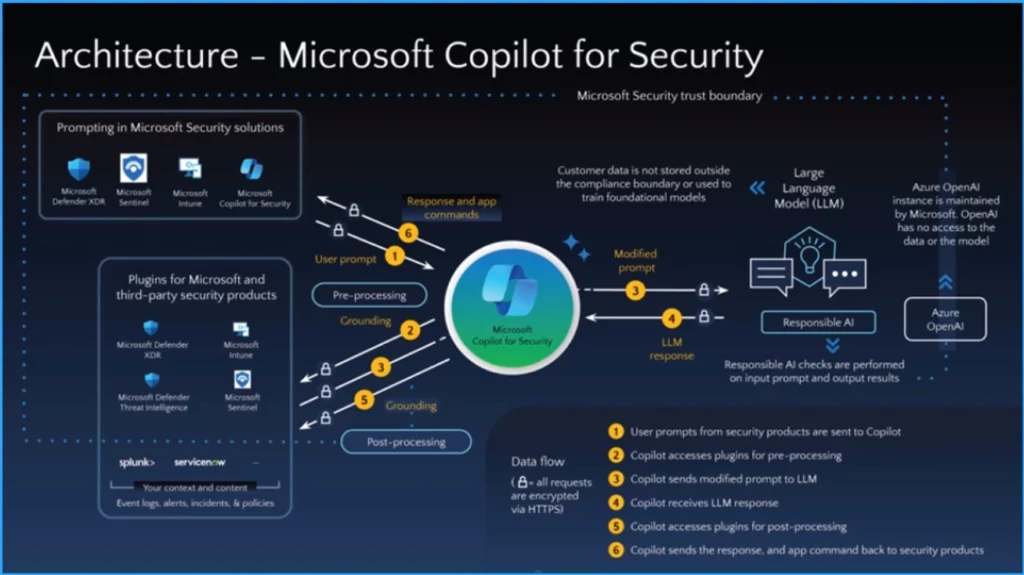
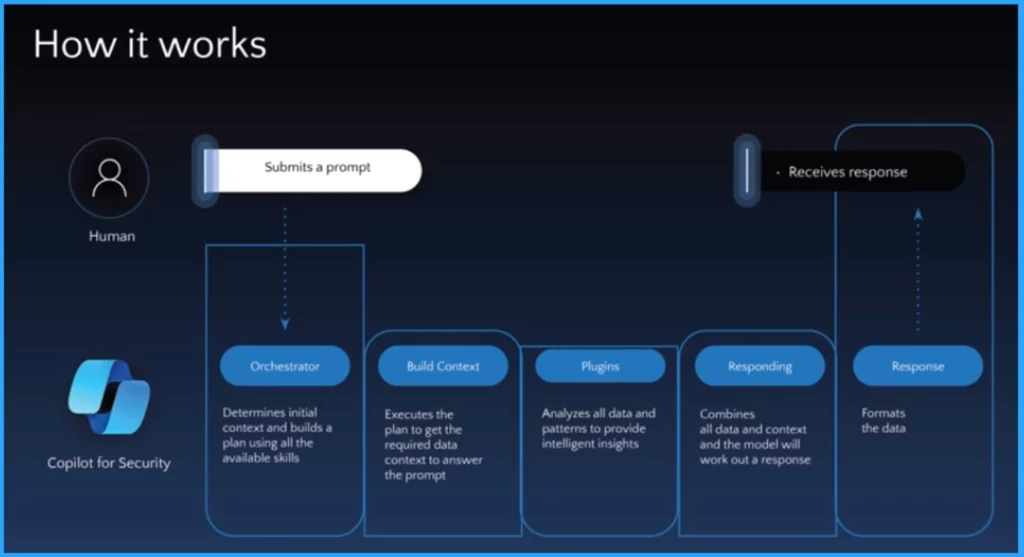
- Insights of How Copilot for Security Works
- Pricing Details of Microsoft Security Copilot
- Data Flow Architecture for Intune and Security Copilot
3. Integration and Provisioning of Microsoft Copilot for Security
In this 3rd Module, you will gain comprehensive knowledge of the integration and provisioning of Microsoft Copilot for security. This section includes some small videos that explain the functionalities of Microsoft Copilot for Security.
It also helps to Explore knowledge base connections, Connect Microsoft Copilot for security to other products, demonstrate provisioning Copilot for security, determine Access Requirements, and recommend configurations.
4. Navigating Copilot for Security Across Different Microsoft Security Products
This section discussed Navigating Copilot for Security Across Different Microsoft Security Products. This module includes several Demonstration video sections. The demonstration video includes Copilot for Security and Microsoft Defender XDR parts 1, 2.
Copilot for Security and Microsoft Purview, Copilot for Security and Microsoft Sentinel, and Copilot for Security and Microsoft Intune.
5. How to Effectively Prompt Microsoft Copilot for Security
With this module, learners can craft effective prompts using best practices in prompt engineering, recognize use cases for built-in promptbooks, and develop their custom promptbooks.
This Module also includes demonstration videos such as Element of an Effective Prompt, Promptbooks in Microsoft Copilot for Security, and Creating Custom Promptbooks in Microsoft Copilot for Security.
We are on WhatsApp. To get the latest step-by-step guides and news updates, Join our Channel. Click here for HTMD WhatsApp.
Author
Anoop C Nair has been Microsoft MVP from 2015 onwards for 10 consecutive years! He is a Workplace Solution Architect with more than 22+ years of experience in Workplace technologies. He is also a Blogger, Speaker, and leader of the Local User Group Community. His main focus is on Device Management technologies like SCCM and Intune. He writes about technologies like Intune, SCCM, Windows, Cloud PC, Windows, Entra, Microsoft Security, Career, etc..
Discussion