






Fix MDM Enrollment Error Code 0x80180001
Let’s discuss Fix MDM Enrollment Error Code 0x80180001. Microsoft recognized an error in MDM enrollment, affecting the MDM Server. This is one of the significant issues Microsoft Intune users experience during the device enrollment stage.
Do you know what MDM enrollment is? Mobile device enrollment is the first step in enterprise management. Using security precautions, devices are configured to communicate with the MDM server during enrollment.
As you know, MDM (Mobile Device Management) allows users to manage different aspects of devices using the features built into Intune. This approach is called mobile device management (MDM). Sometimes users may get many errors in MDM enrollment.
There are many reasons behind the errors occurring in MDM Enrollment. In this blog post, I will explain more about Fix MDM Enrollment Error Code 0x80180001 and how to resolve this issue. This blog post will help you to prevent Error Code 0x80180001.


- Fix Autopilot Device Enrollment Error 0x80180022
- FIX Windows Autopilot Enrollment with Error 0x801C03ED
- FIX Intune Windows Enrollment Invalid_Client Error
Fix MDM Enrollment Error Code 0x80180001
Error Code 0x80180001 occurred in MDM Enrollment. These issues may occur when enrolling a device into MDM. Users get this error as a message format. The main reason for this issue is that the auto-enrollment feature is not working as expected. Various requirements and settings are configured incorrectly.
| Namespace | Subcode | Error | Description | HResult |
|---|---|---|---|---|
| s: | MessageFormat | MENROLL_E_DEVICE_MESSAGE_FORMAT_ERROR | Invalid message from the Mobile Device Management (MDM) server. | 80180001 |

Steps for Prevent Fix MDM Enrollment Error Code 0x80180001
Users must follow many things to avoid these types of errors. The following steps will help you resolve error issues.
- Users must have a valid Intune license before going to enroll the device.
- Verify that auto-enrollment is activated for those users who will enrol the devices into MDM with Intune.
- When using group policy for enrollment, verify that the Enable Automatic MDM enrollment using the default Microsoft Entra credentials group policy is properly deployed to all devices that should be enrolled into Intune.
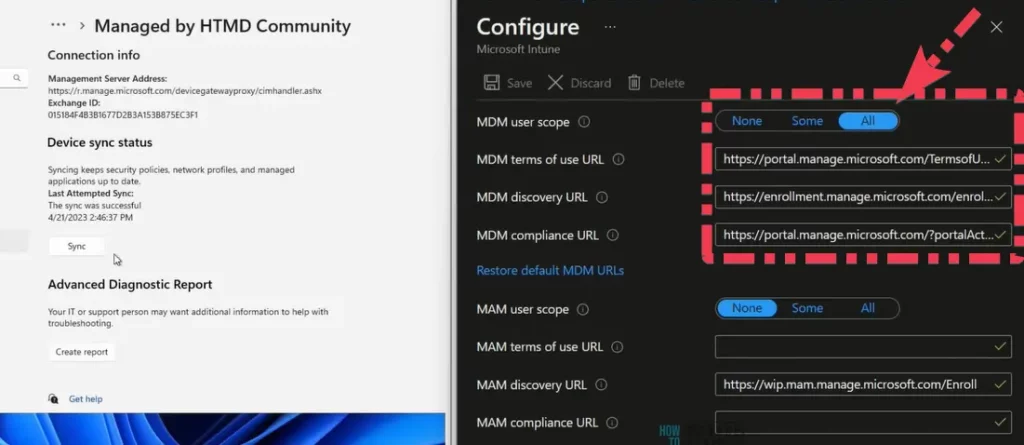
- How to Configure Automatic Intune MDM Enrollment | Auto Enrollment
- Fix Intune Enrollment Error Unknown Win32 Error code 0x8018002b | 0xcaa90014
- Intune Enrollment using Group Policy | Automatic Enrollment AVD VMs
We are on WhatsApp now. To get the latest step-by-step guides, news, and updates, Join our Channel. Click here. HTMD WhatsApp.
Author
Anoop C Nair is Microsoft MVP! He is a Device Management Admin with more than 20 years of experience (calculation done in 2021) in IT. He is a Blogger, Speaker, and Local User Group HTMD Community leader. His main focus is on Device Management technologies like SCCM 2012, Current Branch, and Intune. He writes about ConfigMgr, Windows 11, Windows 10, Azure AD, Microsoft Intune, Windows 365, AVD, etc.


Discussion