






Retirement of Legacy Authentication Methods Management in Microsoft Entra ID
Exciting News! Retirement of Legacy Authentication Methods Management in Microsoft Entra ID. Microsoft announced that legacy Multifactor Authentication (MFA) and Self-Service Password Reset (SSPR) policies in Microsoft Entra ID will retire on September 30, 2025.
Did you know that Microsoft Entra ID is a cloud-based solution for managing identity and access? It provides a comprehensive suite of authentication and authorization services for various Microsoft offerings, including Office 365, Dynamics 365, Azure, and many cloud-based applications.
Microsoft usually provides many updates and improvements on Microsoft Entra. Now, Microsoft has announced important news that affects Entra users. So, users must migrate their methods to the converged authentication methods policy.
Migration of authentication methods is very important. If users do not migrate authentication methods, they may affect service impact. In this blog post, I will help you learn more about retiring Legacy Authentication Methods Management in Microsoft Entra ID.


- High Level Overview of Identity Protection in Microsoft Entra ID
- Retirement of Legacy Authentication Methods Management in Microsoft Entra ID
Retirement of Legacy Authentication Methods Management in Microsoft Entra ID
As I mentioned, Microsoft Entra’s authentication methods will be changed in the upcoming year. IT Admins can migrate this to their organization. After migration, users can manage all authentication methods in the Authentication methods policy. This allows users to create tenant-wide authentication policies from a single configuration page in the Microsoft Entra admin center.
| Retiring Authentication Methods |
|---|
| Legacy Multifactor Authentication Methods (MFA) |
| Self-Service Password Reset (SSPR) |
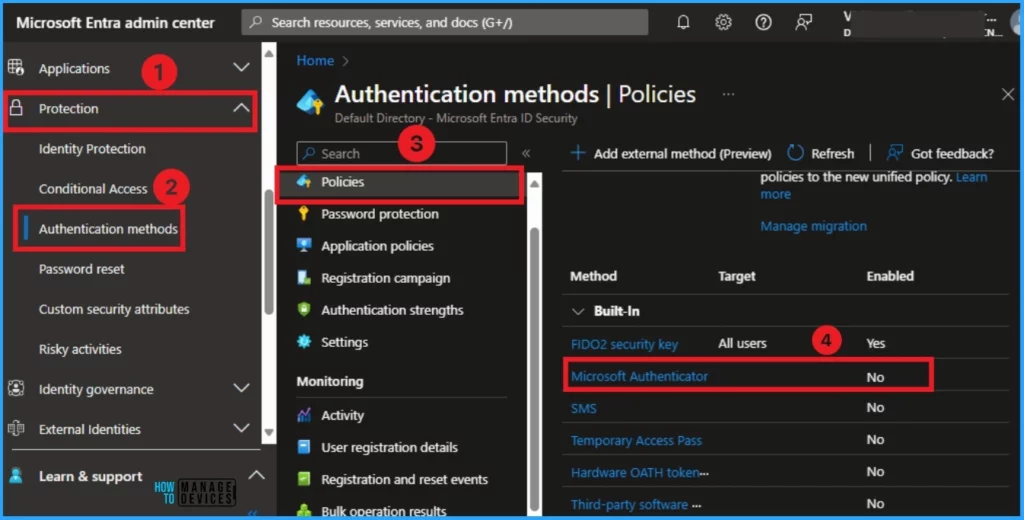
Before migrating, you should recognize which authentication methods your organization enabled in the Microsoft Entra ID. To do this, Log in to the Microsoft Entra admin center.
- After that, select the Protection section on the left side of the Microsoft Entra admin center.
- Then Click on the Authentication methods from Protection.
- From the Authentication method, click on Policies, then click Microsoft Authenticator.
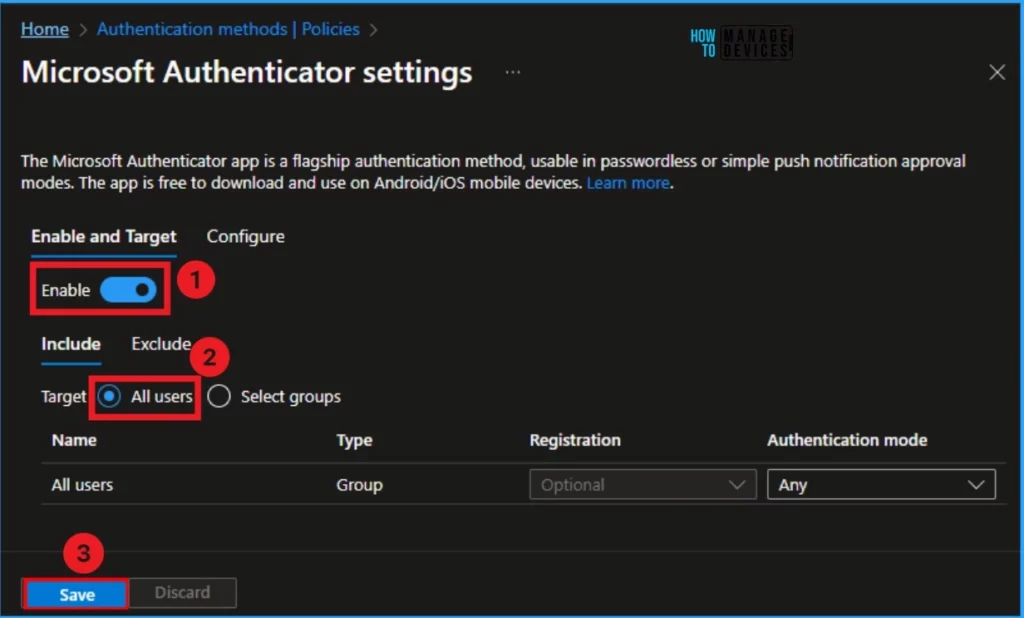
After that, you will get a new window of Microsoft Authenticator Settings. Then click on Enable and Select All users. After that click on the Save button from the below window.
After enabling the Microsoft Authenticator for all users from the previous window, you can see the changes in the Authentication method window. Enabling this option helps your organization migrate Authentication Methods for all users.

Migration of Authentication Methods (MFA)
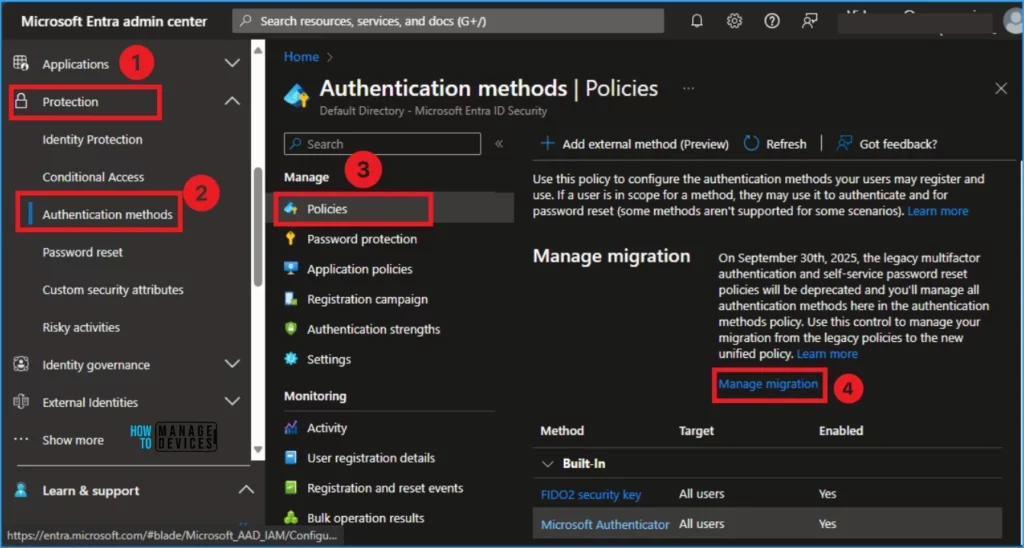
Managing the migration of Authentication is very easy for users. Users can complete this process via Azure AD or Microsoft Entra portal. In the Authentication Method, select Policies, and this page shows Manage Migration.
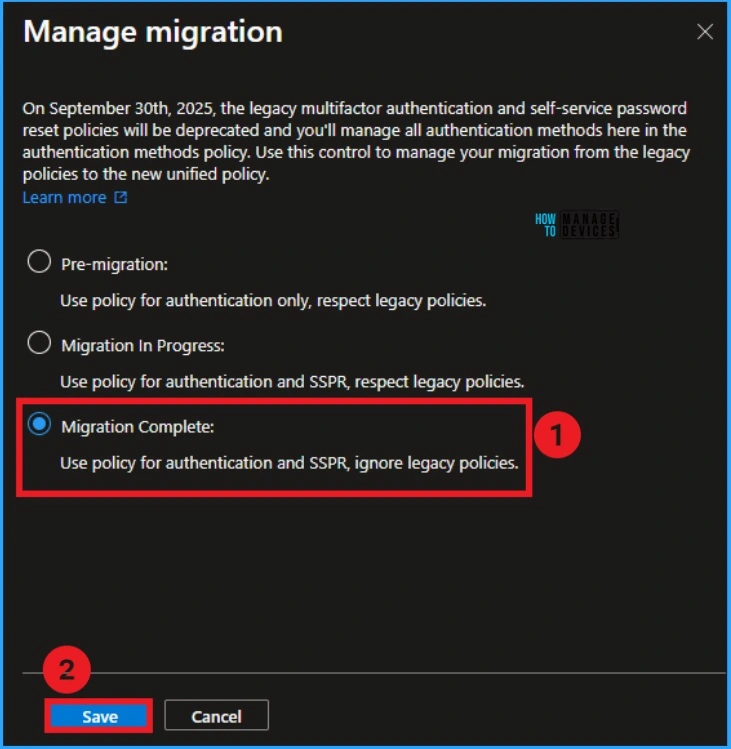
On the Manage Migration page, you can see different options. Click on the Migration In Progress option. After clicking, you can see the blue button.
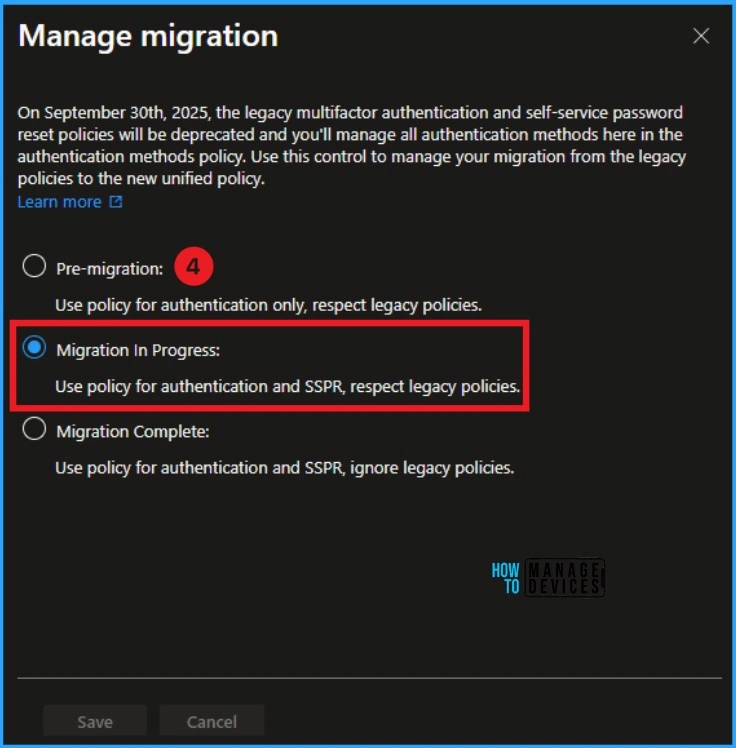
After disabling all methods in the legacy MFA and SSPR policies, you can click on the Migration Complete option on the Manage Migration page. Then, follow the steps to complete the migration.
- Go to Microsoft Entra admin center
- Click Protection > Authentication methods
- Click Manage migration
- Select Migration Complete
- Click Save
- External Collaboration Settings in Entra ID
- Modernize MFA Authentication Policies in Entra ID
- Entra ID Best Practices Monitoring Option for the Tenant
We are on WhatsApp now. To get the latest step-by-step guides, news, and updates, Join our Channel. Click here. HTMD WhatsApp.
Author
Anoop C Nair is Microsoft MVP! He is a Device Management Admin with more than 20 years of experience (calculation done in 2021) in IT. He is a Blogger, Speaker, and Local User Group HTMD Community leader. His main focus is on Device Management technologies like SCCM 2012, Current Branch, and Intune. He writes about ConfigMgr, Windows 11, Windows 10, Azure AD, Microsoft Intune, Windows 365, AVD, etc.




Discussion