






How to Fix Missing Threat Severity Settings in Intune Antivirus Policy
How to Fix Missing Threat Severity Settings in Intune Antivirus Policy! While updating the Intune Antivirus policy, we noticed an unusual issue where portions of the Threat Severity section were missing. When portions of the Threat Severity settings are missing in Intune Antivirus policies, IT admins lose control over how threats are handled on endpoints.
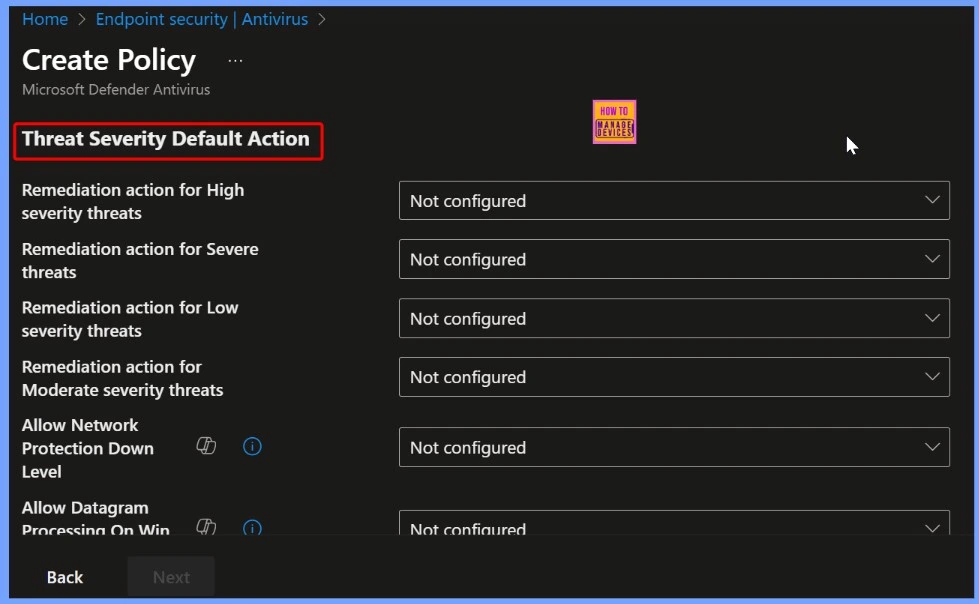
Normally, the policy lets you choose how strict the antivirus should be for high, medium, or low-level threats. But now, those options are missing. Without the ability to configure high, medium, and low-level threat protections, admins cannot ensure that all devices are properly protected, which increases the risk of malware or ransomware infections.
This missing impact both security and efficiency, making it harder for IT admins to safeguard the organisation and maintain consistent antivirus policies across all devices. Additionally, IT teams may need to spend extra time troubleshooting, reapplying settings, or monitoring endpoints manually to ensure protection, which can affect productivity and delay other IT projects.
In this post, you will find complete details on how to fix missing Threat Severity settings in an Intune Antivirus policy. It covers the reasons why the settings may disappear, the impact on IT admins and organizations, and step-by-step methods to restore the missing configurations to ensure your endpoints remain properly protected.

Table of Contents
How to Fix Missing Threat Severity Settings in Intune Antivirus Policy
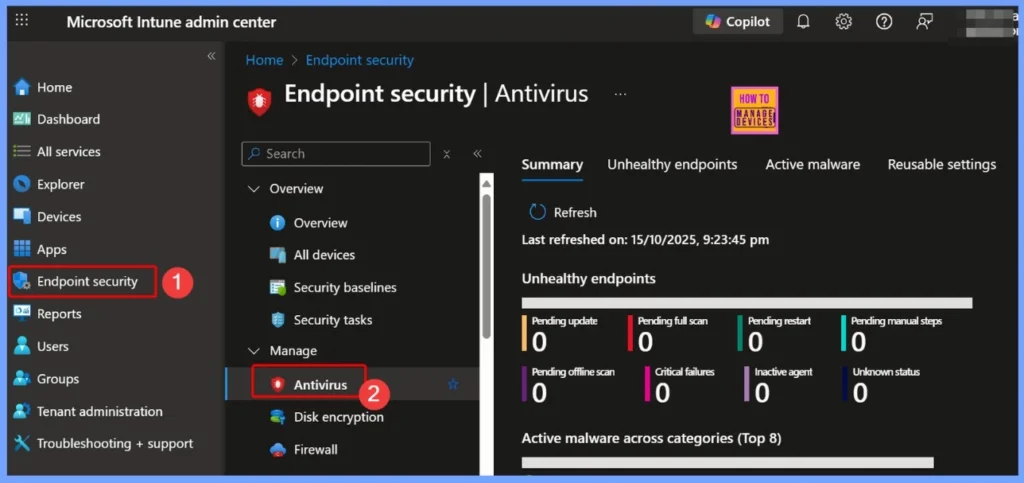
After saving changes to the Intune Antivirus policy, we checked the Defender settings and noticed that the Threat Severity options were completely gone. This probably happened because of a error during the update or save process, and it can temporarily reduce how well antivirus protection works for the organization.
- How To Control The Visibility Of App And Browser Protection In Windows Defender Using Intune Antivirus Policy
- Best Antivirus for Windows 11 Microsoft Defender | App Browser Protection | Firewall Protection
- 3 Ways to Configure Microsoft Defender Antivirus Policies for Windows 11 using Group Policy Intune Policy
Why Threat Severity Settings Might Disappear in Intune
This issue can happen for several reasons, such as recent updates to the Intune portal, changes in how policies are structured, or compatibility problems between Microsoft Defender and Intune. It is also possible that Microsoft has moved or changed some settings in the latest version.
Steps to Restore Missing Threat Severity Settings
Let’s discuss the Steps to Restore Missing Threat Severity Settings. An antivirus is a type of software that is designed to protect computers and devices from malicious programs such as viruses, malware, ransomware, and spyware.
| Steps to Restore Missing Threat Severity Settings |
|---|
| Administrators can first review the policy version history to see if the previous configuration is still available. |
| If the settings are not in the history, admins can reapply the missing configurations manually to restore the desired threat protection levels. |
| Creating a new antivirus policy can help determine if the missing options reappear, ensuring that endpoints continue to receive proper protection. |
Need Further Assistance or Have Technical Questions?
Join the LinkedIn Page and Telegram group to get the latest step-by-step guides and news updates. Join our Meetup Page to participate in User group meetings. Also, Join the WhatsApp Community to get the latest news on Microsoft Technologies. We are there on Reddit as well
Author
Anoop C Nair has been Microsoft MVP from 2015 onwards for 10 consecutive years! He is a Workplace Solution Architect with more than 22+ years of experience in Workplace technologies. He is also a Blogger, Speaker, and Local User Group Community leader. His primary focus is on Device Management technologies like SCCM and Intune. He writes about technologies like Intune, SCCM, Windows, Cloud PC, Windows, Entra, Microsoft Security, Career, etc


Discussion