






Fix PDF Opening Issue Windows 10 | KB5004760 | Out of band Update
Today, I will explore Fix PDF Opening Issue Windows 10 | KB5004760 | Out of band Update. Microsoft has released an out-of-band optional update to fix the PDF Opening Issue in Windows 10. This KB5004760 update addresses an issue that prevents users from opening PDF documents in Internet Explorer and applications using Web browser control.
The issue noticed while opening PDFs is impacting the following Windows versions:
- Client: Windows 10, version 21H1; Windows 10, version 20H2; Windows 10, version 2004
- Server: Windows Server, version 20H2; Windows Server, version 2004
An out-of-band optional update, KB5004760, is now available on the Microsoft Update Catalog to address an issue where Internet Explorer 11 and apps using the web browser control might fail to open PDFs.
You should only install this optional update on your device if you are affected by this issue. A cumulative update is available for devices running client editions of Windows 10 versions 2004, 20H2, and 21H1 and Windows Server versions 2004, 20H2.

Issue Summary – PDF Opening Issue Windows 10
After installing KB5003637 or later updates in the affected Windows version, you might experience problems that prevent you from opening PDFs using Internet Explorer 11 or apps that use the 64-bit version of the web browser control. Additionally, a PDF might render as just a grey background when using the Adobe Acrobat plug-in.
Note – Internet Explorer is only affected if Enable 64-bit Processes for Enhanced Protected Mode is enabled in the Advanced tab in Internet Options.
Workaround
To mitigate the issue, you can use one of the following:
- Open the PDF file directly in Adobe Acrobat instead of within IE11 or the affected app.
- For IE11 only: Disable the setting Enable 64-bit Processes for Enhanced Protected Mode in the Advanced tab of Internet Options.
Resolution – Fix PDF Opening Issue Windows 10 KB5004760
This issue was resolved in the out-of-band update. It is a cumulative update, so you do not need to apply any previous update before installing it.
It is now available on the Microsoft Update Catalog and must be manually downloaded and installed. You can also manually import this update into Windows Server Update Services (WSUS).
Validation
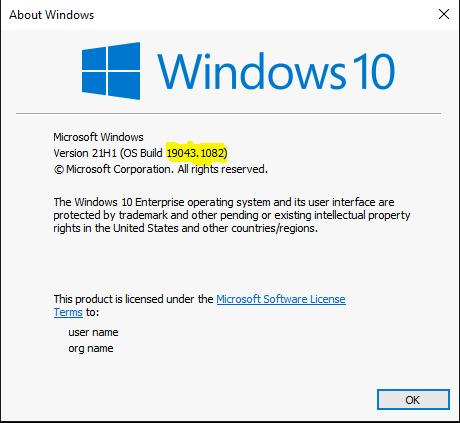
Click Start, Type Winver, and Press Enter. If you use Windows 10 version 2004, 20H2, or 20H1, you will build version Windows 10, version 21H1 (OS Build 19043). Once KB5004760 is installed on your device, it will update the build number to 19041.1082, 19042.1082, or 19043.1082, respectively.
You can refer to Windows 10 version numbers to understand Windows 10 Version Numbers Build Numbers.
Resources
Internet Explorer 11 and apps using the web browser control might fail to open PDFs
We are on WhatsApp. To get the latest step-by-step guides and news updates, Join our Channel. Click here –HTMD WhatsApp.
Author
Jitesh Kumar, Microsoft MVP, has over six years of working experience in the IT Industry. He writes about and shares his experiences related to Microsoft device management technologies and IT infrastructure management. His primary focus is Windows 10/11 Deployment solution with Configuration Manager, Microsoft Deployment Toolkit (MDT), and Microsoft Intune.



Discussion